English · 简体中文


Remote Bash is an SSH plugin for DeepSeek Harness (DSH). Register a few remote Linux / macOS hosts in Settings, then let the agent run commands on one host or a whole group in a single call.
Passwords, private keys and sudo passwords are stored in the local DSH credential store; the model only sees whether a credential is configured. Host keys are recorded on first connect and rejected if they change later. Dangerous commands go through an approval prompt, and a persistent session keeps cd / export state between calls.
Settings page
The plugin adds a Remote Bash section to Settings, with three tabs: hosts, known hosts and persistent sessions. Each host row can test the connection, edit credentials and show its recorded fingerprint.
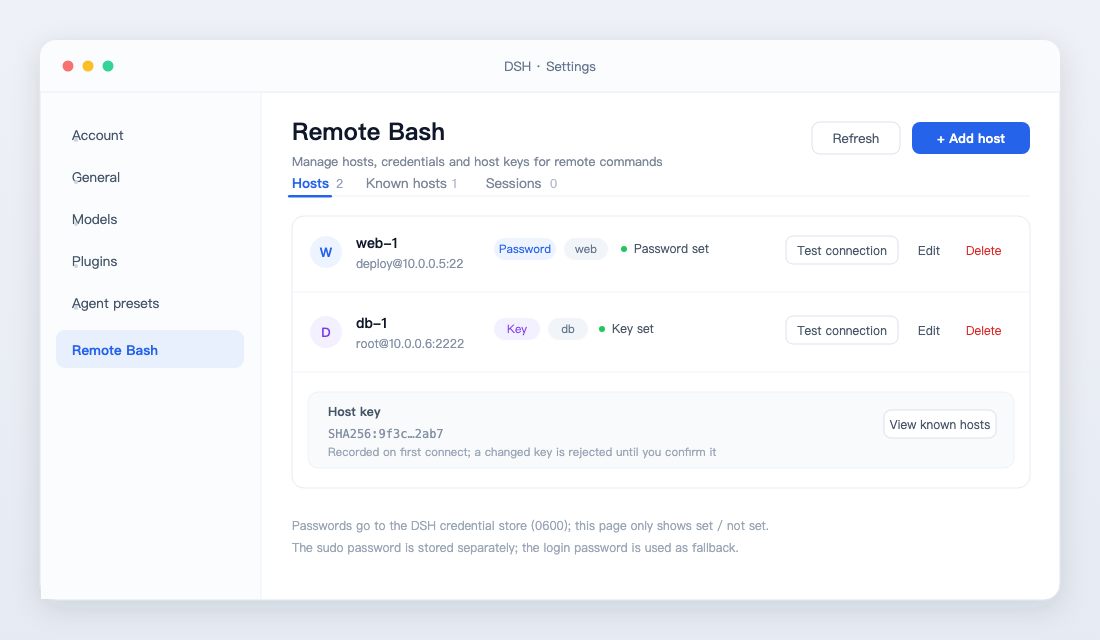
Layout illustration; colors follow your DSH theme.
Installation
Requires DSH 0.2.x (tested on 0.2.1-rc.3) and Node 20+. The plugin depends on ssh2, which npm installs during setup; no local ssh client or sshpass is needed.
Install from GitHub from inside DSH (it asks for approval once):
plugin_manager({
  action: 'install_bundle',
  target: 'git+https://github.com/wybiacx/dsh-remote-bash.git'
})
For production use, pin a commit so upstream changes do not hit your environment directly:
plugin_manager({
  action: 'install_bundle',
  target: 'git+https://github.com/wybiacx/dsh-remote-bash.git#<commit>'
})
For local development, point at the checkout:
plugin_manager({ action: 'install_bundle', target: '/absolute/path/to/dsh-remote-bash' })
After the first install, refresh the browser once and the Remote Bash section appears in Settings. For link: installs, toggle the plugin row off and on again (or restart DSH) to load Host-side changes.
Configuration
Configuration lives in the profile's cordis.patch.yml:
- insert:
    - id: remote-bash
      name: 'dsh-remote-bash'
      config:
        dataDir: ''                  # default: <DSH_HOME>/remote-bash
        defaultTimeoutSec: 60        # per-host command timeout
        maxParallelHosts: 8          # concurrent hosts
        maxOutputBytes: 32768        # per-host output cap
        sessionIdleMinutes: 30       # idle timeout for persistent sessions
        approvalMode: dangerous      # dangerous | always | trusted
        extraDangerousPatterns: []   # additional danger regexes (strings)
approvalMode controls when approval is requested:
| Value | Behavior |
|---|---|
dangerous (default) |
Ask only when a danger rule matches (including sudo) |
always |
Ask for every remote command |
trusted |
Never ask, execute directly |
Usage
> check disk usage on web-1

  remote_bash({ targets: 'web-1', command: 'df -h /', description: 'check root filesystem usage' })
Common patterns:
| Goal | Parameters |
|---|---|
Run on every host in the web group |
targets: '@web' |
| Pick specific hosts | targets: 'web-1, db-1' (name or id) |
| Start in a directory | cwd: '/opt/app' |
Keep cd / export state |
session: 'deploy', reused by name across calls |
| Need root | sudo: true (uses the host's sudo password, falls back to the login password) |
| Transfer files | remote_upload / remote_download, with {host} and {name} templates |
There are five tools:
| Tool | Purpose |
|---|---|
remote_bash |
Run a command on one or many hosts; supports cwd, timeoutSec, session, sudo |
remote_hosts |
List hosts, groups and credential state (never passwords) |
remote_upload |
Upload files or directories over SFTP, recursive |
remote_download |
Download over SFTP; multi-host downloads use <name>-<file> or <name>/ |
remote_sessions |
List or close persistent sessions |
remote_bash also takes a description: one line describing what the command is for. It shows up in the approval dialog and the tool card, which makes approvals easier to read; the full command stays in the audit record.
Authentication and security
The full path of one call:
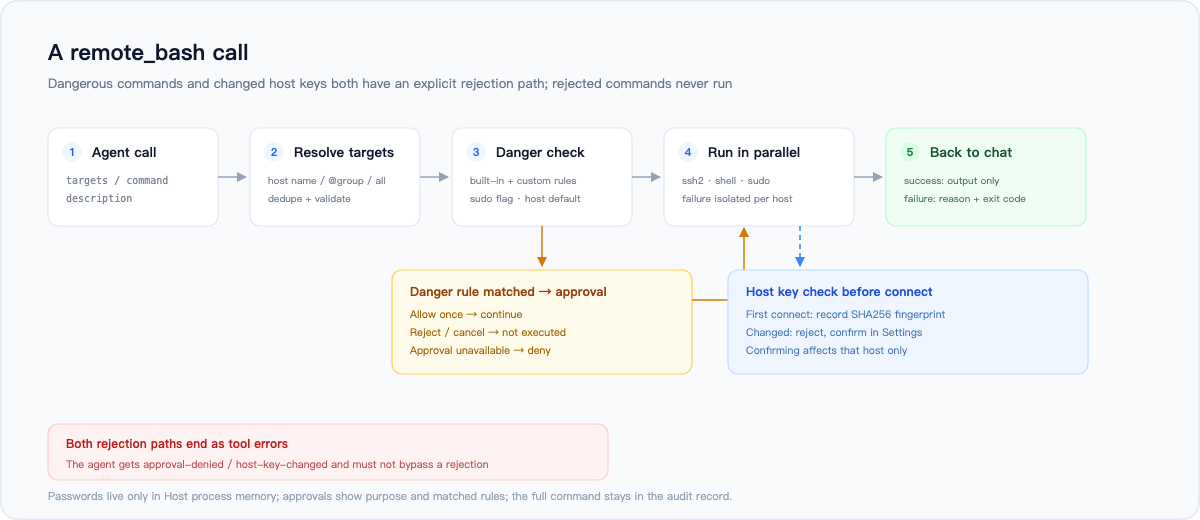
Credentials. Passwords, key passphrases and sudo passwords go into the records space of the DSH credential store (remote-bash/<hostId>) with file mode 0600. Reads and writes happen only inside the Host process, and the API returns just "configured / not configured". One boundary is worth stating: like the DSH credential store itself, any process running as the same OS user (including the agent's shell tools) can read that file in principle. That is a file-permission limit; the plugin cannot isolate further.
Host keys. On first connect the SHA256 fingerprint of the host key is written to known_hosts.json, and every later connection is checked against it. A mismatch rejects the connection and leaves the new fingerprint pending in Settings; approving it affects that one host. This protects against man-in-the-middle and also catches a replaced machine.
Dangerous commands. Commands matching a built-in rule (rm -rf on dangerous paths, mkfs, dd to a device, shutdown, stopping critical services, account changes, firewall flushes, overwriting system config, etc.) or carrying sudo go through ctx.approval. The rules are regex heuristics: they can miss and they can false-positive, and a false positive costs one extra confirmation. Add extraDangerousPatterns, or use approvalMode: always. If the approval service is unavailable, the command is denied.
sudo passwords are passed to sudo -S through a heredoc on stdin. They never appear in argv or ps, and are not logged.
Commands and output become part of the current session record; that is how DSH works, so keep secrets out of commands. The plugin does not collect data and does not talk to any network address other than the hosts you configure.
Report security issues privately as described in SECURITY.en.md.
Architecture
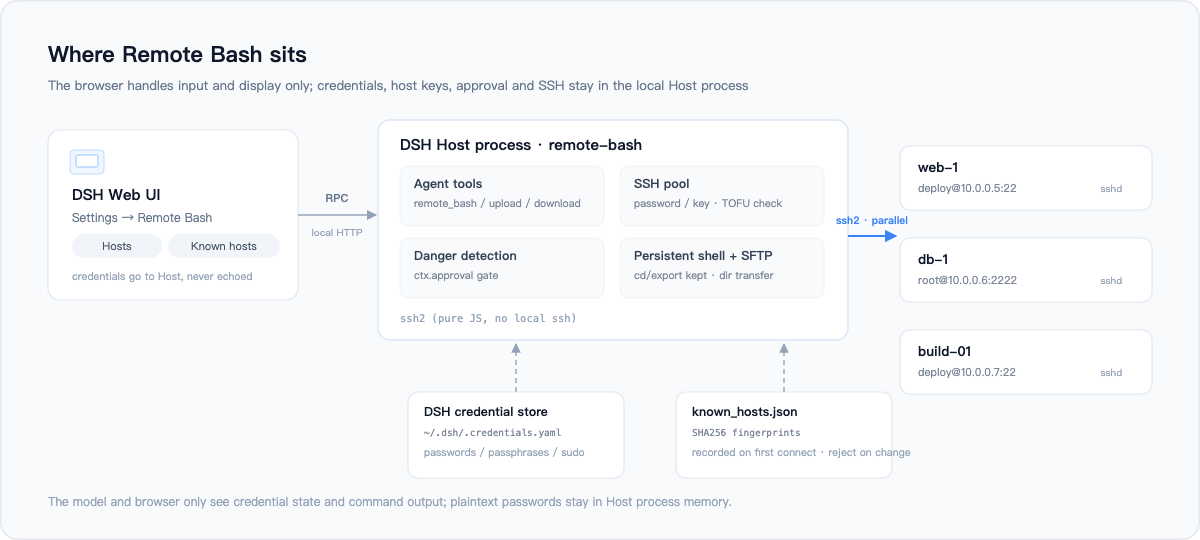
The Host process opens SSH connections itself, using the pure-JS ssh2 package. That avoids depending on the local ssh version and needs no askpass helper for password auth; SSH agent forwarding is not implemented. The browser half only handles the Settings page and talks to the Host over a DSH-authenticated local RPC (/api/remote-bash/rpc).
Persistent sessions are bash -s on the same SSH channel, without a PTY. cd and export survive between calls; terminal programs such as vim or top do not work. When a command in a session times out, the session is closed and reconnects automatically on the next call.
Repository layout
host/          Host side: tools, RPC, SSH, credentials, approval, persistent sessions
client.js      Browser Settings page (settings.section)
tests/         End-to-end tests and the mock SSH server
docs/images/   README artwork (SVG sources + PNG exports)
INTERFACE.md   Host/Client interface contract
Data files
Default location is <DSH_HOME>/remote-bash (~/.dsh/remote-bash when DSH_HOME is unset; override with dataDir):
| File | Content | Mode |
|---|---|---|
inventory.json |
Host list, no passwords | 0600 |
known_hosts.json |
TOFU fingerprints | 0600 |
~/.dsh/.credentials.yaml |
Passwords / passphrases, managed by the DSH credential store | 0600 |
Tests
npm install
npm test            # node:test end-to-end suite (five files)
npm run test:mock   # self-test for the mock SSH server (optional)
The tests start a real SSH server on 127.0.0.1 with ssh2 and cover authentication, TOFU and host-key rotation, single- and multi-host execution, failure isolation, timeouts, persistent sessions, correct/incorrect sudo passwords, SFTP files and directories, dangerous-command detection, credential handling and the RPC envelope. CI runs the same suite on Node 22 and 24.
Known limitations
- Targets must be Linux / macOS (POSIX shell).
- Persistent sessions have no PTY, so interactive TUI programs do not work.
- Dangerous-command rules are heuristics: they accept false positives and may miss things.
- Local paths are resolved relative to the Host process working directory; absolute paths are safer.
- The Settings section appears after a page refresh following the first install.
- Not supported yet: SSH agent, bastion hosts / ProxyJump, Windows targets.
Development
INTERFACE.mdis the Host/Client contract (RPC methods, service methods, result shapes, tool parameters). Read it before changing code.- Host changes load after toggling the plugin row off and on;
client.jschanges apply on page refresh. - Tests use
node --testand need no real remote host; add new cases undertests/.
License
MIT © 2026 wybiacx
No comments yet. Be the first to write one.