Pixel Usage Desk
English | 简体中文


A retro pixel CRT for DeepSeek Harness: keep the DeepSeek account balance and live token usage visible while you work.
The repository ships two related pieces:
| Piece | Where | What it is |
|---|---|---|
| DSH overlay plugin | repository root | A shell.overlay widget inside the Harness Web UI: balance, current-session tokens, context, total usage, live rate. |
| macOS desktop app | desktop/ |
The same visual as a standalone transparent app that can live anywhere on your display. |
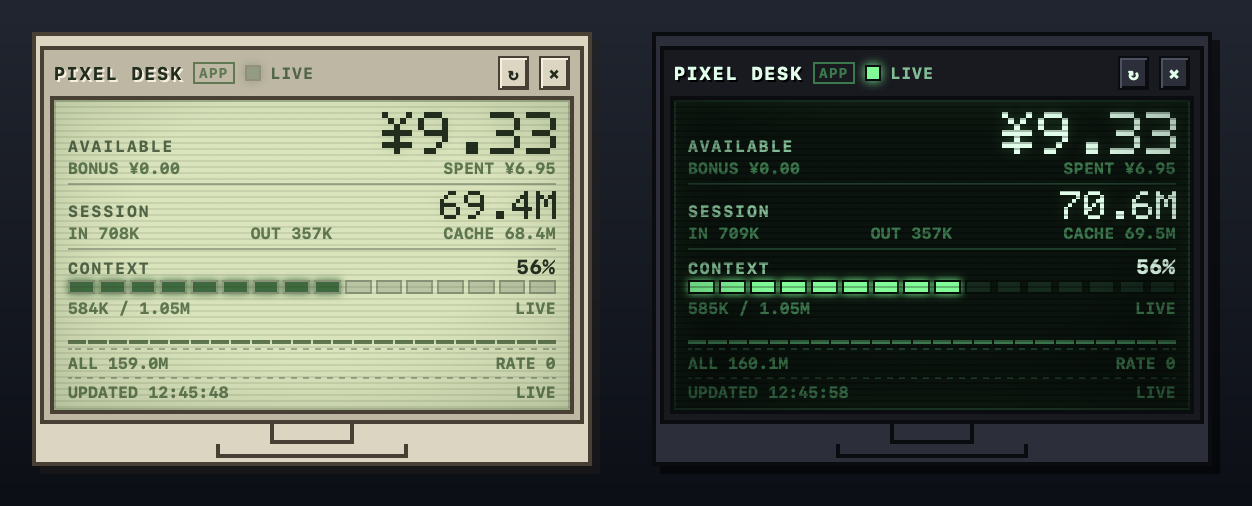
Screenshot: the macOS desktop app — warm beige in light mode, green phosphor CRT in dark mode. The DSH overlay uses the same display design.
Features
DSH overlay
- Balance and budget gauge. The wallet value includes normal and bonus balances.
- Current session token totals: input, output, cache read/write.
- Context occupancy with a segmented bar (
used / context window). - Accumulated tokens across the loaded sessions, plus a live tokens-per-minute rate and a 24-tick activity strip.
SYNCto refresh the balance,SETto edit the local budget,–to collapse.- Pixel font, 5×7 glyphs, scanlines, hard shadows, reduced-motion support.
- No model calls. It reads DSH's session projections and the existing account remote; it does not spend tokens.
macOS desktop app
- Transparent, borderless, always-on-top by default; drag from the entire top border.
- Light / dark / follow-system palette. The dark mode is a green CRT; the light mode is a warm beige LCD.
- Dock icon and menu-bar icon. The
×button only hides the window; click the Dock icon to reopen. SPENTshows the account's lifetime platform cost (not a token count).- Reads the same local DSH data; can keep running when DSH is closed, though the token may expire and the cache stops updating.
Repository layout
.
├── client.js                 # Web Client half: the overlay UI and data store
├── index.js                  # Host half (deliberately a no-op)
├── cordis.patch.yml          # Loader row for the plugin
├── package.json              # dsh.bundle + dsh.client manifest
├── locale/                   # Plugin-manager title/description
├── icon.svg                  # Plugin icon
├── desktop/                  # Standalone macOS app (Swift + WKWebView)
├── assets/                   # Storefront icon and preview
├── market/                   # awesome-dsh-plugin catalog entry
└── .github/workflows/        # Syntax / manifest validation
Requirements
- DSH 0.2.1-rc.3 or newer for the overlay.
- A DeepSeek account signed in through DSH for the wallet balance. Token usage works without it; the wallet will show
OFFLINE/NO ACCOUNT. - macOS 13+ and Xcode Command Line Tools for the desktop app (
swiftc).
Install the DSH plugin
From Git
Use the DSH Plugins page to add this repository as a plugin source:
https://github.com/wxfiveopps1102/pixel-usage-desk
Or, when the dsh CLI is on your PATH:
dsh plugin --profile <profile> add git+https://github.com/wxfiveopps1102/pixel-usage-desk.git
After installation, enable Pixel Usage Desk in the Plugins page. The CRT appears in the frame-wide overlay layer at the top-right.
The repository root is the installable bundle (
dsh.bundleinpackage.json, pluscordis.patch.yml). The desktop app is a separate download and is not installed by this plugin.
From the community catalog
The repository is prepared for the awesome-dsh-plugin catalog; see SUBMIT.md. Once the listing is merged, the plugin can be installed from any format-1 market, including dsh-market.
Using the overlay
- Drag the
PIXEL DESKheader to move it within the Harness frame. SETedits the local budget used by the balance gauge.SYNCforces a balance refresh.–collapses the widget to a compact bar.- Disable the plugin from the Plugins page to remove it.
The overlay lives inside the DSH window. For a widget that can be moved anywhere on the desktop, use the macOS app.
Desktop app
cd desktop
./build.sh
open PixelUsageDesk.app
See desktop/README.md for controls, the optional LaunchAgent, and troubleshooting. The app is ad-hoc signed and built locally; it is not a notarized download.
How it reads data
Overlay
- Wallet: DSH's existing
ctx.remote.account.getBalance(...)(thedeepseek-accountprovider). The remote is optional: if a profile has no account service, token metrics still work and the wallet reportsOFFLINE. - Tokens:
ctx.sessions.listand the token-meter wire projections (tokenUsage,contextPressure). No session-log replay in the browser. - Refresh: balance every 30 s, usage on session changes and a 5 s rate tick.
Desktop app
- Wallet: the current DeepSeek account token in
~/.dsh/.credentials.yaml, sent only tohttps://platform.deepseek.com/api/v0/users/get_user_summary. - Tokens:
~/.dsh/storages/session_projcache/sessions/*.json; the current session is the most recently modified cache file. - Refresh: balance every 30 s, usage every 2 s.
Privacy and security
- The plugin adds no telemetry and makes no model calls.
- The desktop app reads the DSH credential token read-only; it never writes it, logs it, or uploads it anywhere except the DeepSeek Platform balance endpoint.
- The overlay uses the DSH account remote; it does not open its own network connection.
- No credentials are committed to this repository. Build the desktop app locally; do not distribute a copy containing someone else's data.
Compatibility and limitations
- The overlay requires DSH Web
0.2.1-rc.3+and theshell.overlay/session-controller services. - The wallet balance requires a signed-in DeepSeek account; token usage is local and independent of the account.
- "All" usage is the sum of the sessions with loaded projections, not a historical database. There is no per-day/monthly breakdown yet.
- Projection cache values update at DSH checkpoint boundaries, so the overlay can trail the live request by a moment. The rate strip is indicative.
- The desktop app is macOS-only and unsigned/notarized; macOS may require
Start Pixel Usage Desk.commandor Gatekeeper confirmation. - If DSH is closed, the desktop app keeps its last data; the balance token may expire and the projection cache stops advancing.
- The desktop app is not a DSH plugin and cannot be installed from the plugin market.
Development
# JavaScript syntax and manifest sanity
node --check index.js
node --check client.js
npm pack --dry-run

# Desktop app
cd desktop
./build.sh
GitHub Actions runs the syntax/manifest check on every push and pull request.
Troubleshooting
| Symptom | What to check |
|---|---|
| Overlay does not appear | Plugin installed and enabled; reload the DSH page; check the browser console for pixel-usage-desk. |
Wallet shows NO ACCOUNT |
Sign in to the DeepSeek account in DSH Settings → Account. |
Wallet shows OFFLINE |
The account remote or platform request failed; try SYNC; check the DSH account session. |
| Token numbers stay at 0 | Open a session; the projection cache is written as DSH checkpoints the session. |
| Desktop app will not open | macOS 13+; double-click PixelUsageDesk.app, or use desktop/Start Pixel Usage Desk.command if LaunchServices refuses the ad-hoc-signed app. |
| Desktop app is hidden | Click the Pixel Usage Desk Dock icon or the menu-bar display icon. |
| Desktop app shows stale data | DSH is closed or signed out; reopen DSH and wait for a checkpoint. |
Contributing
Issues and pull requests are welcome. Keep the overlay's data contract read-only and avoid adding model calls to the widget. For catalog changes, the one-file submission is documented in SUBMIT.md.
License
MIT — see LICENSE.
No comments yet. Be the first to write one.