dsh-tool-codex-computer-use
English | 简体中文


Delegate one-shot desktop and text tasks from DeepSeek Harness (DSH) to your local Codex CLI, with configurable models, reasoning effort and service tiers.
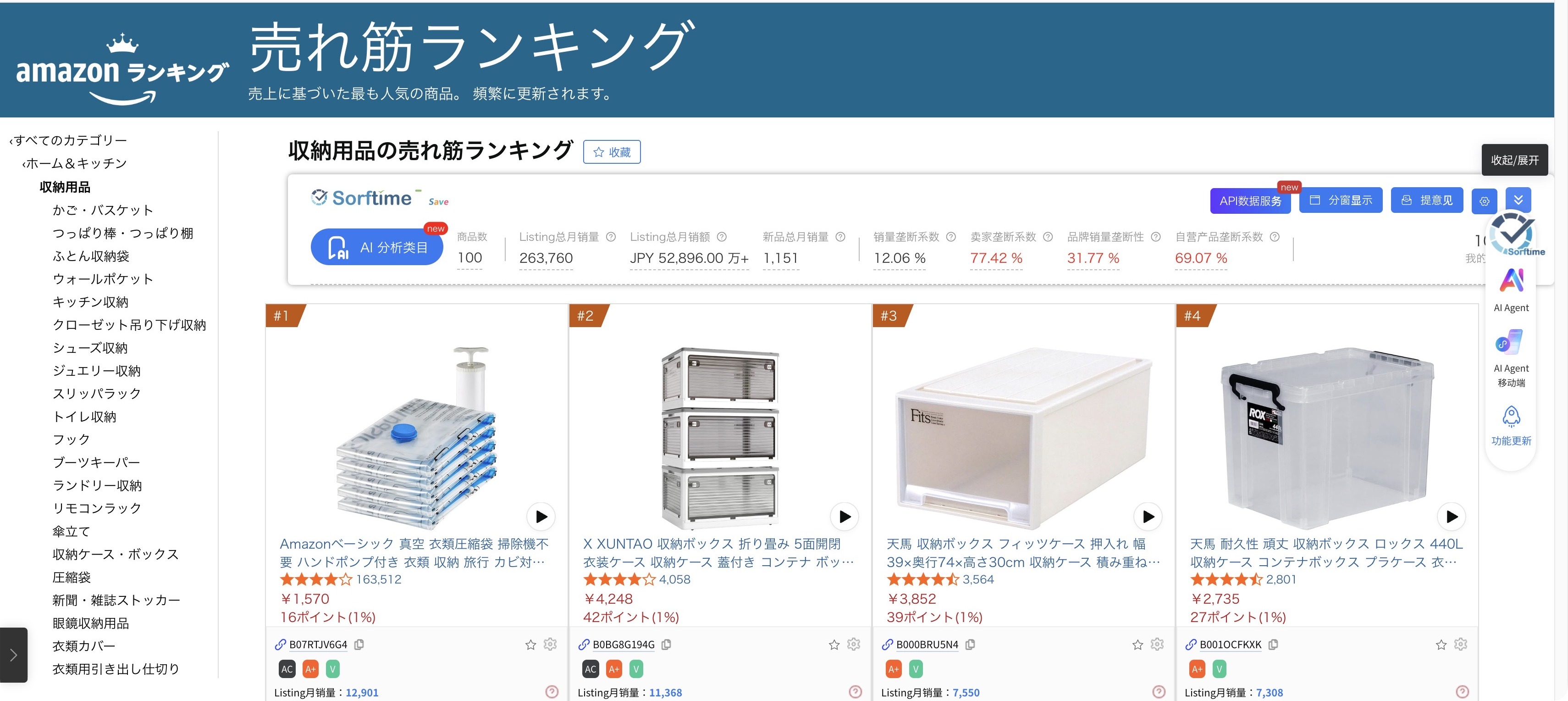
Live capture: computer_use_codex completed a category search on Amazon Japan.
Features
- Desktop and text modes: use
computer_use_codexfor desktop automation or a one-shot text task. - Model controls: choose a model, reasoning effort and service tier per call or through plugin defaults; results show the effective overrides and their sources.
- Environment inspection:
computer_use_codex_statusreports CLI and desktop app versions, models, authentication metadata and platform details. - Verifiable results: inspect returned text, screenshot paths and local logs; timeout handling attempts graceful termination before forcing the process to stop.
- macOS and Windows validation: real desktop runs include macOS Calculator and Windows Notepad; see Compatibility.
- Small Host bundle: no runtime dependencies; registers tools through
ctx.toolsand invokes the CLI selected bycodexBin. - No automation primitives: clicking, scrolling, typing and screenshots are performed by Codex's own computer-use plugins; this plugin only delegates, applies parameters and returns results.
Each task starts a fresh codex exec process. Calls are independent and cannot continue a session or ask follow-up questions. Existing measurements suggest about 3–5 seconds of startup overhead; actual timings vary. DSH's built-in subagent_codex serves a separate role as a subagent provider; the two can coexist.
Related work
The DSH community already has several computer-use plugins. The following overview reflects research dated 2026-11-12; these projects take different approaches to desktop control.
| Project | Platform | Approach |
|---|---|---|
| fangchenghao/dsh-computer-use | macOS | Accessibility-first; fresh observations, stale-state rejection and scoped permissions. |
| @wangyong1972/dsh-computer-use-macos | macOS | Screenshots with native mouse and keyboard control. |
| dsh-plugin-computer-use | Windows / macOS / Linux | Cua Driver's in-process Rust SDK. |
| MoyuDRCC/dsh-computer-use | Windows | Element targeting through UI Automation. |
| gxpppp/dsh-computer-use | Windows | Reuses Codex's native helper. |
| JHyugou/dsh-computer-use | Windows | Provides 25 tools. |
What this plugin offers
| Aspect | This plugin's approach |
|---|---|
| Two modes | The same computer_use_codex tool handles desktop operations with mode=desktop and text-only delegation with mode=text. |
| Bring your own CLI and choose model controls | codexBin can select any local Codex CLI installation, independent of DSH's bundled 0.153.4 in the snapshot above. Configure the model, reasoning effort and service tier through model, reasoningEffort and serviceTier. |
| Environment inspection | computer_use_codex_status reports the model catalog, plan metadata, CLI and desktop app versions, and an online CLI version comparison. |
| Cross-platform validation | Both macOS and Windows 11 have been tested; see Compatibility. |
Limitations
| Limitation | Practical impact |
|---|---|
| No accessibility tree or element targeting | Control relies mainly on coordinates and visual observations, with less precision at the control level than accessibility-first implementations. |
| Local Codex CLI required | The CLI must be installed and signed in on the host machine. |
| A separate process for every call | Each call incurs a cold start of a few seconds; existing measurements suggest about 3–5 seconds. |
| No permission scopes or approval panel | Security boundaries depend on securityMode and Codex's own controls. |
When to choose another plugin: For element-level precision, choose an accessibility-first implementation such as fangchenghao/dsh-computer-use, or evaluate MoyuDRCC/dsh-computer-use for Windows UI Automation. For cross-platform control through an in-process SDK without a separate Codex CLI dependency, consider the Cua Driver-based dsh-plugin-computer-use.
Requirements
- DSH in the 0.2.2 release line; recorded end-to-end validation used 0.2.2-rc.2.
- Node.js >=20. Repository CI uses Node.js 24.
- An installed, signed-in Codex CLI. Recorded validation used 0.167.2; the plugin uses your local installation.
- For desktop tasks: the required computer-use/browser plugins and an available desktop session. On macOS, grant Accessibility and Screen Recording permissions to the relevant Codex/host application.
- An existing working directory for
cwd. See Compatibility for tested environments and remaining gaps.
Install
The repository root is the installable DSH bundle: package.json points to cordis.patch.yml. Choose the intended DSH profile; replace desktop below if your profile has a different name. Fresh-profile installation has not yet been verified; existing validation used a locally linked bundle.
From the Git repository
With dsh on your PATH:
dsh plugin --profile desktop add git+https://github.com/wxfiveopps1102/dsh-tool-codex-computer-use.git
After installation, enable the bundle in DSH's Plugins page. When replacing an installed version, restart the Host process to load the new module.
From the DSH Plugins page
Open Plugins → Add plugin, enter the Git installation target below, install it, and enable the bundle:
git+https://github.com/wxfiveopps1102/dsh-tool-codex-computer-use.git
Repository: wxfiveopps1102/dsh-tool-codex-computer-use. A community catalog listing is not required for this route; catalog inclusion remains planned.
By npm package name (recommended)
Published on npm as dsh-tool-codex-computer-use@0.1.0.
dsh plugin --profile desktop add dsh-tool-codex-computer-use
Confirm the version with npm view dsh-tool-codex-computer-use version. See the release record.
Usage
Once the plugin is enabled, call its tools from DSH. The JSON below contains tool arguments, not shell commands.
Desktop task — mode=desktop
Call computer_use_codex to calculate a value and request a screenshot:
{
  "task": "Open Calculator, calculate 7 × 8, and verify the result with a screenshot.",
  "mode": "desktop",
  "cwd": "/absolute/path/to/workspace",
  "timeoutSeconds": 600
}
Replace cwd with an existing directory; on Windows, for example, use C:/path/to/workspace. Desktop mode is the default. Screenshots are requested as .jpg in <cwd>/.codex-cu/ unless configured otherwise; a prompt does not guarantee that screenshots are created.
Text task — mode=text
Call computer_use_codex for a one-shot explanation:
{
  "task": "Explain what 7 × 8 means in one sentence.",
  "mode": "text",
  "timeoutSeconds": 600
}
Text mode omits desktop/screenshot instructions and screenshot-directory creation. It keeps the configured security mode and does not disable Codex plugins. mode is a call argument only, with no config or environment default.
Call parameters
| Parameter | Meaning / default |
|---|---|
task |
Required, non-empty task description. |
mode |
desktop (default) or text. |
verify |
String: strict (default), final or none. strict verifies each action with a screenshot; final takes one confirmation screenshot at completion. Both first check that the page/window/category matches the task, stopping and reporting any mismatch. none requires no screenshots, for text-only or trusted tasks; forced to none in mode=text. The result object echoes the effective verify value. |
ephemeral |
Boolean, default false. When true, adds --ephemeral to codex exec so session files are not written to disk, reducing leftover files without changing output. |
cwd |
Existing working directory; defaults to the Host process directory. |
timeoutSeconds |
Integer, 30–3600; call argument > config > environment > 600. |
model |
Model ID; inherits the defaults under Configuration. |
reasoningEffort |
Reasoning effort; follows the same precedence as model. |
serviceTier |
Service tier; follows the same precedence as model. |
Environment inspection
Call computer_use_codex_status with {}. It returns environment JSON directly, without the task result's ok/output wrapper, and does not run a desktop task or create screenshot directories.
| Field | Meaning |
|---|---|
platform, platformLabel, osVersion |
Platform identifier, readable platform name and OS version. |
codexVersion |
CLI version from codex doctor --json, or unknown. |
latestCodexVersion |
Latest version from npm, or null when checking is disabled or fails. |
upToDate |
true if the local version is at least the npm latest, false if older, or null if comparison is unavailable. |
desktopAppVersion, authMode |
Desktop app version and stored authentication mode from doctor, or unknown. |
planType |
Local JWT's chatgpt_plan_type claim, or null. |
subscriptionActiveUntil |
Local JWT's chatgpt_subscription_active_until claim, or null; not a live entitlement check. |
models |
Catalog objects containing slug, displayName, efforts and serviceTiers; defaults to []. |
warnings |
Non-fatal source failures, bundled-catalog notices and upgrade suggestions; [] when none occur. |
The sources are codex debug models, codex doctor --json and $CODEX_HOME/auth.json (default ~/.codex/auth.json). Source results are cached for five minutes per resolved CLI path and online-check setting in the current process. A source failure adds a warning while preserving other results; CLI entry resolution must succeed first. Use planType with models when selecting a model; Codex validates the final selection.
Task results
computer_use_codex returns ok, exitCode, mode, codexVersion, warnings, durationMs, output, controls, securityMode, securityNotice and, when available, logPath. ok:true means successful CLI exit, not achievement of the task objective. Review screenshots for desktop tasks and returned text for text tasks.
Output is limited to 8000 JavaScript characters. Full logs remain in a private system temporary directory in both modes; final-message files are deleted. See Security for retention and permission boundaries, and the architecture guide (Chinese) for the complete output contract.
Configuration
For model, reasoningEffort and serviceTier, each field resolves independently as call argument > plugin config > environment variable > local Codex configuration (~/.codex/config.toml). Omitting a call argument still uses any config or environment default. timeoutSeconds uses the same first three levels, then falls back to 600.
Other settings use apply(ctx, config) values before their environment defaults. Environment variables must reach the Host process; setting them only in a shell tool may not work. The online-check switches are an exception: either disabling switch takes effect, as described below.
| Config | Environment | Default |
|---|---|---|
codexBin |
DSH_CODEX_BIN |
executable codex on PATH, then $DSH_PROFILE_DIR/node_modules/@openai/codex/bin/codex.js |
securityMode |
DSH_CODEX_SECURITY_MODE |
bypass |
timeoutSeconds |
DSH_CODEX_TIMEOUT_SECONDS |
600 (integer, 30–3600) |
terminateGraceMs |
DSH_CODEX_TERMINATE_GRACE_MS |
5000 milliseconds (integer, 0–30000; 0 skips graceful termination) |
screenshotDir |
DSH_CODEX_SCREENSHOT_DIR |
<cwd>/.codex-cu/ |
model |
DSH_CODEX_MODEL |
inherit the local Codex configuration |
reasoningEffort |
DSH_CODEX_REASONING_EFFORT |
inherit the local Codex configuration |
serviceTier |
DSH_CODEX_SERVICE_TIER |
inherit the local Codex configuration |
onlineCheck |
DSH_CODEX_OFFLINE |
enabled; config false or environment 1 disables inspection's online checks |
CLI resolution is config → environment → PATH → profile. Explicit entries must be file paths, not shell commands; invalid explicit entries fail without fallback. Task calls report resolution failures as readable ok:false results. JavaScript entries use DSH_NODE_EXECUTABLE or the current runtime with ELECTRON_RUN_AS_NODE=1. Relative screenshot paths resolve against cwd.
There is no schemastery Config export or promised automatic configuration UI: workspace-linked imports failed, profile resolution is unverified, and the plugin has no runtime dependencies.
Model × reasoning effort matrix (snapshot, 2026-11-12)
This is the user-supplied snapshot of the live catalog on 2026-11-12; it was not fetched again for this documentation update.
| Model | Supported efforts |
|---|---|
gpt-6.1-sol |
low / medium / high / xhigh / max / ultra |
gpt-6-astra |
low / medium / high / xhigh / max / ultra |
gpt-6.1-terra |
low / medium / high / xhigh / max / ultra |
gpt-6-sol |
low / medium / high / xhigh / max / ultra |
gpt-5.6-sol |
low / medium / high / xhigh / max / ultra |
gpt-5.6-terra |
low / medium / high / xhigh / max / ultra |
gpt-reserve |
low / medium / high / xhigh / max |
gpt-6-luna |
low / medium / high / xhigh / max |
gpt-5.6-luna |
low / medium / high / xhigh / max |
codex-auto-review |
low / medium / high / xhigh / max |
ultra = max reasoning + automatic task delegation, creating additional subtasks and token costs. Codex validates reasoning efforts; invalid values return HTTP 400. Actual availability varies with the subscription plan and CLI version; use models[].efforts returned by computer_use_codex_status as the source of truth.
Model and service-tier defaults
Example plugin entry in cordis.patch.yml:
- insert:
    - id: tool-computer-use-codex
      name: 'dsh-tool-codex-computer-use'
      config:
        model: gpt-6-astra
        reasoningEffort: high
        serviceTier: priority
The Fast service tier ID is priority; check the model's returned serviceTiers before selecting it. Defaults can also be set with DSH_CODEX_MODEL, DSH_CODEX_REASONING_EFFORT and DSH_CODEX_SERVICE_TIER.
The returned controls string lists effective overrides and sources, separated by spaces. With the config example above and no call overrides:
model=gpt-6-astra(config) reasoningEffort=high(config) serviceTier=priority(config)
reasoningEffort=high(config) comes from plugin config; reasoningEffort=low(environment) comes from the environment; reasoningEffort=low without a suffix comes from a call argument. Fields not listed inherit the local Codex configuration. If no fields are overridden, the entire string is inherited from Codex config; it does not report inherited values themselves.
Online checks and caching
Online checking is enabled by default. The plugin queries https://registry.npmjs.org/@openai/codex/latest; successful and failed queries are cached for six hours in the current process and shared by the task and status tools. Each status response adds the version comparison to a copy of the cached source results.
Set onlineCheck: false or DSH_CODEX_OFFLINE=1 to disable these online checks; latestCodexVersion and upToDate then return null. The model catalog normally refreshes through codex debug models; a failure falls back to codex debug models --bundled with a warning. With online checking disabled, it uses --bundled directly and adds an offline-catalog warning. These switches control inspection, not networking by delegated tasks.
How it works
DSH → ctx.tools → computer_use_codex → local codex exec → result + local evidence
- The bundle patch loads
index.js, which registerscomputer_use_codexandcomputer_use_codex_statusas Host tools. - A task call validates arguments, resolves configuration and locates the chosen CLI.
- A preflight runs
codex --versionand compares it with the cached npm latest. Version probes, including failures, are cached by entry path for the current process. A failed probe returnsunknownwith a warning; a failed npm query leaves comparison unavailable. Neither blocks execution. - A fresh
codex execruns with the selected model controls and security flags. Desktop mode adds desktop/screenshot instructions; text mode omits them. - The plugin captures the final message, execution status and log path. On timeout, it attempts graceful termination, then forces termination after
terminateGraceMs.
See the architecture, overview and optimization notes for technical detail (Chinese).
Security
The default securityMode is bypass. It passes --dangerously-bypass-approvals-and-sandbox, disabling CLI approvals and the sandbox so tasks can affect the local desktop and files. Use it only for tasks and environments you trust. workspace-write passes --sandbox workspace-write; real GUI behavior in that mode remains unverified and may fail. Results include securityMode and securityNotice.
Text mode retains the same security setting and available plugins. A filesystem sandbox does not guarantee containment of external GUI plugins. Timeouts cannot undo desktop effects, and descendants outside the targeted process tree or group may remain. Host cancellation through execute's exec argument is not integrated because the signal contract remains unverified; bounded timeout is implemented.
Logs and screenshots may contain sensitive data and require manual cleanup. The status tool only decodes the required JWT claims locally; it does not output or transmit tokens. Subscription metadata is a local claim snapshot, not a live entitlement check; a past timestamp alone does not establish that benefits have ended. Delegated Codex tasks use your configured authentication, plugins and network access. See the detailed safety guide (Chinese).
Compatibility
| Platform | mode=text |
mode=desktop |
Recorded environment / evidence |
|---|---|---|---|
| macOS | Tested | Tested | DSH 0.2.2-rc.2 + Codex CLI 0.167.2; Calculator 3×9=27; earlier 7×8=56 evidence also exists. |
| Windows | Tested | Tested | Windows 11 Pro + DSH 0.2.2-rc.2 + Codex CLI 0.167.2; Notepad contained hello, with three screenshots and a status bar showing 5 characters. |
| Linux | Not verified | Not verified; no desktop-support claim | Requires separate validation. Ubuntu CI only checks syntax, manifest and packaging. |
The existing cross-platform validation is dated 2026-11-12; desktop tests were not rerun for this documentation update. The macOS OS version was not recorded. Windows used DSH Desktop's desktop profile, Node v24.14.0, npm 11.9.0 and ChatGPT login (planType: prolite). Both platforms passed smoke, status, text and desktop checks; status returned 10 models with warnings: [].
Windows results correspond to commit e99d5a4: text completed in 52.3 s and desktop in 100.5 s. After manually restarting DSH, both tools succeeded on their first calls, with no must declare output warning, application: applied and warnings: []. Full evidence is in the cross-platform release record; the Windows test guide retains an earlier temporary-fix test record.
Remaining gaps include Linux desktop behavior, real GUI tasks under workspace-write, clean-profile installation and npm installation/publication. The model matrix is a dated snapshot; availability depends on the selected CLI and account.
Development
Repository layout
.
├── .github/workflows/validate.yml  # Syntax, manifest and package checks
├── .gitignore
├── index.js                        # Host tools and CLI execution
├── cordis.patch.yml                # DSH bundle loader patch
├── package.json                    # Package metadata and dsh.bundle
├── icon.svg
├── locale/
│   ├── en.json
│   └── zh.json
├── docs/
│   ├── ARCHITECTURE.md
│   ├── DETAIL.md
│   ├── OPTIMIZATION.md
│   ├── OVERVIEW.md
│   ├── PUBLISHING.md
│   ├── WINDOWS-TEST.md
│   └── assets/amazon-ranking.jpg   # Redacted preview
├── test/smoke.mjs                   # Fake-CLI smoke tests
├── README.md
├── README.zh.md
├── RELEASE.md                      # Validation and publication record
└── LICENSE
From the repository root, with Node.js 24 and npm available:
node --check index.js
node --input-type=module -e 'import fs from "node:fs"; import assert from "node:assert/strict"; const pkg = JSON.parse(fs.readFileSync("package.json", "utf8")); assert.equal(pkg.dsh?.bundle?.patch, "./cordis.patch.yml"); assert.ok(fs.statSync(pkg.dsh.bundle.patch).isFile());'
npm pack --dry-run
GitHub Actions runs these checks on Ubuntu with Node.js 24 for pushes and pull requests. The workflow does not run desktop tasks or publish a package.
For runtime changes, run the existing smoke suite separately:
node test/smoke.mjs
On macOS, the DSH-bundled runtime is another option:
ELECTRON_RUN_AS_NODE=1 "/Applications/DeepSeek Harness.app/Contents/MacOS/DeepSeek Harness" test/smoke.mjs
Smoke tests use fake CLIs and do not operate the desktop. Windows uses .js fixtures via the Node launcher; other platforms use shell fixtures. Coverage includes registration failure handling, CLI commands and three real 30-second timeout cases. POSIX checks TERM handling and KILL escalation; Windows checks bounded timeout and taskkill requests. These tests do not establish real desktop compatibility.
Troubleshooting
| Symptom | What to check |
|---|---|
| Tools do not appear | Confirm that the bundle is installed and enabled in the intended profile; restart the Host after replacing the package. |
| Codex entry cannot be found | Set codexBin or DSH_CODEX_BIN to a valid file path. An invalid explicit path fails without fallback; on Windows, check the actual executable or codex.js path. |
| Model or reasoning effort is rejected | Inspect computer_use_codex_status.models, especially efforts and serviceTiers; use values available to the selected CLI and account. |
| CLI version or catalog appears stale | Upgrade the installation actually selected by config / environment / PATH / profile, then restart the Host to clear process-local caches. |
| Desktop access fails | Check authentication, required plugins, desktop permissions and securityMode; GUI behavior under workspace-write remains unverified. |
ok:true, but the result is wrong or no screenshot exists |
Verify the returned text and actual screenshot evidence; successful CLI exit alone does not prove task completion. |
| A task times out or leaves a session behind | Review logPath, timeoutSeconds and terminateGraceMs; prior desktop effects and detached descendants may remain. |
| npm cannot find the package | npm publication is planned; use the Git repository installation route. |
For a profile-local CLI installation, the recorded-version upgrade example is npm install --prefix ~/.dsh/profiles/desktop @openai/codex@0.167.2; adjust the profile path. This is a manual example, not an automatic upgrade or a claim about the latest version. An explicit CLI path or PATH entry may take precedence over that installation.
Timeout handling first requests taskkill /pid PID /T on Windows and adds /F when forced termination is needed. POSIX sends SIGTERM to the child process group, then SIGKILL. Failed tree/group termination falls back to child.kill(signal). terminateGraceMs is a plugin setting, not a call argument; setting it to 0 skips the graceful step.
Windows screenshot paths may use forward slashes; use the returned absolute path. Historical .png screenshots can contain JPEG bytes; current prompts request .jpg without renaming old files. On macOS, a virtual mouse or sharing indicator can remain after the task process exits. For manual cleanup:
pkill -f SkyComputerUseClient
killall SkyComputerUseService 2>/dev/null
This affects any ongoing Codex computer-use sessions. The plugin does not run these commands automatically.
Contributing
Issues and pull requests are welcome. Include your OS, DSH and Codex CLI versions, the task mode, expected result and redacted diagnostic output. Keep README.md and README.zh.md aligned, run the development checks, and distinguish fake-CLI tests from real desktop evidence. Do not commit authentication files, tokens, private logs or unredacted screenshots.
See RELEASE.md for validation history and publication work still pending.
License
MIT © 2026 wx5.
No comments yet. Be the first to write one.