READMESource: main@6c2b088c
dsh-explorer
Native workspace file explorer plugin engineered specifically for DeepSeek Harness (DSH). Bridges local workspace navigation and AI-assisted conversation workflows with seamless chat referencing, fluid animations, and editor tab integration.
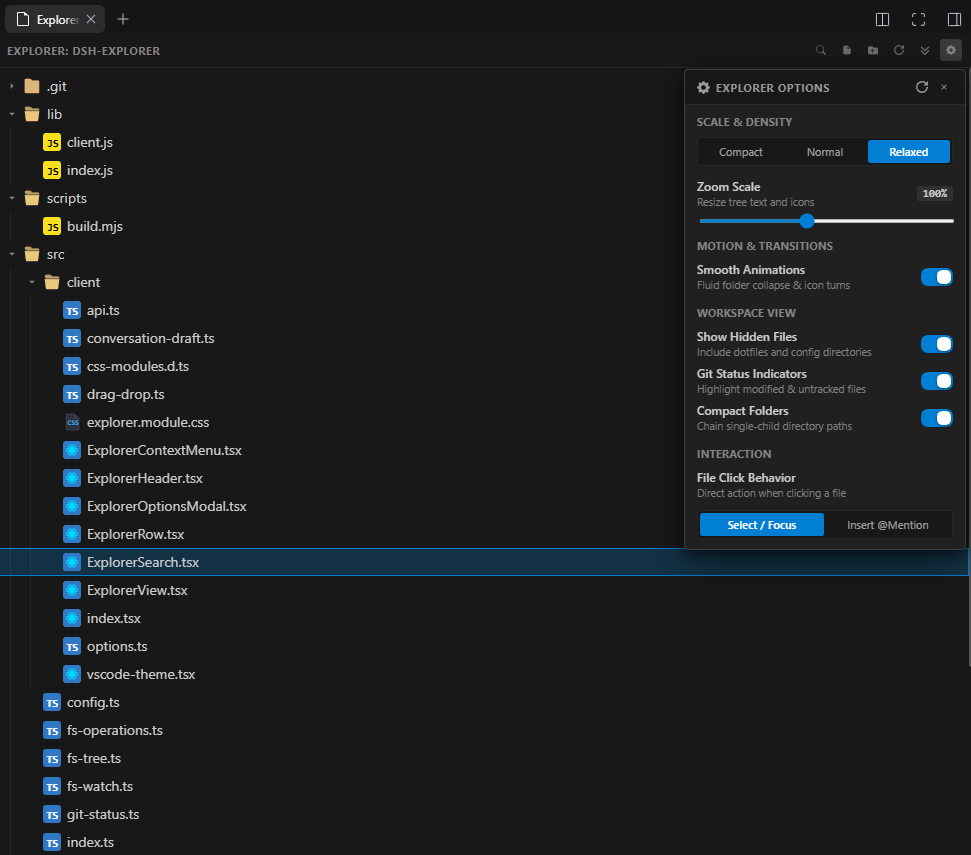
Key Features
1. Conversational Chat Integration
- Precision Drag & Drop: Drop files or folders into the DSH chat composer with exact text cursor / insertion point positioning, preserving existing words without clobbering text.
- Smart Mention Chips: Files dropped or inserted appear as
@path/to/filechips, and directories appear with trailing slash@path/to/folder/. - Modifier Drop Snippets: Hold Alt or Shift while dropping a file to embed its full source code directly into the chat prompt as a syntax-highlighted markdown code block.
- One-Click Mentioning: Click the
@hover icon on any row or select Insert Mention to Chat from the context menu to insert the reference at your active cursor.
2. Tab Navigation & Workspace Viewing
- Double-Click to Open: Double-click any file to launch it directly into a new DSH editor tab (seamlessly integrating with
betterSidebar,sidebarRight, or native workspace tabs). - Context Menu "Open in New Tab": Right-click any file to open it in an editor tab.
- Instant Filter Search: Top search bar filters files and folders in real time with instant path matching.
3. Motion Collapse Transitions
- Fluid Grid Animations: Smooth CSS grid accordion animations when expanding and collapsing folders.
- Rotating Chevrons: Responsive chevron rotation synchronized with folder open/close state.
- Toggleable in Preferences: Easily disable animations in the Options modal for instantaneous snap navigation.
4. Git Status Indicators
- Multi-Repo & Monorepo Support: Automatic detection of git repositories at workspace root or nested sub-repositories across tools and project folders.
- Parent Folder Bubble-Up: Ancestor directories reflect modified (
M), untracked (U), or deleted (D) states of their children, so changes are visible without needing to expand every folder. - Refined Pill Badges: Right-aligned status badges with subtle tint backgrounds (
Min warm amber,Uin soft green,Din coral red). - Toggleable in Preferences: Cleanly hide all Git colors and badges with one switch in the Options modal.
5. Compact Folders
- Single-Child Folder Chaining: Single-child directory hierarchies (such as
src/client/ui) are collapsed into a single compact line. - Instant Responsive Toggle: Turn Compact Folders on or off in the Options modal with immediate, zero-lag visual re-rendering.
6. Scale & Density Customization
- Density Presets: Switch between Compact (20px rows), Normal (24px rows), and Relaxed (28px rows).
- Continuous Zoom Slider: Zoom the entire tree from 75% to 135% scale, automatically adjusting row heights, font sizes, icon sizes, and indentation step guides.
- Persistent Preferences: All display options are saved to local storage and restored automatically.
7. Language Icons & Visual Hierarchy
- Color-Coded File Types: Hand-tuned colors and badges for TypeScript, JavaScript, Python, Rust, Go, C/C++, HTML, CSS, JSON, Markdown, YAML, Docker, Git, and shell scripts.
- Directory Guides: Visual indent guide lines showing nesting levels clearly across deep workspace structures.
- Hidden Files Toggle: Toggle visibility of dotfiles and hidden system configurations.
8. Complete File Management
- Inline Operations: Hover actions for Mention (@), Copy Relative Path, Rename (F2), and Delete.
- Keyboard Navigation: Full keyboard navigation support (Up / Down arrows, Left / Right collapse / expand, Enter to mention or expand, F2 to rename).
- Live File System Watcher: Instantaneous tree updates via WebSocket server when files are created, modified, or deleted externally.
Installation
Via DSH Plugin CLI (NPM)
dsh plugin --profile web add dsh-explorer
(or use --profile desktop for desktop harness)
Via Source (GitHub)
dsh plugin --profile web add github:wwwroot/dsh-explorer
Via cordis.patch.yml
Add dsh-explorer to your profile configuration:
- insert:
    - id: dsh-explorer
      name: 'dsh-explorer'
Development & Building
Building the standalone client bundle and host ESM service:
# Install dev dependencies
npm install

# Build host ESM (lib/index.js) and client bundle (lib/client.js)
npm run build

# TypeScript validation
npm run typecheck
Architecture
- Host Service (
src/index.ts,src/fs-tree.ts,src/git-status.ts): Node.js ESM service running on the DSH Cordis container, providing secure filesystem tree traversal, WebSocket live file-watching, and parallel git status aggregation. - Client Surface (
src/client/index.tsx,src/client/ExplorerView.tsx): React UI mounted inside DSH's right sidebar slot (sidebar.right.panel), managing reactive tree navigation, drag-and-drop caret tracking, and customizable display preferences. - Self-Contained Distribution: Build outputs in
lib/are fully bundled byesbuildwith inlined CSS modules, requiring zero external client dependencies at runtime.
License
MIT
No comments yet. Be the first to write one.