dsh-sidebar-shelf
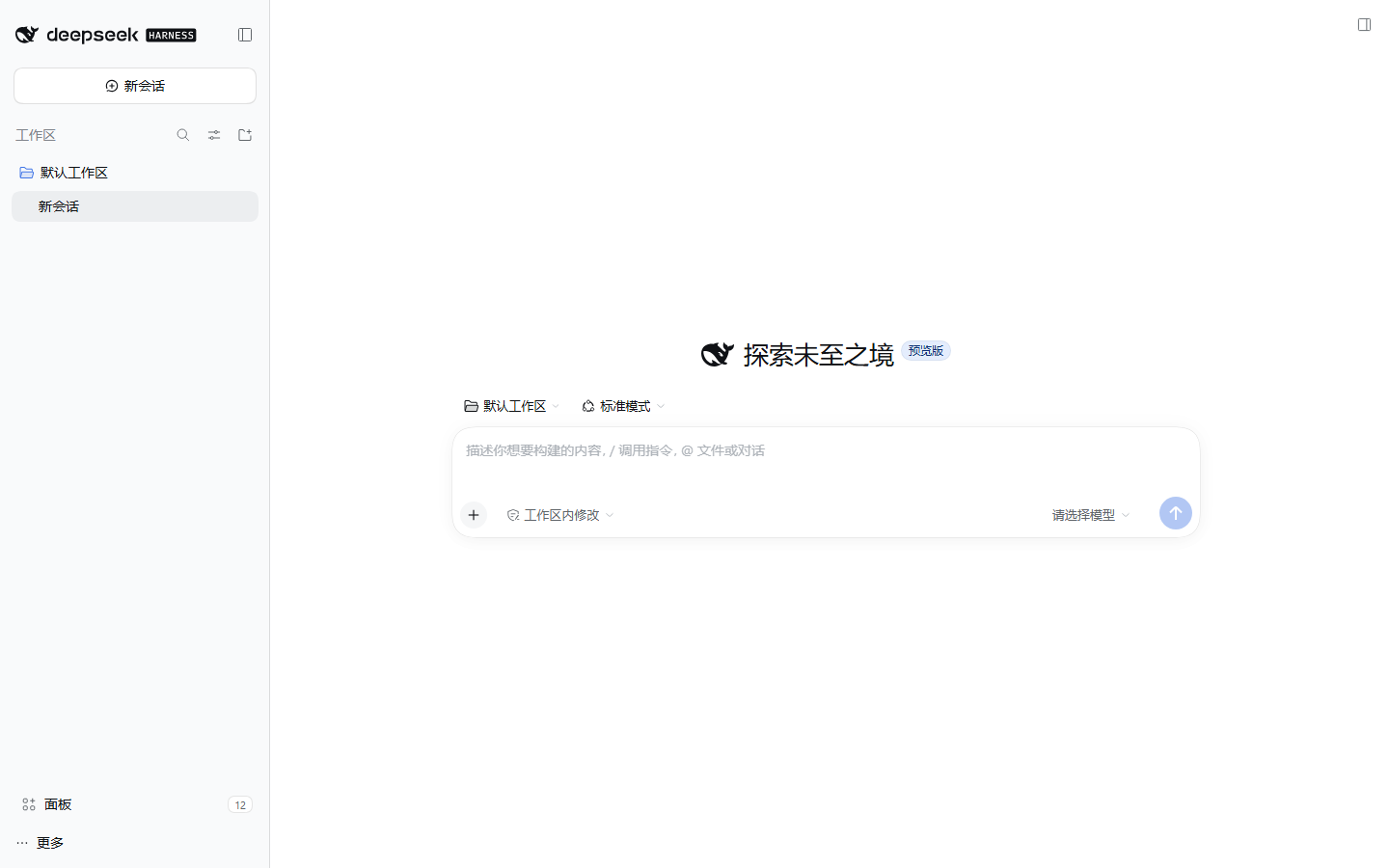
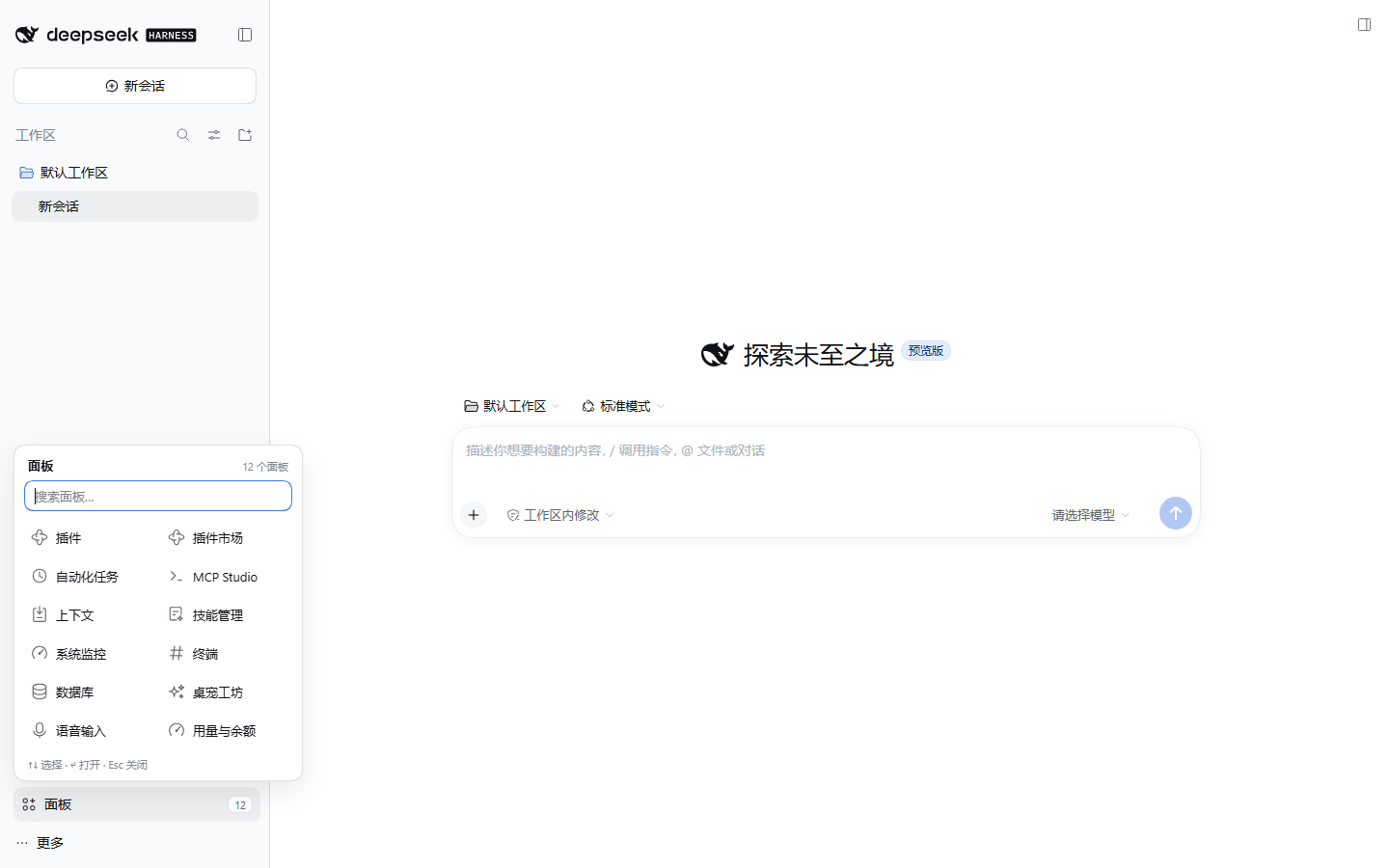
Give the DSH sidebar back its space. Every left-sidebar panel entry folds into one quiet shelf that sits exactly where the panels used to be — above the workspace. Open a panel only when you need it.


Why
The DSH Web/desktop sidebar stacks its brand row, New Session, every global panel entry, the workspace list, and Settings. Each plugin that adds a panel adds a row to that column — plugin manager, plugin market, schedules, MCP studio, context, skills, system monitor. Ten rows is roughly 400px, and the workspace area is squeezed to a couple of conversations.
dsh-sidebar-shelf folds all panel entries into a single row in that same column, right above the workspace, and brings any panel back on demand.
- One row where the panel list was. Same place, same width, same spacing as a native panel row — the workspace moves straight up under it.
- Adopts injected entries. Plugins that bypass the slot and inject a row straight into the sidebar (the
data-dsh-*-entryconvention used bydsh-webchat, taskboard and ssh) are hidden in place and listed in the same shelf with their own icon, label and active state; choosing one clicks their own button, so their toggle keeps working. - A native row, not a fake one. The shell's own button, hover state, 36px rail form and tooltip are reused; only the sibling rows are hidden.
- A 2-column shelf with each panel's own registered icon.
- Search appears once there are more than seven panels.
- Keyboard first:
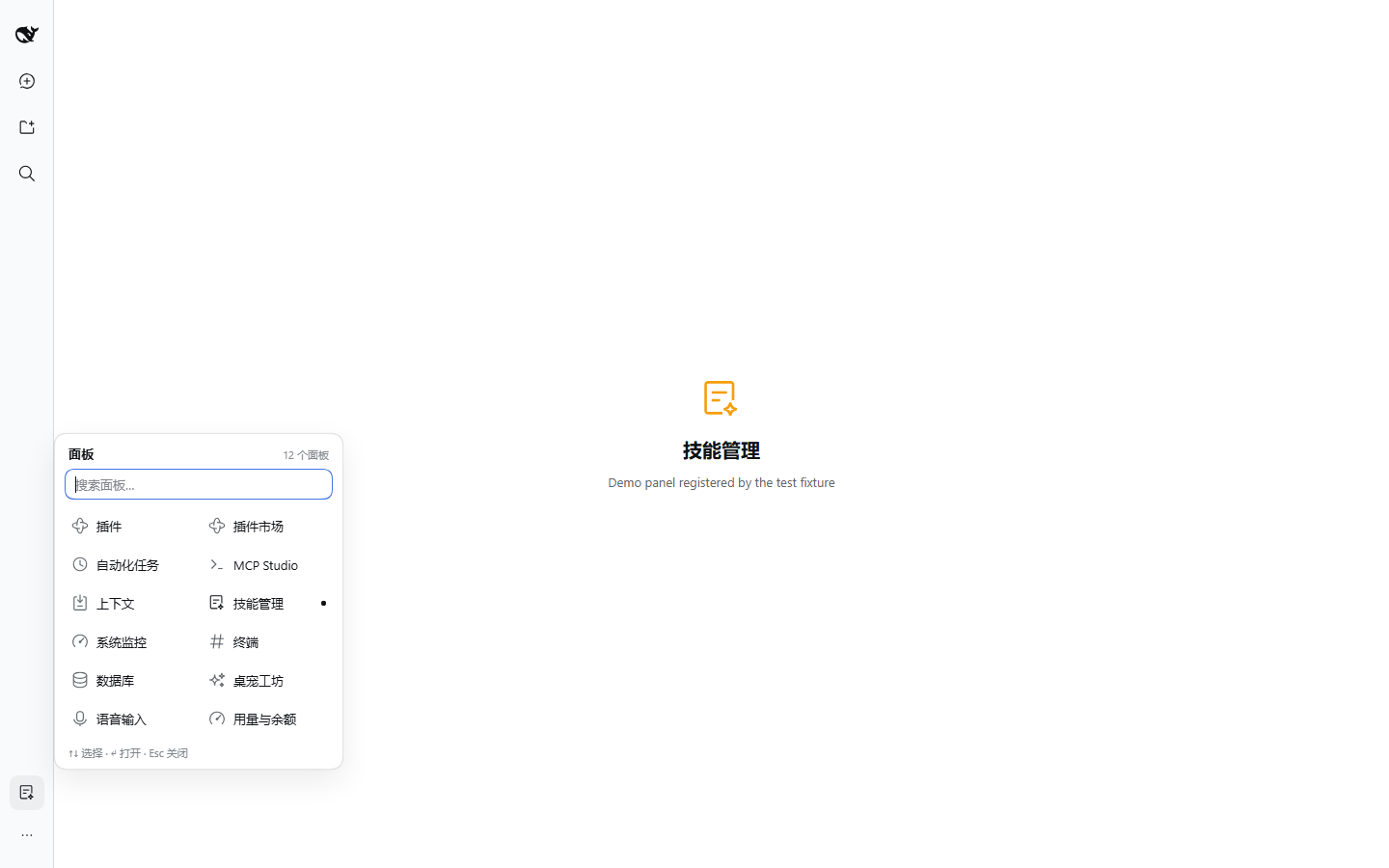
↑/↓to move,Enterto open,Escto close, and plain typing filters. - Rail aware: in the 56px sidebar rail the row is still the shell's 36px icon and the shelf opens beside the rail, not on top of it.
- Theme aware: only
--dsw-alias-*/--dsw-radius-*/--dsw-shadow-*tokens; follows light and dark themes.
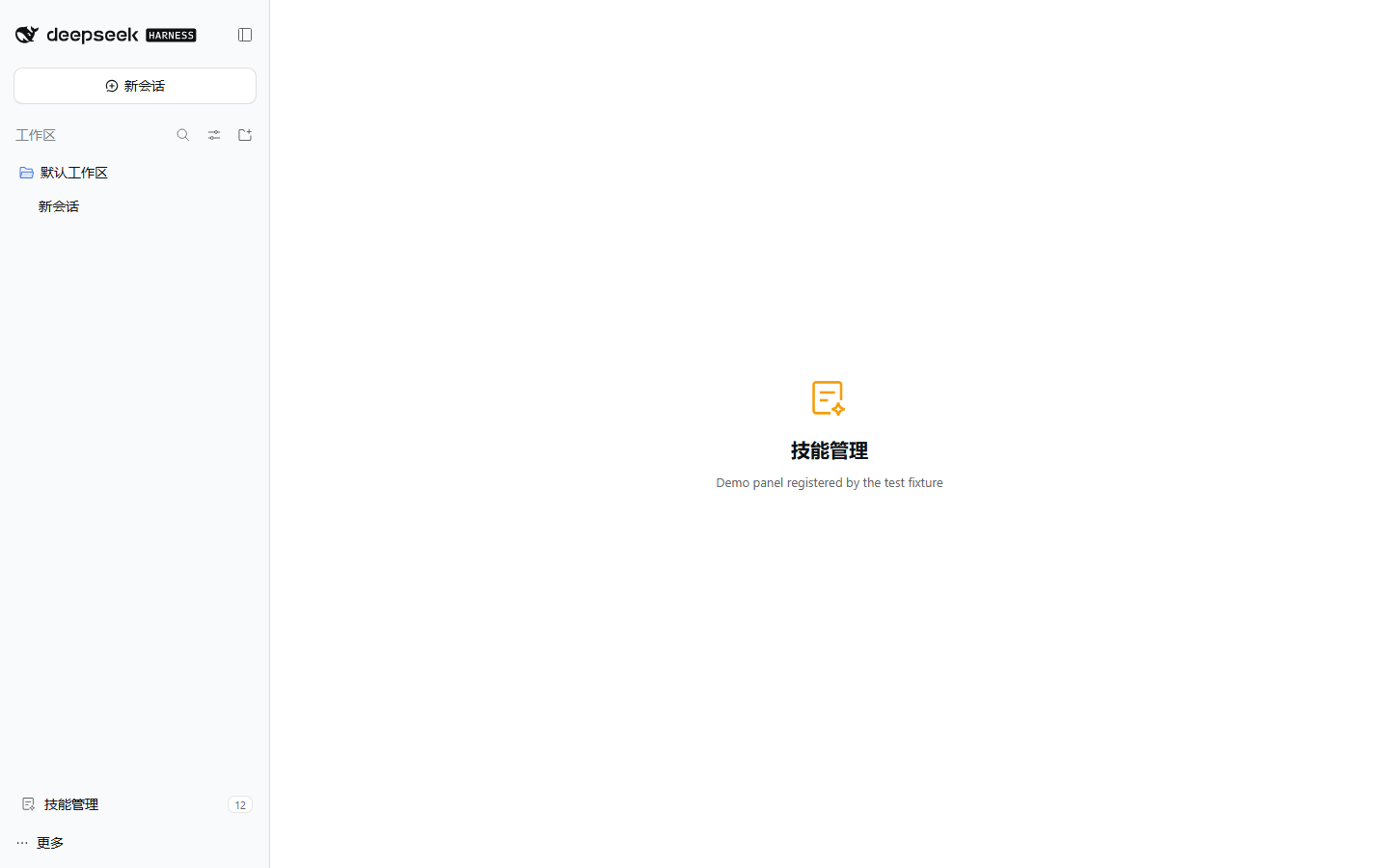
| Panel open | Rail | Dark |
|---|---|---|
 |
 |
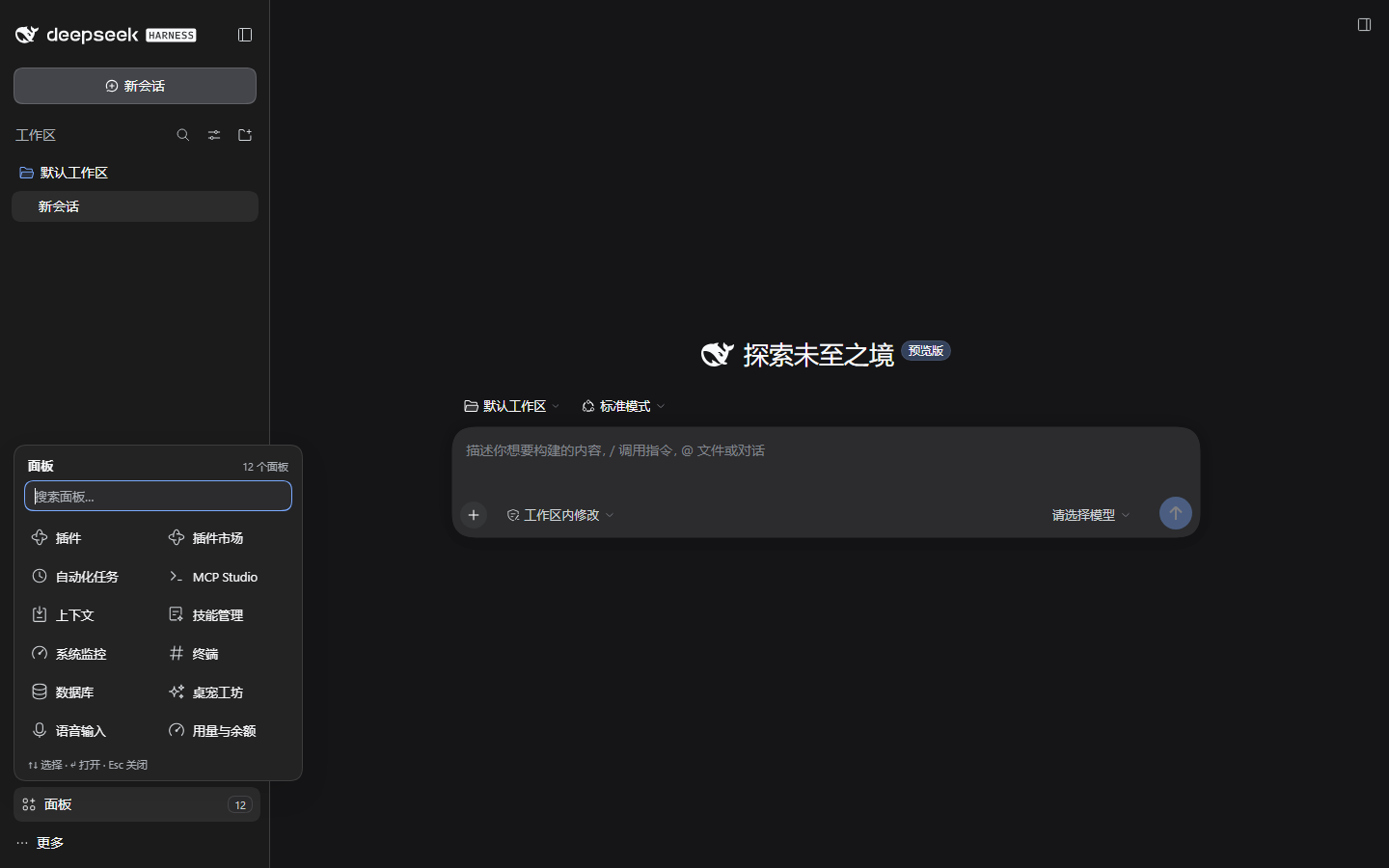 |
Install
Requires DSH (DeepSeek Harness) with the web profile — the desktop app uses the same client.
# straight from GitHub (no build step, no allowBuilds approval)
dsh plugin --profile desktop add github:wumouren114/dsh-sidebar-shelf

# or from a local clone
git clone https://github.com/wumouren114/dsh-sidebar-shelf.git
dsh plugin --profile desktop add ./dsh-sidebar-shelf
desktop is the profile name in this repository's examples; substitute web, tui, or whatever profile you run. After installing, enable the plugin in Settings → Plugins (it is added to dsh.profile.bundles) and reload the page.
Verify: the whole panel column becomes one Panels row between New Session and 工作区 / Workspace. Click it — every registered panel is there, including "Plugins". Picking one opens it and closes the shelf.
This package ships a hand-written
lib/client.js: there is noprepare/postinstallscript, so a GitHub install never stops at pnpm'sERR_PNPM_GIT_DEP_PREPARE_NOT_ALLOWEDorERR_PNPM_IGNORED_BUILDS.
Requirements: DSH 0.2.x client, Node.js ≥ 20 for the CLI that installs it.
How it works
DSH's left sidebar is owned by @deepseek-ai/dsh-client-ui-sidebar. Third-party plugins cannot re-declare that list, but the shell publishes a small, stable contract:
| Contract | Use |
|---|---|
sidebar.panellist slot (root scope, list) |
Every panel registers an icon component with id / order / label. The shelf registers one entry of its own here (order: -1000) and reads the rest of the registry as its data source. |
| The registered row's DOM | The shell wraps our icon in its own <button class="panelRow">. From the glyph we find that button, mark it data-dsh-shelf-row and intercept its click in the capture phase. |
ctx.layout.selectPanel(id) |
The official way to open a panel; the shelf never fakes a click on another row. |
ctx.layout.panelInfo |
The selected-panel source, used for the active marker inside the shelf. |
Concretely, lib/client.js:
- registers its own
sidebar.panellistentry (id: dsh-sidebar-shelf-entry,order: -1000, label面板/Panels); - from its glyph walks to the shell's row button, marks it, and attaches a capture-phase click handler — this both opens the shelf and stops the shell from calling
selectPanelon an id that has no main panel; - hides the sibling rows with one scoped rule:
[data-dsh-shelf="on"] > nav > *:not([data-dsh-shelf-row]) { display: none !important }— the list element itself stays mounted, so the row keeps the shell's native position, spacing and rail geometry; - also watches the sidebar root for rows injected by other plugins (
data-dsh-*-entry), hides them in place and lists them at the top of the shelf with their own icon, label anddata-activestate; choosing one calls that row's ownclick(); - reads
ctx.slots.entriesOfSlot("sidebar.panellist")for the remaining shelf contents, mirrors the sidebar's own sort (order, then registration order), and renders each panel's own icon component (wrapped in an error boundary that falls back to an initial); - calls
ctx.layout.selectPanel(id)when a registered panel tile is chosen.
Nothing else is touched: no workspace rows, no brand row, no Settings, no host-side behavior, no DSH files. Unmounting the plugin removes the marker, the handler and the stylesheet, and the native rows come back.
Verified
- DSH
0.2.1-rc.3, Windows, Chromium 1440×900 — 23/23 end-to-end checks: placement above the workspace, sibling-only hiding, search, keyboard, panel switching, active marker, Escape, adoption of a DOM-injecteddata-dsh-*-entryrow (hidden in place, listed first, own click handler runs, active state reflected), 56px rail, dark theme, no page errors. node test/smoke.mjs— 10 manifest/bundle/wiring checks, no dependencies.
The screenshots above were produced by test/e2e.cjs against a throwaway profile; the panels in them come from a test-only fixture (test/demo-panels), not from shipped code.
Known limitations
- Every other panel row is hidden, including the shell's own "More" menu (
Browse other plugins/Create your plugin). The Plugins panel is still one click away in the shelf. - Injected rows are adopted only when they follow the
data-dsh-*-entryconvention (asdsh-webchat, taskboard and ssh do). A plugin that injects a row without that marker stays in the sidebar. - One plugin, one job: there is no per-panel pin/hide policy yet. If you need "keep these three in the sidebar", say so in an issue — it is the natural next step.
- Do not pair it with another plugin that hides the same list (e.g.
dsh-toomuch-plugins,dsh-sidebar-organizer); pick one. - The DOM contract is the shell's panel-row button inside the list. If a future DSH release changes that structure, the worst case is an un-hidden list, never a broken sidebar.
Development
node test/smoke.mjs                  # static + wiring checks, no browser
node test/e2e.cjs <dsh-web-url>     # real UI checks + screenshots (needs puppeteer-core)
test/e2e.cjs expects NODE_PATH to point at a node_modules that contains puppeteer-core, and a Chromium/Edge binary (override with DSH_SHOT_BROWSER). The repo has no build step: lib/client.js is the shipped bundle.
License
MIT © wumouren114 — see LICENSE.
No comments yet. Be the first to write one.