dsh-sandbox-monitor
Real-time sandbox observability for DeepSeek Harness — latency, loss, errors and resource burn in the native right sidebar.
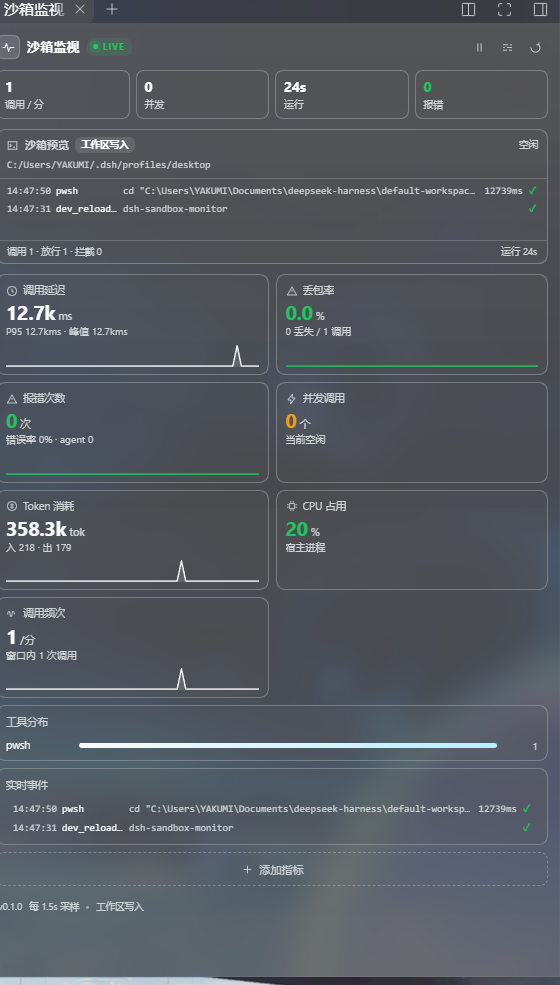
A live dashboard plus a terminal-style sandbox preview, so you can see what the sandbox is doing right now instead of guessing from the chat transcript.
Why
DSH runs tools inside a sandbox (PowerShell, file reads/writes, MCP calls, …). When something feels slow or fails silently, the chat only shows the final result. This plugin samples the tool pipeline and answers:
- How long do sandbox calls actually take? (avg / P95 / peak, 60 s sparkline)
- Are calls being blocked, cancelled or timing out? (loss rate)
- What is failing, and with which error code?
- How much are we spending? (tokens, bytes, CPU, memory)
- Which tools dominate the workload?
- What is running right now?
Features
- Sandbox preview — a live console of the most recent calls: time, tool, command/path summary, duration, status. Plus the active sandbox mode, root directory, uptime and in-flight count.
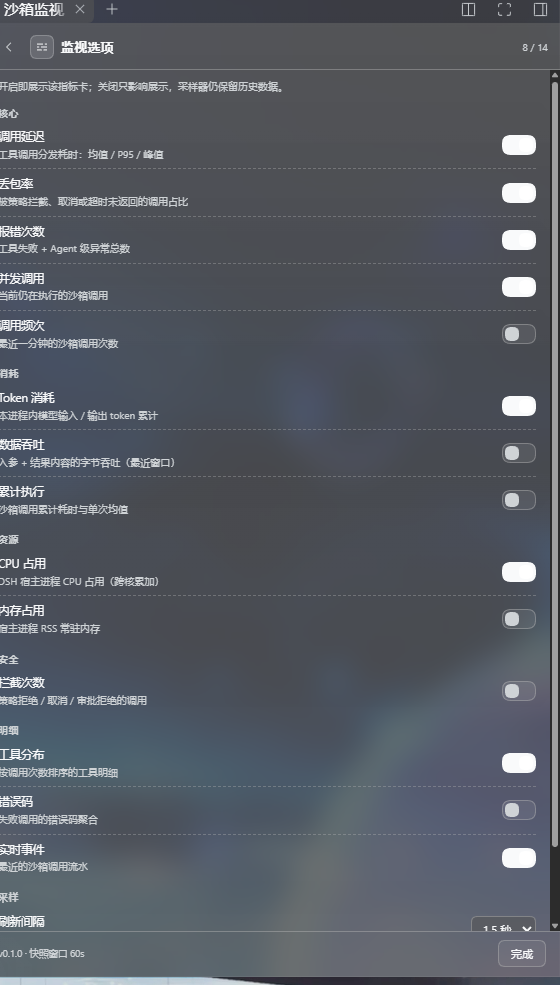
- 14 selectable metrics — add/remove cards at any time; the selection is persisted server-side.
- Live event stream — every call, with human-readable arguments (command, path, pattern), not just
ok. - Tool distribution and error-code aggregation.
- Theme-native — uses DSH design tokens, so light/dark and glass skins work out of the box.
- Zero schema cost — no LLM tool is registered, nothing is added to the system prompt. Sampling is passive.
- Local only — counters live in the host process; config lives in
~/.dsh/sandbox-monitor/config.json. No network calls, no telemetry.
Install
Requires a DSH build with the native right sidebar (@deepseek-ai/dsh-client-ui-sidebar-right), tested on 0.2.0-rc.2.
# recommended
dsh plugin --profile web add github:wuming295/dsh-sandbox-monitor

# or a release tarball
dsh plugin --profile web add https://github.com/wuming295/dsh-sandbox-monitor/releases/download/v0.1.0/dsh-sandbox-monitor-0.1.0.tgz
Replace web with your profile name (e.g. desktop), then refresh the browser.
An npm release is planned; until then install from GitHub or the release tarball above.
From source / without the plugin manager
git clone https://github.com/wuming295/dsh-sandbox-monitor.git
cd dsh-sandbox-monitor
Point your local DSH loader at the folder (the super-injector path), or add it to a profile's node_modules and enable the bundle. There is no build step — lib/ is the shipped JavaScript.
Where to find it
- First install opens itself once, automatically.
- Afterwards: click the pulse icon at the bottom-left of the sidebar, or
- Right sidebar →
+→ 沙箱监视 (Sandbox Monitor).
The panel is session-independent: it shows the whole host, not just the current conversation.
Metrics
| Metric | What it measures |
|---|---|
| Latency | Tool dispatch duration: avg / P50 / P95 / peak, plus a 60 s sparkline |
| Loss rate | Calls denied by policy, cancelled, or aborted/timeout |
| Errors | Failed tool calls + agent-level errors, with error-rate and error codes |
| In-flight | Sandbox calls executing right now |
| Call rate | Calls per minute over the sampling window |
| Tokens | Input/output tokens folded from assistant/message usage |
| Throughput | Argument + result bytes per second |
| Exec time | Cumulative dispatch time and average per call |
| CPU | Host process CPU (sum across cores) |
| Memory | Host process RSS / heap |
| Blocked | Policy denials, cancellations and approval rejections |
| Tool distribution | Calls, errors and average duration per tool |
| Error codes | Aggregated failure codes |
| Events | The live call stream |
Options
Open the sliders button in the panel header:
- enable/disable any metric (8 of 14 on by default),
- set the polling interval (1 s / 1.5 s / 3 s / 5 s),
- reset the current counters.
How it works
The host half is a passive sampler. It hooks:
tools/pre-execute— policy decisions (deny/cancel)tools/execute— dispatch timing and in-flight trackingtools/result— errors, result size, final statusagent/error— agent-level failuressession/event— token usage from assistant messagesprocess.cpuUsage()/process.memoryUsage()— host resources
Waterfall hooks always call next() and return the original decision/result unchanged.
The client half registers a tab type with sidebarRightTabs, mounts the panel on sidebar.right.pane.tab, and adds a footer button on sidebar.footer.action. It polls the host through a small JSON endpoint.
HTTP API
GET  /sandbox-monitor/api/snapshot
GET  /sandbox-monitor/api/health
POST /sandbox-monitor/api/config   { "enabled"?: string[], "refreshMs"?: number, "windowSec"?: number }
POST /sandbox-monitor/api/reset
Configuration
~/.dsh/sandbox-monitor/config.json:
{
  "enabled": ["latency", "loss", "errors", "inflight", "tokens", "cpu", "tools", "events"],
  "windowSec": 60,
  "refreshMs": 1500,
  "maxEvents": 40
}
Compatibility
- DSH Web with the native right sidebar (
ui-sidebar-right). - Tested on DSH
0.2.0-rc.2(Windows desktop build). - Node.js ≥ 20.
- No bundler required; the client bundle is a plain
__ModuleLoader__module.
Development
git clone https://github.com/wuming295/dsh-sandbox-monitor.git
cd dsh-sandbox-monitor
npm run check      # syntax-check both halves
npm pack --dry-run # inspect the package contents
lib/index.js— host: sampling, aggregation, HTTP routes, config persistence.lib/client.js— client: right-sidebar tab, cards, options page.docs/— screenshots.
PRs are welcome. Please keep both halves dependency-free and theme-token based.
License
BSD-3-Clause © 2026 YAKUMI
No comments yet. Be the first to write one.