dsh-agent-graph
Graph orchestration for DeepSeek Harness: scoped agent nodes, structured handoffs, bounded rework, and a layered global ledger.


English · 简体中文
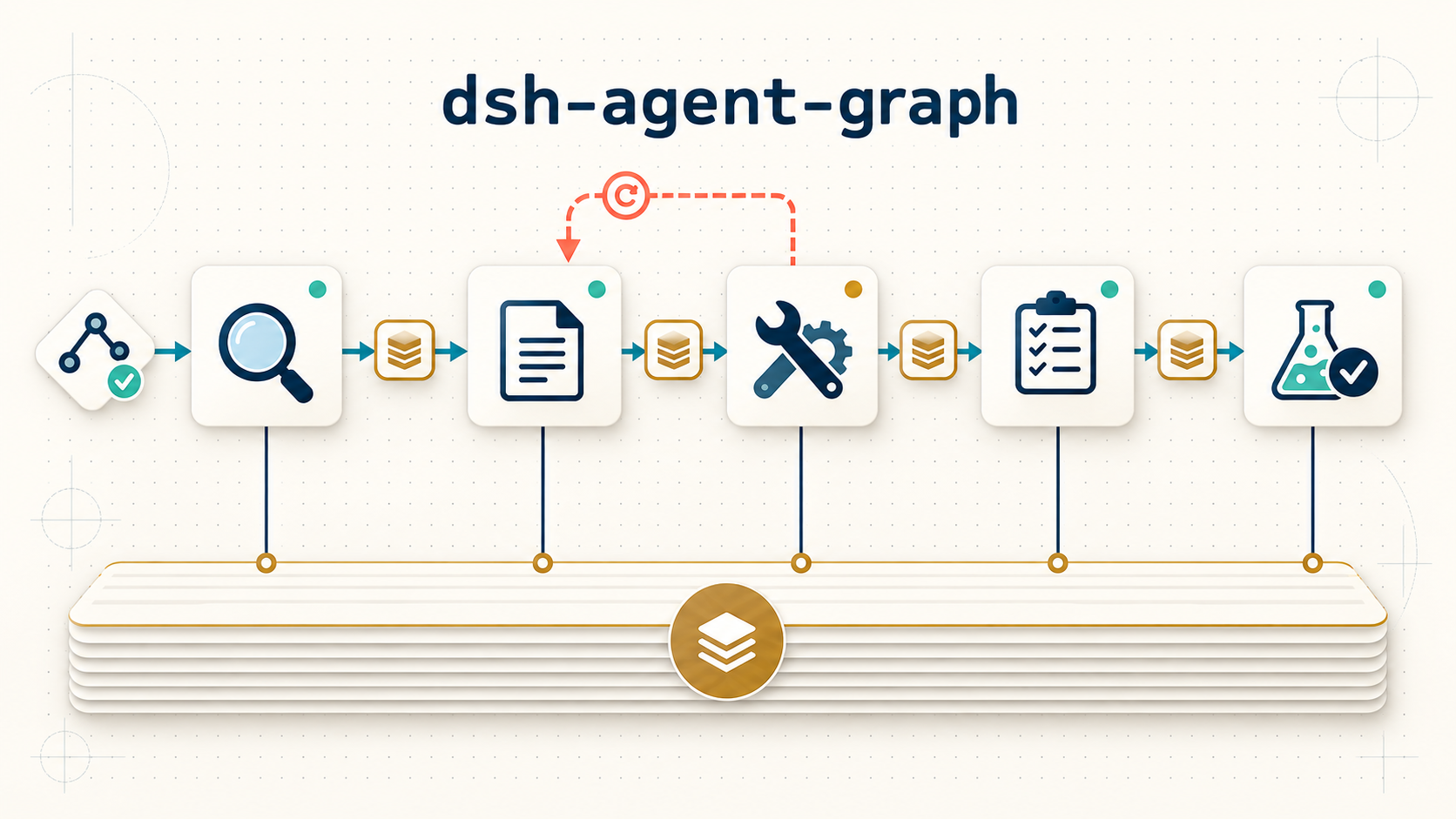
A task such as “deliver this feature” can be split into nodes that each own one scope: research, spec, implementation, test plan, tests. dsh-agent-graph runs that graph. Every node is a fresh DSH subagent; an upstream node hands its delivery downstream as a structured contract; a node that finds an upstream delivery insufficient returns the problem to its direct upstream; and every node records progress, todos, key decisions and pitfalls into one layered ledger that any human or agent can read.
dsh plugin --profile web add dsh-agent-graph
Table of contents
- What it is
- Why it exists
- How it compares
- Example workflow
- Visual DAG editor (V2)
- Install
- The graph document
- Commands
- How a run works
- Rework protocol
- The ledger
- Node output contract
- CLI
- Data handling and limits
- Troubleshooting
- Development
- Contributing
- License
What it is
| Concern | How dsh-agent-graph handles it |
|---|---|
| Task decomposition | A YAML graph of nodes with needs edges; the engine validates it (cycles, unknown references, duplicate ids) before a run starts |
| Node execution | One-shot ctx.subagents.start('spawn', …) per activation, with a scope prompt, upstream handoffs, ledger pointers, and a structured output schema |
| Attention focus | Nodes share no conversation. An activation sees its own prompt, its upstream deliveries, and the ledger; nothing else |
| Visual authoring | In DSH Web, the 编排 conversation tab provides a drag-and-drop DAG canvas, node inspector, dependency editor and graph validation |
| Delivery between nodes | A structured handoff version (summary / artifacts / openIssues) is injected into every direct downstream activation |
| Insufficient upstream work | A bounded rework request returns to a direct upstream with evidence and an acceptance criterion; the request can be provided, declined, or forwarded one hop at a time |
| Shared memory | A per-run ledger (README → index → node sections → details) that nodes read and write and the engine regenerates deterministically |
| Failure behavior | Fail-fast: the first node failure stops the run; /graph resume retries failed and interrupted nodes |
| Observability | /graph status plus the ledger; every activation, handoff, rework trail and index is on disk |
The graph executes inside a DSH session as a human command (/graph), not as a model-facing tool. Nodes, however, are ordinary subagents and can use the tools their host grants them.
Why it exists
DSH already delegates work well one call at a time. Long multi-step tasks then run into three recurring problems:
- Context bleed. A single conversation accumulates every concern; a node asked to write tests starts reasoning about architecture. Scope boundaries decay as history grows.
- Silent compensation. When an upstream result is not good enough, downstream agents tend to guess, work around it, or quietly expand their own scope instead of returning a precise request.
- Disappearing reasoning. When a node is re-created (retry, resume, follow-up), its conversation is gone. Decisions and pitfalls vanish with it.
dsh-agent-graph addresses each with a mechanism rather than a prompt: a declared graph for boundaries, a rework protocol with evidence and limits for escalation, and a durable ledger for memory. Agents stay disposable; the graph and the ledger persist.
How it compares
These features solve adjacent, rather than identical, problems, and they compose. Pick the surface that fits the task.
| Need | dsh-agent-graph |
Built-in subagent |
Built-in workflow |
Built-in ralph |
|---|---|---|---|---|
| Unit of work | A declared node in a dependency graph | One delegated call | A model-written JS orchestration script | One immutable goal, iterated |
| Dependencies | Explicit needs edges, topologically scheduled |
Caller decides order in chat | Written imperatively in the script | Not applicable |
| Data between agents | Structured handoff contract + artifacts | Final answer text | Script variables | Bounded structured report |
| When an upstream result is insufficient | Bounded rework request to the direct upstream, with evidence and an acceptance criterion | Caller retries or prompts again | Script decides (no protocol) | Workspace + next round |
| What survives a restart | Graph, handoff versions, ledger, run state (/graph resume) |
Nothing | Run snapshot / effect cache (plugin-dependent) | Workspace |
| Human review surface | /graph status + layered ledger |
Chat | Run UI | Chat |
Use dsh-agent-graph when a task has real dependency structure, more than two or three participants, and a long enough horizon that “who decided what” must survive re-creation. For one or two delegations, the built-in subagent tool is the shorter path.
Example workflow
The repository ships a five-node example (examples/feature-delivery.yaml) and a scripted dry run (examples/fake-script.json) that needs no model:
npm install
npm run demo
A real run starts the same graph with live subagents:
/graph run examples/feature-delivery.yaml
Started run feature-delivery-20260918-024342 (graph "feature-delivery", 5 nodes, concurrency 2).
Ledger: /path/to/workspace/.agent-graph/runs/feature-delivery-20260918-024342
Track with /graph status; nodes are DSH subagents, so this may take a while.
Tracking and inspection stay in the session:
/graph status

Run feature-delivery-20260918-024342 — feature-delivery · status completed
activations 7/24 · started 2026-09-17T18:43:42.782Z · finished 2026-09-17T18:43:42.807Z

node               state            try  handoff
implement          ok               2    nodes/implement/handoff/v1.md
research           ok               1    nodes/research/handoff/v1.md
spec               ok               1    nodes/spec/handoff/v2.md
test-plan          self_handled     2    nodes/test-plan/handoff/v1.md
tests              ok               1    nodes/tests/handoff/v1.md

/graph show test-plan     # prints that node's ledger section
The dry run demonstrates both rework outcomes: implement returns a missing detail to spec, which provides an addendum (provided); test-plan requests interface boundaries from implement, which declines because that is not its scope — test-plan then resolves the gap itself (declined → self_handled). Both exchanges are recorded under requests/.
Visual DAG editor (V2)
When installed in DSH's Web profile, a new 编排 tab appears in the conversation header alongside the built-in views. It is a visual authoring surface for the same graph document: drag node cards to arrange the canvas, edit a node's id, scope, prompt and outputs in the inspector, and tick direct upstreams to draw dependency edges. The draft and its layout are kept per browser session, while a saved graph is written as canonical YAML under .agent-graph/graphs/<name>.yaml — resolved against the DSH host process's working directory (the directory dsh web was started from), which the plugin config's workspace option can override. Both the graphs and the run ledger therefore live in that one workspace, not in each session's cwd.
The activation boundary is intentional and strict:
- Edit or save graph — validates and writes YAML only. It does not call
ctx.subagents.start(), so it creates no agent session. - Save and run — saves the same YAML, then starts a graph run.
- Scheduler activates a ready node — only root nodes start immediately; each downstream node waits until every direct upstream has settled. At that point the scheduler calls DSH's
ctx.subagents.start()for that one activation. - DSH shows the child — those activations are normal DSH subagent sessions (labelled
agent-graph:<graph>:<node>), so they appear in the sidebar under their parent session. Nodes that are pending or blocked never have a child session to show.
This gives the canvas an inexpensive planning mode: build, move and validate a complex DAG before any model work begins, then inspect the real child sessions and durable ledger once execution starts.
Install
In DSH
From npm — recommended:
dsh plugin --profile web add dsh-agent-graph
From GitHub (pin a commit with #<sha> for reproducible installs):
dsh plugin --profile web add github:wrc093/dsh-agent-graph
From a local checkout (development):
cd /path/to/dsh-agent-graph
npm install && npm run build
dsh plugin --profile web add "$(pwd)"
Restart dsh web after installing or changing the plugin. Verify the plugin row is present:
dsh --profile web --dump-config | grep -i agent-graph
Requirements: Node.js >=22, a DSH profile with the commands and subagents services, and a subagent provider that supports structured output (spawn does; acp, claude-code and codex do not).
Update or remove
dsh plugin --profile web add dsh-agent-graph                       # update from npm
dsh plugin --profile web add github:wrc093/dsh-agent-graph#<sha>  # or pin a commit
dsh plugin --profile web remove dsh-agent-graph                    # remove
The graph document
name: feature-delivery
description: research → spec → implement → test plan → tests
concurrency: 2
budget:
  maxNodeRuns: 24     # total activations, including rework retries
  reworkPerEdge: 2    # rework requests allowed per dependency edge
nodes:
  - id: research
    scope: Investigate facts, constraints and risks; no solution design, no code
    prompt: |
      Investigate this requirement: relevant modules, constraints, risks …
    outputs: [facts, constraints, risks]
  - id: spec
    needs: [research]        # direct upstreams; also the only rework targets
    scope: Turn the research into an executable spec; no code
    prompt: |
      Produce the spec from the upstream handoff …
| Field | Meaning |
|---|---|
name, description |
Identity of the graph, recorded in the ledger |
concurrency |
Maximum simultaneous activations; default 2 |
budget.maxNodeRuns |
Hard cap on activations for the whole run; default 40 |
budget.reworkPerEdge |
Hard cap on rework requests per dependency edge; default 2 |
nodes[].id |
^[a-z][a-z0-9_-]*$, unique within the graph |
nodes[].scope |
The ownership boundary. It is the criterion a node — and its peers — use to decide whether a rework request is legitimate |
nodes[].prompt |
Task description injected on every activation of this node |
nodes[].needs |
Direct upstream node ids. Upstreams drive scheduling and are the only nodes a rework request may target |
nodes[].outputs |
Optional, documentation only (shown in the node ledger section) |
The compiler rejects cycles, unknown or duplicate references, self-loops, non-positive budgets and malformed ids. The topological order is computed with an id-sorted frontier, so the same document always yields the same order.
Commands
| Command | Behavior |
|---|---|
/graph run <file.yaml> |
Validates the graph, creates the run ledger, starts the run in the background and returns immediately |
/graph status [runId] |
Shows a run: state table, open rework requests, failures, recent activity (latest run by default) |
/graph resume [runId] |
Rebuilds the engine from run.json and continues; failed and interrupted nodes are retried |
/graph show [runId] <node> |
Prints one node's ledger section (nodes/<id>/index.md) |
/graph runs |
Lists runs in the workspace, newest first |
/graph editor save <base64url> |
Internal bridge used by 编排 to validate and save canonical YAML; it never starts a run or a subagent |
Runs execute in the background because nodes are full subagents. The ledger is the authoritative progress surface; /graph status reads the in-memory engine when the run is active and run.json otherwise.
How a run works
- Validate and compile. Parse the YAML, check the graph, compute upstream/downstream maps and a canonical topological order.
- Schedule. Nodes whose
needshave all settled (okorself_handled) become runnable, up toconcurrency. Holder activations for open rework requests are scheduled through the same limit. - Activate. The node starts as a one-shot subagent. Its prompt is assembled deterministically from:
scope+prompt, the latest upstream handoffs, ledger paths (runREADME, its own node section, decisions/pitfalls indexes), recording duties, and — when applicable — the rework request or the retry resolution. - Hand off. A successful activation writes
nodes/<id>/handoff/vN.md. Itssummary,artifactsandopenIssuesare injected into every direct downstream activation on read. - Record. Each activation is written to
nodes/<id>/attempts/NNN.md; the ledger's README, indexes, progress timeline and node sections are regenerated deterministically after every state change. - Settle or fail. When all nodes are
ok/self_handledthe run completes. The first node failure stops the run (in-flight activations are aborted);resumeputs failed and interrupted nodes back topending.
Every durable write is serialized through a single persist chain, so concurrent node completions cannot race on the same files.
Rework protocol
A node that cannot fulfil its scope returns status: "needs_rework" with:
| Field | Meaning |
|---|---|
target |
A direct upstream node id (anything else degrades to self-handling) |
problem |
What is missing or wrong |
evidence |
Ledger/handoff references, e.g. nodes/spec/handoff/v1.md#interface |
acceptance |
What the upstream must deliver for the node to proceed |
The target is re-activated as a holder and must answer with exactly one outcome:
| Outcome | Effect |
|---|---|
provided |
The addendum is written as a new handoff version of the holder and handed back to the origin node, which is re-activated with the new material and the provenance (providedBy) |
declined |
The origin node is re-activated and told to complete the missing part itself; its final state becomes self_handled |
| forward | The holder returns needs_rework with its own direct upstream as the target; the request travels one hop and keeps its trail |
Bounds keep the loop finite:
- A request may be forwarded once per node; an invalid or missing forward target degrades to
declined. - The same problem (
problemnormalized and hashed per origin) may be requested only once. A repeat gives the origin one self-handle retry; a second repeat fails the node loudly (unbounded rework). budget.reworkPerEdgecaps requests per edge; the next request on that edge degrades to self-handling.- A holder activation that fails fails the run like any other node.
Every request is written to requests/R-XXXX.md with its full trail, so the escalation path is reviewable after the fact.
The ledger
.agent-graph/runs/<runId>/
├── README.md              # run overview, node table, recent activity
├── index.md               # section index
├── progress.md            # full activity timeline
├── run.json               # durable machine-readable run state
├── nodes/<id>/
│   ├── index.md           # scope, state, upstreams, handoffs, attempts
│   ├── handoff/vN.md      # delivery versions (and rework addenda)
│   └── attempts/NNN.md    # per-activation record written by the engine
├── decisions/index.md     # aggregated `D-*.md` written by nodes
├── pitfalls/index.md      # aggregated `P-*.md` written by nodes
└── requests/R-XXXX.md     # rework requests with their full trail
Node agents are instructed to persist their working record with their normal file tools (attempts/, decisions/D-<HHMMSS>-<slug>.md, pitfalls/P-<HHMMSS>-<slug>.md, todo.md). The engine owns the layout and regenerates every index; nodes never edit shared files. Reading is layered: README → index → node section → drill-down.
.agent-graph/ is ignored by this repository's .gitignore; decide per workspace whether a ledger should be committed or exported as a deliverable.
Node output contract
Every activation must end with structured output, enforced through the DSH outputSchema (the child calls the structured-output tool):
{
  "status": "ok | needs_rework | failed",
  "summary": "the handoff message downstream nodes will read",
  "artifacts": ["path/to/deliverable"],
  "openIssues": ["what downstream must know"],
  "rework": {
    "target": "direct-upstream-id",
    "problem": "what is missing",
    "evidence": ["nodes/spec/handoff/v1.md#section"],
    "acceptance": "what must be delivered"
  },
  "reworkOutcome": "provided | declined",
  "addendum": "material handed back to the origin node",
  "declineReason": "why the request was declined"
}
rework is required when status is needs_rework. reworkOutcome + addendum/declineReason are required when a node answers as a rework holder. Results that violate the contract fail the node with an explicit reason; the engine validates every result, real or scripted.
CLI
The CLI covers validation, dry runs and inspection. Real execution happens inside DSH, because nodes are host subagents.
dsh-agent-graph validate <file.yaml>                        # parse + validate, print the topological order
dsh-agent-graph run <file.yaml> --fake <script.json>        # dry run against scripted responses (no model, no network)
dsh-agent-graph status [--run <runId>] [--workspace <dir>]  # inspect a run (state table, requests, failures)
dsh-agent-graph resume [--run <runId>] --fake <script.json> # continue a stopped/failed run
--fake uses the format { "nodes": { "<nodeId>": [ {result}, … ] } }; see examples/fake-script.json. Exit codes: 0 success, 1 usage/validation error, 2 run ended failed.
Data handling and limits
- The ledger is local plain text under
<workspace>/.agent-graph/. It contains node summaries, artifacts paths, decisions and pitfalls — not model credentials, prompts from other sessions, or tool arguments. Review a ledger before sharing it, since node-authored summaries can quote project content. - Nodes run as DSH subagents with the permissions their host grants them. This plugin does not widen sandbox or approval settings.
- Every activation is a real subagent run and costs tokens. Budgets bound the spend:
budget.maxNodeRunscaps total activations,budget.reworkPerEdgecaps rework, andnodeTimeoutMs(plugin config, default 30 minutes) bounds one activation.
| Limit | Default | Meaning |
|---|---|---|
concurrency |
2 |
Maximum simultaneous activations |
budget.maxNodeRuns |
40 |
Total activations per run, including retries and rework |
budget.reworkPerEdge |
2 |
Rework requests per dependency edge |
nodeTimeoutMs |
1800000 |
Hard per-activation timeout; 0 disables it |
Exceeding maxNodeRuns fails the run with budget exhausted. Exceeding the timeout fails that node (fail-fast), and the message is recorded in the ledger.
Troubleshooting
| Symptom | Check |
|---|---|
/graph is ordinary chat |
Plugin installed in the active profile, commands service present, host restarted after install |
subagent provider … does not support … capability |
Use a provider that supports outputSchema (spawn/fork); acp, claude-code and codex do not |
finished without structured output |
The child did not call the structured-output tool; check the provider's structured-output support, retry the node |
Run immediately failed with budget exhausted |
Raise budget.maxNodeRuns or reduce rework; a rework loop is visible in requests/ |
unbounded rework failure |
The node re-requested a problem that was already self-handled; tighten the node prompt or the upstream delivery |
no runnable nodes: the graph is stuck |
A dependency never settled; inspect node states and open requests in /graph status |
invalid rework target in the timeline |
A node targeted a non-upstream node; it self-handled instead — fix the node prompt or the needs edges |
Status shows pending nodes after a crash |
Run /graph resume <runId>; finished nodes are not re-run |
| Graph validation error on start | Unknown/duplicate ids, a cycle, a self-loop, or a non-positive budget; the error lists every issue |
Development
npm install
npm run typecheck
npm test
npm run demo        # end-to-end dry run of the shipped example (no model required)
npm run build       # dist/ (plugin entry + CLI)
| File | Responsibility |
|---|---|
src/core/graph.ts |
YAML parsing, validation, canonical topological compilation |
src/core/engine.ts |
Scheduling, handoffs, the rework state machine, persistence |
src/core/store.ts |
Ledger layout and deterministic index/progress regeneration |
src/core/runner.ts |
Node result contract, JSON schema, and the scripted test double |
src/core/prompt.ts |
Deterministic activation prompt assembly (scope, handoffs, ledger, rules) |
src/core/types.ts |
Shared vocabulary (graph, run state, requests, results) |
src/dsh/contracts.ts |
Structural contracts for ctx.commands and ctx.subagents |
src/dsh/subagent-runner.ts |
One-shot spawn runner with structured output |
src/plugin.ts, src/cli.ts |
Slash command surface and CLI |
test/, examples/ |
Unit/integration tests and the shipped example |
Tests are deterministic: the scripted runner replaces subagents, so scheduling, rework and ledger semantics are covered without a model or network. The plugin command surface is verified against a fake host. See mydocs/specs/ for the V1 design record.
For local DSH development, build the checkout, install its path into a development profile, and restart DSH after changes. Keep .agent-graph/ and credentials out of source control.
Contributing
Open an issue with a minimal graph, a scripted trace (or ledger excerpt), and the expected scheduling or rework behavior. Add a focused regression test under test/ for semantic changes, and run the checks above. Documentation distinguishes what the protocol guarantees from what depends on node prompts and model behavior.
License
This project is licensed under the MIT License.
No comments yet. Be the first to write one.