DeepSeek Web Chat Import (DeepSeek Harness plugin)
English | 中文
Import your chat.deepseek.com conversation history as real DeepSeek Harness (DSH) sessions: each import appears in the sidebar workspace list, opens with its full history, and can be continued with any model.
This is an installable DSH plugin bundle (
dsh.bundlemanifest: a host half plus a web client half), installed withdsh plugin add. See Install below.
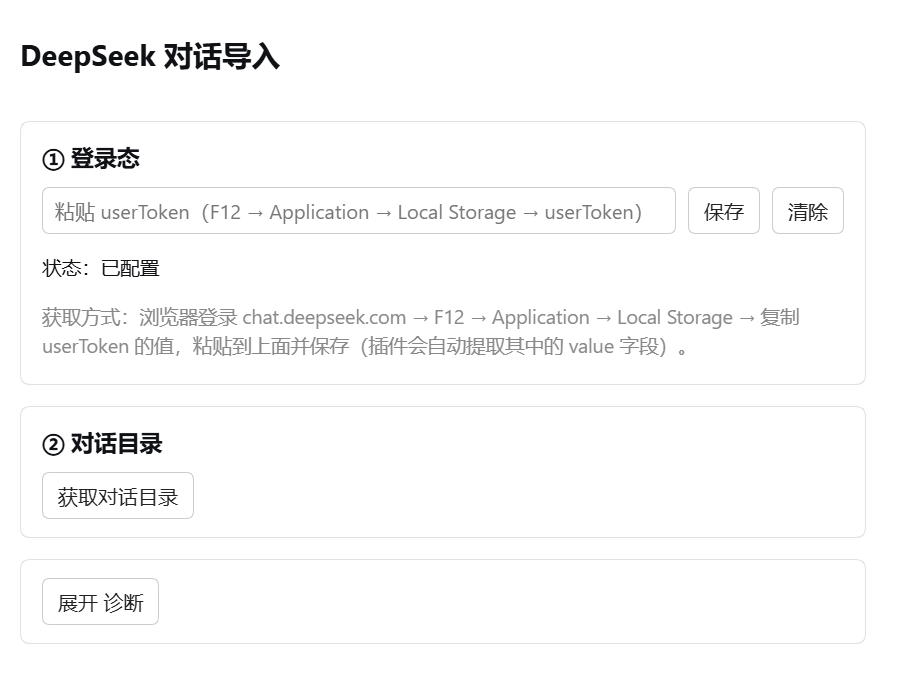
Screenshots
✨ Features
- A "DeepSeek Chat Import" page inside the settings panel
- Paste a
userTokenand fetch the conversation directory in one click (titles + dates only; transcripts are fetched on import) - Pick a target workspace per conversation and import it as a DSH session in one click
- Imported sessions:
- keep the original DeepSeek title
- can be continued with a model of your choice (they take DSH's normal resume path, so they never hit
cannot prepare session while it is live) - are persisted under
~/.dsh/sessions/<workspace>/and survive a DSH restart
- Extracts the
valuefield from auserTokenautomatically (accepts the{"value":"...","__version":"0"}form) - A built-in Diagnostics section for requesting raw responses when the upstream API changes
- Localized UI (English/Chinese) that follows the DSH/browser language and falls back to English
⚠️ Important
Refresh the page (F5) after importing a conversation so the sidebar shows the new session immediately.
Without a refresh the new session may only appear after the next session-list refresh or reconnect.
Install
Prerequisite: a node executable on PATH (Node.js). The plugin performs its request in a node child process (DSH's web.fetch cannot carry custom headers); without Node.js the page says it cannot start Node.js, and why, instead of failing to load the directory for no visible reason.
The plugin declares dsh.bundle (see package.json), so it installs with dsh plugin add:
dsh plugin add deepseek-web-import        # published on npm
# or straight from this repository:
dsh plugin add wpc0323/deepseek-web-import
After installing, restart DSH; Settings → DeepSeek Chat Import then appears. In this repository
lib/index.jsis the host half (same-origin JSON routes) andlib/client.jsis the web client half (the settings-page UI); they talk over thewebServerroutes andfetch.
Usage
- Open Settings → DeepSeek Chat Import.
- ① Sign-in: paste the
userToken→ Save.- How to get it: sign in to chat.deepseek.com in your browser →
F12→Application→Local Storage→ copy theuserTokenvalue. - The plugin extracts the
valuefield itself, so pasting the whole entry is fine.
- How to get it: sign in to chat.deepseek.com in your browser →
- ② Conversation directory: click "Load conversations" → the most recent 100 conversations appear (title + date).
- For each conversation: pick a workspace, then click "Import as session".
- Refresh the page after importing, then open the new session from the sidebar → choose a model → keep chatting.
Example
1. Open Settings → DeepSeek Chat Import
2. Paste the userToken → Save (the status turns "configured")
3. Click "Load conversations" → your DeepSeek conversations appear (title + date)
4. On the "sharp load failure fix" row, pick the workspace dsh-work → click "Import as session"
5. Refresh the page → "sharp load failure fix" appears in the sidebar → open it and continue the conversation
An import writes to persistence only (
sessionPersistence) and never enters the live store, which is why an imported session can be opened and continued normally (it never reportscannot prepare session while it is live).
A session will not open, or the log looks corrupt
See docs/TROUBLESHOOTING.md (Chinese). It covers two failures:
corrupt session log: seq gap …— a DSH recovery-cursor bug of its own (session/end-seedis appended separately by a live session, and the post-restart cursor misses it, so aseqgets reused); unrelated to this plugin, whose bulk write happens to avoid the trigger.format v2 surface before first step …— a session imported by plugin 0.1.0 cannot be migrated by a v3+ DSH build, because that importer wroteturn/start → user/message → step/startwhile the v2→v3 migration requires no surface event before the firststep/start. 0.2.x writes the correct order, so new imports are unaffected; an old artifact can be repaired with the bundled tool:node tools/fix-surface-before-step.mjs --root ~/.dsh/sessions # dry run: what would change node tools/fix-surface-before-step.mjs --root ~/.dsh/sessions --apply # back up, then repair in place
Compatibility (DSH Session format v0–v4)
Every DSH release writes one session format (v0…v4). The plugin adapts to the running build. Measured matrix:
| DSH version | Session format | Status |
|---|---|---|
| 0.1.0-rc.7 – 0.1.2-rc.1 | v0 | ✅ verified against the real backend |
| (unreleased) | v1 | ✅ modeled as v0 + runtime dialect evidence |
| 0.1.3-alpha.2 | v2 | ✅ verified against the real backend |
| 0.1.5-alpha.1 – 0.1.6-alpha.2 | v3 | ✅ verified against the real backend |
| 0.1.7-alpha.1+ (including desktop 0.2.0-rc.2) | v4 | ✅ verified against the real backend |
How each row was verified, and where the evidence comes from, is in docs/COMPATIBILITY.md (Chinese). npm test runs the unit tests; sh test/matrix.sh runs the full matrix.
How it works (briefly)
- Architecture:
lib/index.js(host half) registers same-origin JSON routes (/__deepseek-web-import/*) on DSH'swebServer;lib/client.js(web client half) calls them withfetchfrom the settings page. No dynamic-plugin machinery is involved, so the plugin stays installed across restarts. - Endpoints (unofficial DeepSeek web internals, confirmed by reverse-engineering their own JS bundle):
- conversation directory:
GET /api/v0/chat_session/fetch_page?count=100 - conversation history:
GET /api/v0/chat/history_messages?chat_session_id=<uuid>
- conversation directory:
- Import as session: history messages are translated into valid DSH session events (
turn/start → user/message → step/start → assistant/message → step/end → turn/end, surface events carryingsurfaceOp: "append", plussession/titleandsession/end-seed), written to persistence only (v0/v1 throughcreate(meta)+append(id, events), v2+ through the write handle returned bycreate(header)), and then attached to the chosen workspace withworkspace.attachSession— the session never enters the live store, which is what makes it openable and continuable. A history that ends with an unanswered user question keeps its unclosed turn; DSH closes it withinterruptedwhen the session is opened. - Body and reasoning: DeepSeek keeps the text in
fragments(REQUEST/RESPONSE/THINK). A user question comes fromREQUEST; an answer usesRESPONSEas the text andTHINKas areasoningblock. Event times come from the message'sinserted_at. - Network layer:
web.fetchcannot carry custom headers, so the plugin runs Node through thesubprocessservice and sends the request withAuthorization: Bearer. The request spec (including that header) travels on the child's stdin, so it never shows up inps//proc. Certificates are verified first; only a certificate-class failure (an environment whose TLS is intercepted by a proxy or antivirus) retries once without verification and reportsinsecureTls(one line in the DSH log, visible in Diagnostics) instead of degrading silently. The child bounds the streamed response by characters (~2M) and by bytes (6MB) and reportstoo_largeinstead of buffering a huge response into memory. - Interface language: settings-page copy is registered into the host locale namespace (
ctx.locale), so it follows the DSH/browser language and falls back to English for unregistered languages (German, say). Without a locale service the module resolves the browser language itself. - Token storage: through DSH's
credentialsservice ($DSH_HOME/.credentials.yaml); it is never written into a session or the settings document.
Known limitations
- It depends on DeepSeek's unofficial internal API, which can break when the web app is redesigned (use Diagnostics to see the raw response when it does).
- Password sign-in is blocked by DeepSeek's bot protection (AWS WAF), so the
userTokenroute is the only one. - The directory fetches at most 100 conversations: the measured
fetch_pageresponse carries onlychat_sessions+has_more, with no usable cursor field (cursor/lte_cursorhave no effect), so beyond 100 you get the latest 100. userTokenexpires after some hours to days; copy and save a fresh one when it does.- The plugin installs as a bundle through
dsh plugin addand stays installed across DSH restarts. - Web-search steps (
TOOL_SEARCH/TOOL_OPENfragments) and message status (anINCOMPLETEanswer cut off while generating) are not preserved: web search has no DSH event to map onto, so only the text and reasoning are imported; an interrupted answer keeps whatever text/reasoning it had. - Importing the same DeepSeek conversation twice creates two DSH sessions (the plugin keeps no "DeepSeek conversation id → DSH session id" mapping) and DSH's persistence offers no delete, so archive the duplicate yourself.
- The response cap for one import is about 2M characters (a conversation over it returns
too_largerather than being silently truncated). - An attachment-only message imports as one explicit note; non-conversation roles (
SYSTEM/TOOL, …) are ignored. - An import follows the single main line returned by
history_messages(it does not resolveparent_idbranches): if DeepSeek returns sibling branches for an edit/regenerate, they are imported as two consecutive turns.
Security
- Never leak your account password or
userTokenin a conversation, issue, or repository. - If you have pasted your password into a chat, change your DeepSeek password now.
No comments yet. Be the first to write one.