dsh-file-explorer
中文 | English
A file explorer for DSH Web. A floating "Files" button opens a left drawer (workspace file tree); clicking a file floats a draggable/resizable preview box on the right. Clicking a "generated files" chip or a tool-row file link opens that file in the preview box instead of the OS default app.
Screenshots
| Light | Dark |
|---|---|
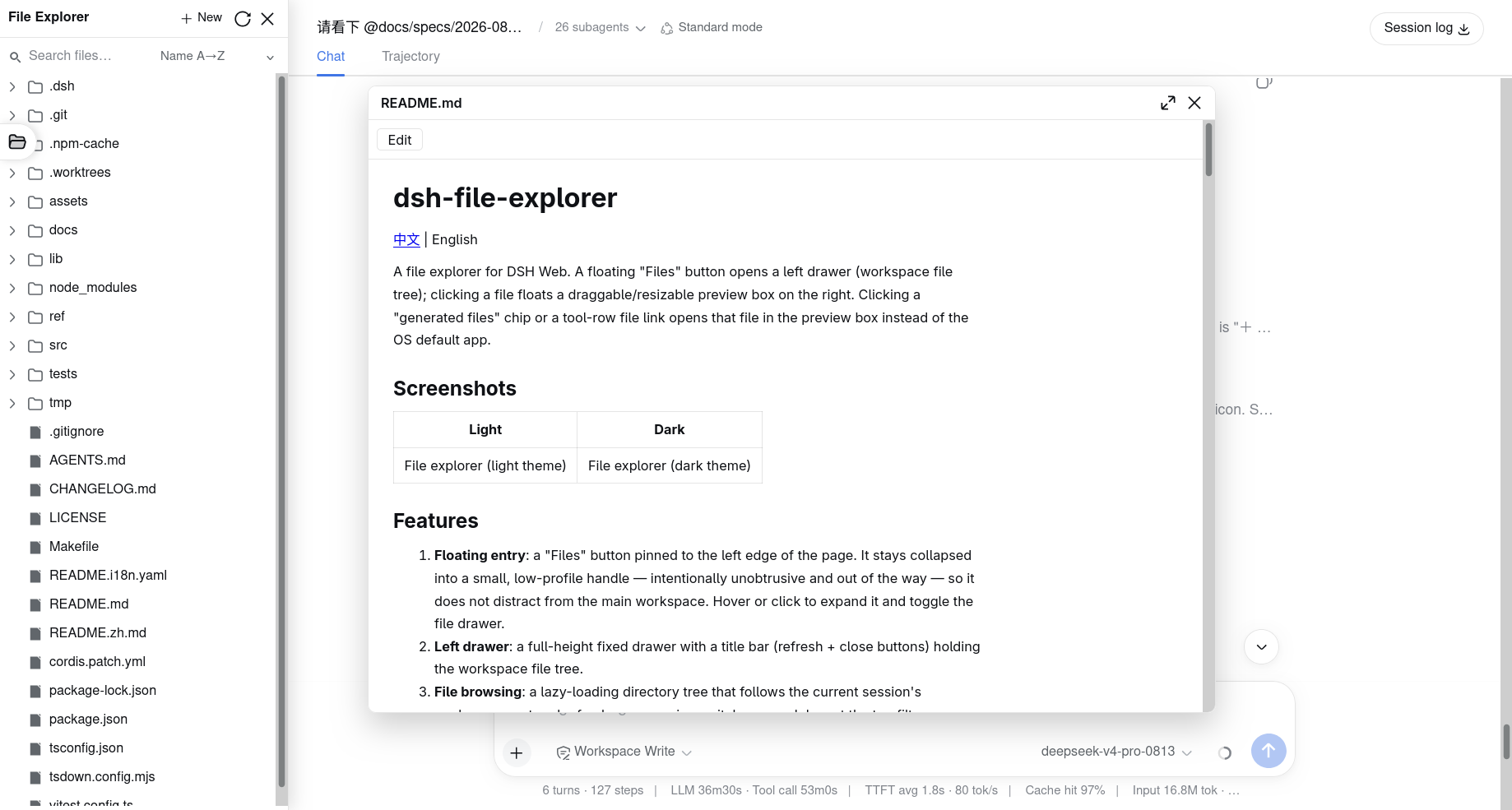 |
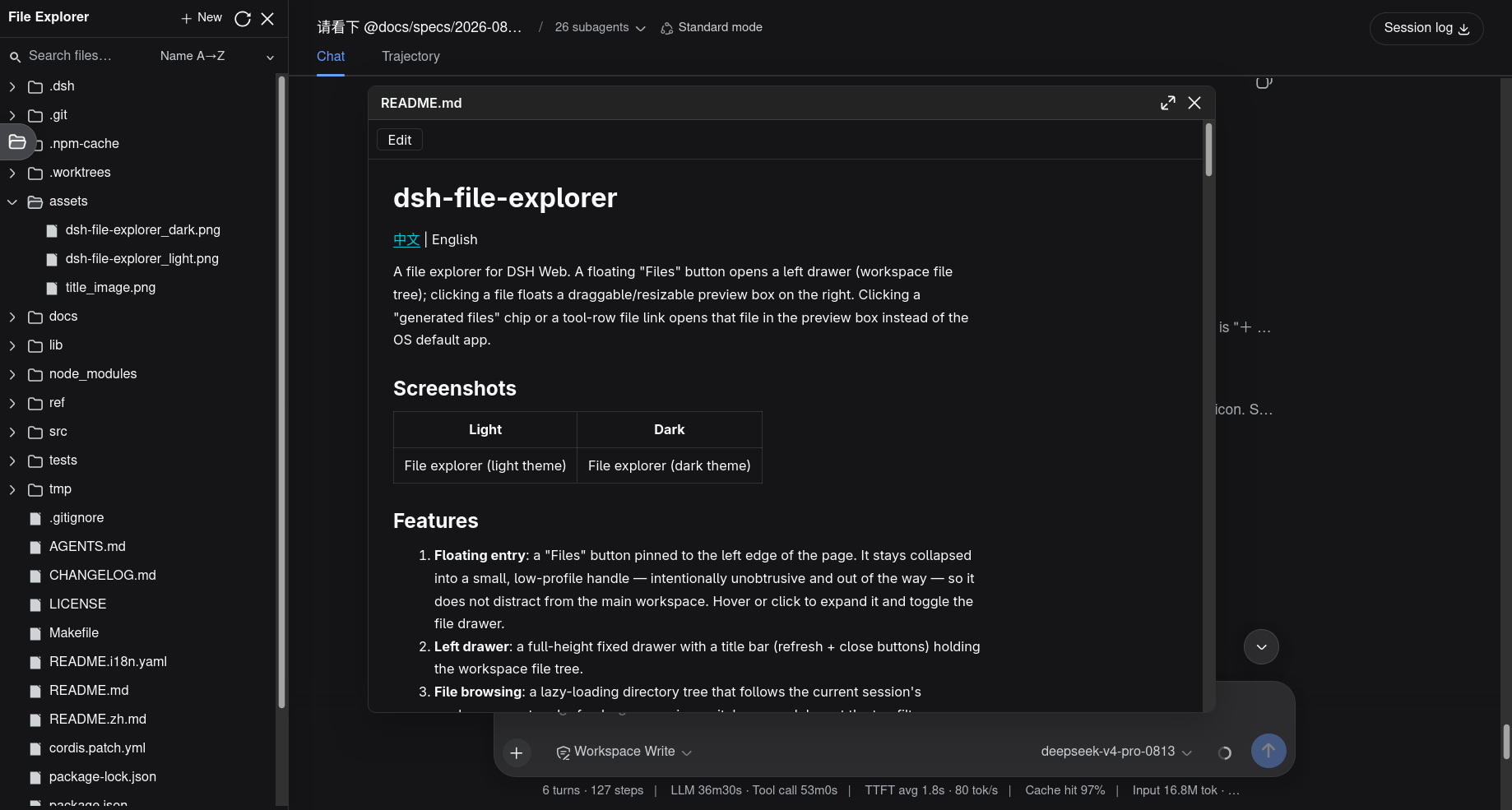 |
Features
- Floating entry: a "Files" button pinned to the left edge of the page. It stays collapsed into a small, low-profile handle — intentionally unobtrusive and out of the way — so it does not distract from the main workspace. Hover or click to expand it and toggle the file drawer.
- Left drawer: a full-height fixed drawer with a title bar (refresh + close buttons) holding the workspace file tree.
- File browsing: a lazy-loading directory tree that follows the current session's workspace root and refreshes on session switch; a search box at the top filters already-loaded entries by name or path, and a sort selector reorders them by name / size / modified time (ascending or descending).
- Floating preview: clicking a file floats a draggable/resizable/minimizable/closable preview box on the right.
- Previewers: built-in text (source), Markdown (rendered + source toggle + inline edit), image (data URL, including SVG), CSV (read-only table), and binary (hexdump) previews.
- Extensible previews: register previewers by extension through the
fileExplorerservice; unregistered extensions fall back to the built-in preview for their detected kind (plain source for text, image for images, hexdump for binary), and a higher-priority registration overrides the built-in preview for that extension. Add protein-structure (.cif/.pdb→ Mol*), sequence, etc. previewers without touching the core. - Open in the browser: clicking a
.pdf/.html/.htm/.xhtml/.jsonfile opens it in a new browser tab with the browser's native renderer; HTML pages load their same-directory assets (CSS/JS/images/fonts). - Row actions menu: hover a row to reveal a "···" menu. File rows offer Open (or Open as text / Open as binary) and Copy absolute / relative path; both file and directory rows offer Rename, Move, Copy, and Delete, while directory rows add New file / New folder. A "+ New" button in the drawer title bar creates a file or folder at the workspace root.
- Shortcut:
Ctrl/Cmd+Shift+Etoggles the file drawer.
Preview behavior by file type
How a file opens depends on its extension and on how its bytes are detected (text vs binary):
| Type | Extension(s) | Default behavior |
|---|---|---|
| Source text | .ts .tsx .js .jsx .css .py .yaml .yml .sh .go .rs .xml .sql .txt … |
Plain source preview; large files stream page by page |
| Markdown | .md .mdx |
Rendered HTML, with a source toggle and inline edit |
| Image | .png .jpg .jpeg .gif .webp .svg |
Image preview (data URL) |
| CSV | .csv |
Read-only table (first row is the header) |
.pdf |
Browser's native viewer, new tab | |
| HTML | .html .htm .xhtml |
Browser's native renderer, new tab |
| JSON | .json |
Browser's native viewer, new tab |
| Binary / unregistered | — | Hexdump (hexdump -C style, first maxBinaryBytes) |
Text versus binary is decided by a NUL-byte scan; images are recognized by extension. A zero-byte file is treated as empty text (editable) unless its extension is an image, which shows a status note; files past their size cap show "File too large" (text pages instead of failing). Any file can also be force-opened as text or as binary from its "···" row menu, bypassing the default above.
Overriding built-in previewers
Built-in previewers register at priority 0. Because registerPreview(ext, component, priority) resolves the highest priority first, an extension can
replace any built-in preview for a specific extension — for example a richer
Markdown or CSV renderer — without touching the core.
Install
From the git repository (recommended):
dsh plugin --profile web add github:wolfsonliu/dsh-file-explorer
dsh web
Or from a local checkout:
git clone https://github.com/wolfsonliu/dsh-file-explorer
cd dsh-file-explorer
npm install
npm run build
dsh plugin --profile web add .
dsh web
Optional preview plugins
Install additional previewers for richer file previews:
# CodeMirror 6 code preview with syntax highlighting and editing
dsh plugin --profile web add github:wolfsonliu/dsh-file-explorer-preview-code

# Mol* molecular-structure preview (.cif / .pdb)
dsh plugin --profile web add github:wolfsonliu/dsh-file-explorer-preview-molstar

# SeqViz sequence viewer (FASTA / GenBank / JBEI / SnapGene / SBOL)
dsh plugin --profile web add github:wolfsonliu/dsh-file-explorer-preview-sequence
Configuration
The bundle enables the following defaults:
- insert:
    - id: file-explorer
      name: '@dsh-external/dsh-file-explorer'
      config:
        maxTextBytes: 2097152
        maxImageBytes: 10485760
        maxBinaryBytes: 65536
        maxRawBytes: 104857600
        showHidden: true
| Config | Default | Description |
|---|---|---|
maxTextBytes |
2 MiB | Max size of a single text file to preview |
maxImageBytes |
10 MiB | Max size of a single image file to preview |
maxBinaryBytes |
64 KiB | Max bytes of a binary file to read for its hexdump |
maxRawBytes |
100 MiB | Per-read cap for raw reads / readRawFile |
showHidden |
true | Whether to list dot-prefixed (hidden) files |
inlineCsp |
none | Optional Content-Security-Policy for inline html/xhtml/svg via the static route |
Data layer
The host half registers a /file-explorer/api exact route via ctx.webServer.register(). Actions (action query param):
list: lists one directory level (directories first, by name), returningBrowserEntry[].preview: reads one file, returning a discriminatedFilePreview(text/text-large/image/empty/binary/too-large).pdf: streams a.pdffile inline (Content-Type: application/pdf) so the browser's native viewer renders it in a new tab.resolve-path: resolves a workspace-relative path to an absolute path and parent path.write: writes UTF-8 text to a workspace file (POST body{ path, content }), returning the saved relative path.
All paths pass a workspace-containment check (inside(root, input), including realpath symlink resolution); out-of-workspace paths are rejected. Text/binary is detected by a NUL-byte scan; images map extensions to MIME and return a data URL. Binary previews return the first maxBinaryBytes as base64 (plus a truncated flag) for a hexdump -C-style hex dump.
The host also registers a kind: 'prefix' route at /file-explorer/files/<sessionId>/<relative path…> that streams workspace files with a browser-native content type (text/html, text/css, image/*, application/pdf, web fonts, audio/video, and application/octet-stream for unknowns). It honors Range, serves a directory's index.html, and always sets x-content-type-options: nosniff + cache-control: no-store. This is the URL .pdf/.html/.htm/.xhtml open in a new tab.
Model Experience
This plugin is a pure UI surface — it emits no session events and does not modify session logs, so it is invisible to the model. The host half only reads file content for browser preview, independent of agent tool execution.
Known Limitations and Deferred Work
- Lightweight text editing: built-in editing covers Markdown plus any text file not claimed by an extension preview (inline edit/save with autosave on file switch and panel close); rich CodeMirror editing (syntax highlighting, line numbers) across all files still requires the
preview-codeextension. - Single-file preview: no multi-tab or inline diff.
- Automatic refresh is a debounced poll: while the drawer is open and the tab is visible, the tree re-fetches its loaded directories every ~3s and on focus; there is no server-push (fs.watch) transport.
- File-link interception is best-effort: it relies on DSH's CSS class names (
_fileLink,data-produced-files-row); update the selectors if the upstream UI changes. - Large files: large text files stream in pages (past
maxTextBytesthe preview pages viareadRawFile); image reads are bounded bymaxImageBytes, and binary hexdumps read only the firstmaxBinaryBytes. - Hidden files are shown by default: dot-prefixed files/directories are listed (the bundle sets
showHidden: true); setshowHidden: falsein the bundle config to hide them. - Client-side search: the tree search box matches only already-loaded (expanded) entries — files inside collapsed directories are not found; there is no server-side recursive search.
Developing extensions
dsh-file-explorer exposes the fileExplorer cordis service: registerPreview, registerFileAction, writeFile, and readRawFile. Domain experts can ship extensions as separate plugins (named @dsh-external/dsh-file-explorer-preview-<domain>) without touching the core.
See Developing a dsh-file-explorer extension (中文) for the full guide — contracts, routing, handling large/binary files with readRawFile, editing with writeFile, bundling, i18n, and reference implementations.
Quick skeleton:
import type { PreviewProps } from '@dsh-external/dsh-file-explorer/client'

export const inject = ['fileExplorer']

export function apply(ctx: {
  fileExplorer: { registerPreview(ext: string, comp: React.ComponentType<PreviewProps>, priority?: number): () => void }
  effect(cb: () => (() => void), label?: string): void
}): void {
  ctx.effect(() => ctx.fileExplorer.registerPreview('cif', CifPreview, 10))
}
Extensions
dsh-file-explorer is designed for extension through the fileExplorer service. Known extensions:
| Extension | Description | Repository |
|---|---|---|
dsh-file-explorer-preview-code |
CodeMirror 6 code preview with editing | wolfsonliu/dsh-file-explorer-preview-code |
dsh-file-explorer-preview-molstar |
Mol* molecular-structure preview (.cif / .pdb) |
wolfsonliu/dsh-file-explorer-preview-molstar |
dsh-file-explorer-preview-sequence |
SeqViz sequence viewer preview (FASTA / GenBank / JBEI / SnapGene / SBOL) | wolfsonliu/dsh-file-explorer-preview-sequence |
More extensions are welcome — build your own by following Developing a dsh-file-explorer extension.
Development
npm install
npm run check     # tsc type check
npm test          # vitest unit tests
npm run build     # tsc + tsdown (host ESM + client CJS bundle)
References
- dsh-side-panel — a DSH Web side panel plugin; the architectural reference for this project's host route and file-link interception.
- DeepSeek Harness — the DSH framework this plugin extends.
No comments yet. Be the first to write one.