READMESource: main@0cda5668
dsh-cost-gauge
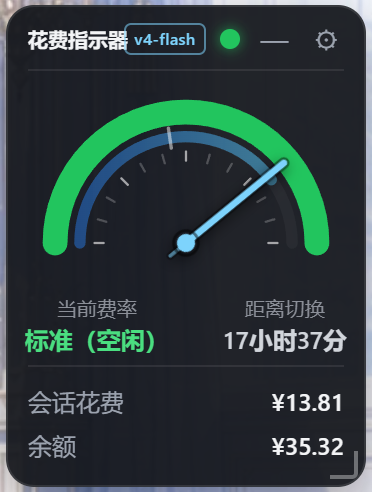
DeepSeek Harness(dsh)的花费指示器:Web 界面左侧靠上的方形浮动窗,实时显示会话花费与余额;半圆表盘指针随北京时间走动,弧色按当日费率带显示(绿=标准 / 黄=高峰,周末全天绿);余额低于阈值时顶部红灯报警;支持拖拽缩放与最小化(状态灯 + 倒计时饼图 + 模型徽标)。
🔀 相关项目:v1.4 起新增的「极简时钟 / 多皮肤」改版线已独立为 dsh-cost-gauge-plus;本仓库保持 **v1.0 经典形态(方形指针表)**继续开发,两者互不干扰。
截图
| 展开态 | 最小化态 |
|---|---|
 |
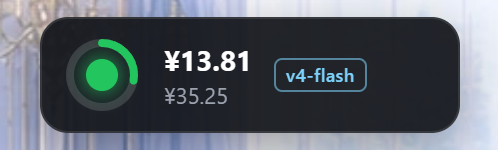 |
左:展开态(工作日高峰:表盘绿/黄双色、黄色弧段=高峰时段);右:最小化态(费率灯 + 所剩时间饼图 + 会话费/余额 + 模型缩写徽标)。
功能
- 🔲 方形浮动窗:默认停在界面左侧靠上,可按住标题栏拖动,位置自动记忆。
- 💰 会话花费:按官方峰谷价实时换算当前会话的 token 花费(缓存命中/未命中、输出分桶计价)。
- 🧭 费率指针:指针摆向「标准(空闲)」或「翻倍(高峰)」,并显示距下一次切换的倒计时。
- 高峰(翻倍):北京时间周一至周五 09:00–12:00、14:00–18:00
- 空闲(标准):其余时间(含周六、周日全天),价格为高峰的一半
- 🔴 红灯报警:余额低于阈值(默认 ¥10)时,窗口顶部小红灯闪烁报警;余额充足时绿灯。
- ⚙️ 阈值可设:点齿轮即可改报警阈值,立即生效并记住(localStorage)。
安装
一键安装(推荐,无需 git)
PowerShell 复制整行回车(自动补齐 dsh,无需本机 git):
irm https://raw.githubusercontent.com/wjingshan/dsh-cost-gauge/main/install.ps1 | iex
一键安装自动装最新稳定版(GitHub 最新 Release tag,发版后无需改脚本)。想装开发版或锁指定版本,先下载脚本再带参数运行:
irm https://raw.githubusercontent.com/wjingshan/dsh-cost-gauge/main/install.ps1 -OutFile install-dsh-cost-gauge.ps1
.\install-dsh-cost-gauge.ps1 -Ref main        # 装 main 开发版
.\install-dsh-cost-gauge.ps1 -Ref v1.0.0      # 锁指定版本
仓库尚未推送时可先用本地脚本装(-Source 指定本地目录):
powershell -ExecutionPolicy Bypass -File .\install.ps1 -Source .\dsh-cost-gauge
手动安装(默认锁稳定版 v1.0.0)
# 从 git 安装(需要本机有 git,锁稳定版 tag)
dsh plugin --profile web add github:wjingshan/dsh-cost-gauge#v1.0.0

# 无 git 时用 tarball 直链(锁稳定版)
dsh plugin --profile web add https://github.com/wjingshan/dsh-cost-gauge/archive/refs/tags/v1.0.0.tar.gz

# 想装最新开发版(main 分支)
dsh plugin --profile web add github:wjingshan/dsh-cost-gauge#main

# 从本地目录安装(链接方式,改 lib/*.js 后刷新页面即生效)
dsh plugin --profile web add link:/path/to/dsh-cost-gauge
装完重启 dsh web,刷新页面即可看到左上角浮动窗。
dsh web
配置
余额阈值既可在浮动窗里点齿轮改,也可在 profile 的 cordis.patch.yml 里覆盖:
- update:
    - id: cost-gauge
      config:
        threshold: 10          # 余额报警阈值(人民币)
        baseUrl: 'https://api.deepseek.com'
        apiKeyEnv: 'DEEPSEEK_API_KEY'
        refreshSeconds: 30     # 余额查询缓存秒数
覆盖时需完整重述该行需要的全部 config 键(patch 按行整体替换 config,不做深合并)。
发布新版本
改完代码后,用 release.ps1 一条命令完成:提交 → 升版本 → 推送 → 创建 GitHub Release。
.\release.ps1 -Message "feat: 新增 xxx"                 # 默认 patch(1.0.0 → 1.0.1)
.\release.ps1 -Type minor -Message "feat: 新增 xxx"     # minor(→ 1.1.0)
.\release.ps1 -Version 1.2.0 -Message "feat: 新增 xxx"  # 显式版本号
.\release.ps1 -Message "..." -DryRun                    # 预演(不真正执行)
- Release 说明默认从「上一个 tag 以来的提交历史」自动生成,也可
-Notes "…"自定义。 - 创建 Release 需要 PAT:设置环境变量
GH_TOKEN(fine-grained,仓库权限 Contents 读写),或运行时按提示输入。 - 发版后无需改任何脚本——
install.ps1会自动安装最新 Release tag。
数据与安全
- 余额经官方
GET /user/balance查询,API Key 只在宿主侧解析(credentials 接缝 / 环境变量),绝不下发浏览器。 - 花费由宿主读取会话的
tokenUsage投影、按官方峰谷价换算;缓存写入不单独计费(与官方口径一致)。 - 纯 ESM、零运行时依赖:宿主不 import 任何包,浏览器半身是原生 JS(无 React)。
目录结构
dsh-cost-gauge/
├── package.json          # dsh.bundle(宿主)+ dsh.client(浏览器)声明
├── cordis.patch.yml      # 插件行插入(含默认 config)
├── install.ps1           # 一键安装脚本(irm … | iex)
├── release.ps1           # 一键发布脚本(提交+升版本+推送+创建 Release)
├── docs/
│   └── alipay-qr.jpg     # 支付宝收款码(README 赞助区引用)
├── lib/
│   ├── index.js          # 宿主半身:余额查询 + 花费统计 + 峰谷判定 + /api/cost-gauge/* 路由
│   └── client.js         # 浏览器半身:方形浮动窗(指针表 + 红灯 + 拖动 + 阈值设置)
└── README.md
License
MIT
☕ 赞助
如果这个插件帮到了你,欢迎请我喝杯咖啡 ☕

感谢你的支持! 💙
No comments yet. Be the first to write one.