dsh-portable
Offline and online export/import for DeepSeek Harness: pack a whole working DSH home into one .dshpkg file and restore it on another machine — no network, no pnpm install, no manual path fixing.
中文说明 · CHANGELOG · PUBLISHING · HANDOFF
Why
Moving a DSH setup between machines is painful for three reasons:
- A working profile is not one file. It is
profiles/<name>/plus plugins with theirnode_modules, skills, hooks, task boards, storages,AGENTS.md, installed runtimes, and session logs. - Plugins are installed by pnpm from the network. An air-gapped machine, a locked-down corporate laptop, or a machine behind a dead proxy simply cannot run
dsh plugin add. - Configuration files embed absolute paths (
C:\\Users\\me\\.dsh,/home/me/.dsh) and the profile name, so copying the directory tree produces a DSH that boots with broken plugin paths.
dsh-portable solves all three: it packages a whitelist of roots into a single self-describing archive, refuses to walk outside that whitelist, and on import rewrites the six configuration files that actually contain machine-local paths.
What goes into a package
| Root | Path | Default |
|---|---|---|
| profile | profiles/<name> (config and plugin node_modules) |
always |
| skills | skills |
always |
| skills-disabled | skills-disabled |
always |
| hooks | hooks |
always |
| storages | storages |
always |
| task boards | task-board / todo-board storage | always |
| browser host | dsh-builtin-browser-host | always |
| agent instructions | AGENTS.md |
always |
| sessions | session logs | opt-in (includeSessions) |
| runtimes | downloaded runtimes | opt-in (includeRuntimes) |
| credentials | .credentials.yaml |
opt-in, off by default |
| source maps | *.map inside the package |
on (includeSourceMaps) |
| backups | *.bak-* next to config files |
off (includeBackups) |
Anything not listed is never collected — there is no recursive "copy the whole home directory" step anywhere in the code.
Install
dsh plugin --profile desktop add dsh-portable
The plugin has to be registered in the profile's own package.json — under dependencies and dsh.profile.bundles. Copying the package directory into profiles/<profile>/node_modules by hand looks like it works, until that profile runs npm install again: npm treats an undeclared package as extraneous and deletes it, and from then on the panel still renders its cards while every request answers 404. dsh plugin add (or npm install dsh-portable inside the profile) writes both halves.
Then open DSH settings → Portable Migration (便携迁移). The panel is registered at settings.section with order 70, and is bilingual (zh/en) automatically.
Nothing is written to the DSH home until you press a button.
Using the panel
Six cards:
- Export — pick which optional roots to include, name the file, press Export. Packing runs in a worker thread; the progress bar streams entry counts, and a 20 MB package over ~14 000 entries takes about 3 seconds.
- Packages — every
.dshpkgunder<DSH_HOME>/dsh-portable/exports, with size, modification time and buttons: Select / Download / Share / Delete (delete asks for confirmation). Select marks a package for the Import card below; Download streams it to the browser so it can be saved to disk and carried to another machine on a USB stick — the LAN share is only reachable while both machines are on the same network. - Upload — drag or pick a
.dshpkgand it is streamed to disk (.partthen rename) with a live percentage, so a 2 GB package never sits in memory. - Import — pick merge or replace (the active choice is highlighted), press Preview first (zero writes), then Run import — which opens an inline confirmation before anything is written. The result is a small key/value summary: applied items, rewritten paths, backup folder and warnings, plus the plugin-list merge (bundles kept from this machine, bundles the package needs but this machine lacks). Restart DSH after the import for the written configuration to take effect.
- LAN share — publish a package as a one-shot download link (
http://<lan-ip>:<port>/d/<token>). Defaults: 1 download, 60 minutes, Range/HEAD supported, 410 on expiry or exhaustion. Copy puts the link on the clipboard and only reports success when the clipboard really accepted it (a textarea fallback covers plain-HTTP origins). No relay, no cloud, no account. - Backups — the automatic pre-install backups (
<DSH_HOME>/portable-backups/<stamp>), newest 5 kept. Each one has Restore, which copies its files back over the live tree after first saving the current versions under<stamp>-pre-restore. Restart DSH afterwards for the restored files to take effect.
Screenshots
Taken from the DSH settings panel. The DSH home path and the LAN share link in these images are placeholders.
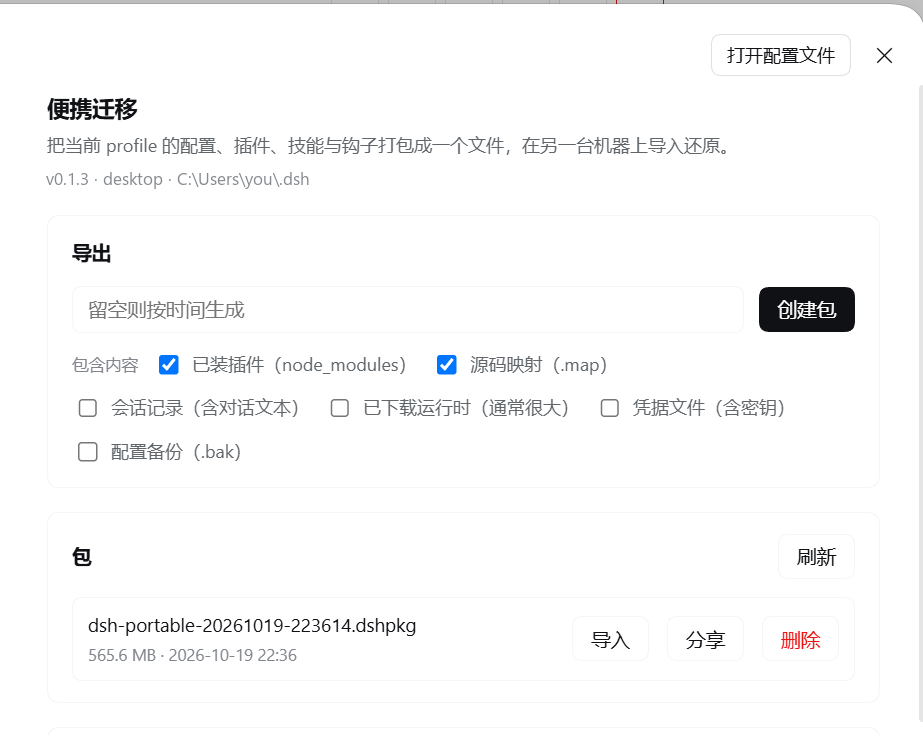
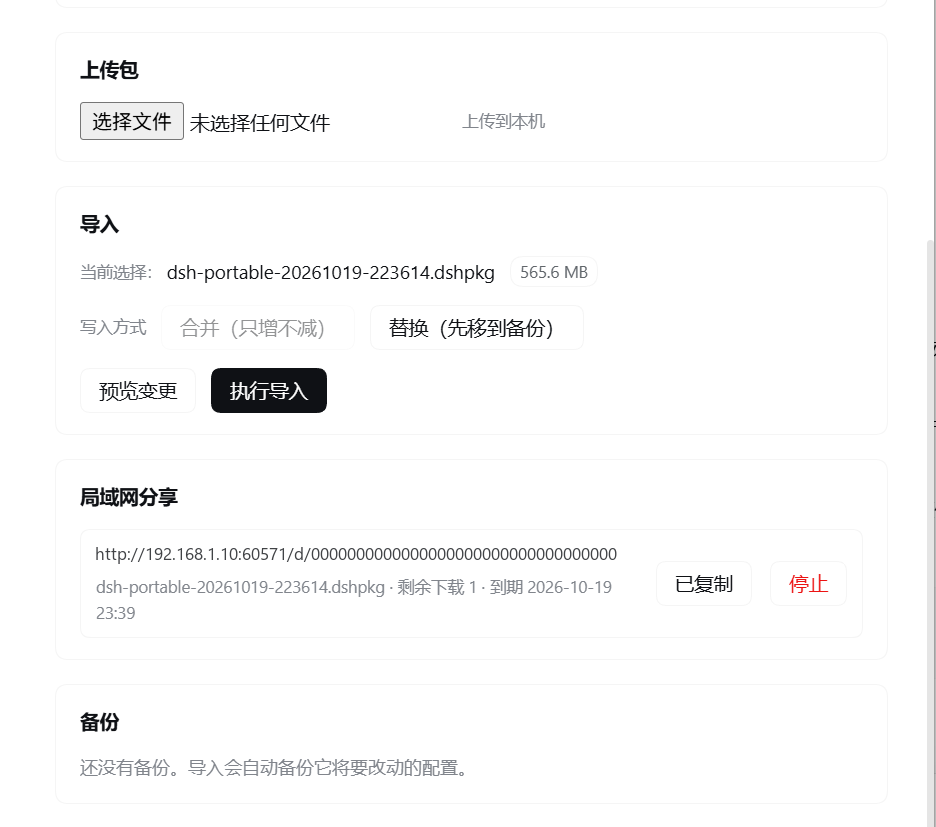
HTTP API
Base: /dsh-portable/api. All responses are JSON except the download route and the uploaded-file streaming route. Authentication reuses the host's connection.requestRejection fence (cookie + trusted origin), and falls back to a loopback-only check when that service is absent.
| Method | Path | Purpose |
|---|---|---|
| GET | /status |
host info, package counts, active job, share server state |
| GET | /profiles |
profiles present in this DSH home |
| GET | /jobs |
recent jobs (export / preview / import) |
| GET | /jobs/detail?id= |
one job with live progress |
| POST | /jobs/cancel |
cancel a running job |
| POST | /export |
start an export |
| GET | /artifacts |
packages available for import |
| GET | /artifacts/meta?id= |
manifest of one package |
| GET | /artifacts/download?id= |
stream a package to the browser as an attachment (save it to disk; HEAD returns the headers only) |
| POST | /artifacts/delete |
delete a package (confirmed in the UI) |
| PUT | /upload/<name> |
stream an uploaded package to disk |
| POST | /import/preview |
two-phase install, phase 1 (zero writes) |
| POST | /import |
two-phase install, phase 2 (confirm:true required) |
| GET | /backups |
automatic pre-install backups |
| POST | /backups/restore |
copy one backup back over the live tree (current files saved first) |
| POST | /share |
mint a one-shot LAN download link |
| GET | /share |
list live links |
| POST | /share/remove |
revoke a link |
Everywhere a package is named, the API takes an artifactId such as exports:machine-20261018.dshpkg, never a filesystem path. /, \\, .. and control characters are rejected, so neither the model nor a web page can use this plugin to read or write an arbitrary file.
Model tools
Registered on the host tools service (silently skipped if the service is absent):
| Tool | Behaviour |
|---|---|
portable_export |
package the current profile; returns id, size, entry count, per-root breakdown |
portable_inspect |
read a package manifest without importing |
portable_import |
without confirm:true it is a dry run; with it, performs the two-phase install |
portable_share |
mint a one-shot LAN link (1 download, 60 min) |
CLI bootstrap (target machine without DSH)
# Windows
powershell -ExecutionPolicy Bypass -File bootstrap\install.ps1 preview .\machine.dshpkg
powershell -ExecutionPolicy Bypass -File bootstrap\install.ps1 install .\machine.dshpkg --yes

# macOS / Linux
sh bootstrap/install.sh preview ./machine.dshpkg
sh bootstrap/install.sh install ./machine.dshpkg --yes
Flags: --home <dir> (default $DSH_HOME or ~/.dsh), --profile <name>, --mode merge|replace, --keep <n>, --yes. Exit codes: 0 success, 1 failure, 2 usage error. Without --yes on a non-TTY it refuses to write.
Package format
.dshpkg is a gzipped tar. The manifest is the first entry:
.dsh-portable/manifest.json
profiles/desktop/...
skills/...
hooks/hooks.json
...
{
  "format": "dsh-portable/1",
  "createdAt": "2026-10-18T02:11:03.000Z",
  "tool": { "name": "dsh-portable", "version": "0.1.0" },
  "source": {
    "hostname": "WORKSTATION",
    "platform": "win32",
    "arch": "x64",
    "node": "v22.23.2",
    "dshHome": "C:\\Users\\me\\.dsh",
    "profile": "desktop"
  },
  "options": { "includeNodeModules": true, "includeSessions": false },
  "stats": { "entries": 13774, "files": 13482, "dirs": 292, "links": 0, "bytes": 20664511 },
  "roots": [{ "id": "skillsDisabled", "logical": "skills-disabled", "files": 13193, "bytes": 44615569 }]
}
Because it is a plain tar, tar -xzf machine.dshpkg works anywhere — you can inspect a package on a machine that has never heard of DSH. Long paths use PAX extended headers; the reader understands them incrementally, including PAX bodies that straddle chunk boundaries.
A trailing .dsh-portable/checksums.json entry carries a sha256 for every payload file. Import re-computes each digest while it writes and refuses the package if any file differs, so a tampered or truncated archive cannot be silently restored. Packages without that entry (older ones, hand-built ones) still import, but the report says verified: false instead of implying the contents were checked.
Disk headroom. Import writes the package's full contents into
portable-staging/<stamp>before merging them into place, so peak disk use is roughly package size after extraction on top of what the profile already occupies. That double write is what makes a failed import recoverable — nothing in the live tree has been touched yet.
Import pipeline
preview:  read manifest ──► per-top counts + existsOnTarget ──► report (zero writes)
install:  extract to <home>/portable-staging/<stamp>  (sha256 verified while writing)
          ──► rename profile dir if the target profile name differs
          ──► rewrite local paths in the 6 config files
          ──► back up those 6 files to <home>/portable-backups/<stamp>
          ──► apply each top-level item (merge: add/overwrite; replace: move aside first)
          ──► prune old backups ──► delete staging
Cancelling an import asks the worker to abort and waits for it to unwind (up to 5s) before terminating it, so the staging directory is always removed — a cancelled 1 GB import does not leave a 1 GB copy behind.
Path rewriting is deliberately narrow: only profiles/<p>/cordis.patch.yml, cordis.yml, package.json, pnpm-workspace.yaml, hooks/hooks.json, hooks/settings.json. Plugin package contents are not rewritten, so third-party integrity checks and source maps stay intact.
Safety model
- Whitelist collection. No recursive home-directory walk exists.
- Artifact ids, never paths. See above.
- Import needs confirmation. The route returns
400 CONFIRM_REQUIREDwithoutconfirm:true; the model tool defaults to dry run. - Extraction guards. 200 000 entries, 2 GB single file, 8 GB total, compression ratio 200 (only after 64 MB of output),
wxflags (no overwrite),safeJoinagainst.., symlinks rejected when absolute or escaping. - Backups before writes. The six configuration files are copied aside before anything is applied;
replacemode moves whole directories intoportable-backups/<stamp>/replaced/rather than deleting them. - Credentials are opt-in.
.credentials.yamlis skipped unless explicitly requested, and the panel labels the risk on the checkbox. Export is a purely local operation; nothing is uploaded. - Share links are narrow. One download, 60 minutes, single file, token-gated, 410 afterwards. No directory listing, no relay.
Development
npm test          # 60 tests: tar, archive, installer, jobs, routes, share, inspect
npm run check     # syntax check + import smoke test
npm run sync      # copy this package into a profile's node_modules for live testing
npm run verify    # release gate: version consistency, files manifest, tests
The plugin has no build step: index.js (host), lib/client.js (browser bundle, plain React.createElement) and lib/*.mjs are shipped as-is. That is a deliberate constraint — a DSH plugin must load on a host whose package versions are unknown, so the client half depends on nothing but react and --dsw-alias-* CSS variables.
Compatibility
- DSH
>= 0.1.7-rc.2 - Node
^22.15.0 || >= 24.0.0 - Windows, macOS, Linux (long paths handled through the
\\?\prefix on Windows)
Limitations
- Session logs are opt-in because they contain conversation content.
- A package is a tar: it is not encrypted and not signed. Put it on encrypted media if it contains credentials.
- Import merges or replaces whole top-level roots; there is no per-file selector in v0.1.x.
- Symlinks that point outside the DSH home are packaged as links but will fail to be recreated on Windows without developer mode; that failure is a warning, not an abort.
License
MIT — see LICENSE.
No comments yet. Be the first to write one.