dsh-hide-sidebar
A mobile left sidebar for the DeepSeek Harness (dsh) Web GUI.
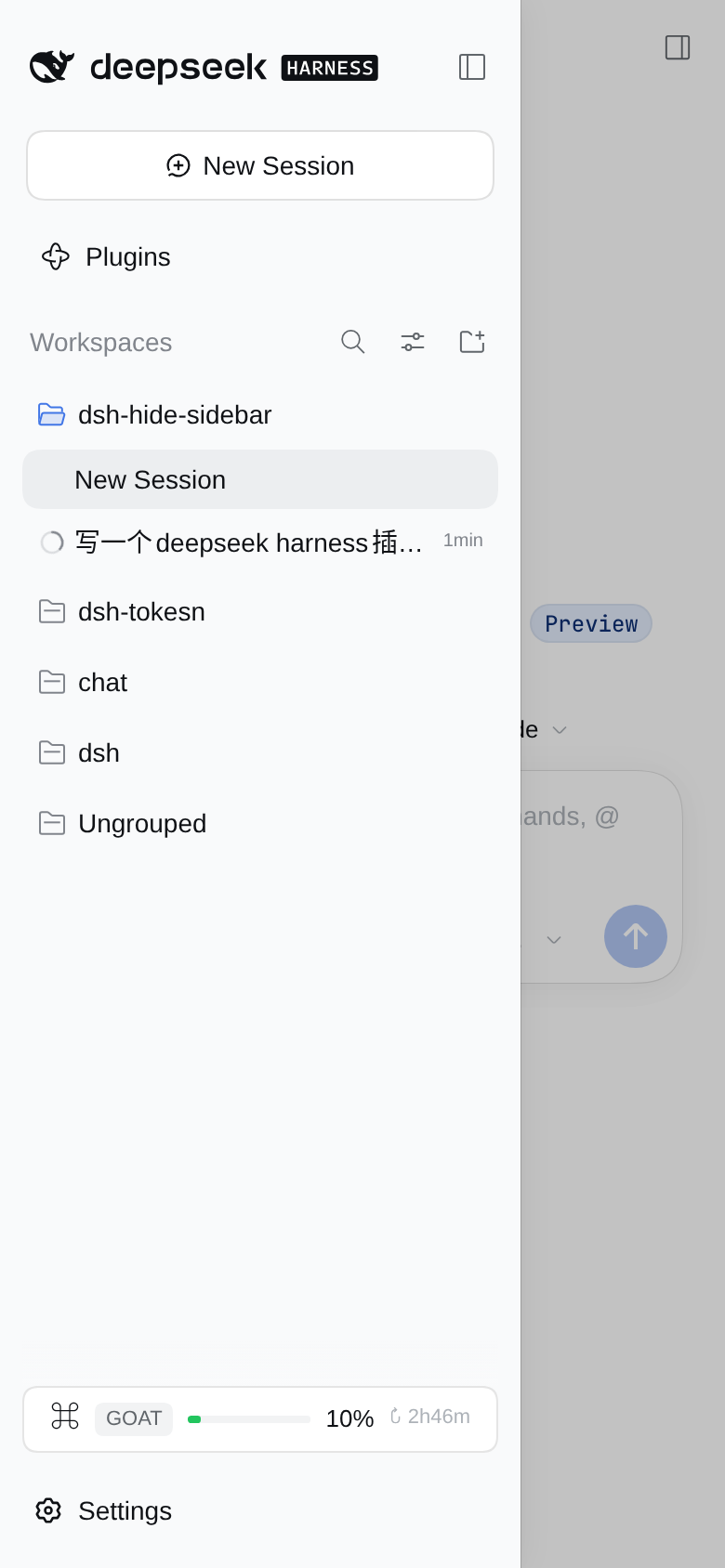
On a narrow viewport the 56px collapsed icon rail stops being a permanent fixture. Instead there is one button at the top of the frame: tap it, and the sidebar slides in over the content. Pick a session — or tap the scrim — and it slides away.
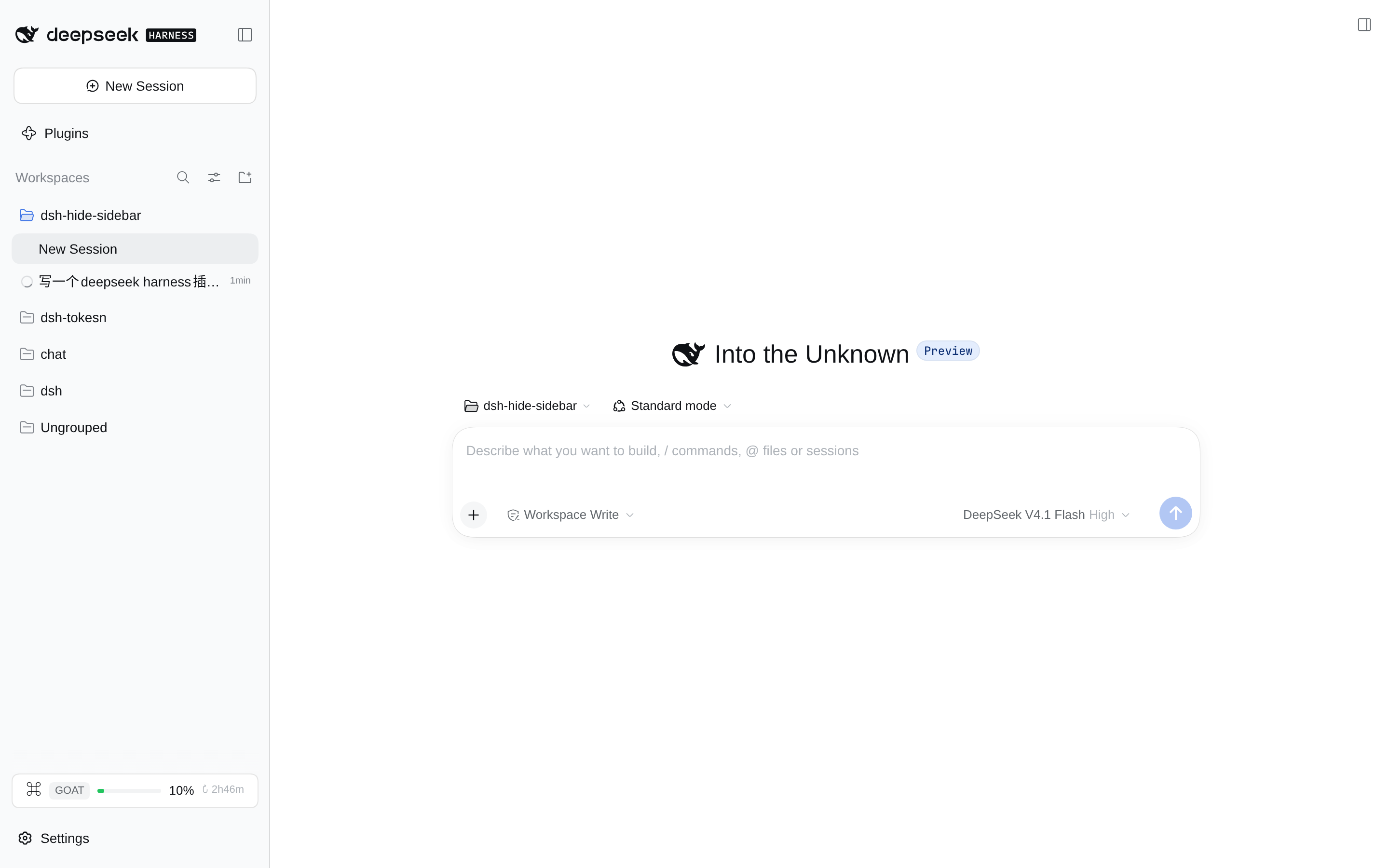
Wide viewports are untouched: the sidebar docks, resizes and collapses exactly as it shipped.
English | 中文


What it does
"Narrow" means the frame measures less than 1024px — the same breakpoint ui-layout uses for its own auto-collapse.
| Before | After | |
|---|---|---|
| Collapsed | A 56px icon rail permanently eats a seventh of the screen, on every page | The rail is gone; content gets the full width |
| Expanded | The sidebar takes a column and squeezes the content down to ~110px | The sidebar is a 280px drawer over the content; the content keeps its width |
| Opening | The little arrow on the rail | The button at the top left — inside the header on the Conversation, floating in the top-left corner on every other panel |
| Closing | The arrow again | The scrim, the sidebar's own collapse control, or just picking a session or a panel |
That last one is deliberate: a drawer that stays open hides the thing you just asked for. The decision reads stable hooks only — data-row-key, data-slot, aria-expanded, aria-haspopup, never a generated class name or a translated label — and asks one question: did that tap navigate, or did it open something?
- dismisses: picking a session, switching to a global panel (Plugins), Settings, New Session, a link;
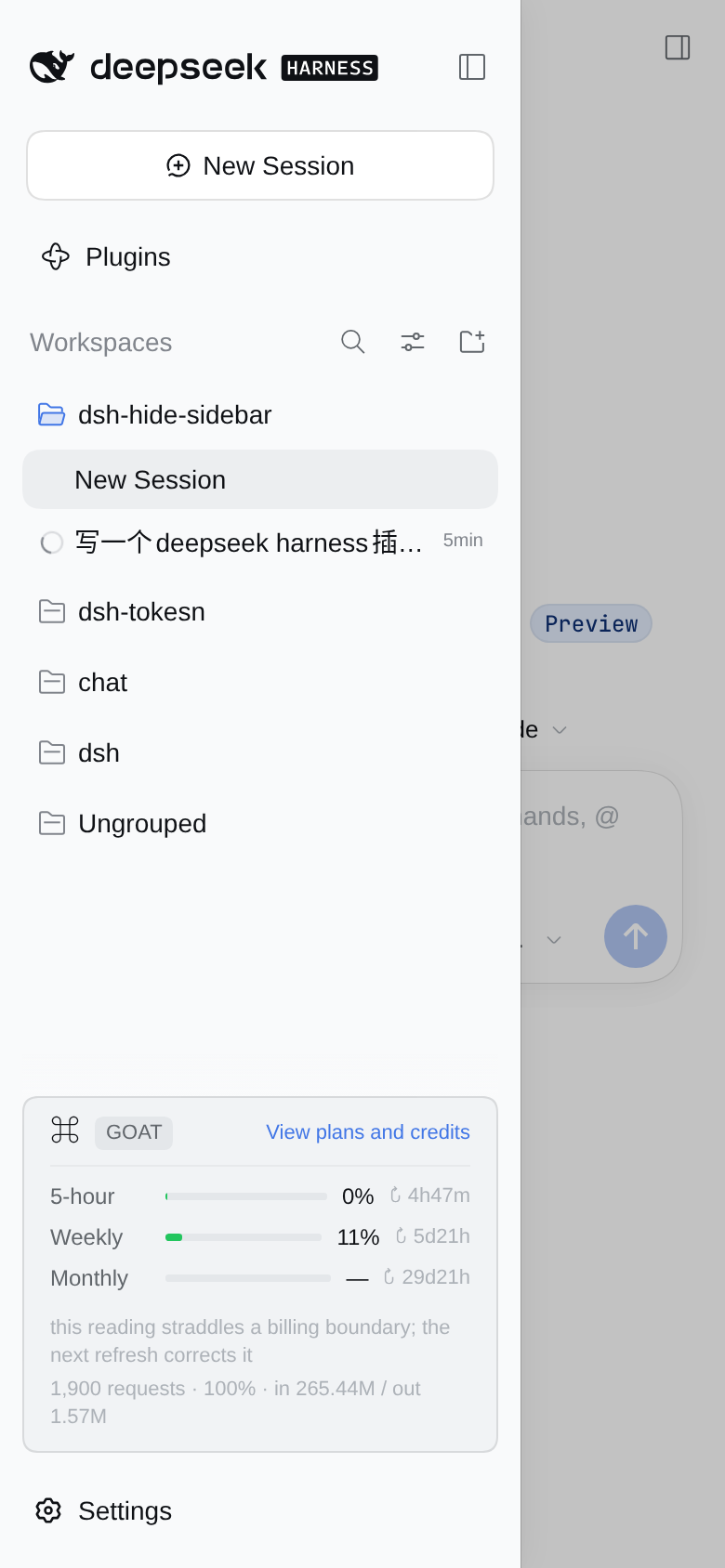
- stays open: a control that opens something (the Command Code quota card unfolding its dashboard, a session's action menu, the session search, a Workspace group row) and a control nested inside a row (archive, pin) — as does blank space.
It is about what the control does, not which slot it sits in. An earlier version dismissed by slot, and the quota card in the sidebar foot paid for it: tapping it closed the drawer instead of unfolding the dashboard.
On wide viewports the plugin is inert: no button is rendered, and every layout rule is gated on html[data-dsh-hide-sidebar] — an attribute written only while the frame's measured width is below the breakpoint.
Install
Requires dsh >= 0.2.0-rc.1 < 0.3.0-0. That range is checked at install and boot time through peerDependencies, and it has to spell out the prerelease: a ^0.2.0 range does not match 0.2.0-rc.2.
# From GitHub
dsh plugin --profile web add github:winniesi/dsh-hide-sidebar

# Or from a local checkout — pnpm creates a link, so edits only need a page reload
dsh plugin --profile web add /path/to/dsh-hide-sidebar
Then reload the browser page; no dsh restart is needed.
On the desktop app, use Settings → Plugins → Add plugin → Local directory instead and restart the app afterwards. There is no --profile desktop: that profile belongs to the Electron app.
Uninstall with dsh plugin --profile web remove dsh-hide-sidebar.
What needs what to take effect
| Changed | Needed |
|---|---|
client.js (drawer, buttons, styles, copy) |
Reload the browser page |
package.json / cordis.patch.yml |
Usually recomposes through live reload |
index.js (the host half, currently empty) |
Restart dsh |
How it works
Two halves. index.js is the host half and deliberately does nothing — this plugin touches no model, no filesystem and no transport; it exists only because a Loader row has to resolve to a plugin. Everything else lives in client.js, a hand-authored bundle: no build step, so components use React.createElement instead of JSX and the styling is one injected .dsh-hs- stylesheet.
The layout stays in charge
- Opening and closing reuses ui-layout's own narrow toggle: below 1024px,
ctx.layout.toggleSidebar()flipsnarrowExpanded. - The open/closed state is read straight from ui-layout's own
data-sidebar-collapsedattribute; nothing is stored twice. - The breakpoint is compared against the measured frame width — the same box ui-layout measures — so JS and CSS can never disagree about which mode the frame is in.
Where the rail goes
The frame receives its three tracks as an inline grid-template-columns. One !important rule turns the first track into 0px, but the sidebar column stays a grid item: taking it out of flow would shift the centre and right columns one track left (the centre would land on the 0px track). So the column stays put as a containing block and only the sidebar's own root becomes the absolutely positioned drawer:
[data-slot="root"] > div               ← the frame, a three-track grid
  ├─ div (sidebar column)  position:relative, 0 wide
  │   └─ [data-slot="sidebar"] > *     ← the drawer, absolute + translateX(-101%)
  ├─ centerCol
  └─ rightbarCol
- Closed is
translateX(-101%), clipped by the frame's ownoverflow:hidden; open istranslateX(0)on a single 0.26s easing curve. - The drawer width is not hard-coded to 280px: the bridge parses the first track out of the frame's inline style (that is the dragged width) and republishes the third track too, as CSS variables — so overriding the track list never forces the right panel over the content.
- The sidebar's component tree, scroll positions and portals are never unmounted: no second copy of the session list, no lost state.
The scrim and the two buttons
- The scrim lives in the frame's
shell.overlayslot and uses the app's own modal mask tokens (--dsw-alias-bg-mask-1plus--dsw-mask-blur), so light and dark follow along. Layering puts the drawer (z-index 30) above the overlay layer (20): the scrim dims the content, never the drawer. - There are two button seats because the top of the frame differs by page:
- the Conversation has a real header seat,
conversation.header.leading, so its button sits in the title row and costs no space; - entry panels (Plugins, Schedules) have no leading seat, so the button floats in the frame's top-left corner and the panel root reserves a 40px transparent left border for it — a transparent border adds to whatever padding the panel already declares instead of replacing it.
- the Conversation has a real header seat,
- While the right panel is open (fullscreen on a phone) the floating button hides: that panel has its own collapse control, and opening it already collapses the narrow sidebar.
- The glyph is the shipped one, not a look-alike:
IconPanelLeftOutlineRegular, copied verbatim out of@deepseek-ai/dsh-client-ui-primitives— same 16px box, 1px stroke, rounded frame and colour token. The top-right "open right sidebar" control draws that very artwork mirrored (scaleX(-1)), so taking it unmirrored here is that icon turned 180°: the two corners read as one family. It is copied instead of imported because a profile-installed plugin must not depend on dsh's own packages, and a failedrequirewould take the whole Web boot down with it. The copy is a snapshot this plugin owns: if a later dsh release redraws its icon, this one deliberately stays as it is.

Only public seams
shell.overlay, conversation.header.leading, ctx.layout.toggleSidebar(), ctx.slots, ctx.locale, plus ui-layout's own data-sidebar-collapsed attribute. No @deepseek-ai/* runtime import — a profile-installed plugin cannot resolve dsh's own node_modules — so the only dependency is React, alongside the browser's ResizeObserver, MutationObserver and :has().
Checks
npm test # = node test/smoke.mjs — offline, no browser needed
test/smoke.mjs loads client.js the way the module loader really does (through window.__ModuleLoader__.load), drives apply() with a stub context, then renders both seats with react-dom/server. It runs 55 assertions here (53 when dsh is not installed for the token comparison below), covering the registration shape (two slots, the list-slot id, locale, the injected face, exports.inject), splitTracks edge cases (nested parentheses, empty, single track), the frame-state observer (notifies only on a real change), the rendered markup (no undefined, no NaN, aria-label/aria-expanded present) and the stylesheet's discipline: every layout rule gated on the root attribute, no literal colours, and every --dsw-* token it uses verified against the token list of the theme actually installed on this machine.
That last group exists because a component that throws inside a slot silently empties the whole slot in the browser, so awkward inputs are worth rendering. That comparison reads a file dsh itself installed, and is skipped with a note when dsh is absent: the plugin has no runtime dependency on that package, so its internals being reorganised is not this plugin's failure.
There is also a live check against a running GUI:
DSH_URL="http://127.0.0.1:3080/?token=…" node test/live-browser.mjs
It opens a 390×844 phone viewport and a 1440×900 wide viewport and asserts: the rail is off canvas while the inline style still asks for 56px, exactly one toggle seat is reachable at a time, the drawer opens flush to the left edge, the sidebar's own collapse control closes it, picking a session row dismisses it, a panel page gets the floating button and its 40px gutter, the wide layout is untouched, and the console stays clean. Screenshots land in test/artifacts/.
Limits and compatibility
- Breakpoint: 1024px, matching ui-layout's
SIDEBAR_AUTO_COLLAPSE; deliberately not configurable. :has(): used to select the sidebar column and to detect the Conversation — Chrome 105+, Safari 15.4+, Firefox 121+, i.e. every current phone browser.- Right panel: on a phone it is fullscreen, so the floating button hides while it is up. On tablet widths (768–1023px) the right panel keeps a real docked track: the plugin overrides the first track only and republishes the third untouched.
- Dragging: the sidebar's resize handle is hidden in narrow mode. An 8px
touch-action:nonestrip along the drawer's edge would only swallow scroll gestures. - This plugin is written against
dsh0.2.x's public client seams, which are still moving fast. If a slot or attribute is renamed inside 0.2.x, the constants at the top ofclient.jsare the only place that has to follow.
License
MIT
No comments yet. Be the first to write one.