dsh-recent-tasks
English | 中文



A collapsible 「最近任务」/ Recent tasks block at the section level of the DeepSeek Harness sidebar. Chats that have no workspace land there instead of piling up in 未分组 — and because the block is a real workspace record rather than a look-alike drawn by a plugin, a chat started from it genuinely belongs to it.
DSH groups every chat under the workspace its session cwd resolves to. A chat started without a workspace gets no group at all, so it falls into the 未分组 bucket together with archived folders and deleted projects. This plugin registers one real workspace record for a dedicated folder: "no workspace" becomes an ordinary group with ordinary behaviour — rename, drag order, pin, archive, search — and that group is promoted into a collapsible block of its own, level with 工作区 and collapsing independently of it.
| Piece | What it is |
|---|---|
| Group | A genuine workspace record for <recentTasksDir>, registered through ctx.workspaceRegistry and created as the last group; the plugin never rewrites the durable order afterwards, so where you drag it is where it stays |
| Entry | + 最近任务对话 beside Settings at the sidebar foot, plus the Mod+Alt+N / Mod+Shift+N shortcut — both start a session in that workspace |
| Settings | The 最近任务 tab of Settings → 内置插件 — folder, group name, auto-repair — backed by this plugin's official live config |
| Host API | POST /dsh-recent-tasks/api/state and /ensure, read-only and idempotent; the only write path is the official settings form |
Screenshots
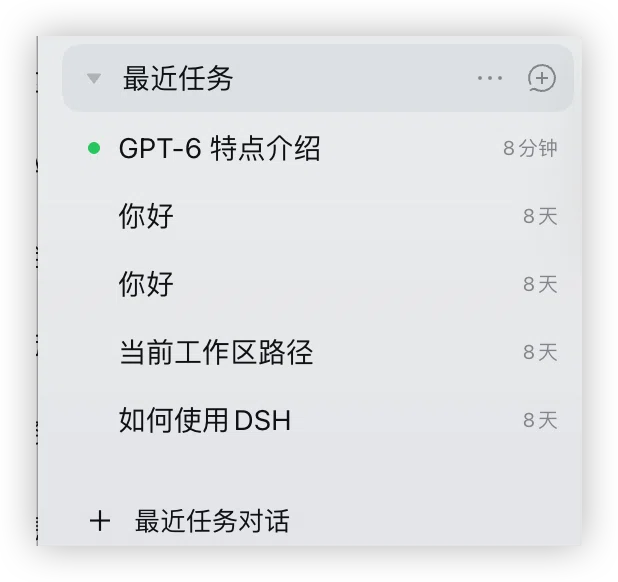
The block behaves like any other group: GPT-6 特点介绍 is the chat that is running right now, older ones show how long ago they were used, and + 最近任务对话 at the sidebar foot starts a new chat in that folder. (This capture predates the promotion to a section-level block; the section below describes how the list reads now.)
Why a real workspace record
The alternative — a plugin-drawn group — cannot work: the sidebar's groups are the workspace storage domain, and no slot lets a third-party plugin insert a parallel group. Registering a record instead of shadowing the sidebar means:
- sessions started there are normal sessions whose
cwdis the recent-tasks folder, so the group'ssessionIdsfills itself through the official path (Workspace.sessionIdsis filtered byrealpath(cwd) === path, which also makes it impossible for a chat to be dragged into another group); - the file-access boundary is unchanged: the session's sandbox root is that folder, and escalation inside the chat works exactly as in a workspace chat (design §8.7);
- nothing official is patched, no
workspacelocale string is touched, and 未分组 keeps working untouched; the plugin's own group name is kept in the active language by renaming its own record, never the built-in namespace and never another group.
Sidebar hierarchy: Recent tasks is its own block
最近任务 reads as a block-level section beside the official workspaces heading, and the two collapse independently: the arrow in front of "Workspaces" hides the other workspace groups (Recent tasks stays), while the arrow in front of "Recent tasks" collapses its own chats, which sit one indent step in from its title.
- This is presentation only: the group is still one real workspace record, and the plugin writes no workspace data — it neither reorders the list nor touches a workspace record. The one exception is the official
未分组fallback bucket, which is not a record at all (next bullet). - It absorbs the official 未分组 bucket. Delete a workspace and its chats no longer match any workspace record, so DSH files them under a pseudo group that is not a workspace record — the empty-key group
groupByWorkspaceappends, whose row reads未分组/ Ungrouped — and that group always renders last, i.e. below this block, where it reads as one more workspace. The plugin drops that row's label and hands its chats to the block: same indent right after the block's own chats, same official row behaviour (open, rename, drag, archive), no未分组name. Since DSH collapses every group until you touch it (groupExpansionstarts empty), dropping the label alone would leave those chats under a folded heading, reading like loose rows in the workspace list — so the plugin opens the block once (setGroupExpanded(<this block's id>, true), the same write its own chevron makes; once per row, so collapsing it afterwards is not undone — at most once per app start). From then on they are the block's contents: collapse the block and they fold with it, exactly as DSH treats any chat whose group is collapsed. When the bucket follows the block its own group gap goes to zero, so the seam is just the official 2px row rhythm the first absorbed row carries (4px + 2px before) and they read as a continuation. The bucket itself may also be collapsed, and a collapsed group renders no session rows at all, so the plugin expands it too throughsetGroupExpanded('', true)before absorbing; where those official writes are unavailable it leaves everything exactly as DSH renders it, because hiding chats is never the fallback. - It keys on official stable attributes (
data-row-key,role, the inline--dsh-workspace-indent) and never on official class names, which are build hashes that change between releases. If a DSH update moves those anchors the promotion disables itself: the sidebar falls back to the stock look with nothing left behind, one line in the console. - It also stands down for the flat list, while searching, in the 56px rail, and in tree mode when the folder is nested under another workspace (then it is not a peer). Switching back re-applies it immediately.
- Known trade-offs: the block scrolls with the workspace list; while "Workspaces" is collapsed the highlight of a chat inside a hidden group is not visible until you expand it again; and on the single frame in which the official UI re-renders the container (before our replay runs) a collapsed group can flash back into view.
- The collapse flag lives in your own browser storage (
dsh.recent-tasks.workspaces-collapsed.v1); it is never reported anywhere. - The absorbed bucket has no label row any more, so the empty-key group has no visible name: its chats stay clickable and focusable, and a screen reader reads them as a run of session rows.
- Absorbing the ungrouped bucket expands that official group once, and opens the promoted block once — a write into the official browser-local view state (
groupExpansionofdsh.workspace.view.v5), the same write its own chevron makes; without the expansion there are no rows to absorb. After uninstalling, the bucket simply stays expanded.
Requirements
- DSH with a
webordesktopprofile,0.2.0-rc.1or newer (developed and verified on0.2.0-rc.2, cordis~4.0.4) - Node.js
>= 22.19.0— only to build from source - pnpm is recommended when installing into a profile
- No network access, no native modules, no install scripts, no runtime dependencies
Install
The bundle entry (
id: recent-tasks) is self-declared by this package'scordis.patch.yml— no manual patch file is needed.
From npm (recommended)
dsh plugin --profile desktop add dsh-recent-tasks
Published on npm as dsh-recent-tasks. The package declares its repository, so the plugin market matches it back to this repo and can offer version and download information; installs are prebuilt and skip the build-approval step entirely. This is the path the plugin market prefers.
From GitHub
Install by repository identity to get the tip of main — useful for trying an unreleased change, and it is also how the plugin market resolves this package to winditer/dsh-recent-tasks when npm is not used:
dsh plugin --profile desktop add github:winditer/dsh-recent-tasks
For a web profile use --profile web. Restart DSH (quit fully and reopen); the 最近任务 group appears at the foot of the sidebar.
The built browser half (dist/client.js) is committed on purpose. A github: install never runs this package's build — pnpm blocks lifecycle scripts by default — so the committed bundle is what makes this install path work out of the box. Nothing is compiled on the consuming side.
From the app
Settings → Plugins → install bundle, pointing at this directory (or a file: spec). The script scripts/install-into-profile.sh is the manual equivalent: pnpm add file:<repo> plus a dsh.profile.bundles entry.
The dependencies entry is not optional — a bundle listed only in dsh.profile.bundles is erased by the desktop crash-recovery path, which re-derives the list from dependencies.
From the prebuilt tarball
Every release attaches the packed package, so the whole repository is not downloaded and nothing is compiled on the consuming side:
dsh plugin --profile desktop add https://github.com/winditer/dsh-recent-tasks/releases/download/v0.5.2/dsh-recent-tasks-0.5.2.tgz
The URL is pinned to the tag rather than written as releases/latest/download/… on purpose: latest resolves per request but the filename is literal, so a versioned asset name breaks that URL the moment the next release renames it.
From source (development)
git clone https://github.com/winditer/dsh-recent-tasks.git && cd dsh-recent-tasks
npm install
npm run build          # regenerates dist/client.js
dsh plugin --profile desktop add .
dist/client.js is regenerated by node scripts/build.mjs before every launch; if it is ever missing, the host half still loads and the app logs client bundle not found; run \pnpm run build` before launch`.
Settings
All three live rows are ordinary official settings, and they live in exactly one place: the 最近任务 tab of Settings → 内置插件, beside 插件列表 and 插件市场. The values are this plugin's own live Config; the tab writes through configForms, the same document the profile keeps.
Upgrading from 0.3.x: those settings used to sit in Settings → 通用设置. That row is gone — the keys, the defaults and the file the values live in are unchanged.
| Key | Default | Meaning |
|---|---|---|
recentTasksDir |
~/Documents/DSH 最近任务 |
Folder the group owns. Created on first use; must stay an absolute path. Changing it registers/uses the record for the new folder immediately. |
title |
最近任务 |
Group name used when a record is created. While the stored title is still one of this plugin's own default names (最近任务 / Recent tasks) it follows the UI language; any other title is yours and is never rewritten. |
autoRepair |
true |
Recreate the record if it was deleted from the sidebar. Switching it off turns deletion into a visible error instead of a silent rebuild. |
enabled |
true |
Master switch (patch only — no form). |
apiPrefix |
/dsh-recent-tasks/api |
Host API path (patch only). |
Edits are persisted by dsh-config-editor into the active profile's cordis.patch.yml (atomic write, validation, rollback) and hot-apply to the running host: the loader commits new values into the plugin's live Volatile refs and emits loader/volatile-update, which the host half uses to re-ensure immediately. This plugin never writes a config file of its own.
Precedence: the profile patch layer wins over this package's bundled defaults, so a user edit survives upgrades.
Behaviour details
- The API is small and local. Two idempotent POSTs (
state,ensure) requiringcontent-type: application/json; the JSON-only rule is also the CSRF defence, since a cross-site "simple request" cannot set that type without a preflight this route never answers. Nothing secret is exposed and the plugin never accepts a path or a command from the browser. - Failure is never silent. Every refusal is a code (
bad-config,dir-not-writable,dir-not-directory,missing-record,disabled,unavailable, …) which the client renders from this plugin's own locale namespace; the host never ships display text. - State is read-only.
statenever mkdirs, never creates, never reorders — a vanished record is reported (workspaceId: null+missing-record) and onlyensurerepairs it. - Reuse over creation. If the configured folder is already a workspace, that record is reused and its title is left alone (DSH's
createis idempotent perrealpathand ignores the title for an existing record). - Placed last, once. DSH's
createprepends a new record, so a freshly installed plugin would otherwise drop its block above every workspace you already own. The plugin therefore appends the record it creates (insertBefore(id)with no anchor) — and only the record it creates: an existing one keeps the place it has, including one you dragged it to. No other group is ever reordered. - The group name follows the UI language. The sidebar row and the workspace switcher both render the record's durable
titleverbatim — DSH localizes only its owndefault-workspacesentinel, and a plugin cannot add to the built-inworkspacelocale namespace. So while the stored title is still one of this plugin's own default names (最近任务/Recent tasks), the client half rewrites it to the active language through the officialworkspaces.rename— the same call the sidebar's own rename dialog makes — which updates both surfaces immediately and durably. Rename the group yourself in the sidebar, or configure a differenttitle, and the plugin never touches it again. The folder on disk is never renamed: the path is the session-grouping key, so moving it would strand existing chats in 未分组. - Nested folders are flagged. A recent-tasks folder inside another workspace renders as a child of it; the settings row warns instead of pretending otherwise.
- Deletion is honest. If the group is deleted while
autoRepairis off, both the entry point and the shortcut reportmissing-record— a chat is never quietly started somewhere else. - Shortcut fallback.
session.newalready ownsMod+N(desktop) andMod+Alt+N(web), andshortcuts.registerrejects an overlapping default. Desktop getsMod+Alt+N; web/macOS and web/Windows getMod+Shift+N; web/Linux stays unbound. A residual collision is caught and the sidebar entry stays the guaranteed way in.
Troubleshooting
| Symptom | Cause / fix |
|---|---|
| No 最近任务 group appears | Check Settings → 内置插件 → 最近任务 for a coded reason; missing-record + auto-repair off, or dir-not-writable. |
| The group is nested under another workspace | recentTasksDir is inside a registered workspace — pick a folder outside every workspace. |
The entry point says unavailable |
The host half is not mounted (row disabled, or the row mounted before workspaceRegistry). Reload the app once after installing. |
| Settings row shows the read-only hint | No configForms in this composition (no official settings surface); edit the recent-tasks row in the profile's cordis.patch.yml. |
| Chats still land in 未分组 | They were created without this workspace's cwd. Existing chat history is never migrated (design §6.3/N3): the group owns new chats started through the entry or the shortcut. |
| Deleting a workspace made a 未分组 row appear | That is the official fallback bucket: the deleted workspace's chats are still on disk, but their cwd matches no workspace record any more. Since 0.5.0 the plugin absorbs that bucket into the 最近任务 block (label gone, chats kept). Still seeing the label means the promotion is off — see the row above, or switch the sidebar back to the grouped view. |
| A search result is labelled 未分组 | Search results are the flat official list, and each row's meta shows the workspace it belongs to; a chat without a cwd renders as 未分组 in the official UI. That is official copy, not something the plugin rewrites — the result is still clickable. |
| The block sits above the workspaces I already had | An install that predates the placement fix (0.3.0 relied on create, which prepends). The plugin only appends a record it just created — re-appending an existing one would undo your own drag — so drag the block below them once. |
Development
node scripts/build.mjs      # build dist/client.js
node --test test/*.test.js  # 91 tests: protocol, host, client logic, sidebar section adapter, bundle contract
node scripts/build.mjs && node --test test/*.test.js   # = npm run verify
npm pack --dry-run          # inspect the published file list
node_modules/@deepseek-ai/* are symlinks into the extracted 0.2.0-rc.1 tree under .asar/, which only exists so node --test can resolve @deepseek-ai/schemastery; production resolves those specifiers through DSH's own profile interception, so the package declares them as optional peers and ships no runtime dependency.
Layout
| Path | Role |
|---|---|
src/host.js → lib/index.js |
Host half: Config, the registry service, the JSON API, the volatile-config listener |
src/client.js → dist/client.js |
Browser half: sidebar entry, settings row, refresh loop, shortcut |
src/client-core.js |
React-free logic: state machine, planCreate, snapshot store, shortcut resolution, collapse flag, promotion predicate |
src/client-adapter.js |
Sidebar section adapter: locates the official nodes at runtime, stamps data-dsh-rt-*, injects the collapse toggle, replays on re-render (presentation only, writes no data) |
src/protocol.js |
Shared vocabulary: codes, methods, path handling, response parsing |
src/locales.js |
recentTasks zh/en dictionaries (flat keys, 1:1 key sets) |
assets/ |
Screenshots used by this README (and picked up by the plugin market) |
screenshots.json |
The screenshot list the plugin market reads (its convention: declared beside package.json, paths relative to the repo) |
test/ |
protocol · host · client · adapter (hand-rolled DOM) · bundle |
docs/superpowers/ |
This repo's own specs and implementation plans (specs/, plans/) |
.agents/notes/ |
Implementation notes, including verified official facts and deviations from the draft spec |
License
MIT © 2026 dsh-recent-tasks contributors
No comments yet. Be the first to write one.