dsh-zh-hant
繁體中文 language pack for DeepSeek Harness
(DSH). It adds a third language to the web GUI — zh-Hant — next to the shipped
zh (Simplified) and en, and puts it in Settings → General → Language.
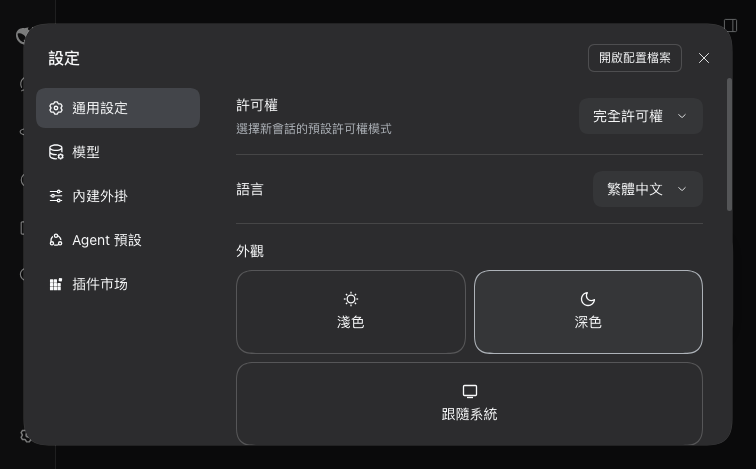
Nothing in DSH is patched, no bundle is forked, and no other plugin is modified.
The locale service in @deepseek-ai/dsh-client-locale is explicitly extensible,
so Traditional Chinese is a plugin: it registers one language definition and one
dictionary per namespace, and the running app picks both up immediately.
Install
dsh plugin add dsh-zh-hant            # from npm
dsh plugin add file:./plugins/dsh-zh-hant   # from a local checkout
Then choose 繁體中文 in Settings → General → 語言.
The dsh web host must be running with the plugin already installed. A
server started before dsh plugin add keeps serving the client module graph it
built at boot, so the language does not appear until it is restarted. If the
Plugins panel lists the plugin but the Language menu does not, that is why.
What it covers
62 namespaces, 2,699 keys, ~90 KB — every dictionary the installed web GUI
registers, including the experimental features and the third-party plugins that
opt into ctx.locale.
| Settings | 設定 · 通用設定 · 模型 · 外觀 · 字號大小 · 快捷鍵 … |
| Conversation | 發送 · 插話發送 · 排隊發送 · 停止生成 · 軌跡 · 差異 |
| Sidebar | 摺疊側邊欄 · 新建會話 · 封存 · 刪除會話 · 工作區 |
| Files / preview | 檔案預覽 · 影像預覽 · PDF 預覽 · 沒有可預覽的檔案類型 |
| Plugins, schedules, agents | 外掛 · 提醒 · 子代理 · 預設權限 · 軌跡檢視 |
What it does not cover
This is a language pack for DSH's own interface. It deliberately does not reach into anything else:
- Other plugins' hardcoded copy.
dshmarketnever callsctx.locale, so its panel title stays 「插件市场」. Editing that plugin's source is not this package's business — a plugin that wants Traditional Chinese registers its own dictionaries. - Copy captured outside the dictionary — plugin titles from package
manifests (
ctx.locale.resolveText), command descriptions read once at registration time. - Model output, file contents, and anything the user typed.
How the dictionaries are built
The web GUI has ~2,700 keys and DeepSeek ships new ones every release, so the
dictionary is generated from the zh values the installed build already
contains, never hand-maintained:
scripts/extract-locales.mjs   read every ctx.locale.register() call site out of
                              the installed client bundles (shorthand consts,
                              esbuild-renamed consts, object spread and all)
        │
        ▼
scripts/build-dictionaries.mjs  OpenCC cn → tw → twp, per value
        │
        ▼
lib/client.js                 src/client.js with the literal spliced in
Rebuild after a DSH upgrade:
npm install                      # opencc-js, build-time only
npm run build                    # → lib/client.js
npm test                         # behaviour + conversion checks
npm run build:tw and npm run build:t produce the character-only variants if
you prefer 設置/文件 to 設定/檔案.
Two details that are easy to get wrong:
- A single
cn → twppass is not a fixed point.STPhrasesrewrites 发送 to 發送 andTWPhrasesthen finds nothing Simplified left, so 待发送附件 comes out as 待發送附件 and only becomes 待傳送附件 on a second pass. Runningcn → twto completion and applying the variant pass afterwards is both more idiomatic and idempotent. fallbackiszh, noten. A key this pack does not cover falls back to Simplified rather than English, which is the right failure mode for a Traditional reader — and it means a namespace added by a future release degrades instead of breaking.
Tests
npm test checks the registration contract (one language, one dictionary per
namespace, the three-argument register form), that a zh-Hant id already owned
by another pack is a warning rather than a boot failure, that the key set matches
the installed bundles exactly, and that no Simplified-only character survives
the conversion.
License
MIT
No comments yet. Be the first to write one.