dsh-one-person-company
Run a software company alone, with a team of AI agents.
Ten role charters · a spec-as-contract workflow · a task board that refuses to lie.
The idea in one line
node tooling/src/cli.mjs pack T-0005
That command prints the prompt you give an agent: the company charter, the approved spec, the task, the role charter, the declared write scope, the definition of done, and the operating rules — about 300 lines instead of the whole repository.
Everything else here exists to make that one prompt trustworthy. The plugin ships the machine (the CLI, the playbook, the roles, the rules) plus a sidebar panel that shows the board without leaving the GUI.
Install
dsh plugin --profile web add dsh-one-person-company
Restart the host and refresh the page. Two things appear:
- A
one-person-companyskill in every workspace's catalog — ask an agent "use the one-person-company skill to start a project here". - A "Company board" panel row in the sidebar, beside Plugins and Automation tasks.
Quick start — everything in the GUI
You never open a terminal. The panel is the operator's console.
- Add a workspace in DSH as you normally would. An empty folder is fine.
- Open Company board in the sidebar, beside Plugins and Automation tasks.
- It says this workspace has no company OS yet and offers Bootstrap this workspace. Click it.
- The page now shows the next step — the stage you are at, what it means, and a button that copies the exact prompt to hand to an agent.
- Paste it into a chat with an agent. When the agent is done, press Refresh.
That is the whole interface. Every stage of the cycle is driven from this page: the prompt tells the agent what to do, Run the checks tells you whether the result is real, and the board tells you what is left.
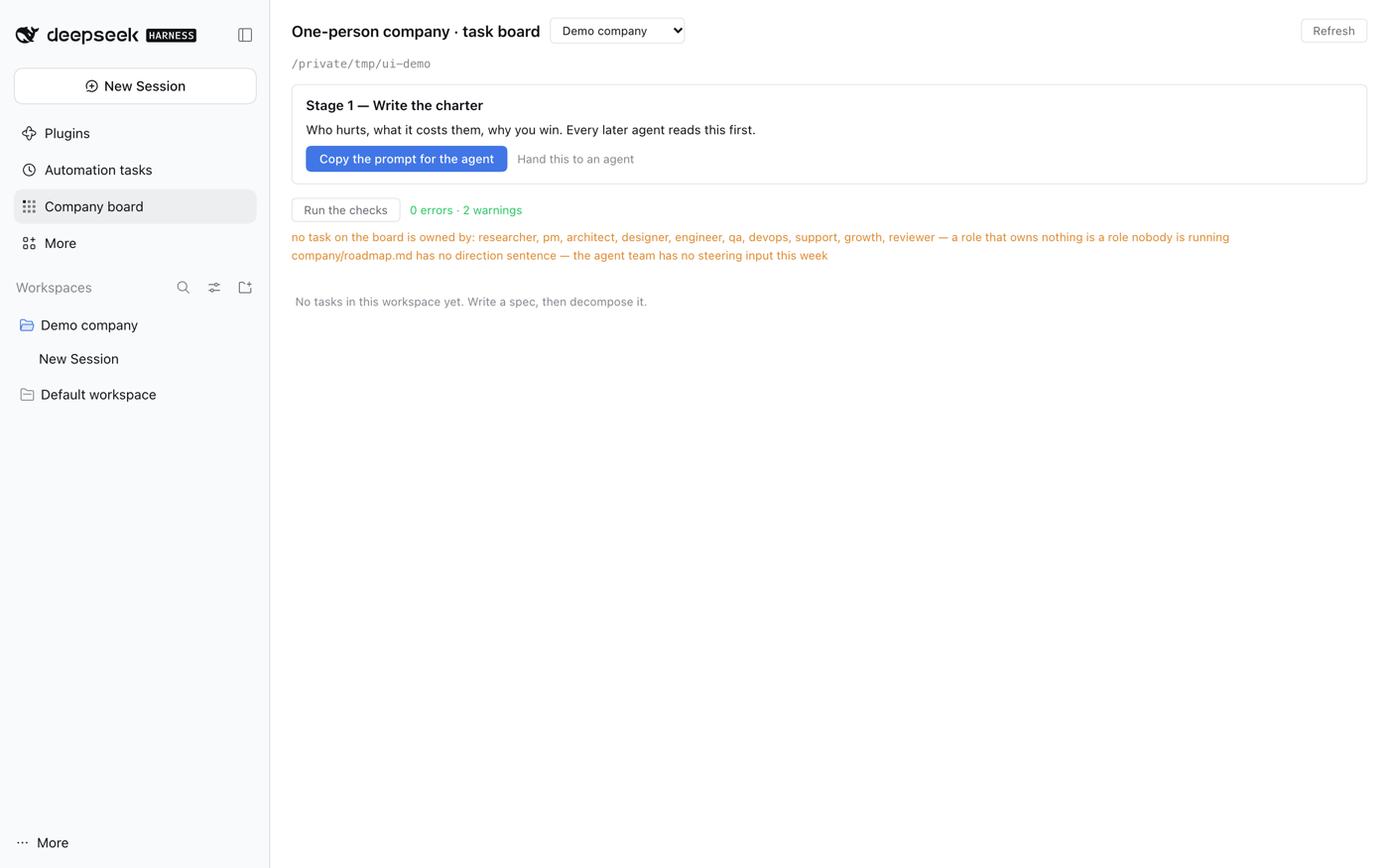
| On the page | What it does |
|---|---|
| The next-step card | the stage, computed from the artefacts on disk — charter written, specs approved, tasks ready / in progress / in review |
| Copy the prompt for the agent | puts the exact instruction in your clipboard |
| Run the checks | runs the ~30 consistency checks on the host and lists what it found |
| The board | every task with status, owner, priority and dependencies |
| The mockup | rendered inline when a screen is waiting for your review — play with the states, then approve or request changes |
| Bootstrap this workspace | creates the company OS in a folder that has none |
For agents and CI, not for you
The same operations have a CLI, because an agent or a CI job has no clipboard:
node tooling/src/cli.mjs cycle     # the same object the panel renders
node tooling/src/cli.mjs doctor
node tooling/src/cli.mjs pack T-0003 > /tmp/ctx.md
Running opc by hand is never required to operate the company. It exists so the
pipeline can run headless.
What you get
AGENTS.md                  operating manual any agent reads first
company/
  charter.md               what we do, for whom, what we will never do
  AGENTS.md                the eight operating rules
  specs/                   the contract: numbered AC-1..AC-n criteria
  tasks/                   the work ledger: status, owner, write scope, deps
  decisions/               ADRs — why each costly decision was made
  research/                4 source-linked research briefs
  metrics.md  budget.md  roadmap.md
  playbooks/               on-call, release, support answers
.agent/
  roles/                   the ten role charters
  checklists/              definition of done · review · pre-ship
tooling/                   the opc CLI — plain ESM, zero dependencies
docs/architecture/         four Mermaid diagrams: System, Backend, Frontend, Data
design/
  tokens.css               the single source of visual values
  screens/<name>.html      one interactive mockup per screen, four states
  approvals.json           the human's decision on each mockup
playbook/                  13 documents, including 12-the-full-cycle.md
Screenshots
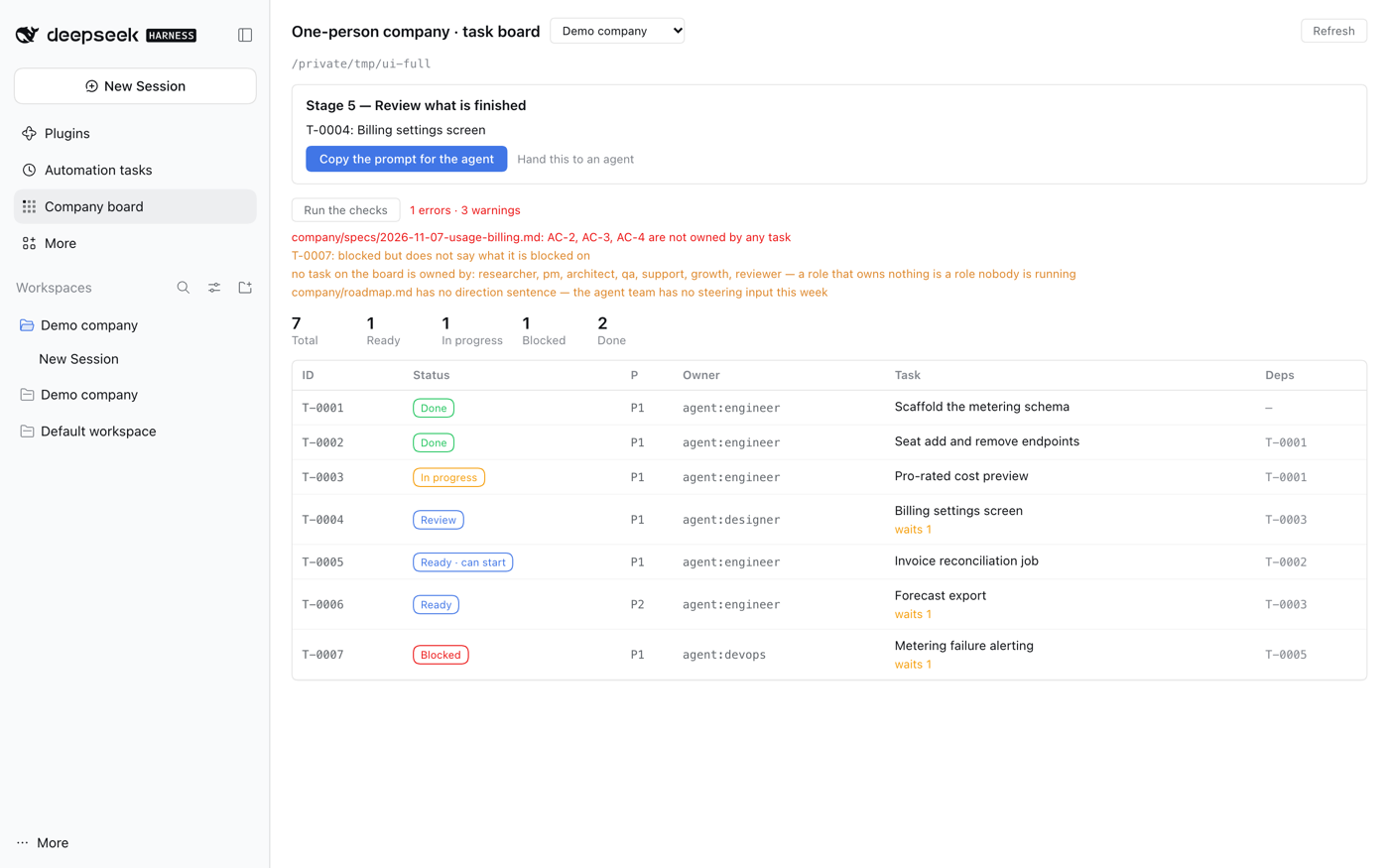
The board
The next step with its copy-the-prompt button, the consistency checks with what
they found, summary counts, and every task with its status, priority, owner and
dependencies. Ready · can start marks tasks whose dependencies are done and
whose spec is approved; waits 3 marks the ones that are not.
Not a company workspace yet
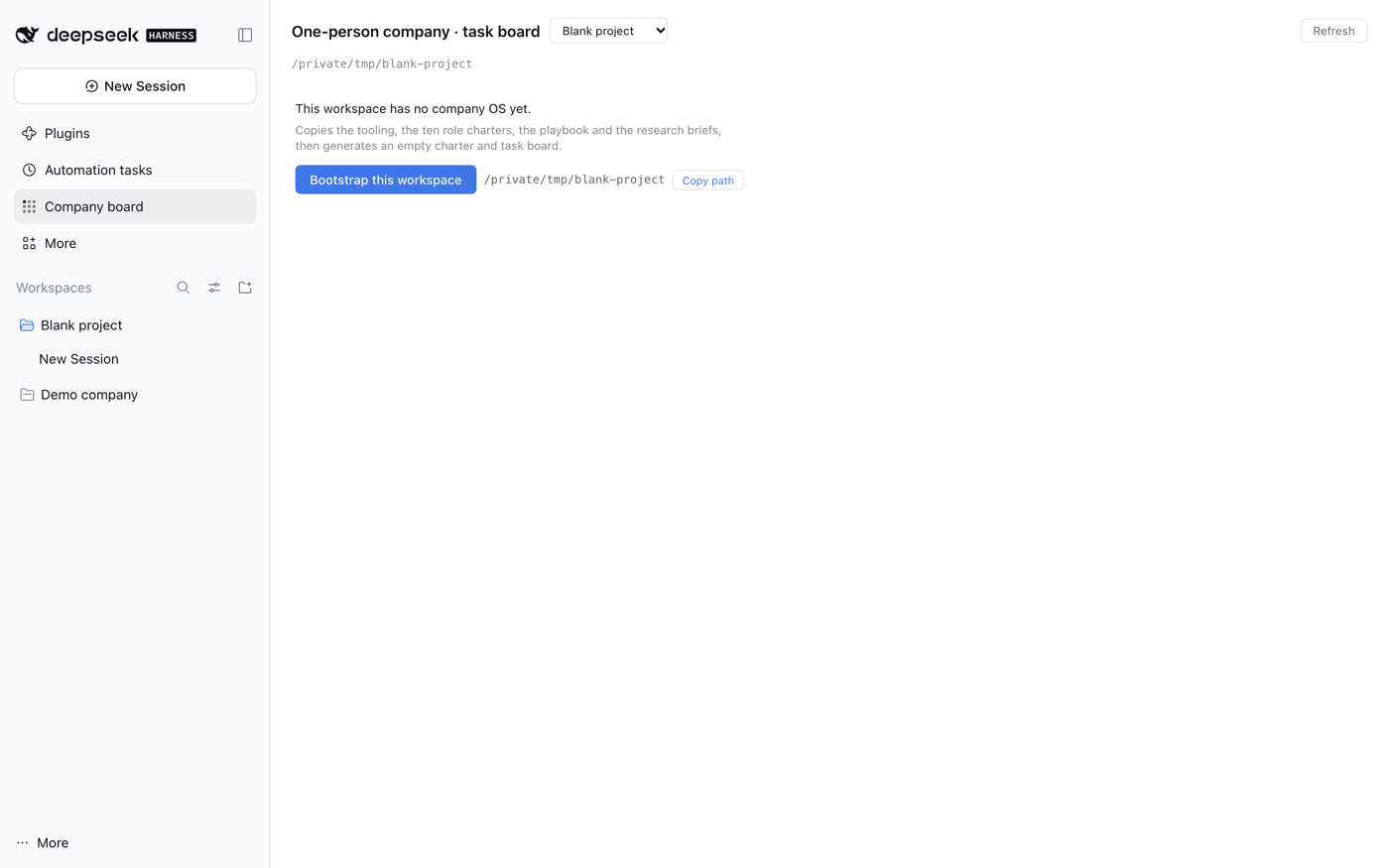
A workspace with no company/ folder is not an error — it is the one click
between you and a working company OS. The button runs the bootstrap on the host;
the path stays available for copying if you would rather run it yourself.
The CLI
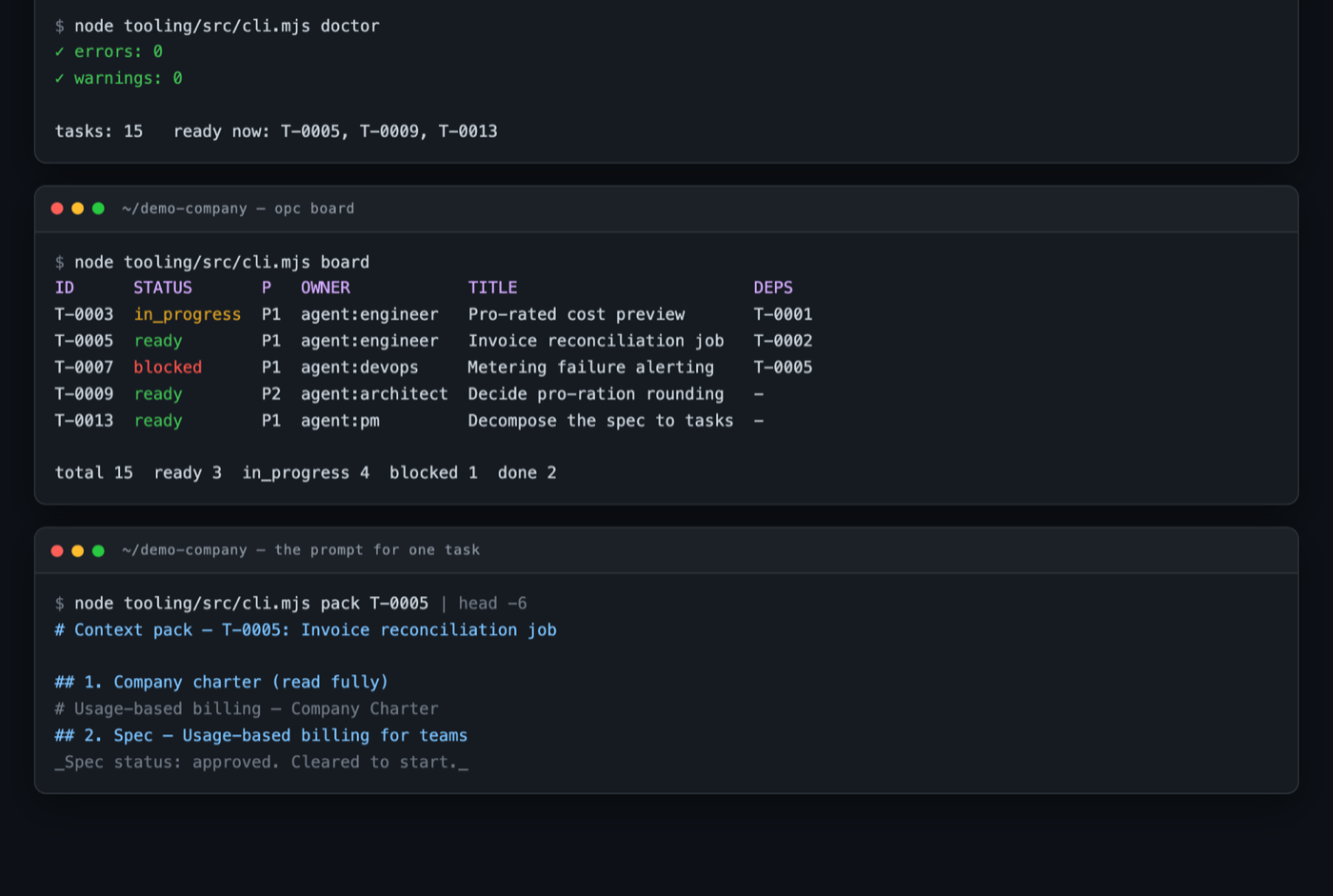
doctor is the health check, board is the derived view, pack is the prompt.
The ten roles
| Role | Owns | Never |
|---|---|---|
researcher |
the research brief — every claim with a source and a date | state a fact without a source; edit specs or code |
pm |
the spec, the board, the roadmap | let a task become "ready" without an approved spec |
architect |
the ADR and the interfaces between parts | write implementation code |
designer |
the design system, the flows, the copy | invent a colour or spacing value outside the tokens |
engineer |
the code, inside its declared write scope | claim something works without running the command |
qa |
the failing test that proves a defect | delete or weaken a failing test |
devops |
the pipeline, the deploy, the runbook, the alert | deploy without a tested rollback |
support |
the answer, the knowledge-base article, bugs filed as tasks | promise a date, a price, or a refund |
growth |
the asset, the channel, the metric | send anything to a real person without approval |
reviewer |
one verdict: approve / request changes / escalate | fix the work itself |
Each charter declares four things — reads, writes, never, done.
That is what makes a role checkable rather than decorative. The reviewer is
the important one: read-only, told to assume the work is wrong.
A mockup before an engineer builds a screen — and you approve it
design/screens/<name>.html is a single-file interactive prototype: its own
CSS (the tokens) and its own JavaScript, with a state switcher for empty /
loading / error / success and a working primary action. One file, double-click,
no build step.
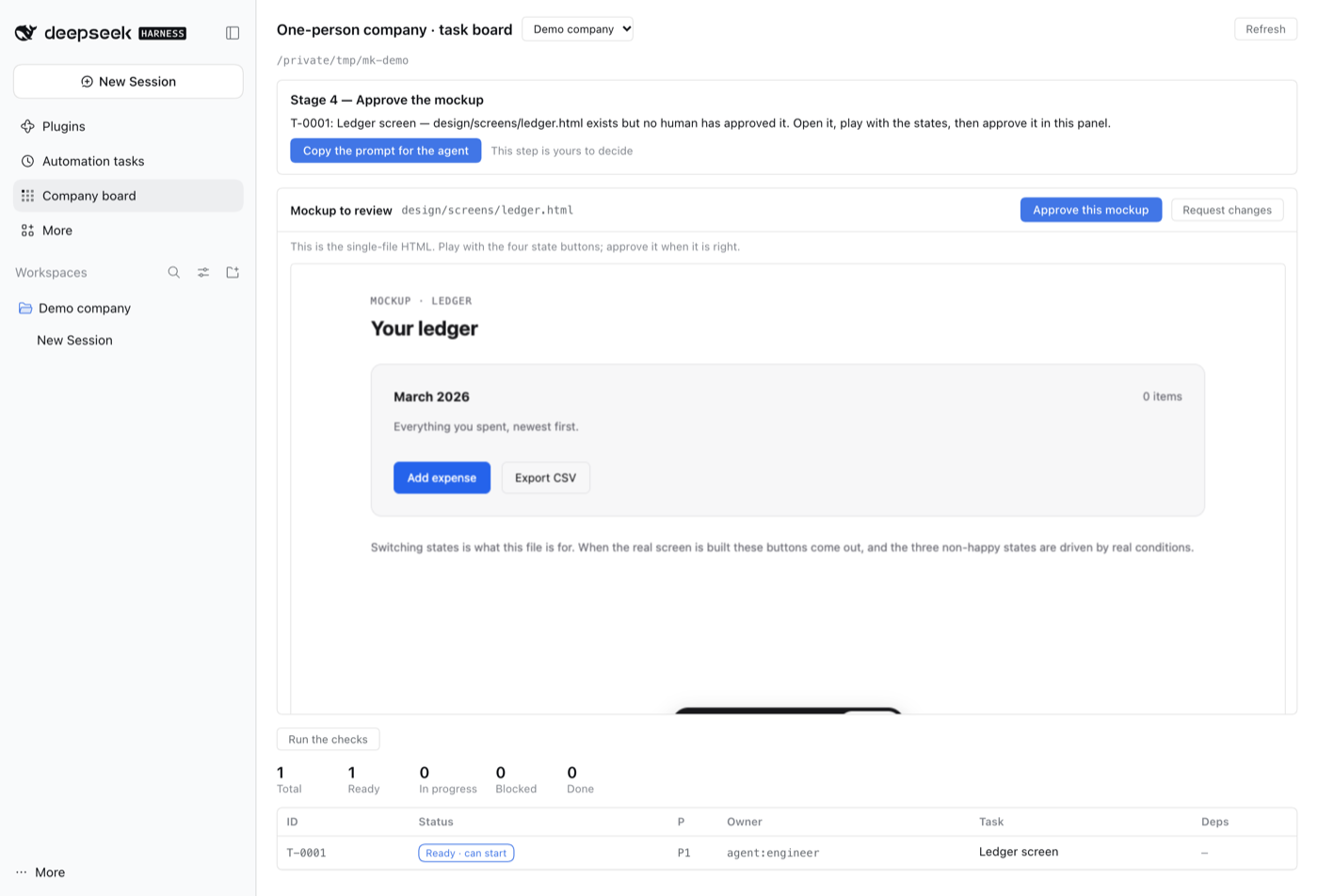
The panel renders it in an iframe, so you play with it where you already are. Then Approve this mockup, or Request changes with a reason. A UI task an engineer owns cannot start until its mockup is approved; the designer's own tasks are exempt because they produce the mockups.
When the mockup changes the requirement
It usually does — a mockup is the requirement in another language, and clicking through it is how you find out what you actually meant. So the loop closes backwards, and all of it is enforced:
| You found | Where it goes | What the checks do |
|---|---|---|
| wrong copy, a missing state, a confused layout | a new mockup | the approval is cleared; re-approve when it is right |
| the requirement is different | the spec | editing an approved spec without re-approving it is an error; the cycle reports Stage 2 — re-approve the spec |
a revision dropped AC-3 |
the tasks | a task claiming an acceptance criterion the spec no longer has is an error |
| the spec moved on | the mockup | an approval recorded against an older spec_version is stale and has to be looked at again |
That is the whole reason the mockup exists: the guess an engineer makes from a paragraph of prose is what the customer ends up seeing.
The architecture is an artefact, not a drawing
docs/architecture/README.md holds four Mermaid diagrams — System (what
talks to what), Backend (the request path and which module owns each step),
Frontend (screens and the endpoints they call), and Data (the tables and
their joins). They are text, so they diff in git, GitHub renders them, and an
agent reads the whole file in about 90 lines.
The rule that makes them worth having:
A diagram that does not match the code is worse than no diagram.
So the diagram is not a one-off deliverable. Any task that adds or removes a
component, a table, a route or a third party updates it in the same change; the
reviewer role treats an unchanged diagram against a changed component as a
blocking finding.
Why not auto-generate it? Anything derived from code goes stale the moment the code changes and nobody notices. An owned artefact with a reviewer gate stays true; a generated picture lies quietly.
The five commands
| Command | When | What it does |
|---|---|---|
doctor |
first thing every session | the checks below |
board |
to see state | every task with status, owner, priority, spec, deps |
board --ready |
to choose work | only tasks whose deps are done and whose spec is approved |
pack <ID> |
to start work | the prompt |
budget |
weekly | the spend ceilings from company/budget.md |
Also: new spec · new task · new adr · new research · new incident · new release · roles · init. npm link installs the opc shorthand.
How it works end to end
You do four things; everything else is an agent's job.
| # | You decide | How often |
|---|---|---|
| 1 | the charter — who hurts, what it costs them, why you win | once |
| 2 | approve the spec — can a test prove each acceptance criterion? | per feature |
| 3 | the review verdict — you looked at the thing and believe it | before it ships |
| 4 | the six founder gates (money, contracts, production data, customers, the charter, the first launch) | when one appears |
The seven stages, and the exact prompt for each, are in
playbook/12-the-full-cycle.md. The short version:
charter → spec → tasks → build → test+review → deploy → operate
   │         │        │       │         │           │         │
  you      you      agent  agent   two agents     agent     agent
 approve  approve                                               │
                                                       you click it
The page tells you where you are — and for a headless run, so does
node tooling/src/cli.mjs cycle:
Company cycle

  charter               written
  specs                 1 (1 approved, 0 not)
  tasks                 20
    ready               4
    in progress         0
    done                0

Stage 4 — build the next task.
  T-0001: Scaffold monorepo, Postgres schema and migrations  (agent:engineer)
    node tooling/src/cli.mjs pack T-0001 > /tmp/ctx.md
  Paste /tmp/ctx.md into a subagent with: "do this task, stay inside the
  write scope, run the verification command, paste the real output."
That is the whole daily loop: doctor, cycle, pick a task, pack it, review
what comes back, move the card.
What doctor actually checks
Every rule that can be checked by a machine is checked here, because a rule that lives only in a prompt is context, not a control.
| Check | Why it matters |
|---|---|
A task is active but its spec is missing or still draft |
the contract is not signed |
An AC-n in a spec is owned by no task |
the spec is quietly half-built |
| A task's owner role has no charter | that agent has no instructions |
| A task's status is not one of the seven | the task is invisible to the board |
| A dependency cycle exists | the board deadlocks |
A Verification block is empty or only comments |
"done" has no evidence |
| Two runnable tasks write the same path | two agents, one file, lost work |
An in_progress task has no write scope |
nobody knows what it may touch |
| A role owns no task | a role nobody is running |
| The roadmap has no direction sentence | the team has no steering input |
| A required file is missing | the machine is incomplete |
How the panel works
- Host half (
lib/index.js) registers a Typert Remote serviceopcBoardwhoselist()readscompany/tasks/*.mdout of every registered workspace and returns the parsed board. The Gateway auto-claims the endpoints, so there is no route, no permission, and no extra attack surface. - It imports the template's own parser —
template/tooling/src/board.mjs— so the panel andopc boardcan never disagree about what is ready. - Browser half (
lib/client.js) contributes two registrations, exactly the pair Plugins and Automation tasks use: a row insidebar.panellist(its nav list,order: 20) and a page inmainkeyed by the same panel id. The board is therefore a normal panel — it selects, deep-links and survives a reload the way the built-in panels do, with no overlay or z-index of its own. - Bootstrap runs on the host, by workspace id. The client never sends a
path, so the button can only write into a folder already registered as a
workspace. It refuses a workspace that already has
company/tasks. - Paths are shown with
~collapsed, so the dialog can be screenshotted or screen-shared without carrying a user name around.
Why files, not a database
- Portable. Every artefact is markdown in the repo. The company survives a harness change, a model change, and a price change — all of which will happen.
- Bounded context.
packemits ~300 lines, not the whole repository. Context that grows with the project is the failure mode the research calls context rot. - Derived board. Status lives in the task files; the board is computed. There is no tracker to fall out of sync.
- Reviewable. A diff of the company's state is a diff of markdown.
Compatibility
DSH 0.2.x, web profile for the panel. The CLI works with no DSH at all — plain ESM, Node ≥ 18, zero runtime dependencies. The plugin declares none either.
Bootstrap flags
bash bootstrap.sh /path/to/workspace            # create
bash bootstrap.sh /path/to/workspace --check    # dry run
bash bootstrap.sh /path/to/workspace --force    # overwrite an existing tooling/
The script never overwrites an existing company/specs/, company/tasks/
or company/charter.md. The machine is reusable; product state is not.
FAQ
Is this a project management tool? No. It is files plus a checker. There is no server, no account, no sync.
Does it call an LLM anywhere? No. Zero API calls. It assembles context and checks invariants. The model is the one you already have in the harness.
Do I need DSH to use it? No, but the panel is the point: it is the operator's console, and it removes the terminal from the loop. Without DSH the same workflow still runs from the CLI, which is also what an agent or a CI job uses.
Will bootstrapping clobber my existing project?
No. It copies tooling/, playbook/, package.json and .gitignore, merges
the reusable company files, and generates the rest only where absent.
How is this different from a TODO list? A task cannot be ready without an approved spec, and cannot be done without a runnable verification command. A TODO list has neither gate.
My agent ignores the board.
Put doctor in CI. The CLI exits non-zero on an error, so the rule becomes
enforced rather than requested.
Do I have to use all ten roles?
No. Start with engineer + reviewer and add the rest when a role's artefact
actually goes missing. The charters cost nothing until used.
Known friction
new taskproduces an intentionally incomplete task:doctorreports the missing verification command and the unowned acceptance criteria until you fill them in. That is the check working, not a failure.- A fresh workspace has two warnings — no tasks yet, and no direction sentence
in
company/roadmap.md. Both clear once real work starts.
Roadmap
- Bootstrap a workspace from the GUI (0.2.0)
- The board is a sidebar panel row, not a footer button (0.3.0)
-
doctor --jsonfor CI - A task detail view in the panel (read a task body without a terminal)
- Run
doctorfrom the panel and show a health badge -
sync-template.shto keep an installed workspace's machine current - Optional
reviewerseat on a separate model, so the adversary is never the same model that wrote the work
Crediting the research
playbook/ is not opinion. It is written against four briefs with sources and
dates: the productivity research (including the study the authors later
retracted), what verification actually costs, the unit economics of a solo
company, and the honest failure list. They ship in every bootstrapped workspace
under company/research/.
License
MIT.
No comments yet. Be the first to write one.