dsh-permission-remote
把一台 Linux 或 macOS 机器上的目录做成 DeepSeek Harness(DSH)工作区。标准会话里的 bash、read、write、edit、read_image、glob、grep 在那台机器上执行;启用可选工具时,apply_patch、str_replace_editor 也在那台机器上执行。只读、工作区可写、完全放开和单次放宽,仍用当前会话的 Permissions 与审批卡片。
安装
前置:DSH >=0.2.2-rc.1 <0.3.0、web profile、Node >= 22.5。仓库:weicy98/dsh-permission-remote。
# 从 GitHub
dsh plugin --profile web add github:weicy98/dsh-permission-remote

# 或从 npm
dsh plugin --profile web add dsh-permission-remote

# 或本机目录
dsh plugin --profile web add /绝对路径/dsh-permission-remote
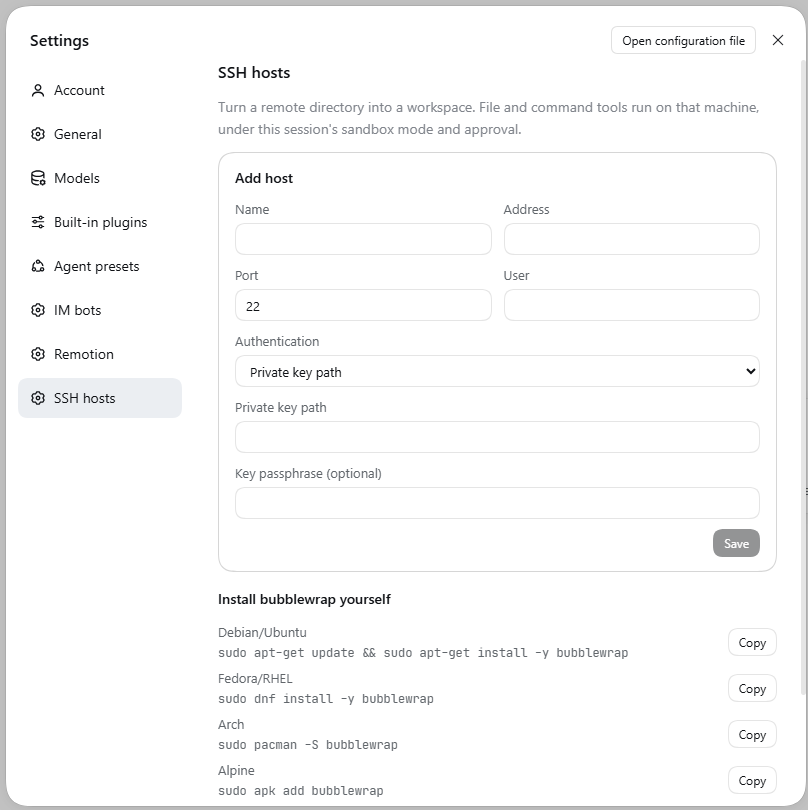
不需要改 profile 的 pnpm-workspace.yaml;SSH 库随插件带上,安装时没有要批准的构建脚本。装完重启 dsh web 并硬刷新页面。设置里会出现 SSH 主机,左侧栏上方也会多一个 SSH 主机 图标,两个入口是同一份界面和配置。
快速开始
- 添加主机。 设置 → SSH 主机,或左侧栏的 SSH 主机 图标。填写地址、端口、用户,以及私钥路径或口令。口令和私钥口令只写入 DSH 凭据存储;私钥只记录本机路径。已保存的主机可以点 编辑 改地址、端口、用户、认证方式和运维策略;改地址或端口会清掉旧指纹,需要重新测试并信任。
- 测试并信任。 第一次连接会显示主机指纹;确认并信任后,插件用只读沙箱 profile 真跑一次
true。 - 准备远端依赖。
glob/grep需要rg,连接时会自动上传对应架构的二进制,主机行也有「安装 ripgrep」按钮。Linux 上受限命令需要 bubblewrap,主机行可代为安装(sudo -n),也提供可复制的发行版命令;macOS 使用系统自带的sandbox-exec。安装与下载源细节见详细说明。 - 创建工作区。 点主机的「浏览目录」,选中远端目录后「把当前目录做成工作区」。目录选择器的筛选、路径补全和键盘说明见详细说明。
- 打开会话。 从侧栏打开新工作区即可。对话里的读写、搜索和命令都发生在远端;左侧文件列表和
@补全仍扫本机占位目录,右侧文件树列出远端目录。
主机设置
每台主机的设置都在卡片上的编辑对话框里。某项偏离默认值时,卡片会显示一个标签,点标签直接打开对话框。
远程调用审批(默认「每次询问」)
控制其他工作区的会话用 ssh_exec / ssh_write / ssh_upload / ssh_download 操作这台主机时放不放行:
| 选项 | 行为 |
|---|---|
| 每次询问 | 执行命令、写文件和传文件各要一次 danger-full-access 审批(默认) |
| 不再询问 | 直接执行,不弹卡。卡片上显示琥珀色标签「远程调用免审批」 |
| 禁止调用 | 这台主机拒绝所有远程命令和写入。卡片上显示灰色标签「远程调用已禁止」 |
读取远端文件(ssh_read)不受这个设置影响。下载算写入:它会在运行 DSH 的机器上落盘,所以和其它写入一起走这道闸门,而不是随读取放行。
环境变量来源(默认「SSH 登录环境」)
远端工作区里的 bash 用哪一套环境变量:
| 选项 | 行为 |
|---|---|
| SSH 登录环境 | 沿用 SSH 登录时拿到的变量,通常只有 /etc/environment 里那几个(默认) |
| 读取 bash 启动脚本 | 捕获一次启动文件导出的变量并复用。卡片上显示「重新读取环境」按钮 |
会读 /etc/profile、~/.bash_profile / ~/.bash_login / ~/.profile、/etc/bash.bashrc、~/.bashrc,丢弃输出,最多 10 秒;超时或失败时沿用 SSH 环境,不反复重试。PWD、OLDPWD、SHLVL 不缓存,~/.zshrc 不读,别名和函数不保留。ssh_exec 固定用 bash -lc,不受这个设置影响。缓存与重读细节见详细说明。
远端根目录与配置备份
「远端根目录」是本地存放所有远端工作区占位目录的位置,默认 ~/.dsh/remote,可用 DSH_SSH_REMOTE_ROOT 覆盖。改目录请用「保存并迁移」:目标为空时整棵复制,已有内容时合并并可选择保留目标或覆盖;工作区里的会话会一并重注册。迁移细节、旧版本受损会话的手工恢复步骤见详细说明。
「主机配置备份」可导出/导入主机列表(不含口令和私钥口令)。「导入并合并」只更新文件里真正出现的字段;地址变化会清掉旧口令和旧指纹。导入后请重新测试连接、按需重填口令。
权限
| 档位 | 文件写入 | bash |
|---|---|---|
read-only |
拒绝 | 有可用 runner 时在约束下执行;没有则 SANDBOX_UNAVAILABLE,命令不跑 |
workspace-write |
只允许打开时的工作区根和远端临时目录 | 同上。可写根不跟着 cd 变 |
danger-full-access |
按远端登录用户执行 | 不包壳 |
模型带 sandbox_permissions 和一句话理由重试时,仍走现有审批。批准只放宽这一次调用。workspace-write 的文件写入在远端沙箱进程里完成:内容先进入同目录的临时文件,再 mv -f 换成目标文件;中途断开留下的是临时文件,原来的内容还在。
远端 run_code(PTC)
远端工作区里的 run_code / workflow 会在 SSH 主机上执行,使用的是宿主机安装的同版本官方 @deepseek-ai/dsh-ptc-runtime-node worker(process.js),不是插件自研的运行器。
- 程序里的
process.env与本地 PTC 一样为空;相对路径和process.cwd()都在远端工作区。 - 支持 per-call
function-body、persistent-in-memory的 REPL,以及vm-script(scriptPersistence开启时保留状态);保留状态按 state owner 留在 SSH 主机进程内。 - 远端需要 Node.js 22+。插件把官方 worker 按 hash 上传到
~/.dsh-permission-remote/ptc/<hash>/,不因升级而重复上传。 - 远端 SSH 需要允许 streamlocal 转发;不支持时回退 loopback TCP,两者都不可用会给出明确错误。
- 上游 worker 契约和升级流程见 docs/upstream-ptc-worker.md。
远程运维
普通工作区(目录在你这台电脑上)也可以让模型操作一台已配置的 SSH 主机。可用工具:ssh_hosts、ssh_exec、ssh_read、ssh_write、ssh_upload、ssh_download、ssh_workspace。
| 工具 | 作用 |
|---|---|
ssh_hosts |
列出主机 id、名称、地址、用户、运维策略和指纹是否已信任 |
ssh_exec |
在那台机器上执行 bash -lc,可选绝对路径 workdir 和 timeoutMs |
ssh_read |
读取远端文件,1 MiB 上限,按行分页;支持 ~/ |
ssh_write |
临时文件加 mv -f 原子替换远端文件,保留权限位 |
ssh_upload |
把一个本机文件传到远端,原子替换 |
ssh_download |
把远端一个文件取回本机,原子替换并置为 0600 |
ssh_workspace |
给已有主机、以某个远端目录创建工作区 |
每台主机在设置里有远程运维策略:
| 策略 | 读取 ssh_read |
命令、写入、上传、下载、添加工作区 |
|---|---|---|
| 询问(默认) | 允许 | 只在本会话是 danger-full-access 时直接执行;否则第一次被拒,带理由重试后弹一次审批 |
| 信任 | 允许 | 直接执行,不弹审批 |
| 禁止 | 拒绝 | 拒绝 |
要点:
- 运维工具不受远端工作区沙箱约束,目标通常是本机工作区之外的机器。
- 信任一台主机也意味着信任它能拿到会话让它上传的本机文件;「信任」下下载/上传不再看当前会话档位。
- 上传、下载都只处理单个文件,不递归、不续传;符号链接、FIFO、设备一律拒绝。
- 单次上限默认 32 MiB、超时默认 120 秒,可在设置页改;
0表示不封顶/不限时。超时可能仍完成落盘,失败可能留下同目录临时文件。 ssh_exec用bash -lc,sudo只能免密(sudo -n);只支持直连 Linux/macOS,不支持跳板机和 Windows 远端。
传输上限、超时、符号链接与 ssh_workspace 的细节见详细说明。
侧栏终端
远端工作区里的侧栏终端连的是那台服务器,不是本机:标签名带主机名(lo · zsh),shell 列表来自远端。
- 侧栏终端是远端登录用户自己的 shell,不套 bubblewrap,也不按按键走 Agent 审批;闸门只有主机指纹已信任。要按权限档位跑命令,用对话里的
bash。 - 每个标签一条 SSH 通道,和文件传输、远端命令共用连接(OpenSSH 默认
MaxSessions 10)。 - 已打开的终端不跟随后续
working_directory;断线即结束,不自动重连。 - 模型侧的
terminal_open在远端会报错并提示改用bash或侧栏终端;terminal_send/terminal_read/terminal_list不受影响。
已知限制
- 只有对话里的工具在远端。 左侧文件列表和
@补全仍扫本机占位目录;右侧文件树列出远端,但自动刷新不可用,手动刷新后属性可能滞后约 5 秒。用户上传的非图片文件会先复制到远端~/.dsh-permission-remote/uploads/。 present可用。 插件先把远端文件复制到对应占位路径,再调用官方present,所以卡片和预览拿到的是本机副本;远端原文件不动,超过 32 MiB 或任一文件失败会整次拒绝。细节见详细说明。- 文件工具已经是官方
dsh-tool-fs的工具层。read、write、edit、read_image、apply_patch的 schema、校验和审批由 DSH 提供;插件只实现远端ctx.fs的writeText/editText/patchText等后端方法,不会把文件写到本机 placeholder。 - 可选的
apply_patch/str_replace_editor。 两者默认都关着,由组合配置决定是否启用了@deepseek-ai/dsh-tool-fs的applyPatch或挂载@deepseek-ai/dsh-tool-str-replace-editor;启用后在远端执行,遵守同一套 Permissions、审批和沙箱,整补丁先预检、失败不回滚。细节见详细说明。 - DSH 跑在 Windows 上时,远端工作区只暴露远端
bash;pwsh、powershell、cmd会被工具过滤和守卫挡住。minimal这类完整 persona 不会被改写。 - 项目说明文件:会话读取
AGENTS.md/CLAUDE.md及其.local时走文件系统接口,占位路径读到远端那份;$DSH_HOME下的全局文件仍是本机。 - 「运行代码」在远端工作区里跑在 SSH 主机上。 它使用宿主同版本官方 PTC worker;
process.env为空,支持 per-call、persistent-in-memory 和 vm-script(scriptPersistence)。 - 只支持直连的 Linux 或 macOS;不支持跳板机和 Windows 远端。网络中断时正在进行的操作会失败,已写入远端的文件不会回滚。
开发
npm install
npm test
npm run test:ci   # 官方工具探针缺失时直接失败,CI 用这个
npm run typecheck
npm run build
lib/ 是安装入口,改完源码需要重新构建。npm run test:ci 需要本机装有 DSH 0.2.2;npm test 在找不到时会把官方工具集成用例跳过。
English
SSH remote workspaces for the DSH web GUI. On a workspace created from Settings → SSH hosts, the standard tools bash, read, write, edit, read_image, glob, and grep run on that Linux or macOS host; when enabled, the optional apply_patch and str_replace_editor tools run there too. The session keeps its existing Permissions selector and approval card.
Install
Requires DSH >=0.2.2-rc.1 <0.3.0, the web profile, and Node >= 22.5. Source: weicy98/dsh-permission-remote.
dsh plugin --profile web add github:weicy98/dsh-permission-remote   # GitHub
dsh plugin --profile web add dsh-permission-remote                  # npm
dsh plugin --profile web add /absolute/path/to/dsh-permission-remote # local
No pnpm-workspace.yaml edit; the SSH library ships inside the plugin and install asks for no build-script approval. Restart dsh web and hard-refresh. SSH hosts appears in Settings and as a sidebar icon — one UI over one configuration.
Quick start
- Add a host. Address, port, user, and a private-key path or password. Secrets go to the DSH credential store; a key is referenced by local path.
- Test and trust. Confirm the host fingerprint; the plugin then runs
trueonce under a read-only sandbox profile. - Remote dependencies.
glob/grepneedrg(uploaded automatically, or install it from the host row). On Linux, confined commands need bubblewrap — installable from the host row withsudo -n. macOS usessandbox-exec. - Create a workspace. Browse a remote directory, then Create workspace. Picker details: detailed notes.
- Open the session. File tools and
bashrun on the remote host; the left file list and@completion still walk the local placeholder tree.
Per-host settings
Both settings live in the host's edit dialog; the card shows a label when one leaves its default.
Remote call approval (default: ask each time) — for ssh_exec / ssh_write / ssh_upload / ssh_download from a session in another workspace:
| Option | Behaviour |
|---|---|
| Ask each time | One danger-full-access approval per command, write, or transfer (default) |
| Do not ask | Runs directly; amber label |
| Block calls | Refuses every remote command and write; grey label |
ssh_read is unaffected. A download counts as a write because it lands on the machine running DSH.
Environment source (default: SSH login environment) — which variables a remote bash runs with:
| Option | Behaviour |
|---|---|
| SSH login environment | Keeps what SSH logged in with (default) |
| Read bash startup files | Captures exported variables once and reuses them; the card offers Re-read environment |
Reads /etc/profile, the first of ~/.bash_profile / ~/.bash_login / ~/.profile, then /etc/bash.bashrc and ~/.bashrc, discarding output, capped at 10 s. PWD / OLDPWD / SHLVL are not cached, ~/.zshrc is not read, aliases and functions are not kept. ssh_exec stays bash -lc. Details: detailed notes.
Remote root directory (default ~/.dsh/remote, overridable with DSH_SSH_REMOTE_ROOT) is where placeholders live. Use Save and migrate to move it; sessions are re-registered and the old tree is kept. Host configuration backup exports/imports the host list without passwords or key passphrases; Import and merge only applies fields the file actually contains. Migration and recovery: detailed notes.
Permissions
| Mode | File writes | bash |
|---|---|---|
read-only |
refused | runs under the available runner; SANDBOX_UNAVAILABLE without one |
workspace-write |
only the workspace root captured at open time plus remote temp dirs | same; the writable root does not follow cd |
danger-full-access |
runs as the remote login user | no sandbox wrapper |
A model retry carrying sandbox_permissions plus a justification still goes through the normal approval and widens only that call.
Remote run_code (PTC)
In a remote workspace, run_code / workflow executes on the SSH host using the host's exact official @deepseek-ai/dsh-ptc-runtime-node worker (process.js), not a plugin-authored runner.
- Program
process.envis empty, exactly like local PTC; relative paths andprocess.cwd()are on the remote workspace. - Per-call
function-body,persistent-in-memoryREPL, andvm-scriptwithscriptPersistenceare supported; retained state stays in the SSH host process keyed by state owner. - The remote host needs Node.js 22+. The plugin uploads the official worker by hash to
~/.dsh-permission-remote/ptc/<hash>/and reuses it across runs. - The SSH server must allow streamlocal forwarding; otherwise the plugin falls back to loopback TCP and reports a clear error if both fail.
- Upstream contract and upgrade steps: docs/upstream-ptc-worker.md. The same runbook is offered to the agent as the
upstream-ptc-upgradeskill, andnpm run upgrade:ptcruns the probe, offline, and (with--live) real-host gates before recording anything.
Remote ops
An ordinary local workspace can operate a configured SSH host with ssh_hosts, ssh_exec, ssh_read, ssh_write, ssh_upload, ssh_download, and ssh_workspace. Each host has an ops policy:
| Policy | ssh_read |
Command, write, upload, download, workspace registration |
|---|---|---|
| Ask (default) | allowed | only a danger-full-access session runs directly; otherwise denied once, then one approval on retry with a justification |
| Trust | allowed | runs without a prompt |
| Deny | denied | denied |
Ops calls are not wrapped in the remote workspace sandbox — the target is usually outside the local workspace. Trusting a host also trusts it with local files a session uploads. Transfers are single files, no recursion or resume; symlinks, FIFOs, and devices are refused. Ceiling 32 MiB and deadline 120 s by default (settings page; 0 means unlimited). Details: detailed notes.
Sidebar terminal
The right sidebar's terminal on a remote workspace connects to that host: the shell menu lists the remote shells and each tab is named after the server.
- It is the remote login user's own shell, not wrapped in bubblewrap and not gated per keystroke; only a trusted fingerprint is required. Use
bashfor permission-mode-aware commands. - One SSH channel per tab on the host's shared connection (OpenSSH
MaxSessions 10). - Open terminals do not follow
working_directory; a dropped connection ends the terminal. terminal_openrefuses remotely and points atbashor the sidebar terminal;terminal_send/terminal_read/terminal_liststill work.
Known limitations
- Only conversation tools run remotely. The left file list and
@completion still use the local placeholder tree; the right file tree lists the remote directory but cannot auto-refresh (manual refresh can lag ~5 s). Non-image uploads are copied to~/.dsh-permission-remote/uploads/. presentworks by copying the remote file to the placeholder path first and then calling the official tool; over 32 MiB or any bad file refuses the whole call. Details: detailed notes.- File tools already use the official
dsh-tool-fssurface.read,write,edit,read_image, andapply_patchkeep DSH schemas, validation, and approvals; the plugin only implements the remotectx.fsbackend methods such aswriteText/editText/patchText, never a local write to the placeholder. - Optional
apply_patch/str_replace_editorare off unless the composition enablesapplyPatchor mounts the editor package. They then run remotely under the same Permissions, approval, and sandbox; a patch is preflighted first and is not rolled back on failure. Details: detailed notes. - Windows-hosted DSH exposes only the remote
bashin a remote workspace;pwsh/powershell/cmdare filtered and guarded. Acomplete: truepersona is not rewritten. - Project instruction files (
AGENTS.md,CLAUDE.md, and.local) are read through the filesystem service, so placeholder paths read the remote copy; global files under$DSH_HOMEstay local. - Run Code runs on the SSH host in a remote workspace. It uses the host's exact official PTC worker;
process.envis empty and per-call, persistent-in-memory, and vm-script modes are supported. - Direct Linux or macOS only; no jump hosts or Windows remotes. A dropped connection fails the running operation and files already written stay on the remote.
Development
npm install
npm test          # skips the official-tool probe when DSH 0.2.2 is unavailable
npm run test:ci   # fails instead of skipping; use this in CI
npm run typecheck
npm run build
lib/ is the install entry point; rebuild after changing source.
No comments yet. Be the first to write one.