Dremu 谱面工坊 · Dremu Chart Studio
A DeepSeek Harness bundle that adds a full-page chart editor for Gorge / Dremu
.g chart projects to the Harness Web UI, plus Host tools so the agent can
read, edit, and generate the same chart.
Editing logic and layout follow rpe-next
(Re:PhiEdit Next, a Phigros chart editor): a horizontal time axis with a snapping
beat grid, direct manipulation, an inspector with per-field editors and a curve
editor, undo/redo, and audio playback. The chart format is the Gorge framework
declarative .g format used by the Dremu chart projects on this machine
(~/Music/DremuTest, ~/Music/Chart/**).
界面语言:中文(可在插件配置里切换到 English)。
What it does
Opens a chart project folder — every
.gstaff file is parsed, the periods are flattened onto one absolute-time axis, and assets (WAV/MP3/PNG) are served to the page with HTTP Range support so audio scrubs and plays.Grouped by staff (谱表) — the timeline gutter and the element list are grouped by staff: one header per
.gstaff (表演 · DremuStaff,Storyboard · DeentyStoryboardStaff, …) with its lane/file counts, and the lanes indented underneath. Click a header to collapse or expand that staff's rows. A row no longer repeats the staff name.Timeline editing — one row per lane name (
DremuMainLane,DremuGuideLane); a row shows every lane element that carries that name (charts reuse names across periods:DremuStaff2.ghas 82 lane elements over 33 names), plus its notes (DremuTap,DremuDrag,DremuHold,DremuTaplik), hold bodies and inner-note ticks; storyboard images and unknown element types get their own rows so nothing is lost.Direct manipulation — drag an element to move it in time, drag its right edge to change
keepTime/holdTime, box-select, ⇧-click to extend the selection, double-click empty space to place the current tool.Inspector — every field of the selected element, rendered from the catalog (numbers, strings, booleans, enums,
VariableFloat,Vector2,ColorArgb, function curves, arrays ofFunctionPiece, and a raw "other fields" section for anything the catalog does not describe).Curve editor — plots
LinearCurve,CubicHermiteSpline,ConstantFunctionCurve,LinearFunctionCurve,PiecewiseFunctionCurve,VariableFloatvariation curves …; drag the control points on the plot or type the numbers on the side; one Apply = one undo step.Playback — waveform strip from the project WAV, play/pause, seek, rate (0.25×–2×), follow-playback auto-scroll.
Playback preview (播放预览, autoplay / playback only) — the header's preview button embeds a 16:10 Canvas-2D rendering of the Dremu playfield in the timeline pane (
.dgc-center); the editor header, left lists and inspector stay visible. It is ported from the Unity form renderer: judgement lines fromlaneLines+animation, notes and hold bodies from theirdistance/positioncurves,LerpColorCurvecolours, the 16:10 camera framing, the autoplay look (note head disappears at the hit) and theDremuRespondHintdiamond/heart hit effects plusRespondEffect.wav. Playback only — no signals, judgement, scoring, HUD or holdinnerNotes.Spaceplay/pause,Escclose,←/→seek. The ported model is specified indocs/playback-model.md.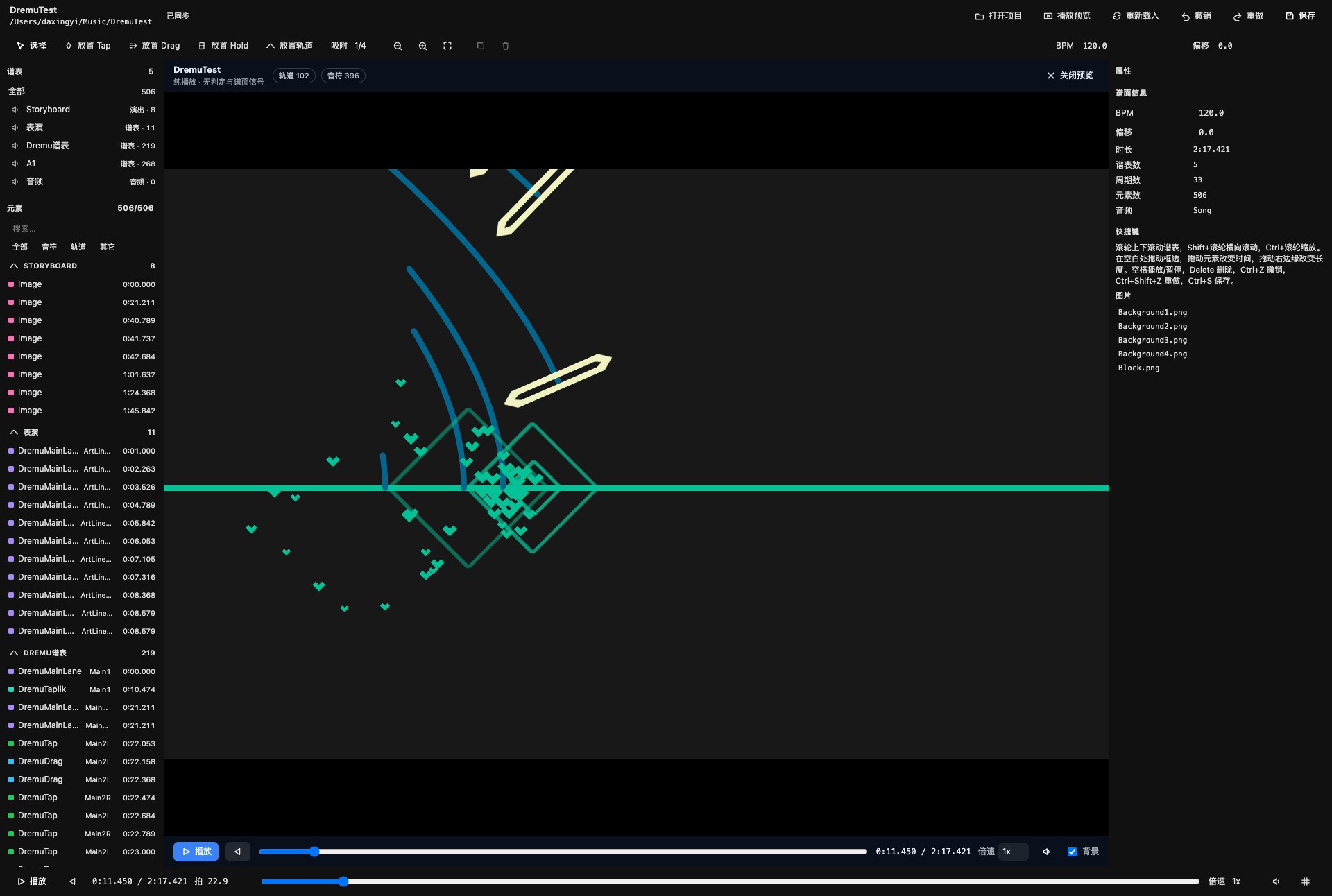
Undo/redo, copy/paste, duplicate, nudge — all edits are queued as op batches, so each gesture is exactly one undo step.
Saves the real
.gfiles — atomic writes with a.g.bakof the original content on the first save of a session. The codec is byte-exact: opening and saving an untouched project reproduces every file byte for byte.Agent tools — the same document is exposed as
gorge_project_list/gorge_project_open/gorge_chart_get/gorge_chart_edit/gorge_chart_save/gorge_chart_validate/gorge_element_schema, and a one-line workspace summary is injected into the system context. Agent edits appear live in the open editor.
Install
The bundle lives in this directory. In a Harness session with Full access:
plugin_manager { action: "install_bundle", target: "<path to this checkout>" }
Installation links the checkout, so later edits in this directory are live after a page refresh (a replaced JavaScript module needs a restart, as with any bundle). The plugin appears in Settings → Plugins as “Dremu 谱面工坊” and in the sidebar panel list (a golden lane glyph); clicking it opens the studio in the main panel.
Use
- Click the sidebar glyph → 打开项目 → pick a folder (
~/Music/DremuTest,~/Music/Chart/Chart 2, …) or type an absolute path. The library list is scanned from the configuredprojectRoot(default~/Music). - Pick tools in the toolbar (or
Vselect,Qtap,Wdrag,Ehold,Tlane), set the snap division, and double-click the timeline to place. - Select something and edit it in the right-hand inspector; curves open their own plot dialog.
Ctrl/Cmd+Ssaves. Autosave is on by default (autoSavein the plugin config) and debounces to the same atomic writer.- Click 播放预览 / Play preview in the header: the Autoplay playfield
(audio + canvas) replaces the timeline pane, while the editor header and side
panes stay visible.
Spaceplay/pause,Esccloses; the preview bar below the canvas has restart, seek, rate, mute and a storyboard-background toggle.
Shortcuts
| Key | Action |
|---|---|
V / Q / W / E / T |
select / tap / drag / hold / lane tool |
Space |
play / pause |
Delete / Backspace |
delete selection |
Ctrl/Cmd+Z, Ctrl/Cmd+Shift+Z / Ctrl+Y |
undo / redo |
Ctrl/Cmd+S |
save |
Ctrl/Cmd+A |
select all elements |
Ctrl/Cmd+C / Ctrl/Cmd+V |
copy / paste at the playhead |
Ctrl/Cmd+D |
duplicate (+1 grid step) |
← / → |
nudge selection one grid step (seeks when nothing is selected) |
1…8 |
snap division 1/1 … 1/16 beat |
+ / - / 0 |
zoom in / out / fit |
Home |
back to 0:00 |
Esc |
clear selection / select tool |
Space / Esc (playback preview) |
play/pause, close the preview |
← / → (playback preview) |
seek backwards / forwards |
Mouse: wheel scrolls lane rows, Shift+wheel scrolls time, Ctrl+wheel zooms
around the pointer, middle-drag or Alt+drag pans, drag on the ruler scrubs.
Plugin configuration
Set keys in the plugin row's config: block in the profile's
cordis.patch.yml (dsh plugin --profile desktop manages that file). The
loader validates the row through Config['~standard'].validate; the plugin
intentionally has no Settings form (its Config must not pose as a
Schemastery schema — a toJSON() lookalike crashes settings/describe and
aborts desktop boot with desktop welcome: Web RPC failed).
| key | default | meaning |
|---|---|---|
projectRoot |
~/Music |
folder scanned for chart projects (directories containing *.g) |
autoSave |
true |
debounce-save edits to disk; false keeps edits in the Host until an explicit save |
locale |
zh |
display language hint for the Host half |
Architecture
package.json          bundle manifest (dsh.bundle.patch + dsh.client)
cordis.patch.yml      inserts the loader row
index.js              Host half: project store, HTTP/SSE, agent tools, prompt context
gorge-codec.js        .g text <-> typed value tree, byte-exact writer (no I/O)
dremu-model.js        chart model: catalog, project load/save, timing, op application
client.js             browser half: the whole editor UI (one self-contained file)
locale/{zh,en}.json   display metadata
docs/                 gorge-format-spec.md (the .g text format),
                      playback-model.md (the Unity → Canvas playback port)
tests/                codec / model / host / client smoke tests (plain node scripts)
Data flow: the browser keeps an optimistic copy of the project. A gesture
becomes an op batch (patch / add / remove / setMeta / …) that is applied
locally and POSTed to /plugins/gorge-chart/edit with {baseRev, ops}; the Host
applies it to the canonical model, bumps the revision, autosaves and notifies SSE
subscribers. When the revision was not produced by this tab (an agent edit), the
page refetches /state. .g serialization always happens on the Host.
Format notes
A staff file is a tiny declarative program:
[
    string form = "Dremu",
    string displayName = "Dremu谱表"
]
@ElementStaff
class DremuStaff
{
    [
        PeriodConfig^ config = PeriodConfig : {
            timeOffset : 0.0,
        }
    ]
    @Chart
    static Element^[] Period()
    {
        return new Element^[1]{
            DremuTap : {
                laneName : "mainLine01",
                hitTime : 2.842105,
            },
        };
    }
}
- A class can declare many period methods (
Period,Period1, …); each has its owntimeOffset(absolute start in seconds) and element times inside it are relative to that offset. The editor flattens them. - Values are typed object/list literals (
Type : {...}/Type^ : {...}), enum references, numbers, strings, and the occasional(-1.0/0.0)±Infinity expression. - The writer is canonical and byte-exact against the entire corpus in
~/Music/DremuTestand~/Music/Chart/**(seetests/codec.test.mjs).
Development
node tests/codec.test.mjs        # 12/12 corpus files byte-exact + 37 codec checks
node tests/model.test.mjs        # 55 checks: load/save fidelity (CRLF + LF), ops, catalog
node tests/host.test.mjs         # 31 checks: store, HTTP handlers, tools, Range, recovery
node tests/client-smoke.mjs      # mounts the page in a tiny React runtime (fixture project)
GORGE_SMOKE_REAL=1 node tests/client-smoke.mjs
                                 # ... and again against the real DremuTest project
node tests/fixtures/review-undo-repro.mjs
                                 # regression harness with React-18 batching semantics
The client harness is a deliberately small React-compatible runtime (function
components, hooks with real dependency memoisation, refs, host elements) plus the
browser globals the bundle touches. It asserts the page renders, the timeline
paints, selecting an element fills the inspector, the curve dialog opens and
applies, dragging a note emits patch(hitTime), undo emits the inverse patch,
redo restores it, and placing a Tap emits an add op with the row's lane.
Verification status
- Host half is live in this profile (
plugin_managerreports the bundle enabled;application: applied). Verified over HTTP from a shell:/statereturns the catalog,/projectslists 6 chart folders,/editround-trips,/fileserves Range requests. - Agent tools verified live:
gorge_project_openopened~/Music/DremuTest(5 staffs / 506 elements / 137.421 s),gorge_chart_getreturned the flattened chart,gorge_chart_validatereturned 0 issues. - Corpus safety: codec and model suites copy the real projects to temp dirs; the read-only corpus is hashed before/after and asserted unchanged.
- Playback preview is asserted structurally by the client smoke suite:
node tests/client-smoke.mjsandGORGE_SMOKE_REAL=1 node tests/client-smoke.mjscheck the preview model and frame sampler (lanes / notes / holds / colours, on the fixture project and on the realDremuTestproject), the guide-lane node transform, and that the preview mounts inside.dgc-center, paints and closes. - Playback preview was checked visually with headless Chrome against the real
page code +
DremuTest(screenshots at many chart times, holds around 26 s, guide/effect scenes around 11 s): note sprites, lane/guide-line orientation, hold bodies, storyboard backgrounds, hit diamonds/hearts and camera scale were compared with the Dremu gameplay reference video. The reference is a different chart (enchanted love), so it validates semantics, not pixel identity; an exact frame diff needs that chart's.gproject. - Lane/hold geometry was cross-checked against the Godot adaptor running the
same
DremuTestchart: at t=4.352s (animated ArtLine) and t=26.20s (hold) the lane/hold positions and shapes now agree. This cross-check found and fixed two real curve bugs: weightedCubicHermiteSplinetangents were not normalized by the y span (drawStart/End overshot), andPiecewiseFunctionCurvebounds usingexpr Infinitywere skipped (the holdLine tail was lost). The run lackedDeentyStoryboardand the nine-slice extension, so only lanes/holds/hearts were comparable; theDremuRespondHintring uses the same Gorge nine-slice algorithm as the Godot adaptor'sdraw_gorge_nine_slice. - Hit sound is the form's
RespondEffect.wav(played once per hit while playing, muted with the song); headless Chrome counted theAudio.play()calls (13hit sounds over 4.5 s of a dense section). - Editor page is still exercised structurally by
tests/client-smoke.mjs; refresh the Web UI and open the sidebar glyph to confirm layout/theming.
No dependencies, no build step: the Client half is plain browser JavaScript in
the module-loader format and only imports react from the Harness module table.
Styling uses --dsw-alias-* theme tokens, so the page follows the shell's light
and dark themes.
Known limitations
- The playback preview implements the Autoplay chart layer (lanes, notes,
holds, storyboard,
DremuRespondHintdiamonds/hearts andRespondEffect.wav), but not the game's UI layer (score/combo/judgement HUD/pause menu) or Unity's bloom/shader pass. It is a visual preview, not a playable build. - The timeline is a chart editor, not the game renderer: it shows element
time extents, not the playfield. The playback preview draws the playfield, but
as a Canvas-2D approximation — line caps/joins follow the CurveSprite
prefab (
numCapVertices=10round caps,numCornerVertices=0miter corners); blending and Unity's material/bloom pass are close to, not pixel-identical with, the real renderer.positionZordering and the nine-slice hit ring are implemented exactly; curves are still edited as data and previewed as plots. - Only the element fields present in the catalog get friendly labels; other fields are editable in the "其它字段" section but shown by their raw names.
.g.bakbackups are written next to the staff files (once per session per file). They are plain copies; the editor does not prune them.- The page re-renders on the transport clock while playing (the left list and the inspector are memoised, the timeline paints through its own rAF loop).
- A Host refresh (agent edit, reload, conflict) replaces the local document and clears the client-side undo stack: the document on disk is the source of truth.
- The playback preview is playback only: no chart signals, judgement, scoring,
combo/HUD, and no hold
innerNotes.DremuRespondHintdiamond/heart hit effects andRespondEffect.wavare implemented; Unity bloom/shader is not. Storyboard backgrounds work forDeentyStoryboard.Imagebehind a toggle;StoryboardVideois not supported. - On a Host restart the last project is reopened from the recovery snapshot and
accepted-but-unsaved op batches are replayed when
autoSaveis false.
No comments yet. Be the first to write one.