OpenCode Usage (OCU)
A DeepSeek Harness plugin bundle that shows
live opencode usage in the Harness Web UI: sessions, prompts, tokens,
estimated cost, and per-tool reliability, read on demand from the local opencode CLI.
What you get
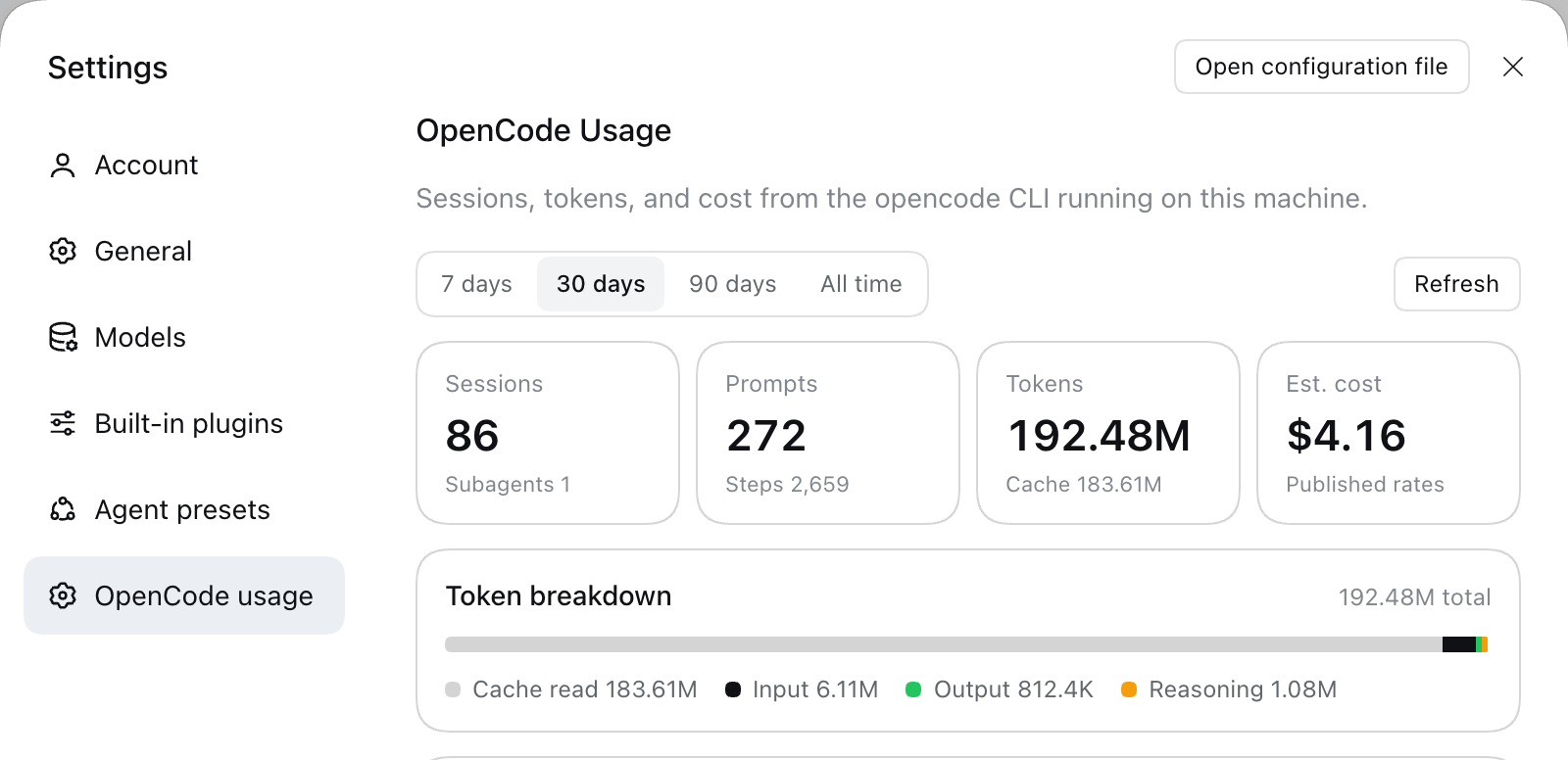
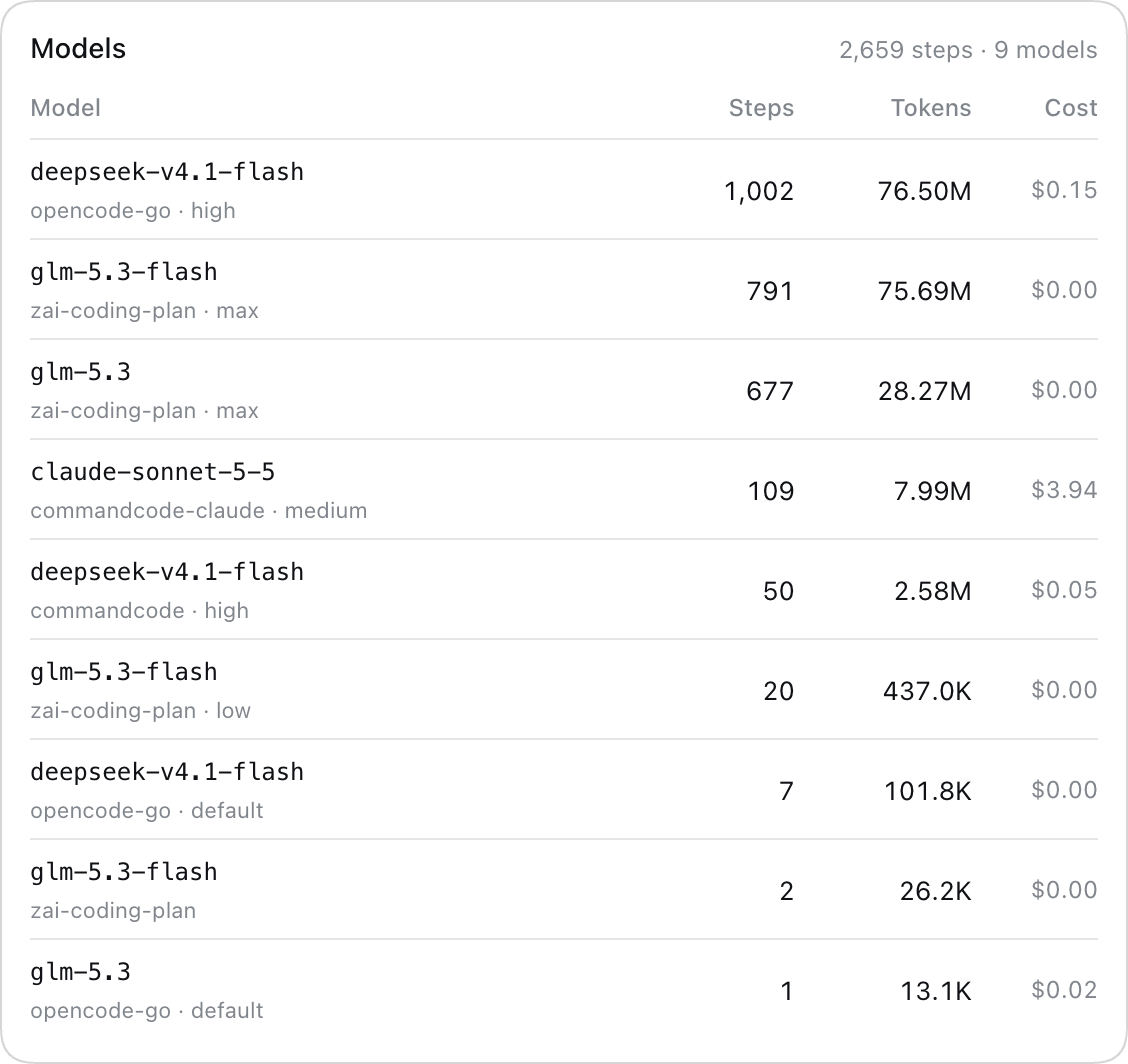
- Settings → OpenCode usage page with range chips (7 / 30 / 90 days, all time), four stat tiles, a token breakdown bar, a per-model usage table, and a tool-reliability table.
- Live data from
opencode stats --json --models: sessions, tokens, cost, and usage per provider/model. Each range is cached for 30 seconds, and the Refresh button forces a fresh read. - No extra service and no secrets: the Harness Host runs the CLI locally; the page fetches one authenticated JSON endpoint.
- English and German page copy, host theme tokens (light and dark), and an original icon.
Scope
This page reports opencode's own usage only. Command Code billing or quota data is deliberately out of scope.
Requirements
- DeepSeek Harness 0.2.x with the Web UI (desktop app or
dsh web). opencodeon the Host, with the local state thatopencode statsreads. The Host resolves the binary at$OPENCODE_BIN,/opt/homebrew/bin/opencode,/usr/local/bin/opencode,~/.local/bin/opencode,/usr/bin/opencode, thenPATH.
Install
The package is a local bundle (@local/opencode-usage), not a registry package.
git clone https://github.com/webmanufaktur/dsh-opencode-usage-plugin.git
Install the checkout as a profile bundle: in the Harness, ask the agent to install the bundle
at /absolute/path/dsh-opencode-usage-plugin — plugin_manager install_bundle links the
directory and enables it. The row id is opencode-usage.
Then open Settings → OpenCode usage. Because the package is link-installed, edits in the checkout apply without reinstalling; restart the Harness to reload the Host half.
How it works
Host half — index.js
Registers one authenticated exact-Fetch route through ctx.connection.fetch:
GET /api/opencode.usage?range=7|30|90|all[&fresh=1]
- Runs
opencode stats --json --models(--days <n>or--all) and projects the payload into small display values: sessions, subagents, prompts, steps, token totals, cost, per-model rows (provider, model, variant, steps, tokens, cost), tool calls and the top 8 tools by call count. - Sorts the model rows by steps and keeps the top 10;
modelCountcarries the full count. - Caches each range for 30 seconds;
fresh=1bypasses the cache (used by Refresh). - Returns
{ ok: false, error }with status 400 for an unknown range and 502 when the CLI fails or is missing.
The route lives inside the browser-authentication fence, so only the owner's page can read it.
Client half — client.js
Registers a settings.section entry ("OpenCode usage") and renders the page with host theme
tokens. It fetches the route document-relative (api/opencode.usage), so the existing browser
cookie authenticates the request. Copy comes from locale dictionaries in English and German.
Layout
| Path | Purpose |
|---|---|
index.js |
Host half: the route, CLI invocation, cache, projection |
client.js |
Client half: Settings page, dictionaries, styles |
cordis.patch.yml |
Bundle patch inserting the opencode-usage row |
locale/en.json, locale/de.json |
Plugin Manager title and description |
icon.svg |
Plugin icon |
docs/preview.png |
Screenshot of the rendered page |
Development
No build step and no dependencies. Check syntax with node --check index.js client.js. The
running Harness picks up client changes through HMR; restart it after changing index.js.
Tech Stack
- JavaScript (ESM), plain browser module, no build step
- DeepSeek Harness plugin bundle (Cordis loader,
dsh.clientweb module) - Host: Node.js, authenticated exact-Fetch route,
node:child_process - Client: React from the Harness module table, host
--dsw-alias-*theme tokens - Data: local
opencodeCLI (opencode stats --json)
Domains
| Env | URL |
|---|---|
| prod | — (local Harness plugin; no hosted endpoint) |
| dev | — (same checkout, link-installed in the desktop profile) |
Client
Internal developer tooling by Alexander Abelt (webmanufaktur). It runs inside the local DeepSeek Harness and has no external client.
No comments yet. Be the first to write one.