README来源: main@8e2e530c
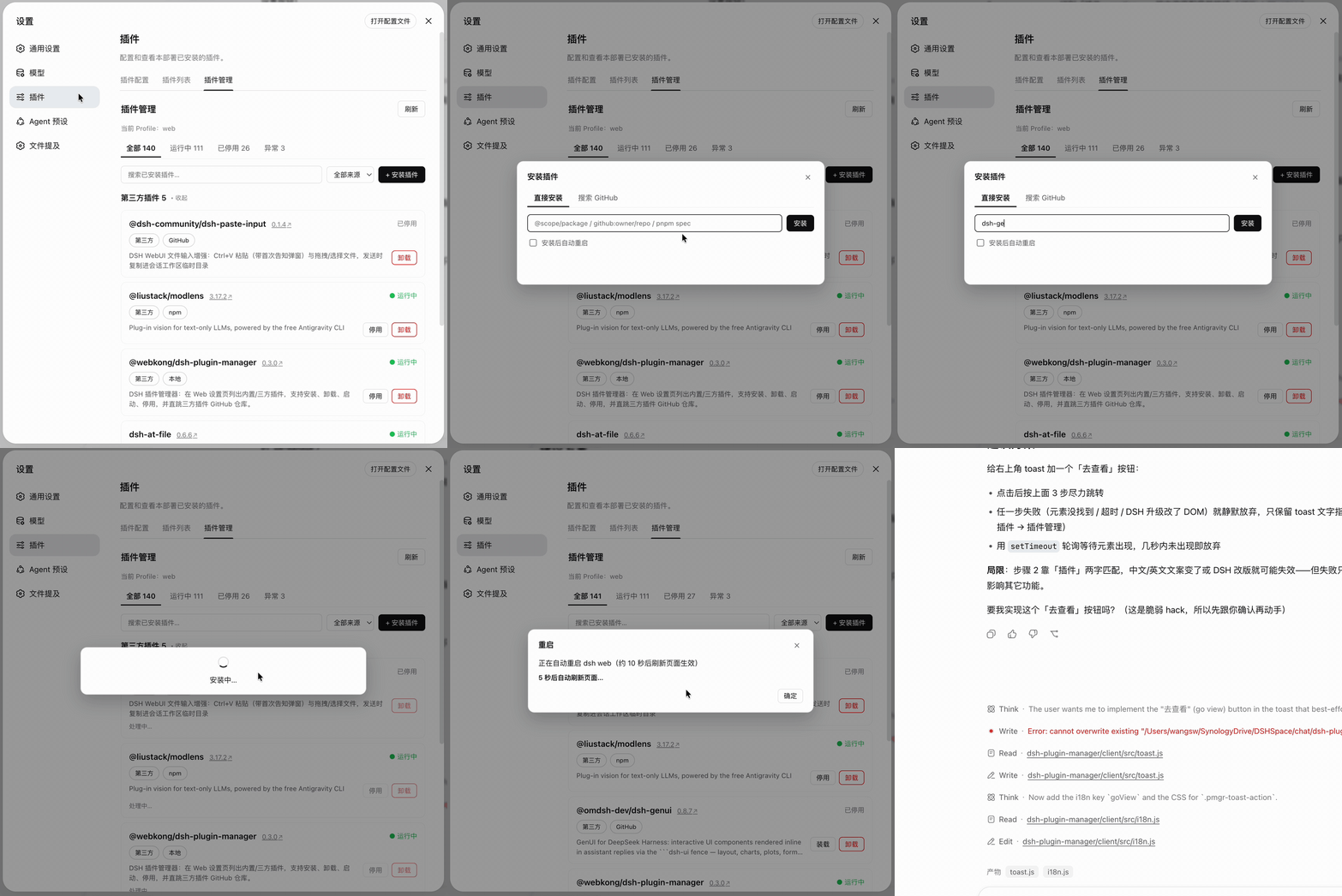
🚀 为 DeepSeek Harness 而生的插件管家
装 · 卸 · 启 · 停,一站式管理你的 DSH 插件生态
dsh-plugin-manager
让 DeepSeek Harness 的插件管理第一次变得像点外卖一样简单。
以前装一个 DSH 插件要翻 GitHub、敲命令、改配置;现在打开 设置 → 插件 → 插件管理,内置 / 三方插件一览无余,安装、卸载、启停、GitHub 溯源全部在一个页面里完成。
✨ 功能亮点
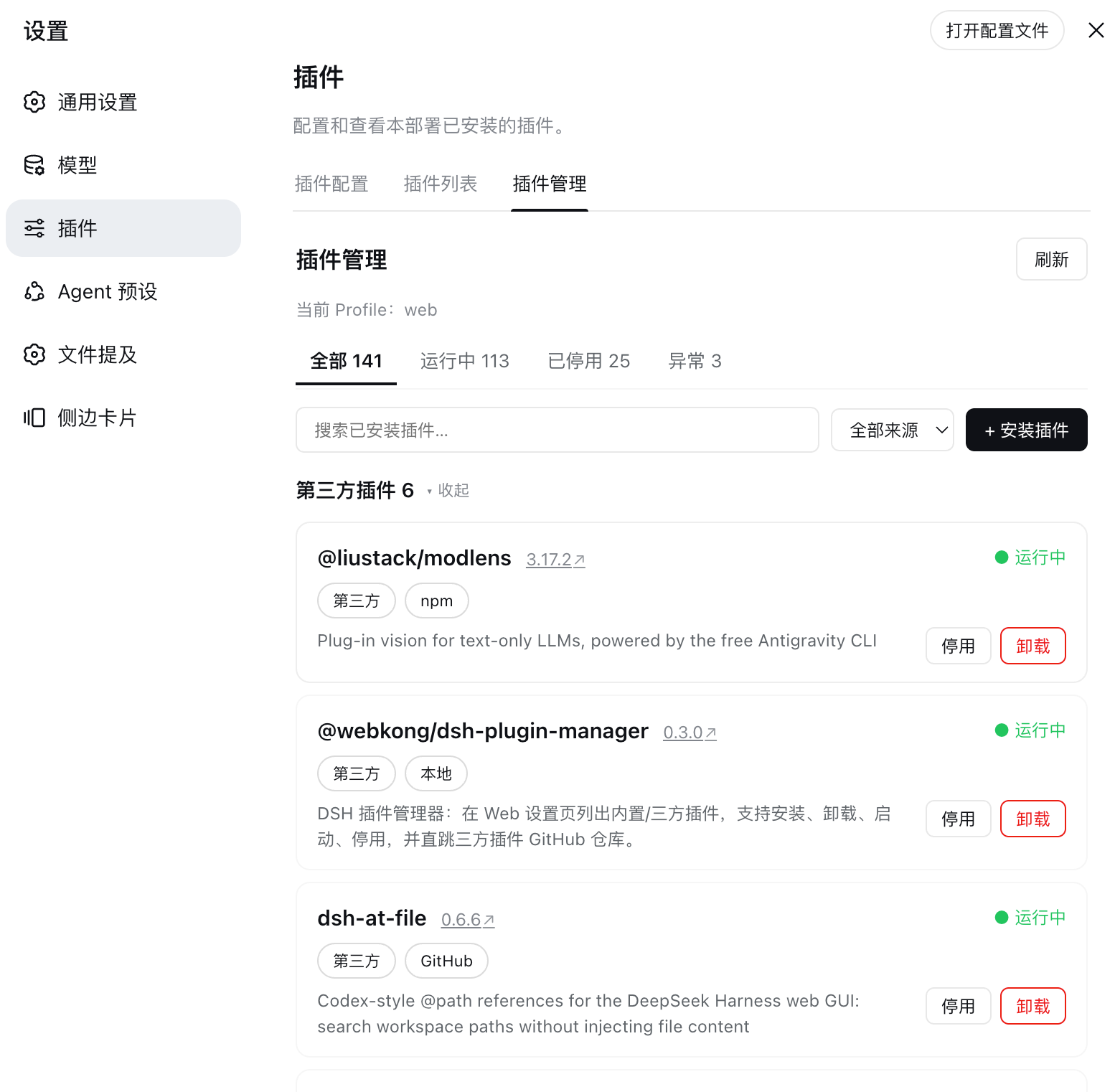
🧭 全局视野,一目了然
- 内置 vs 三方:以 Loader 实时行为主枚举全部 130+ 内置插件,与 DSH 自带列表完全一致;profile dependencies 中的自动识别为第三方、可管理
- 状态一眼可见:运行中 ● / 已停用 / 加载失败,来源标签(npm / GitHub / 本地)、版本、GitHub 入口全在卡片上
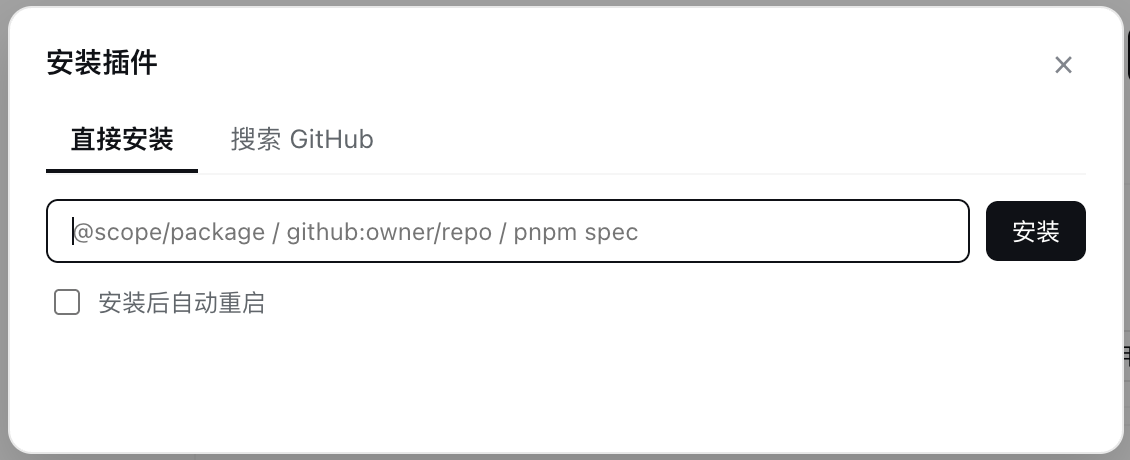
🧩 安装,比你想象的更聪明
- 多种安装源:npm 包名、
github:owner/repo#main、本地路径、tarball URL,通通支持 - 裸包名智能解析:输入
dsh-paste-input这种裸名字,自动探测是 npm 包还是 GitHub 仓库——命中 GitHub 直接列出候选仓库,一键安装 - GitHub 市场搜索:按关键词搜
topic:dsh-plugin,发现生态里还没人注意到的宝藏插件
🎛 启停卸载,背后是精密的手术
- 停用 / 启动:自动解析三方插件 bundle 的装载条目 id,向 profile 的
cordis.patch.yml精确写入 / 移除disabled标记,对 reconcile 免疫 - 卸载:干净利落,连残留的停用条目一起清理
- GitHub 直跳:点卡片上的版本号(↗)直达仓库,看文档、看 star、看代码
⚡ 自动化到最后一公里
- 自动重启:装完自动重启 dsh web(可选,默认关),10 秒倒计时自动刷新页面,重启完成右上角 toast 一键跳回本页
- GitHub token 自动发现:环境变量 / gh CLI / shell rc / git config 逐级探测
GH_TOKEN,未配置时贴心地提示限流原因 - 筛选与搜索:状态 Tab + 来源筛选 + 模糊搜索,内置 / 三方分组可折叠
🌏 为中文用户打磨
- 全中文界面 + English,跟随 DSH 语言偏好自动切换
⚠️ 安装 / 卸载 / 停用 / 启动均在重启后生效(若当前进程 HMR 已激活,停用/启动可能即时生效)。
📦 安装
# 从 GitHub 安装
dsh plugin --profile web add github:webkong/dsh-plugin-manager#main

# 或从本地路径安装(开发)
dsh plugin --profile web add /path/to/dsh-plugin-manager
重启 dsh web 后,进入 设置 → 插件 → 插件管理 即可使用。
⚙️ 配置
默认管理 web profile。可在装载行配置覆盖,并关闭自动重启:
- insert:
    - id: pmgr
      name: '@webkong/dsh-plugin-manager'
      config:
        profile: web        # 管理的 profile(默认 web)
自动重启开关在页面上可随时切换(持久化到 ~/.dsh/dsh-plugin-manager.json)。
🔧 开发
pnpm install
pnpm build      # esbuild 打包 src/ → lib/(Host ESM + Client __ModuleLoader__ bundle)
pnpm typecheck  # tsc 双配置严格类型检查(node / DOM+React)
pnpm test       # node --test 纯函数单元测试(9 用例)
pnpm check      # typecheck + 产物语法检查
结构(TypeScript 模块化)
v0.5.0 起源码整体迁移为 TypeScript 模块化组织(参考官方 ui 插件结构),构建产物在 lib/:
dsh-plugin-manager/
├── package.json              # dsh.bundle / dsh.client 声明,scripts
├── cordis.patch.yml          # bundle patch:装载 pmgr 行
├── build.mjs                 # esbuild 三阶段构建(Host / Client / 纯函数子模块)
├── tsconfig.json             # Host 类型检查(node 环境)
├── tsconfig.client.json      # Client 类型检查(DOM + React 环境)
├── lib/                      # 构建产物(已 gitignore)
│   ├── index.js              # Host 单文件 ESM bundle
│   ├── client.js             # Client __ModuleLoader__ bundle
│   ├── entryIds.js           # 纯函数子模块(供单元测试 import)
│   ├── github.js / patch.js / spec.js
└── src/
    ├── host/                 # Host 源码(TypeScript,Node 环境)
    │   ├── index.ts          # 入口:name/inject/apply + webServer 路由注册
    │   ├── handlers.ts       # HTTP 分发(list/install/uninstall/stop/start/search/resolve/settings/restart)
    │   ├── manager.ts        # 业务层:清单、增删启停、搜索/解析(依赖注入 fs 工具)
    │   ├── fsutil.ts         # node:fs + child_process + 设置持久化
    │   ├── resolve.ts        # 双锚点包解析 / 元数据读取
    │   ├── entryIds.ts       # bundle patch 装载条目 id 发现
    │   ├── github.ts         # GitHub URL 提取 + GH_TOKEN 读取
    │   ├── spec.ts           # 安装 spec 校验
    │   ├── patch.ts          # cordis.patch.yml 停用/启用文本操作
    │   └── http.ts           # JSON 响应 / loopback 校验
    └── client/               # Client 源码(TypeScript,DOM + React 环境)
        ├── index.ts          # apply 入口 + settings tab / shell.overlay 注册
        ├── api.ts            # fetch 封装 + pmgr 方法表
        ├── components.tsx    # 状态 Tab / 工具栏 / 安装弹窗 / 插件卡片
        ├── i18n.ts           # zh / en 文案字典(键类型校验)
        ├── spec.ts           # 客户端 spec 校验 + 裸包名判定
        ├── styles.ts         # CSS 注入
        ├── toast.tsx         # 重启完成 toast + 一键跳转
        ├── types.ts          # 契约类型(wire 形状 / 弹窗状态)
        └── ui.tsx            # 页面编排 / 分组 / 操作弹窗
├── assets/                   # demo GIF + 截图
└── test/pure.test.mjs        # 单元测试(node --test)
通信契约
Host 通过 webServer 前缀路由 /pmgr/* 提供 HTTP API(仅限本机 loopback),客户端用浏览器 fetch 调用:
| 路由 | 说明 |
|---|---|
GET /pmgr/list |
插件清单 + 设置 |
POST /pmgr/install |
安装({spec}) |
POST /pmgr/uninstall |
卸载({name}) |
POST /pmgr/stop / POST /pmgr/start |
停用 / 启用({name}) |
POST /pmgr/search |
搜索 GitHub 插件({q}) |
POST /pmgr/resolve |
解析裸包名(npm 判定 / GitHub 候选) |
POST /pmgr/settings |
更新设置({autoRestart}) |
POST /pmgr/restart |
手动触发自动重启 |
还没有评论,来写第一条。