dsh-session-isolation
Give every new session in a chosen DeepSeek Harness workspace its own working directory — without turning each session into a separate workspace.
@local/dsh-session-isolation is a local DSH bundle with two halves:
- Host — listens to
agent/created; when a session starts (startup) or gets a fresh conversation (clear) inside one of the configured workspaces, it creates<workspace>\<baseDir>\<session-id>and switches the session'sworking-directoryprojection to that directory. - Browser — adds a folder button to the conversation header (next to DSH's built-in "Open in…" split button) that opens the session directory in the OS file manager, and repairs file addresses that DSH builds against the stale workspace root (v1.2.0).
Session ownership never changes: SessionHeader.cwd stays the workspace root, so
the sidebar keeps grouping the session under its original workspace.
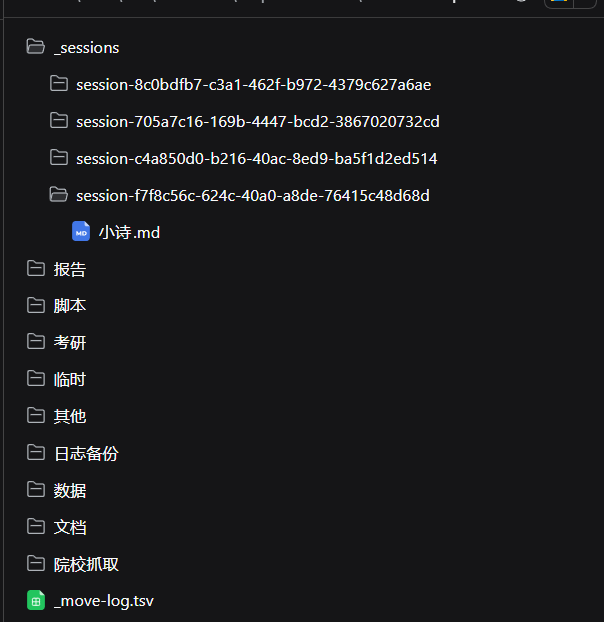
default-workspace\
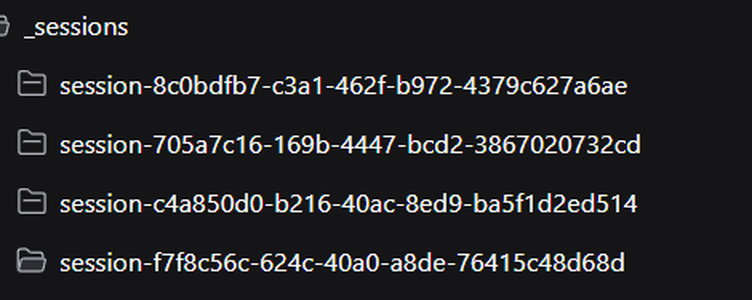
├─ _sessions\                    ← one folder per new session
│  ├─ session-8c0bdfb7-…\
│  │  └─ poem.md
│  └─ session-f7f8c56c-…\
└─ …                             ← existing workspace files, untouched
Features
- Per-session working directory — agents start in
_sessions\<session-id>and only write there unless they explicitly go elsewhere. - No workspace surgery — no new workspace entries, no
SessionHeaderrewrite, no changes to DSH's profile or workspace registry. - New sessions only —
startupandclearare isolated;resumeandcompactkeep whatever the projection already replays. - Subagents included by default — every subagent session gets its own folder (can be turned off).
- Never blocks a session — any isolation failure is logged as a warning and the session silently keeps the workspace root.
- Header button only where it makes sense — it queries a read-only Host route instead of guessing a path, and stays hidden for sessions that are not isolated.
- Client-side address repair (v1.2.0) — file links and file cards in chat open correctly in the document preview even though the working directory is no longer the workspace root.
Screenshots
The folder button added by the bundle, right of DSH's built-in "Open in…" split button:

The files panel browsing the same workspace — every session folder lives under
_sessions:
Requirements
- DSH Desktop 0.2.1-rc.2 or later (tested on 0.2.1-rc.2 and 0.2.1-rc.3).
- The profile enables
@deepseek-ai/dsh-working-directoryand the browser module system — both are on by default in the desktop build. - Windows was the primary target; the Host half uses only
node:built-ins andpathsemantics, so other platforms work as long as the configured workspace paths are absolute.
Install
The package is not published to npm. DSH links a local bundle into the current
profile and mounts the Host row declared by the bundle's own cordis.patch.yml.
- Clone this repository into a stable directory, for example
D:\dsh-session-isolation. - Edit
cordis.patch.yml: replace the exampleworkspacesentry with your own workspace root (absolute path; write doubled backslashes in YAML on Windows). - Install the folder as a bundle and restart DSH Desktop:
- DSH Desktop → Plugins → install a bundle from a folder → select this directory; or
- from a DSH session that exposes the plugin manager:
plugin_manager install_bundle target=<repo path>
A local install is a link: DSH uses the folder in place, so keep it where it is (moving or deleting it disables the plugin).
Configuration
The inserted session-isolation row in cordis.patch.yml:
| Field | Type | Default | Meaning |
|---|---|---|---|
workspaces |
string[] |
required | Absolute workspace roots. Only sessions whose header.cwd equals one of them are isolated. |
baseDir |
string |
_sessions |
Directory name under each workspace. Relative paths are resolved per workspace; absolute paths are used as-is. |
isolateSubagents |
boolean |
true |
Also give subagent sessions their own directory. |
Invalid configuration makes the plugin fail at activation (the row shows as failed) instead of silently doing nothing.
How it works
Host side
agent/created is a serial event: DSH awaits every listener before the session
creation transaction resolves, and a listener that throws aborts creation. The
bundle therefore treats isolation as best-effort — the whole routine is wrapped in
try/catch, failures only produce a warn log line, and the session keeps the
workspace root.
It only acts when source is startup or clear, and only for sessions whose
header.cwd matches a configured workspace. It never overrides a directory that
another mechanism already set (startup skips when the current directory is
neither the workspace root nor the service default).
Header button
The button never guesses: it asks the Host, then reuses DSH's own file-manager routes.
GET /session-isolation/session-directory?sessionId=<id>
  -> 200 {"sessionId": "...", "directory": "<workspace>\\_sessions\\<id>"}   isolated
  -> 404                                                                     not isolated / deleted
The route shares the web server's trust fence (connection.requestRejection,
i.e. DSH's Host/Origin check plus browser auth), answers 405 for non-GET and
400 without a session id. Once a path is returned, the browser half calls the
profile's own GET /open-in-app/apps and POST /open-in-app/open; on Windows
that is File Explorer.
File-address repair (v1.2.0)
DSH's browser code assumes session working directory == workspace root. With an isolated session that assumption can produce two kinds of broken file addresses:
- missing separator —
.../default-workspace_sessions/session-<id>/a.md(workspace root glued tobaseDir); - working-directory-relative —
a.md, which the Host then resolves against the workspace root and misses.
The browser half wraps sidebarRight.openResource and fixes both before opening:
it inserts the missing / when a known workspace root is glued to baseDir, and
prefixes relative paths with <baseDir>/<session-id>/ once the Host confirms the
session is isolated. Repair only applies to configured-workspace, isolated
sessions; every other address passes through untouched. The wrapper is idempotent,
routes to the original method, and never throws.
Only newly opened files are repaired — tab addresses persisted by an older build are not rewritten, so click the file once after upgrading.
Changing index.js or client.js requires restarting DSH Desktop: the browser
half is served from exports["./client"] by the client module system and is
composed at boot.
Verification
- A new session's log (
session.v4.jsonl.zstd) contains aworking-directory/changeevent pointing at_sessions\<session-id>. - The system prompt shows
Current working directory: <workspace>\_sessions\<id>. - Sessions in other workspaces never get an
_sessionsdirectory. - Resuming an old session adds no
working-directory/changeevent. - The header folder button appears and opens the session folder in the file manager.
- Clicking a file link/card inside an isolated session opens the document preview (v1.2.0 fix).
Compatibility
Tested with DSH 0.2.1-rc.2 and 0.2.1-rc.3 on Windows 11. The bundle only uses public, stable contracts and patches no DSH internals:
- Host:
agent/created(serial, awaited listener), theworkingDirectoryservice,webServer.register+connection.requestRejection,sessions.get. - Browser:
dsh.clientpackaging (exports["./client"]→/plugins/<name>/client.js), theconversation.session.header.utilitiesslot, theslots/locale/sessionsservices, and DSH's/open-in-approutes.
Behaviour of the host and client contracts above was re-checked against
0.2.1-rc.3 (working directory service, agent/created signature, slot
registration, file-address grammar, /open-in-app body validation) — no code
changes were required. Runtime dependencies: none (Node built-ins only).
Notes
- The plugin never changes sandbox, approval or permission settings. On Windows,
DSH's own sandboxed shell can have environment-specific issues in some builds
(e.g. console child processes under
workspace-write, or a bundled PowerShell without itsModulesdirectory); those are unrelated to this bundle. - Deleting a session may leave an empty
_sessions\<id>folder behind; nothing cleans it up automatically. - A
_sessionsfolder can be deleted at any time — the session falls back to the workspace root.
Uninstall
Disable the session-isolation row in the plugin manager to stop isolating new
sessions, or remove the whole bundle. Existing sessions and their _sessions
folders are unaffected and can be deleted by hand.
Development
index.js— Host half (isolation + read-only directory route).client.js— browser half (header button + address repair), served viaexports["./client"].cordis.patch.yml— the Host row inserted by the bundle.locale/,icon.svg— plugin-manager display metadata.
License
MIT — see LICENSE.
No comments yet. Be the first to write one.