dsh-scheduled-send
在 DSH 的输入框里,把一条消息排到将来的某个时刻。
它不改发送按钮的功能,只把发送按钮本身做成飞书那种带箭头的分体按钮:宿主那颗蓝色发送圆钮的左边,接上一个同色的 ▾ 半段,两者拼成一颗胶囊——
┌───────────┬─────┐
│     ▾     │  ▷  │   ← 一个控件:左半边开「定时消息」,右半边照常发送
└───────────┴─────┘
- 点 ▾ → 日期 + 时间对话框 →
定时发送;顺手给了10 分钟后 / 30 分钟后 / 1 小时后 / 明天 9:00四个预设 - 发送箭头朝右(飞书同款),整颗胶囊一个蓝色,深色主题自动跟随
- 到点由宿主投递:关掉标签页、切到别的会话、宿主重启,都不影响
- 待发送的条目就列在同一个对话框里,可以逐条撤销;有排队时 ▾ 上带一个白点
- 投递出来的就是一条普通的用户消息,和你自己敲回车发出去的一样
- 主按钮变成「停止」方块时(运行中且输入框为空),▾ 半段自动收起,不会误贴在停止按钮上
截图

输入框右下角:蓝色的 ▾ 和发送键拼成一颗胶囊,左边照常是模型选择器。
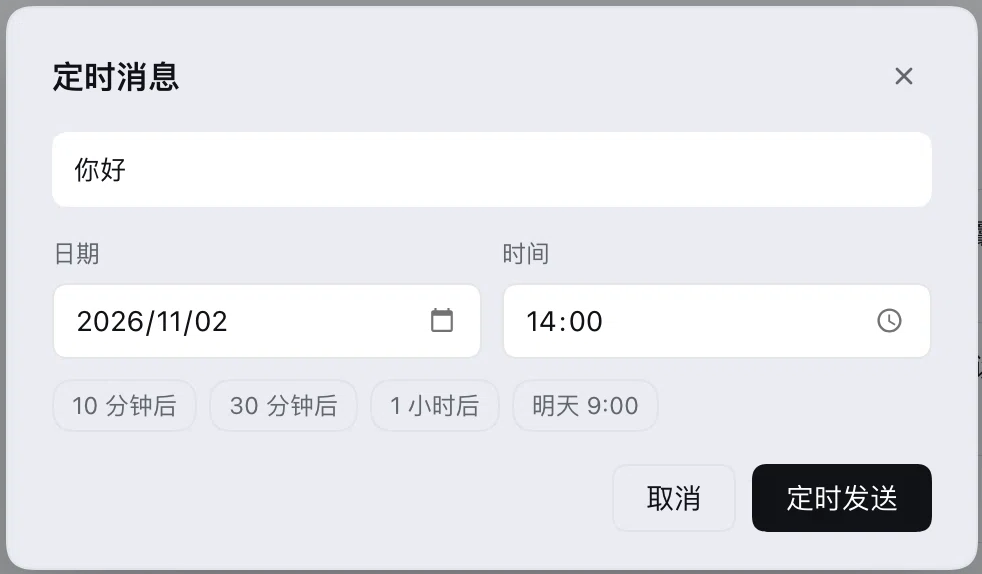
点 ▾ 打开:正文预览、日期、时间、四个预设,底部「取消 / 定时发送」。
安装
# 从 GitHub
dsh plugin --profile web add github:wangjiaxi/dsh-scheduled-send

# 从本地目录(开发时用,link 方式,改文件即时生效)
dsh plugin --profile web add /path/to/dsh-scheduled-send

# 从 npm(发布之后)
dsh plugin --profile web add dsh-scheduled-send@latest
装完刷新页面,发送按钮就变成那颗分体胶囊了。
包声明了
dsh.bundle.patch,dsh plugin add会自动把它写进dsh.profile.bundles,不用手改cordis.patch.yml。
它是怎么贴上去的
输入框工具栏里没有「发送按钮之后」的插槽,conversation.input.right 渲染在 .standardControls 里、模型选择器之前。所以 ▾ 半段的定位是三步 CSS:
order: 999—— 在自己那个容器里排到最后(模型选择器之后);position: relative; right: -24px—— 平移出去吃掉中间的空隙。这个数是从渲染结果量出来的:.trailing的 12px 间距 + 中间那个 0 宽空槽又贡献 12px。宁可多移,因为多出来的部分会钻到发送按钮底下被盖住,而少移就会留缝;- 把自己画成胶囊的左半段(左圆右直),再把宿主发送按钮的左边缘改成直角(
[data-composer-card] button[class*="_primary"]{border-radius:0 999px 999px 0}),两半就合上了;同一个选择器把里面的上箭头rotate(90deg)变成朝右,另一条规则在它的左缘上画那道竖分隔线(位置永远正好在接缝处)。
这三条都是纯外观、可失败的:任何一条在 DSH 升级后匹配不到,功能都还在,只是胶囊接缝处多两个直角、或者箭头仍然朝上。匹配的锚点是 [data-composer-card](宿主自己的稳定标记)+ _primary 类名后缀(CSS Modules 命名),不是哈希全名。
用法
- 在输入框里写好要发的内容(定时发送取的是点 ▾ 那一刻的草稿)
- 点 ▾
- 选日期和时间,或者点一个预设
- 点
定时发送→ 输入框清空,▾ 上出现一个小白点
到点之后,宿主把这条消息作为用户消息投进会话;会话空闲就立刻开始这一轮,正忙就排在下一条。
它和自带的「定时任务」不是一回事
DSH 自带的 schedule_* 是给模型的提醒:到点投递的是一段 [SCHEDULE REMINDER] 提醒帧,会话里显示成「自动化任务」,模型看到的是「有条提醒」而不是「用户说了句话」。
本插件投的是用户自己的消息:source.kind === 'user',走的是输入框回车那条宿主路径(ctx.sessionController.prompt),所以会话日志、界面、上下文里看到的都是一条普通的用户发言。
两者不冲突:需要「提醒模型」用 schedule_create,需要「替我把这句话在 9 点发出去」用这个箭头。
工作原理
┌──────────── 浏览器 ────────────┐        ┌──────────── 宿主 ────────────┐
│ 箭头 → 对话框                  │        │ 每秒扫一次队列               │
│  POST /create {sessionId,      │  ───▶  │ 到点 → sessionController     │
│    text, dueAt, timeZone}      │        │        .prompt({mode:'queue'})│
│  列表 / 撤销                   │  ◀───  │ 队列存 tasks.json            │
└────────────────────────────────┘        └──────────────────────────────┘
- 待发送队列落在
$DSH_HOME/storages/dsh-scheduled-send/tasks.json(写临时文件再 rename),插件 HMR、宿主重启后按绝对时间重建 - 投递走
ctx.sessionController.prompt({ mode: 'queue' })—— 会自动恢复冷会话、做附件与模型能力校验、把消息写进会话日志 - 投递失败(会话没了、宿主忙)每 60 秒重试一次,5 次之后丢弃并记一条 warning
- 时间一律以 epoch 毫秒存储,时区只在投递时作为
clientTimeZone带给宿主,因此换时区不会把已排的条目挪位
HTTP 接口
前缀 /dsh-scheduled-send/api(同源、走浏览器的登录 cookie),脚本和自测都能直接用:
| 方法 | 路径 | 请求 | 返回 |
|---|---|---|---|
| GET | /info |
— | { ok, name, version, queued } |
| POST | /list |
{ sessionId } |
{ ok, items } |
| POST | /create |
{ sessionId, text, dueAt, timeZone? } |
{ ok, item } |
| POST | /cancel |
{ id } |
{ ok, removed } |
| POST | /fire |
{ id } |
{ ok } — 立刻投递,自测 / 补发用 |
dueAt 是 epoch 毫秒,必须晚于现在、且在一年以内;timeZone 省略也可以。
移动端
窄屏(≤767px)或检测到 dsh-web-mobile 的环占位时,不拼胶囊,退回成发送键左边的一个 28px 图标按钮——因为移动端插件会把工具栏间距压到 3px,还会在发送键左边插一个 18px 的隐藏占位(把上下文环搬过去),这时候再往右贴 24px 既贴不严、又会压住那个环。
对话框在 ≤560px 时改成从底部升起的抽屉:占满宽度、圆角只留上面两个、按钮加高到 40px、输入框字号 16px(低于 16px 时 iOS 一聚焦就会把整页放大)。≤400px 时日期与时间改成上下排。
限制
- 只发文本:定时发送不带附件,输入框里有附件时会提示先去掉
- 排上之后输入框会被清空(消息已经进了队列,正文还在对话框的待发送列表里能看到)
- 依赖
webServer与sessionController两个宿主服务(Web / 桌面版的标配) - 路由没有独立的鉴权层,和宿主本身一样信任浏览器会话;不要把
dsh web直接暴露到公网
开发与自测
node --check index.js
node --check client.js
node scripts/validate.mjs   # 等同于 npm run validate
scripts/validate.mjs 检查的是加载器真正会读的东西:manifest、bundle patch、exports、locale 元信息、图标、客户端注册 id。CI 也跑同一套(.github/workflows/validate.yml)。
想不等到点就看投递效果:POST /fire { id }。
License
MIT
English
Turns the composer send button into a Feishu-style split control: a same-blue ▾ half joins the left edge of the shipped send button, so one blue capsule offers schedule on the left and send on the right. Pick a date and time, hit Schedule, and the host delivers that message into the conversation at that moment — closing the tab, switching sessions, or restarting the host does not cancel it.
- The ▾ half lives in
conversation.input.rightand is pinned to the send button with three CSS-only tweaks (order, a relative-8pxshift, matchingborder-radiusplus arotate(90deg)on the shipped arrow); each degrades to "still works, slightly off" if a DSH upgrade changes the markup - The dialog snapshots the draft when you open it; the ▾ half hides itself while the primary button is showing the stop square
- Delivery goes through
ctx.sessionController.prompt({ mode: 'queue' }), so what lands in the session log is an ordinary user message (source.kind === 'user'), not a[SCHEDULE REMINDER]frame - The queue is a JSON file under
$DSH_HOME/storages/dsh-scheduled-send/, rebuilt on load from absolute epoch milliseconds; failures retry every 60 s, five times - Text only — attachments are refused for now
dsh plugin --profile web add github:wangjiaxi/dsh-scheduled-send
HTTP surface: GET /dsh-scheduled-send/api/info, POST /{list,create,cancel,fire}.
No comments yet. Be the first to write one.