Session HUD
A desktop floating HUD for DeepSeek Harness (DSH).
When you minimize DSH, a small glass window stays on top of your desktop and shows the live status of your sessions — which one is running, which one is waiting for your approval, which one just finished. Click a row and DSH comes back to that exact session. Move the window to a screen edge and it collapses into a slim marker that expands on hover, so it never gets in your way.
Windows 10/11 · DSH desktop 0.2.x · first use downloads the Electron runtime once (~110 MB).
Features
- Follows the DSH window: hidden while DSH is on screen, appears when DSH is minimized or hidden, hides again when DSH comes back.
- Live session status: running / waiting for approval / just finished / error, with tool name, turn/step and elapsed time.
- One click back to the session: opens DSH (restoring it if minimized) and navigates to the selected session.
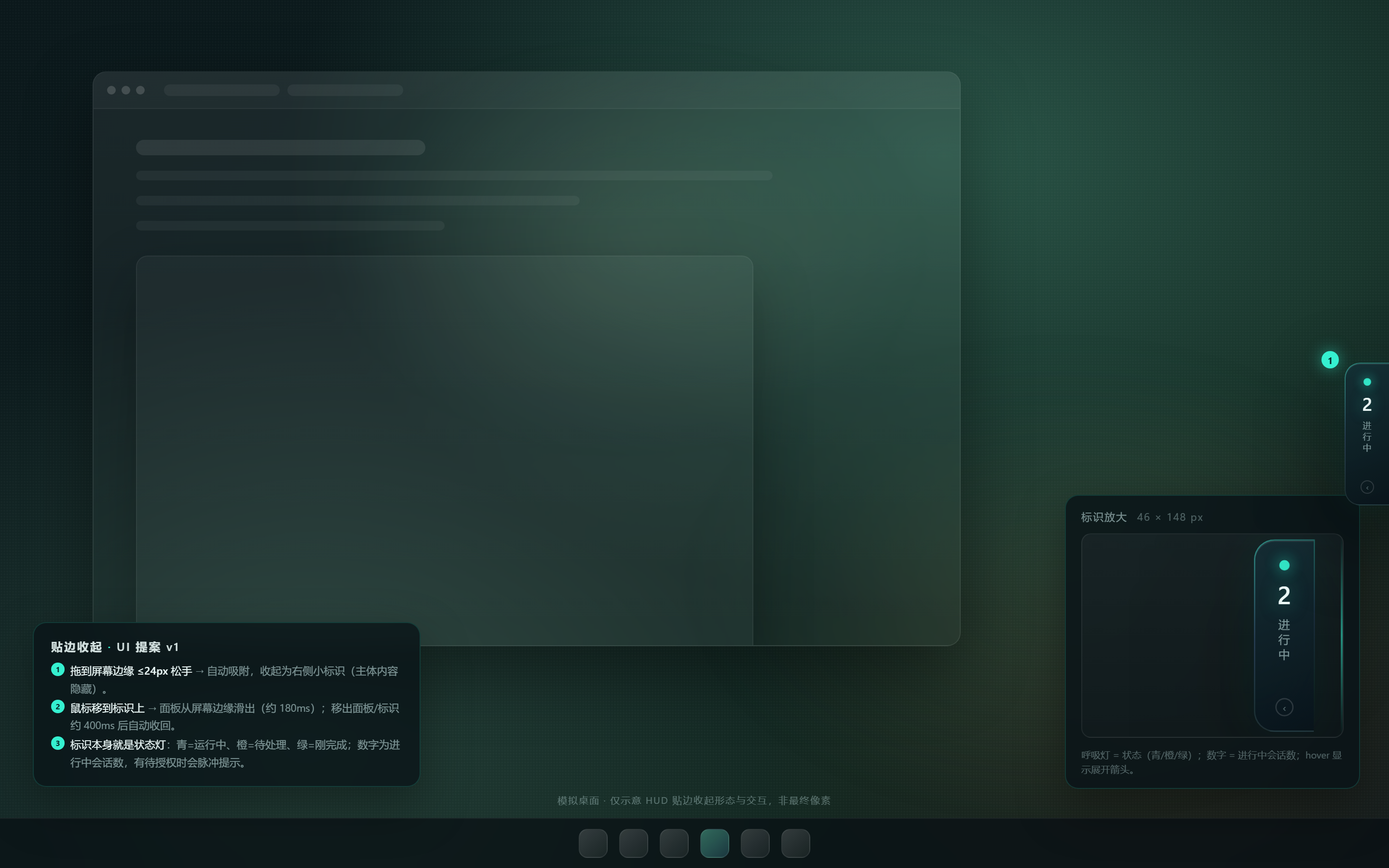
- Edge dock: drag the HUD to the left, right or top edge and it collapses into a slim status marker (colored beacon + running-session count). Hover to expand, drag the title bar back in to restore the normal floating window.
- Inline approvals: pending approval cards can be allowed/denied directly from the HUD.
- Opacity, always-on-top and follow-mode controls in the footer; settings and position persist between restarts.
- Content-free logging: diagnostics never record session titles, identifiers or absolute paths.
Requirements
- Windows 10/11 (x64). macOS/Linux are not supported yet.
- DeepSeek Harness desktop app 0.2.x (the plugin uses the desktop host's
window-state reporting; the browser-hosted
dsh webbuild has no desktop window to follow). - ~110 MB of free disk space for the Electron runtime (downloaded once, shared by all versions of this plugin).
Install
dsh plugin --profile desktop add dsh-session-hud
or install it from the DSH Plugins → Discover tab once the plugin is listed.
Then restart DSH. A "mobile window" button appears in the sidebar footer; click it (or minimize DSH) to show the HUD.
First run
The overlay window is a real Electron window, so the first time it is shown the plugin downloads the Electron runtime into:
%USERPROFILE%\.dsh\session-hud\runtime\
It tries the npmmirror mirror first and falls back to the official Electron GitHub release. If your network cannot reach either, point the plugin at an existing Electron runtime:
$env:HUD_ELECTRON_PATH = "C:\path\to\electron.exe"
(or copy the extracted electron-v44.7.0-win32-x64 folder into the runtime
directory above).
Usage
| Action | How |
|---|---|
| Show / hide | Sidebar footer button, or let it follow the DSH window |
| Open a session | Click a row in the HUD |
| Answer an approval | Click 允许 / 拒绝 on the approval card |
| Edge dock | Drag the window within 24 px of the left/right/top edge |
| Expand docked HUD | Hover the edge marker (or click it) |
| Undock | Drag the expanded panel's title bar back into the screen |
| Follow mode | Footer 「跟随」 chip (on = follow the DSH window) |
| Opacity / always-on-top | Footer controls |
Data and privacy
- The HUD reads session metadata only (title, status, recent tool name, timing) from the running DSH host. It never reads message bodies and never writes them.
- All communication is a local HTTP bridge on
127.0.0.1:41333–41342. Nothing is sent to the network; there is no telemetry. The only network request is the one-time Electron runtime download. - Diagnostics are opt-in (
HUD_DEBUG=1) and are content-free by design: session identifiers and absolute paths are redacted before anything is written. - Runtime state (window position, dock edge, opacity, logs) lives in
%USERPROFILE%\.dsh\session-hud\. Delete that folder to reset everything.
Uninstall
dsh plugin --profile desktop remove dsh-session-hud
The runtime cache and settings in %USERPROFILE%\.dsh\session-hud\ are kept so that
re-installing does not download the runtime again. Remove that folder manually if you
want to reclaim the space and reset the HUD.
Troubleshooting
- HUD does not appear: check that the plugin is enabled for the
desktopprofile, then restart DSH. While DSH is visible the HUD stays hidden by design — minimize DSH or click the sidebar button. - "runtime download failed": check the log under
%USERPROFILE%\.dsh\session-hud\logs\hud-host.log, then either retry (/hud/restartfrom the client, or restart DSH) or setHUD_ELECTRON_PATH. - Port already in use: the bridge scans 41333–41342; if all ports are busy the plugin logs an error and the HUD button shows "未连接".
- Docked window looks odd after an upgrade: delete
%USERPROFILE%\.dsh\session-hud\userdata\overlay-state.jsonto reset the geometry.
Development
npm test          # overlay self-tests (Node 20+, no Electron needed)
npm run check     # syntax check of every entry point
Layout:
index.js            host half: session collection + local HTTP bridge + overlay supervisor
client.js           DSH client half: sidebar toggle, window-state reporting, open-session
runtime.js          Electron runtime resolver / one-time downloader
overlay/            the Electron window (main, preload, renderer)
launcher/           Electron app entry that loads overlay/
focus-dsh-window.ps1  Win32 helper: restore/foreground the DSH window
License
MIT. See LICENSE.
No comments yet. Be the first to write one.