@voltarenyah/dsh-prompt-note

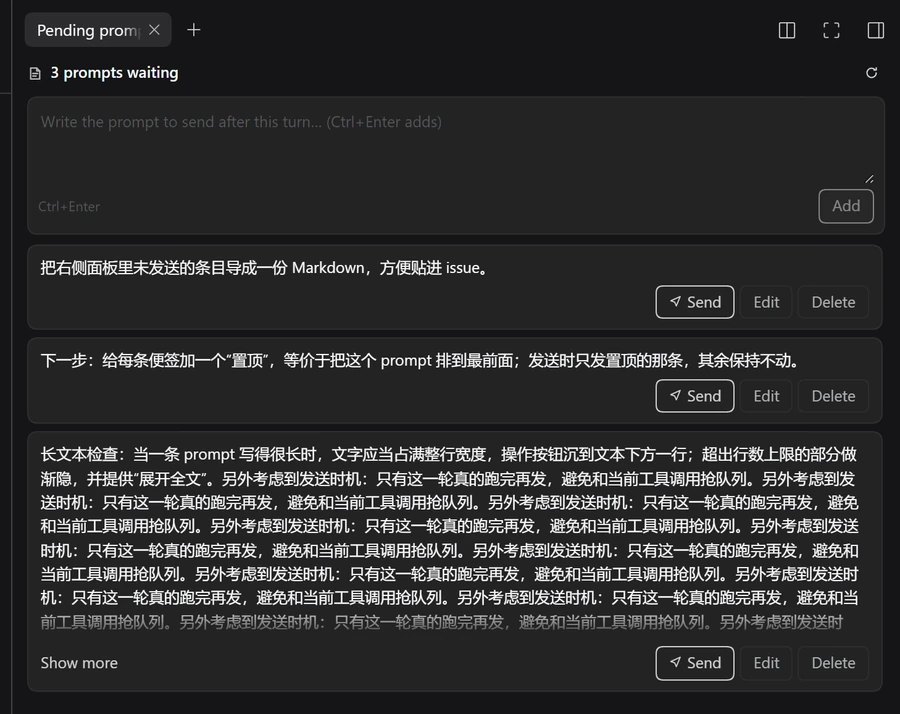
A Session-bound “pending prompts” list for DeepSeek Harness (DSH), rendered as a tab in the right sidebar. Write the next prompt down while the agent is still working on the current turn, then send it — one at a time — when you are ready.
Compatibility
Requires DSH ≥ 0.2.1-rc.2 — the release that ships the right-sidebar tab
registry (ctx.sidebarRightTabs) this plugin registers into. The requirement is
declared as engines.dsh, so an older Host refuses the installation instead of
failing at runtime.
Install
- In the app: sidebar → Plugins → Add plugin, then enter the package
name
@voltarenyah/dsh-prompt-note(or a pinned@voltarenyah/dsh-prompt-note@0.1.2) and install. - With an agent: ask it to install the bundle
@voltarenyah/dsh-prompt-note. - From the CLI:
dsh plugin --profile <profile> add @voltarenyah/dsh-prompt-note.
Installs go to the profile, so every Session in that profile gets the tab. If
your package manager points at a mirror that has not synced the release yet, ask
for npm's own registry explicitly (in the app: the plugin manager's registry
choice; from the CLI: --registry https://registry.npmjs.org/).
Why
The composer queue belongs to the running turn: anything typed while the agent works is queued for that turn. But mid-conversation you often produce ideas that belong to a later turn, and you are not yet sure whether this turn will continue debugging. Writing them into the queue is wrong, and keeping them in your head or in a scratch buffer loses them.
dsh-prompt-note keeps them next to the conversation they belong to.
What it does
- One list per Session. Notes are keyed by Session id, stored by the Host
half in the profile's data directory (
<profile>/dsh-prompt-note/notes.json), so they survive page reloads, restarts, and other clients. - Write, edit, delete. Compose box at the top (
Ctrl+Enteradds), inline edit per note,Escapecancels. - Send when ready.
Sendadmits the stored note as the Session's next prompt through the Host's Session controller (mode: 'queue'), so a running turn queues it exactly like a typed prompt. The note is consumed on success. No composer draft is touched — sending from the panel never overwrites text you were already typing. - Locales. English and Chinese copy; follows the app's active locale.
Where to find it
Open the right sidebar (the panel toggle at the top right), then either pick Pending prompts from the empty-state list or use the sidebar's + (new tab) control. The tab is per-Session: switching conversations switches the list.
Files
| File | Role |
|---|---|
index.js |
Host half: the notes store and the fenced /prompt-note/api/* route (list, add, update, remove, consume, clear, send). |
client.js |
Client half: registers the right-sidebar tab type and its body; renders the panel. |
cordis.patch.yml |
Bundle patch that inserts the prompt-note row. |
locale/en.json, locale/zh.json |
Plugin display metadata (title, description). |
icon.svg |
Plugin artwork. |
Route contract
All methods are POST with a JSON body and answer { ok: true, value } or
{ ok: false, error: { code, message } }. The route is fenced with the Host's
browser-trust check (connection.requestRejection).
| Method | Body | Value |
|---|---|---|
list |
{ sessionId } |
{ notes: Note[] } |
add |
{ sessionId, text } |
{ note } |
update |
{ sessionId, id, text } |
{ note } |
remove |
{ sessionId, id } |
{ removed: boolean } |
clear |
{ sessionId } |
{ cleared: number } |
send |
{ sessionId, id } |
{ sent: true } |
A note is { id, text, createdAt, updatedAt }.
Limits
- 20 000 characters per note, 200 notes per Session.
- The list is not pushed live to other open clients; use the reload control in the panel header.
No comments yet. Be the first to write one.