dsh-matrix-terminal

A phosphor-green terminal skin for the DeepSeek Harness Web UI.
One monospace voice, square edges, scanlines over the glass, a blinking prompt line under the composer, and a chat that reads as a transcript: prompts and answers on the left, everything the harness did behind them moved into a right-side work log.
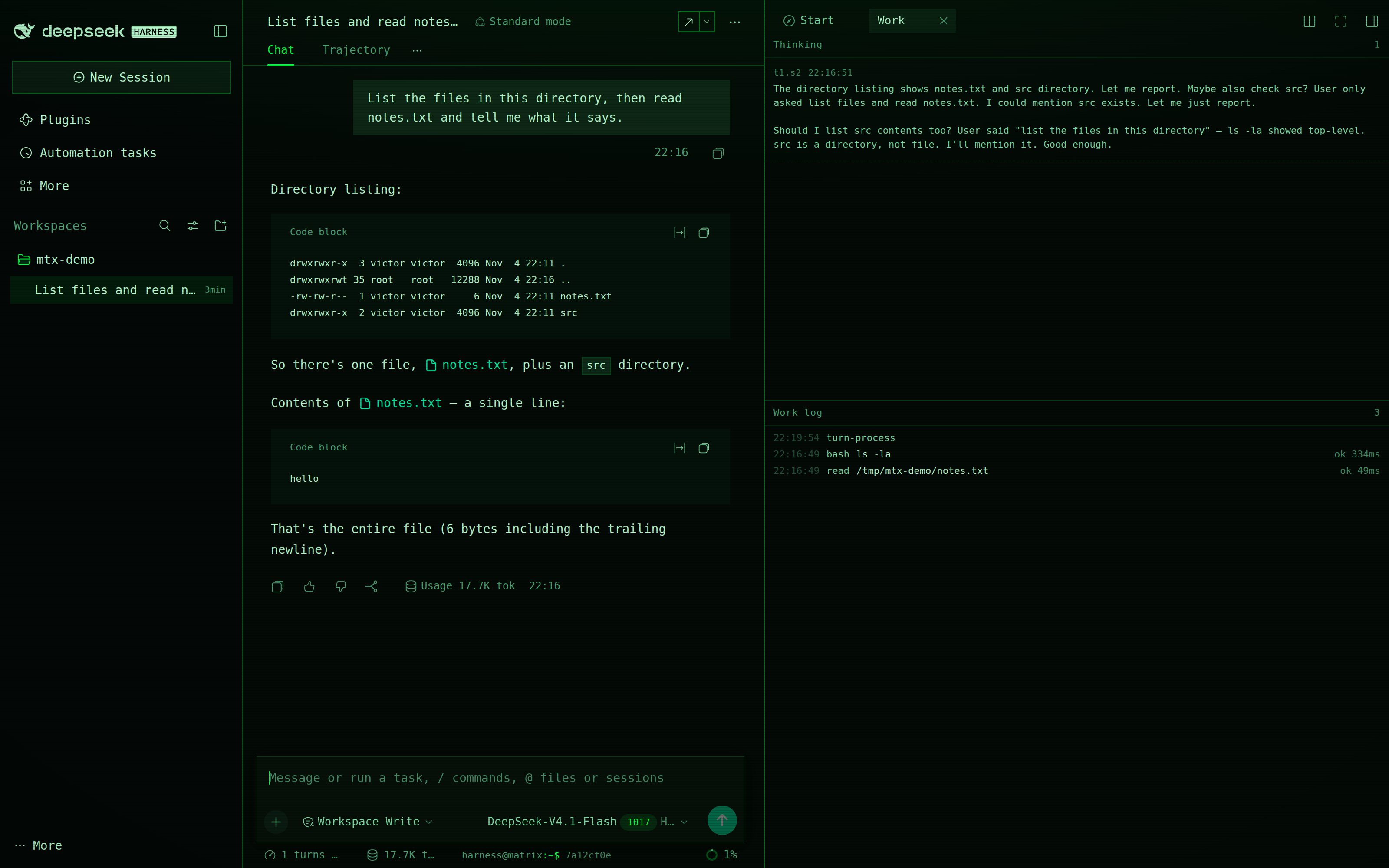
harness@matrix:~$ 3f7c1a08 █ <$0.01
(The screenshots were taken without the companion balance plugin, so the prompt line ends at the cursor.)
What it changes
Design tokens. All 123 --dsw-* tokens the Web UI reads are overridden: surfaces, text ramp,
hairlines, brand, buttons, interaction washes, states, menus, markdown and code blocks, diffs,
scrollbars, plus the geometry (0px radii everywhere) and the type family. Nothing paints a
hard-coded colour on top of a token.
Chrome the tokens cannot express — one injected stylesheet:
body::after— a scanline overlay, one dark row every three pixels, pointer-transparent.body::before— a soft phosphor bloom from the top and a vignette at the edges.- A mono-green Shiki theme, so code blocks stay legible in one hue separated by luminance.
- Heading text-shadow, square scrollbars, a green caret and selection.
The prompt line. A conversation.composer.dock slot under the composer:
harness@matrix:~$, the first eight characters of the session id, a blinking block cursor, and —
if the companion balance plugin is installed — the account balance right-aligned.

The transcript. Process rows the chat would otherwise print inline (tool calls, turn process, system prompts, context, compaction, retries, workflow runs) are hidden from the flow and projected into the work log instead. What stays in the chat is what a terminal transcript keeps: what you typed, what the model answered, and how the turn ended.
The work log. A right-sidebar page type with two panes: reasoning above (one entry per step that thought), the work log below (one row per tool call or process event, with clock, tag, subject and duration). Each pane follows its own tail and releases as soon as you scroll away. The log opens itself once per session; close it and it stays closed until you move to another session.
It also has a door on the sidebar's Start page, beside Workspace files and New terminal, so the log is reachable after you close it without waiting for another session.
The pulse. A second right-sidebar page, also on the Start page: two fields of neural current, one for reasoning and one for tool work. Each field is a small constellation — nodes, spokes, a core — that stays dim while its signal is idle and starts firing when it goes live: current runs along the spokes, nodes flash in sequence, the core lights and throws off a ring. Green for thinking, amber for working, so the column says what is happening without reading the log.
A tool call that settles in 40 ms would never be seen, so the working field keeps its light for 2.5
seconds after the last finish. Each field's foot line names the newest thing behind it — t3.s1 for a
reasoning step, the tool and its subject for a call. The fields read the same live signals as the
log, so they agree with it by construction. With prefers-reduced-motion the fields stay colour-coded
but stop animating.
The nodes drift on their own clocks, idle and live alike: three paths on three durations, each node
offset by a negative delay so no two neighbours move together. That motion is gated on visibility
through an IntersectionObserver, so a hidden tab or a scrolled-away pane costs nothing — verified by
reading animation-name back off the DOM (none) with the tab in the background. Measured in headless
Chrome with the GPU disabled, the animated pane sat inside the app's own idle CPU noise at 60 fps; on
a composited desktop it should cost less.
The sound page. A fourth Start card: drop an audio file on the pane, or choose one, and it plays with a cava-style spectrum — 20 to 56 log-spaced bands with peak caps that fall, drawn on a canvas and only while the pane is on screen. Audio keeps playing when you switch tabs; the drawing does not. Transport is play/pause, seek, elapsed and total, and volume.
With the optional library companion
installed, the pane lists one folder instead — name and size per row, click to play, the next track
starts when one ends, and a rescan button picks up files you added. The folder is ~/Music unless the
library's root config says otherwise. Dropping a file still works with a library loaded; it just
plays instead of the selected row.
The file never leaves the browser. It plays from a blob URL and reaches the analyser through a Web
Audio AnalyserNode, which is also why this page takes files rather than URLs: a cross-origin stream
gives the analyser silence, so a URL player would show bars that have nothing to do with the music.
The pattern page. A fifth Start card: a Strudel editor, seven built-in pieces, and the same
spectrum as the sound page — except here the bars are real. Run plays the editor's code, Stop hushes
it, and Save keeps a piece under a name in localStorage beside the built-ins that live in the repo.
Pieces range from a single loop to a two-minute arrangement: Hyperdrive Extended is built from
arrange(...), seventy cycles of entries and exits that play as an arc and then loop back to the
intro.
Strudel is fetched from esm.sh at the pinned version @strudel/web@1.3.0 the first time you press
Run, so the pane needs the network once per page load. The engine builds its own AudioContext and
connects to context.destination when it plays; this page intercepts connections to that destination
node, scoped to that one context, and puts an analyser in front of it. The bars therefore measure what
actually comes out of the engine, and the sound page's own graph is untouched by the interception.
Before the engine starts, the pane prebakes the dirt-samples drum map: Strudel ships synths only, so
without that every s("bd") would be silent while the filter sweeps and pads played on. The map is
fetched once and each hit pulls its own wav on first use, so the first bar after a cold start may
arrive a second late.
Strudel is AGPL-3.0-or-later, which is a large part of why this plugin is AGPL too.
Why there is no Spotify here. The Web API needs a registered app, an OAuth PKCE round trip, a Premium account and an active playback device — and none of that changes the analyser problem, since Spotify audio crosses an origin boundary the browser will not let you measure. A Spotify build would be a transport with a decorative visualizer, plus a client id and redirect URI to keep. It is doable as a separate page; it would not be this spectrum.
Requirements
- DeepSeek Harness
0.2.2-rc.1or a compatible release, Web profile. The tab and guide APIs this uses are also present in0.2.1-rc.5. - The work log needs the right sidebar. Without it the skin still applies; only the log is lost.
- Dark only, deliberately. A terminal has one look.
Install
Not on npm yet — install straight from the repository:
dsh plugin --profile web add github:victorcastro55/dsh-matrix-terminal
Restart dsh web (or let the profile reload) and the skin is on.
Optional companions, each independent:
dsh plugin --profile web add github:victorcastro55/dsh-matrix-terminal-balance   # balance on the prompt line
dsh plugin --profile web add github:victorcastro55/dsh-matrix-terminal-library   # a folder of audio for the sound page
From a clone
To edit the skin live, clone it and link the working tree instead:
git clone https://github.com/victorcastro55/dsh-matrix-terminal.git
dsh plugin --profile web add link:"$PWD/dsh-matrix-terminal"
Uninstall
dsh plugin --profile web remove dsh-matrix-terminal
The token layer, the stylesheet and the work-log tab are all registered inside the plugin's own effect scope, so nothing is left behind: removing the package restores the stock Web UI on restart.
How it works
Two halves, one package. index.js is the host half and does nothing — the skin is pure client,
which keeps it working on a read-only or remote host. client.js is a Client module that:
- registers an
en/zhlocale namespace, - pushes the palette through
ctx.theme.overrideTokens('dsh-matrix-terminal', …), so it layers over whichever theme is active rather than replacing the theme system, - appends its stylesheet with a
data-pluginmarker and removes it on dispose, - registers the prompt-line slot,
- injects
sidebarRightTabs/sidebarRightoptionally, and only then registers the work-log tab.
No network calls, no telemetry, no data leaves the page. The only outbound request in the family belongs to the companion balance plugin, which runs in the host process and never exposes the key.
Locale
English and Simplified Chinese ship in locale/. The meta block is what the plugin list shows;
the runtime strings live in the module's own dictionaries.
License
AGPL-3.0-or-later. Copyright (C) 2026 Victor Castro Solalto. The full text is in LICENSE.
This is a copyleft licence: you may use, modify and redistribute this plugin, but a version you distribute — including one you run as a network service — must carry the same freedoms and its source with it. It does not reach your content: the music you play, the sessions you run, and the files in your workspace are untouched by it. If you would rather not take on copyleft obligations, install one of the earlier MIT releases instead of this one.
Not affiliated with DeepSeek; no assets from the Harness are redistributed here.
No comments yet. Be the first to write one.