dsh-tabs
Chrome-style tabs for DeepSeek Harness (DSH) chat sessions, in the Web GUI.
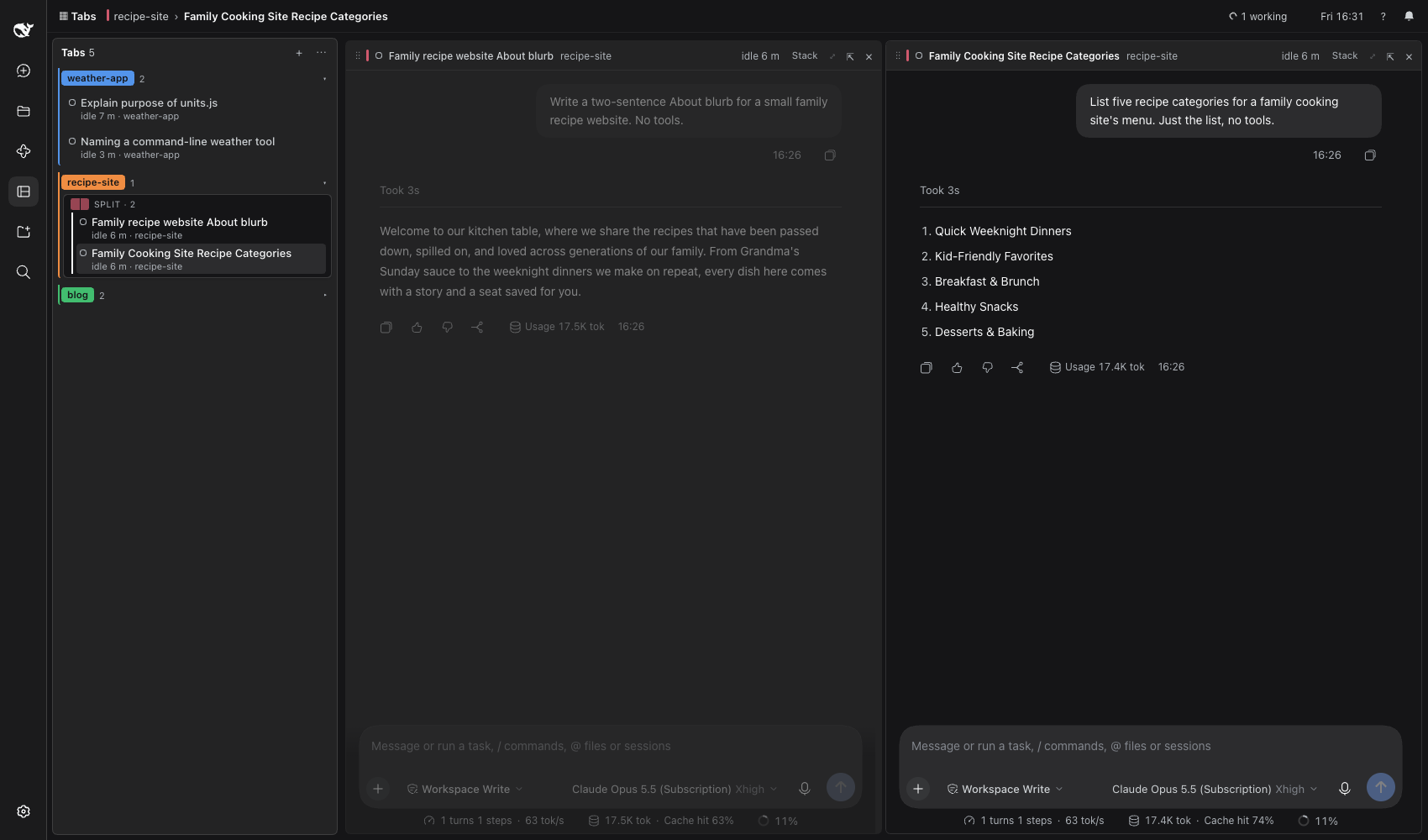
- A tab strip in your order. Opening a chat adds a tab at the end. Only opening, closing and dragging change the order; switching tabs never moves one.
- Vertical or horizontal. Down the side (drag its edge to resize it, 180–560 px) or along the top like a browser.
- Tab groups. Each has a name and a colour and can be collapsed. "Group by project" builds them from the chats' workspaces.
- Splits. A tab holds one session or up to four live panes side by side. Drag a tab onto a pane's edge to split it, or onto its centre to replace or swap it.
- Nothing stops. Closing a tab only takes it off the strip: the session keeps running in DSH's session list (the drawer), and ⌥⇧T reopens it.
- Notifications. A bell collects one notification per question from any open tab, and you can answer short ones right there. ☾ Focus turns off the banners.
- Subagents and jobs. A chip in each pane's header lists them; click a subagent to open it beside the pane.
The page appears as Tabs in the sidebar. Files, Terminal and file previews open on the session's normal full page (⤢); Back to tabs returns.
Install
Requires DSH with the Web GUI (dsh web).
dsh plugin --profile web add @vennahlot/dsh-tabs
Or from a clone, to hack on it:
git clone https://github.com/vennahlot/dsh-tabs.git
dsh plugin --profile web add link:$PWD/dsh-tabs
Then restart dsh web and refresh the page. The bundle adds its own profile row
(cordis.patch.yml); the only option is stateFile (default
~/.dsh/dsh-tabs/state.json).
Shortcuts
| Keys | Action |
|---|---|
| ⌥1 … ⌥8, ⌥9 | Tab n, the last tab |
| ⌥[ ⌥] | Previous / next tab |
| ⌥O | Open a recent chat |
| ⌥W | Close the focused pane |
| ⌥⇧T | Reopen the last closed tab |
| ⌥←↑↓→ | Move focus between panes |
| ⌥F | Full page of the focused pane |
| ⌥B | Show or hide the drawer |
| ⌥N | Notifications |
They also appear in DSH's shortcut reference. ? on the page explains the mouse actions.
For other plugins
dsh-tabs declares two slots that other bundles may fill:
| Slot | Kind | Shows |
|---|---|---|
tabs.menubar.item |
list, root scope | A small item on the page's menu bar (for example a usage gauge). |
tabs.pane.side |
keyed, session scope | A side panel inside a pane, opened from the pane header. |
Inject them with ctx.slots.inject('<slot>', () => ctx.slots.register({ name: '<slot>', … }, Component))
so your bundle waits until dsh-tabs is loaded and works without it.
Development
Plain JavaScript, no build step: index.js is the Host half (the state file and its
route) and client.js is the Client half (the page). See DESIGN.md for
how they work.
npm test        # the pure tab moves (node:test, no dependencies)
npm run check   # syntax check of both halves
After a change to client.js, refresh the page. A change to index.js needs a DSH restart.
No comments yet. Be the first to write one.