多AI模型讨论_圆桌会议
dsh-ai-roundtable · 一个 DeepSeek Harness 插件。几个 AI 就同一议题展开探讨:首轮互不可见,
之后由中立调度员决定谁发言;收场只交三样东西,判断留给你。



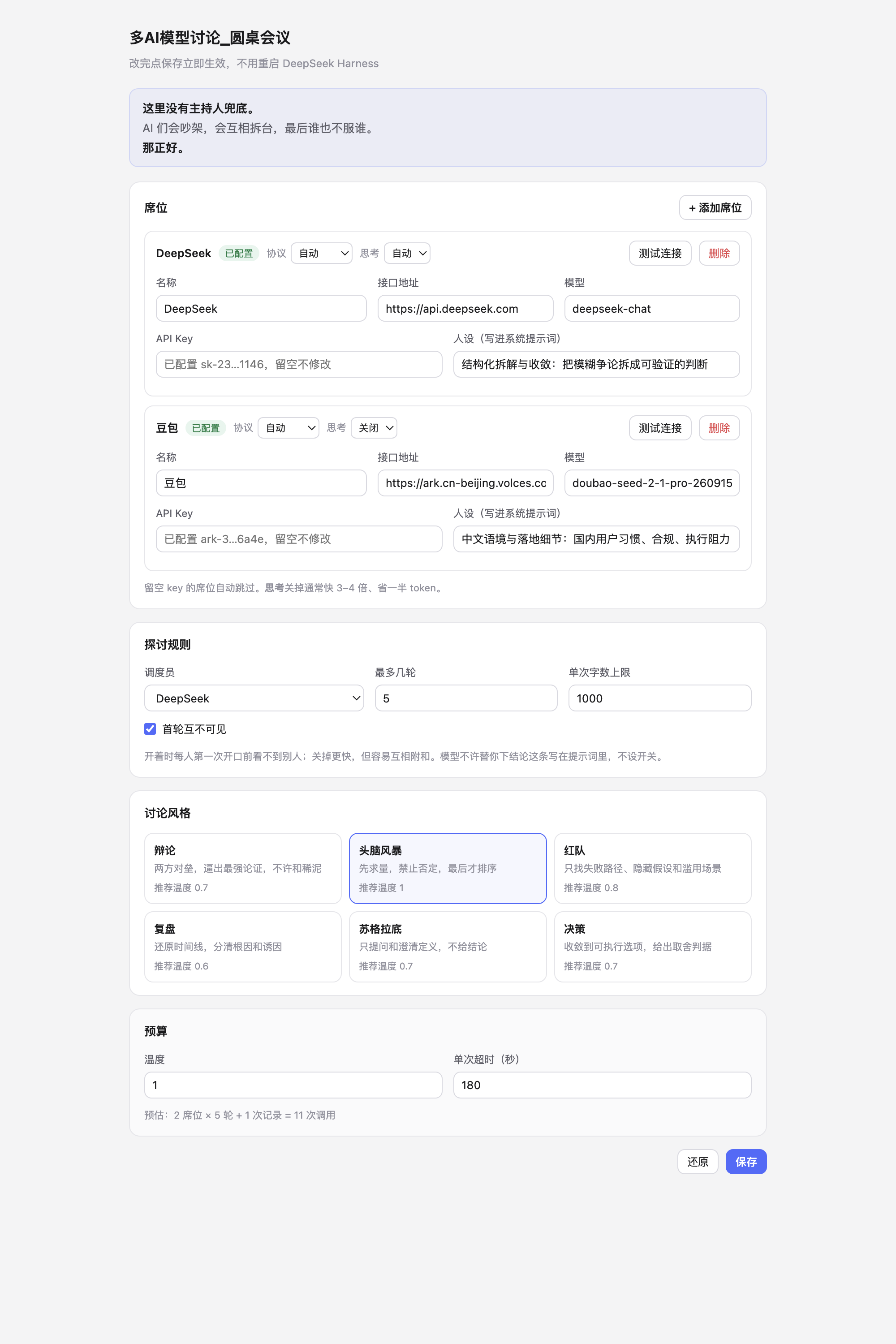
English这里没有主持人兜底。AI 们会吵架,会互相拆台,最后谁也不服谁。那正好。
dsh-ai-roundtable — a DeepSeek Harness plugin that seats several LLMs at one table.
It is built for exploration, not decision-making:
- Blind first round. Nobody sees the others before speaking, so answers don't collapse into agreement.
- Neutral scheduler. After each turn a moderator model reads the transcript and picks who speaks next — with a stated reason, not round-robin.
- The human is a member. Interject at any time; every model sees it on the next turn.
- No verdict. It closes with four things only: angles that surfaced, where the real disagreement is, what nobody answered, and what you could ask next. The judgement stays with you.
- Six modes. debate · brainstorm · red team · postmortem · socratic · decision — each rewrites the scheduling rule, the speaking discipline and the closing note.
Install
Plugins → Add plugin → Install third-party plugin → github:valarjin01/dsh-ai-roundtable
Restart DeepSeek Harness, then open Settings → Roundtable, add at least two API keys, and say "open a roundtable about …" in any session.
Works with any OpenAI-compatible endpoint (DeepSeek, Volcengine Doubao, Zhipu GLM, Qwen, Kimi, OpenRouter, …)
and with Anthropic's Messages API. Keys stay on your machine (~/.dsh/roundtable.json, mode 0600) and are
never echoed back to the settings page.
Requires DeepSeek Harness 0.2.1-rc.3 (tested). Licensed MIT.
它做什么
- 首轮互不可见:每人第一次开口前都看不到别人,避免观点趋同(可关)
- 中立调度员:读完全部记录后决定谁发言,并给出理由,而不是机械轮转
- 人类也是成员:随时插话,下一轮所有模型都会看到并回应你
- 只摊开不裁决:收场交四样东西——出现了哪些角度、真正的分歧、没人回答的问题、你可以接着问的方向
- 六种讨论风格:辩论 / 头脑风暴 / 红队 / 复盘 / 苏格拉底 / 决策
安装
插件 → 添加插件 → 安装第三方插件 → github:valarjin01/dsh-ai-roundtable
装完重启一次,然后 设置 → 多AI圆桌会议 → 填 API key(至少两个席位)。
本地开发用 python3 scripts/install-profile.py(幂等,自带备份;卸载用 scripts/uninstall-profile.py)。
⚠️ 只能装进 DeepSeek Harness。ChatGPT、Claude 的客户端是封闭产品,没有插件机制; 想让它俩参与讨论,只能给它们配 API key 当席位。
快速开始
在任意会话里说一句:
开个圆桌,议题是 XXX。跑两轮,每位发言都贴出来,我要能随时插话。
模型会依次调用 open → next → next … → close,每一步贴出一条发言。
配置台(推荐入口)
双击 tools/打开配置台.command(或命令行 node tools/settings-server.mjs),
浏览器会自动打开 http://127.0.0.1:8766/。
- 只有本机监听,不上传任何东西
- 改完点保存立即生效,不用重启 DeepSeek Harness(插件每次调用都会重读配置)
- 第一次保存会创建
~/.dsh/roundtable.json(权限 600),之后它以这个文件为准 - 关掉终端窗口就停止服务
跑起来的样子见 preview-settings-live.png。
为什么不是 DSH 设置里的一个分区:客户端插件那条路试过了,bundle 没被模块系统加载 (Console 里没有
[roundtable] client bundle loaded),先不折腾,功能一样。
设置页
侧栏 → 插件 或 设置 → 多AI圆桌会议(重启一次后出现)。能改:
- 席位:名字 / 接口地址 / 模型 / key(只显示掩码)/ 人设 / 思考模式
- 我的席位:称呼、参与方式
- 探讨规则:调度员、轮数
- 讨论风格:六选一,自动带推荐温度
- 预算:字数、温度、超时
保存后立即生效,不用重启。
思考模式
| 值 | 行为 | 什么时候用 |
|---|---|---|
auto |
不干预,跟随供应商默认 | 不确定时 |
on |
强制开启 | 需要深推理的判断 |
off |
关闭 | 讨论类发言,快 3–4 倍、省一半 token |
实测豆包 doubao-seed-2-1-pro:开启 43.8 秒 / 1325 tokens,关闭 11.7 秒 / 209 tokens。
插件会按供应商翻译成真实参数(火山方舟用 thinking.type,OpenAI 用 reasoning_effort),
认不出的网关不猜,留 extraBody 兜底。
配置存在哪
- 用户在设置页保存的东西 →
~/.dsh/roundtable.json(权限 600) - 一旦这个文件存在,
cordis.patch.yml里的 config 就只当初始种子,后续改动不再生效 - 页面拿到的 key 永远是掩码,明文不出后端
怎么用
对话里直接说」开个圆桌,议题是 XXX「,模型会按这个节奏走:
roundtable({action:"open",  topic:"…"})            → roomId
roundtable({action:"next",  roomId:"rt-xxxx"})     → 调度员点名 + 该人发言(每次一位)
roundtable({action:"say",   roomId:"rt-xxxx", text:"成本呢?"})
roundtable({action:"next",  roomId:"rt-xxxx"}) ×3
roundtable({action:"close", roomId:"rt-xxxx"})     → 纪要 + 全文
一次调用只走一步,所以每句发言都能立刻出现在对话里,中途还能插话——这是有意的设计, 不要改成"一次跑完"。
讨论风格
配置里的 style 决定三件事:调度员怎么挑人、发言者守什么纪律、纪要长什么样。
| id | 风格 | 适合 | 建议温度 |
|---|---|---|---|
debate |
辩论 | 有明确对立面的决策 | 0.7 |
brainstorm |
头脑风暴 | 没方向时先要量 | 1.0 |
redteam |
红队 | 方案已定,先找它怎么死 | 0.8 |
postmortem |
复盘 | 事后找根因 | 0.6 |
socratic |
苏格拉底 | 概念混乱、前提可疑 | 0.7 |
decision |
决策 | 讨论发散太久要收口 | 0.7 |
单场也能覆盖:roundtable({action:"open", topic:"…", style:"redteam"})。
查看当前配置
对话里说「看看圆桌配置」,模型会调 roundtable({action:"config"}),返回席位、key 状态、调度员、风格和预算。
填 key
编辑 ~/.dsh/profiles/desktop/cordis.patch.yml 里 # >>> dsh-ai-roundtable 那段:
      - name: ChatGPT
        baseUrl: https://api.openai.com/v1
        model: gpt-4o
        apiKey: 'sk-...'          # ← 填这里
三种填法:
| 方式 | 写法 | 适合 |
|---|---|---|
| 直接写 | apiKey: 'sk-xxx' |
最省事,文件权限 600 |
| 环境变量 | apiKeyEnv: ARK_API_KEY |
key 不落盘,但 GUI 启动时要有该环境变量 |
| 换网关 | 改 baseUrl 为 OpenRouter / 302.AI 地址 |
国内直连 OpenAI 不通时 |
席位怎么选:
- 豆包:火山方舟
https://ark.cn-beijing.volces.com/api/v3,有免费额度,模型名填控制台里真实存在的 - DeepSeek:
https://api.deepseek.com,deepseek-chat,按量计费很便宜 - ChatGPT:需要 OpenAI API key(订阅不算)
只有两个 key 也能开圆桌,第三个席位会自动跳过。
改完配置:如果 HMR 开着会立即生效;否则重启应用。
代码结构
lib/core.js     纯逻辑:HTTP 调用、调度决策、状态机、JSON 解析。零依赖
lib/index.js    Cordis 包装:defineTool 注册、参数校验、错误转人话
test/           19 个用例,node --test 直接跑
scripts/        安装 / 卸载 profile 的幂等脚本
跑测试:
node --test test/core.test.mjs test/contract.test.mjs
contract.test.mjs 用 module.registerHooks 把 @deepseek-ai/dsh-tools 换成桩,
所以不需要启动 DSH 就能验证工具定义形状(参数 DSL、输出 schema、render 返回内容块)。
已知限制
- 房间状态在进程内:重启应用后房间全丢;多会话共用一个 roomId 会串
- 串行:没标
isConcurrencySafe,同一时刻只能推一场 - 一轮 = 每人各说一次,
maxRounds: 2就是每人最多说两次
卸载
cd <这个目录>
python3 scripts/uninstall-profile.py          # 加 --dry-run 先看会改什么
会删依赖、从 bundles 移除、删符号链接、删配置块。备份在
~/.dsh/profiles/desktop/.roundtable-backup/<时间戳>/。
声明
数据流向、密钥存储、费用、商标与许可条件见 DECLARATION.md。要点:
- 讨论内容只发送到你自己配置的模型服务商,插件不回传任何数据、无遥测
- 密钥存本机
~/.dsh/roundtable.json(0600),页面只显示掩码 - API 费用由你的账号承担,插件不代收
- 与 OpenAI / Anthropic / 字节 / 深度求索无隶属关系
附:DSH 插件开发要点(来自官方文档)
官方文档没有公开发布,但随应用打包了一份给 agent 用的技能:
@deepseek-ai/dsh-agent-preset/skills/cordis-plugin-development/(SKILL.md + references/ + templates/)。
GitHub 上也有 deepseek-ai/DeepSeek-Harness 的 docs/user/develop/。
打包一个插件
{
  "name": "dsh-ai-roundtable",
  "type": "module",
  "exports": { ".": "./lib/index.js", "./client": "./lib/client.js", "./locale/*.json": "./locale/*.json", "./icon": "./icon.svg" },
  "dsh": {
    "bundle": { "patch": "./cordis.patch.yml" },
    "client": { "platform": "web", "immediately": true, "inject": ["@deepseek-ai/dsh-client-connection"] }
  }
}
dsh.bundle.patch里的 YAML 用insert挂插件行;纯 insert 可以热挂载,带 config 必须重启dsh.client.immediately: true才会在启动时加载浏览器半侧(漏了这个,Console 里一行日志都没有)- 客户端 bundle 必须是
window.__ModuleLoader__.load({ id: <包名>, factory }),id 必须等于包名 - 工厂返回
{ name, inject, apply };react 从factory(require)拿,不能顶层 import
显示元数据
插件管理器和设置页不激活插件就会读:
locale/zh.json/locale/en.json里的meta.title、meta.description- 导出的
./icon(SVG/PNG/JPEG/WebP,≤256 KiB,不能出包目录)
缺了就回退到 package.json 的 name/description。
安装
文档明确要求走 plugin_manager 的 install_bundle,不要手改 profile 的 package.json / cordis.patch.yml。
本项目是用 scripts/install-profile.py 手工装的(等价操作),因为当前会话拿不到 plugin_manager 工具。
No comments yet. Be the first to write one.