dsh-advanced-model-editor
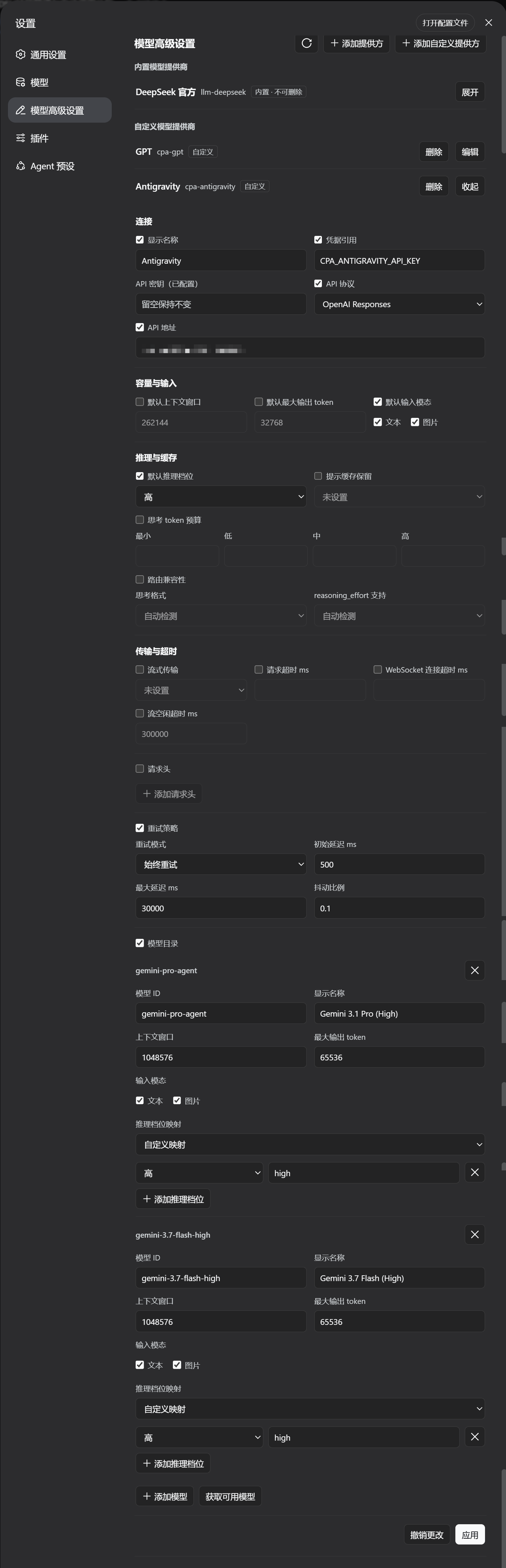
A DeepSeek Harness WebUI plugin that adds an Advanced Model Settings section to the
Settings page. It manages LLM provider profiles across the settings namespaces — the
custom provider namespace (llm-pi-ai) and the official provider namespace
(llm-deepseek) — including built-in and custom providers, model lists,
reasoning/thinking options, headers, retry policy and more, with the same validation
and conflict rules as the official settings UI.
DSH Version Compatibility
| Plugin Version | Compatible DSH Version | Notes |
|---|---|---|
| main (Current) | >= 0.1.5-rc.1 |
Fully aligned with DSH 0.1.5-rc.1 specifications (including thinkingTokenBudgetField, vllmPriority, supportsMaxOutputTokens, DeepSeek-V41-Flash catalog entry, in-history systemPromptUpdate, and latest platform modules) |
Note: If your DSH version is older, please checkout the corresponding historical tag or release. The current main branch no longer maintains backward compatibility with legacy DSH versions prior to 0.1.5.
Quick Install (Recommended / One-Line)
Install directly from the GitHub dist branch (pre-built by CI, no manual clone or compilation required):
dsh plugin --profile web add github:u9521/dsh-advanced-model-editor#dist
Then restart web (dsh web) and hard-refresh your browser (Cmd+Shift+R). The plugin appears as Advanced Model Settings in Settings.
Upgrade (Remote Install)
Use the dsh plugin update command to pull the latest dist release:
# upgrade to the latest dist release
dsh plugin --profile web update @local/dsh-advanced-model-editor

# or re-add the dist branch
dsh plugin --profile web add github:u9521/dsh-advanced-model-editor#dist
Then restart web and hard-refresh your browser.
Local Development & Manual Build
Prerequisites
- pnpm installed —
npx get-pnpm(see https://pnpm.io/installation; alternatives:corepack enableornpm install -g pnpm). Required both for building and becausedsh plugin --profile web addforwards to pnpm internally. - Node.js
^22.19 || >=24.
1. Clone
Clone the repository into the recommended location:
git clone https://github.com/u9521/dsh-advanced-model-editor.git ~/.dsh/plugins/dsh-advanced-model-editor
cd ~/.dsh/plugins/dsh-advanced-model-editor
2. Build
The build output (lib/) is not committed to the source branch — build it yourself for local development:
pnpm install
pnpm run build
The official DSH client-bundle preset is vendored under
external/deepseek-harness/packages/client/, so no DSH source checkout is needed:
pnpm run build runs tsc (type check + emit lib/types/) and tsdown (bundle
lib/index.js + lib/client.js) with the project's own dependencies.
Verify the build with:
pnpm test
3. Local Install
dsh plugin --profile web add ~/.dsh/plugins/dsh-advanced-model-editor
Then restart web (dsh web) and hard-refresh the browser (Cmd+Shift+R).
Development & Maintenance Commands
| Command | Description |
|---|---|
pnpm run build |
Full build (runs tsc type check + generates lib/ bundles) |
pnpm run check |
Type check only (tsc --noEmit) without emitting files |
pnpm test |
Full build, then run the test suite (node --test) |
pnpm run fmt |
Format source and config files with Prettier |
pnpm run fmt:check |
Check code formatting compliance |
pnpm run sync |
Sync the vendored DSH client-bundle preset from upstream (--check or --yes) |
Local Source Upgrade
When installed locally, the plugin is linked via link: into the profile. Upgrading local sources only requires pulling the latest commit and rebuilding — no need to re-run dsh plugin add:
cd ~/.dsh/plugins/dsh-advanced-model-editor
git pull
pnpm run build
(If dependencies changed, run pnpm install before building)
Then restart web (dsh web) and hard-refresh the browser (Cmd+Shift+R).
Uninstall
Whether installed from GitHub or linked from local sources, uninstall with:
dsh plugin --profile web remove @local/dsh-advanced-model-editor
Restart web and hard-refresh the browser afterwards. If local sources are no longer needed, you can delete the cloned directory:
rm -rf ~/.dsh/plugins/dsh-advanced-model-editor
No comments yet. Be the first to write one.