dsh-idle-power
English · 简体中文
Hibernate or shut down Windows once every task in your DeepSeek Harness Host has finished — with a visible 60-second countdown you can cancel.
Long agent runs usually end when you have walked away. This plugin lets you say "shut the machine down when everything is actually done", then keeps its promise safe: it waits for all agents, subagents and background jobs in this Host, shows a full-window countdown, and voids itself the moment new work appears.
| Choose what happens | While it waits |
|---|---|
 |
The sidebar entry names the live state: Schedule shutdown, Waiting · 3 tasks running, 42s to shutdown. |
Why it is safe
Turning off a machine in the middle of an agent run is the interesting problem here, so the plugin is built around not doing that.
It treats the whole Harness as busy if any of these is true:
| Checked | Why |
|---|---|
agent.status === 'running' |
an agent is taking a turn |
agent.inbox.nextTurn / .nextStep non-empty |
work has been queued but not started — the hand-off gap |
a job is running or stopping |
a shell/background job is alive, including ones owned by a session |
| subagents and workflow children | they are ordinary live agents, so one status check covers them |
Then:
- Quiet period — 20 s. All of the above must stay empty continuously. A single tick with work resets the clock. A missing agent registry counts as unknown activity, never as idle.
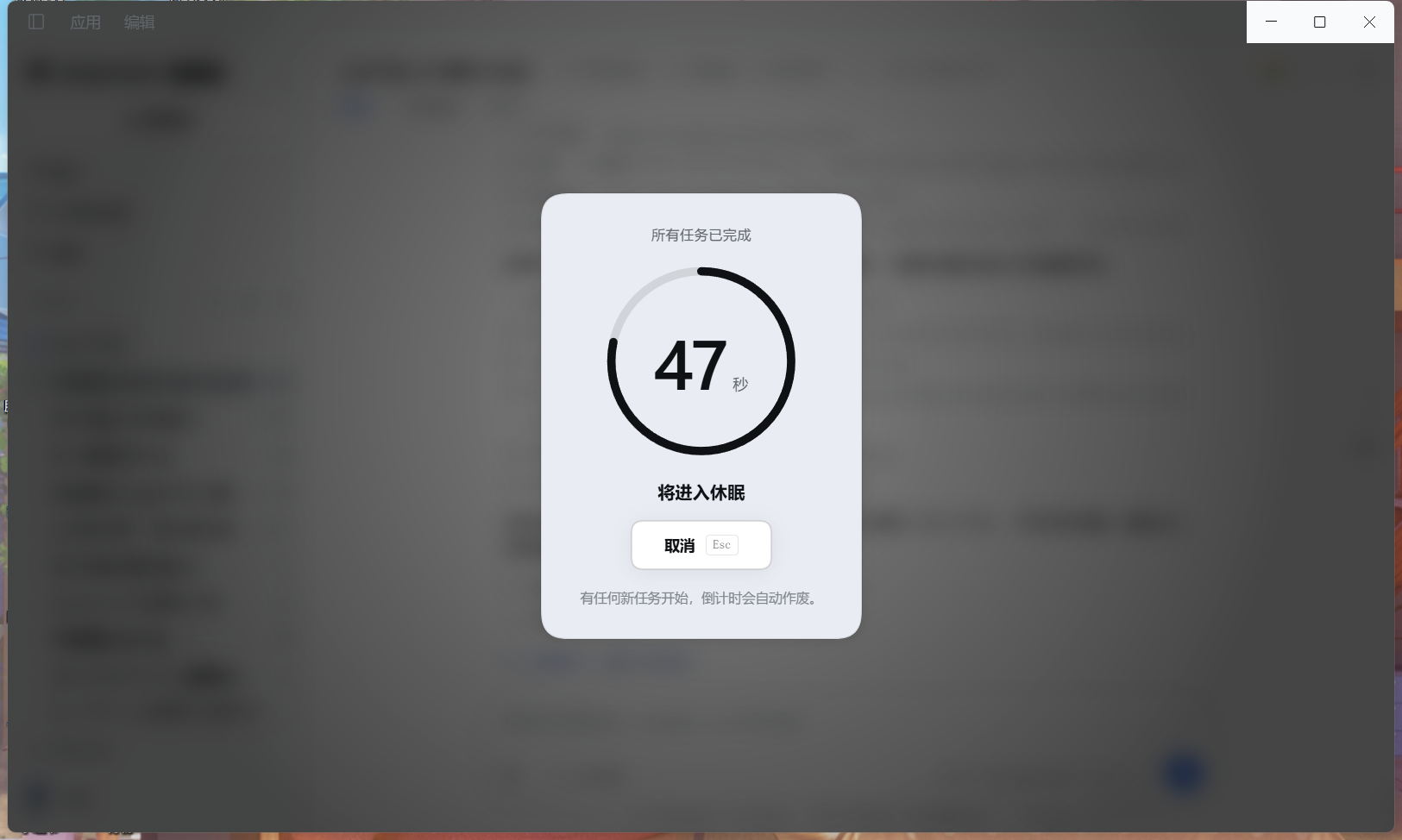
- Countdown — 60 s. A full-window dialog with the remaining seconds, what is about to happen, and one
Cancelbutton (Escworks too). - Any new task voids the countdown and drops back to waiting. You never have to race it.
- Only when the countdown genuinely reaches zero does it run the power command. Once the command is committed, cancel and mode changes are refused with
409, so the UI can never imply a cancellation that did not happen. - Waking from sleep never fires immediately. If one tick arrives far past the deadline — the Host was frozen or the machine was suspended — the plugin re-arms and replays the whole quiet window instead of powering off the moment you sit back down.
The countdown is the only undo you get. shutdown /s /t 0 runs immediately and shutdown /h has no shutdown /a counterpart, so the plugin does not rely on a Windows-provided reversal window — it provides its own.
Arming is always an explicit, human action. There is no model-facing tool, so the assistant can never decide to power off your machine.
Modes
| Mode | Command | What you get |
|---|---|---|
shutdown (default) |
shutdown /s /t 0 /f |
Powers off. DSH conversations are still on disk. |
hibernate |
shutdown /h /f |
Writes the memory image to disk. Next boot restores every open window and unsaved edit. |
Switch modes from the panel; the sidebar entry renames itself to match (Schedule shutdown / Schedule hibernate).
Fast Startup note. If Windows Fast Startup is enabled,
shutdown /sis a hybrid shutdown: the kernel state is saved and the next boot resumes it. The browser half cannot reliably detect that system setting, so the panel does not claim it is on; it warns instead that apps will be forced closed and unsaved work may be lost. A true cold boot needspowercfg /h off(admin, permanent) — this plugin deliberately does not touch your system settings.
Install
The plugin is a regular DSH bundle: an npm package that ships a cordis.patch.yml and a dsh.client entry.
Option A — Plugins page (recommended). Open the Plugins page in Harness and install the bundle dsh-idle-power (or the spec github:tzzs/dsh-idle-power). It writes the dependency and adds the bundle to your profile for you.
Option B — edit the profile by hand. In your profile's package.json, list the package and add it to the bundle list:
{
  "dependencies": { "dsh-idle-power": "github:tzzs/dsh-idle-power" },
  "dsh": { "profile": { "bundles": ["dsh-idle-power"] } }
}
Then install dependencies in the profile directory and restart Harness.
Either way, a restart or a plugin reload is required — the Host half registers its routes when it loads.
Use
The entry lives at the bottom of the sidebar, next to Settings:
⏻ Schedule shutdown          idle
⏻ Waiting · 3 tasks running  armed, work still running
⏻ 42s to shutdown            counting down
⏻ Executing power action     command committed, no longer cancellable
⏻ Failed                     non-zero exit; open the panel for the reason
Click it, pick a mode, press the action button. While a reservation is live the same button becomes Cancel.
The panel also states:
- How it runs —
20 s continuously idle → 60 s cancellable countdown, plus "closing this page does not cancel; other apps and Hosts are not monitored". - What is running — running agents, queued messages and background jobs are listed separately instead of one opaque total.
- Connection state — "Loading status…" before the first answer, "Cannot reach the plugin Host" with controls disabled when the connection drops, "Submitting…" while a request is in flight so a button cannot be pressed twice.
- Failure state — if cancelling the countdown fails, the dialog stays and says cancellation is unconfirmed instead of pretending it worked.
Keyboard: Esc closes the panel or cancels the countdown, ↑/↓/Home/End move between modes, and Tab stays on the cancel button inside the countdown.
Collapsed to the 56 px rail the entry degrades to an icon. On Windows the entire sidebar foot is hidden while collapsed (host behaviour) — expand the sidebar (Ctrl+B) to reach it.
Configuration
Set these on the plugin row in your profile's cordis.patch.yml:
| Option | Default | Meaning |
|---|---|---|
countdownSeconds |
60 |
Countdown length, clamped to 5–3600 |
quietSeconds |
20 |
Required quiet period, clamped to 3–3600 |
defaultMode |
'shutdown' |
'hibernate' or 'shutdown' |
shutdownCommand |
'shutdown' |
Power command; resolved via PATH when the plugin loads |
A mode you pick in the UI is remembered by the Host (it survives a page reload) and resets to defaultMode when the Host restarts.
HTTP routes
The browser half talks to the Host over four authenticated routes. Every one runs a trust check first (Host/Origin, sec-fetch-site, then the auth cookie) and answers 403 / 401 without it.
| Method | Path | Purpose |
|---|---|---|
GET |
/idle-power/state |
mode, phase, remaining seconds, live task counts |
POST |
/idle-power/arm |
reserve; body { "mode": "hibernate" | "shutdown" } |
POST |
/idle-power/cancel |
cancel a reservation or a running countdown |
POST |
/idle-power/mode |
change the mode without reserving |
Once the power command is committed, /arm, /cancel and /mode all answer 409 execution-in-progress. An arm whose upload was overtaken by a cancel, or whose executable check resolved out of order, answers 409 reservation-changed instead of re-arming a reservation the user already cancelled.
Execution happens in the Host, not the browser. Closing the tab does not stop a countdown; that is deliberate — a browser-side timer would never fire if the browser crashed. The trade-off is that an armed reservation keeps running while Harness is open.
Requirements
- Windows.
shutdown.exeis the only backend; on other platforms the plugin reports "unsupported" instead of pretending. - A DSH profile that mounts
agentsandwebServer.jobsis optional — without it the plugin still runs, it just cannot see background jobs.
Tests
npm test
Two dependency-free harnesses drive the real code with stand-ins, so the suite can run on any machine without powering anything off:
test/host.test.mjs— the state machine against fake agents, fake jobs and a subprocess that recordsargvinstead of executing. Covers the busy predicate, a missing registry, quiet behaviour, countdown voiding, both command lines, cancellation, failure reporting, the mode route, and the races: mutations refused once execution is committed, a cancel beating a slow arm upload, a stale lookup unable to overwrite a cancellation, and a suspend that overshoots the deadline re-arming instead of firing.test/client.test.cjs— renders the realclient.jscomponents with a minimal React stand-in and asserts on the produced tree: both entry layouts, every panel state (loading / offline / registry unavailable / executing / failed), the per-kind task breakdown, the progress ring's geometry and edge cases, dismissal, cancel-failure feedback, expanded-state ARIA, andprefers-reduced-motioncoverage.
Neither suite replaces looking at the page, and neither proves that shutdown really powers the machine off — that needs a human clicking the button.
License
MIT
No comments yet. Be the first to write one.