dsh-notes
@tyouter/dsh-notes 1.1.2 — a notebook inside DeepSeek Harness, in three tabs. Type into one box,
read the typeset result beside it, and call the model only when judgement is needed. See
CHANGELOG.md for what the first official release contains.
Install
The package is on npm: @tyouter/dsh-notes — a DSH bundle that carries the host half, the web panel and the agent presets it needs, so one install is complete.
dsh plugin --profile <name> add @tyouter/dsh-notes
Then add @tyouter/dsh-notes to dsh.profile.bundles in the profile's package.json if your
installer does not do it for you, and restart. The plugin appears in the sidebar and the plugin
inventory as Notebook.
From a checkout instead:
git clone https://github.com/tyouter/dsh-notes.git
cd dsh-notes
npm run build          # writes client.js from src/
# then install the directory through Plugin Manager / install_bundle
Requirements: a DSH build with node:sqlite (Node 24 ships it). No other runtime dependency is
installed; everything under lib/ is first-party.
What it is for
Dedicated to: thinkers who love to think and enjoy the pure beauty of words.
A minimal writing plugin I built for myself, because:
- when you open the tool, you have already forgotten what you meant to write
- when you put up with the painful typing experience of an AI chat box
- when a complicated notes app keeps interrupting you with its toolbars
- when your train of thought stalls
- when your notes become a forgotten corner
All we do is three things:
- A sheet of paper — spaces and line breaks are the only formatting there is: two spaces make a bullet, four the next level, and your hands never leave the keyboard.
- AI alongside — suggestions, structure and translation wait at the edge of the page and answer when you ask. Your notes are looked after by the AI, not by toolbars.
- Writing as it should be — clean, direct, uninterrupted. The page is already set while you type.
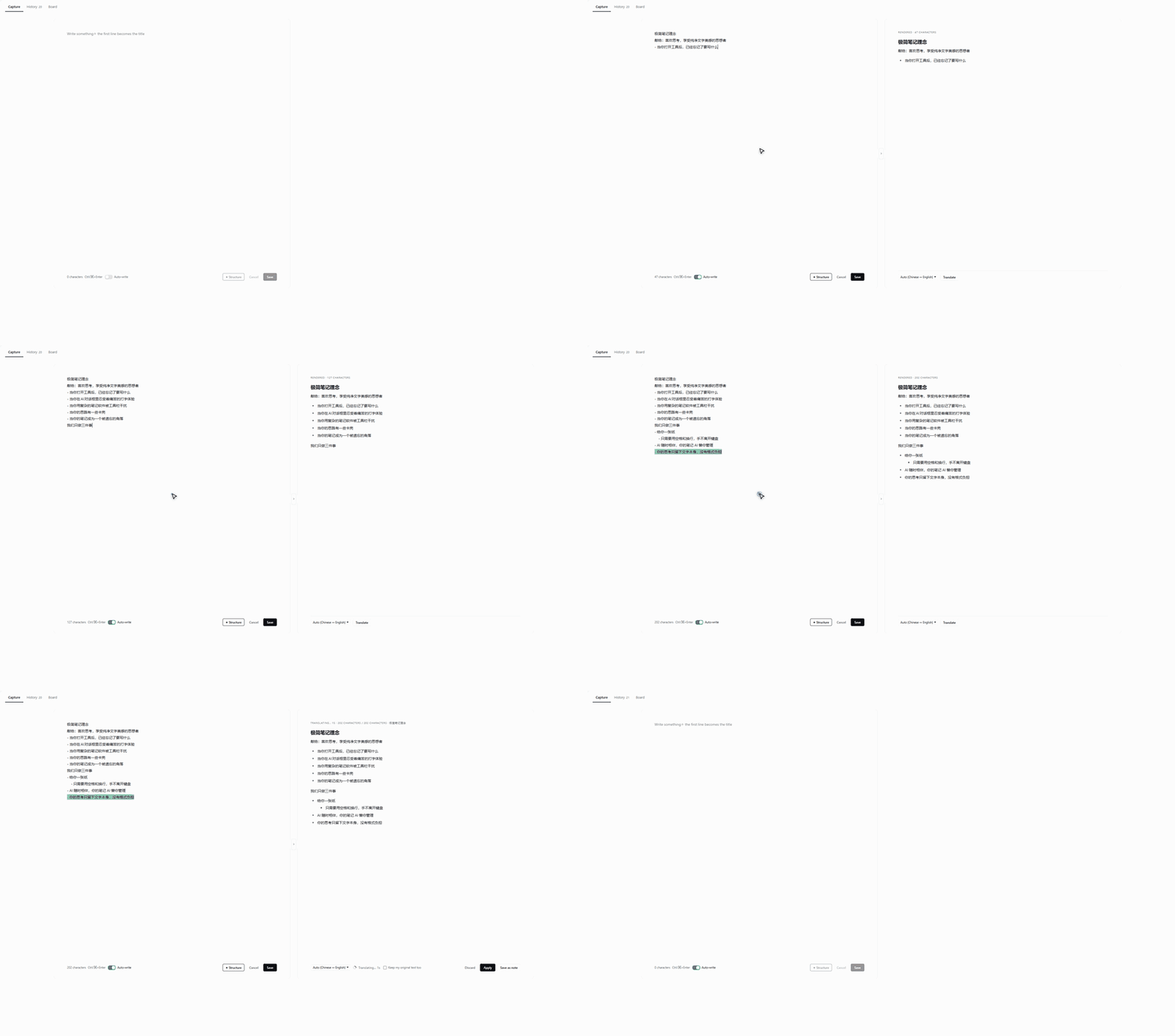
Capture
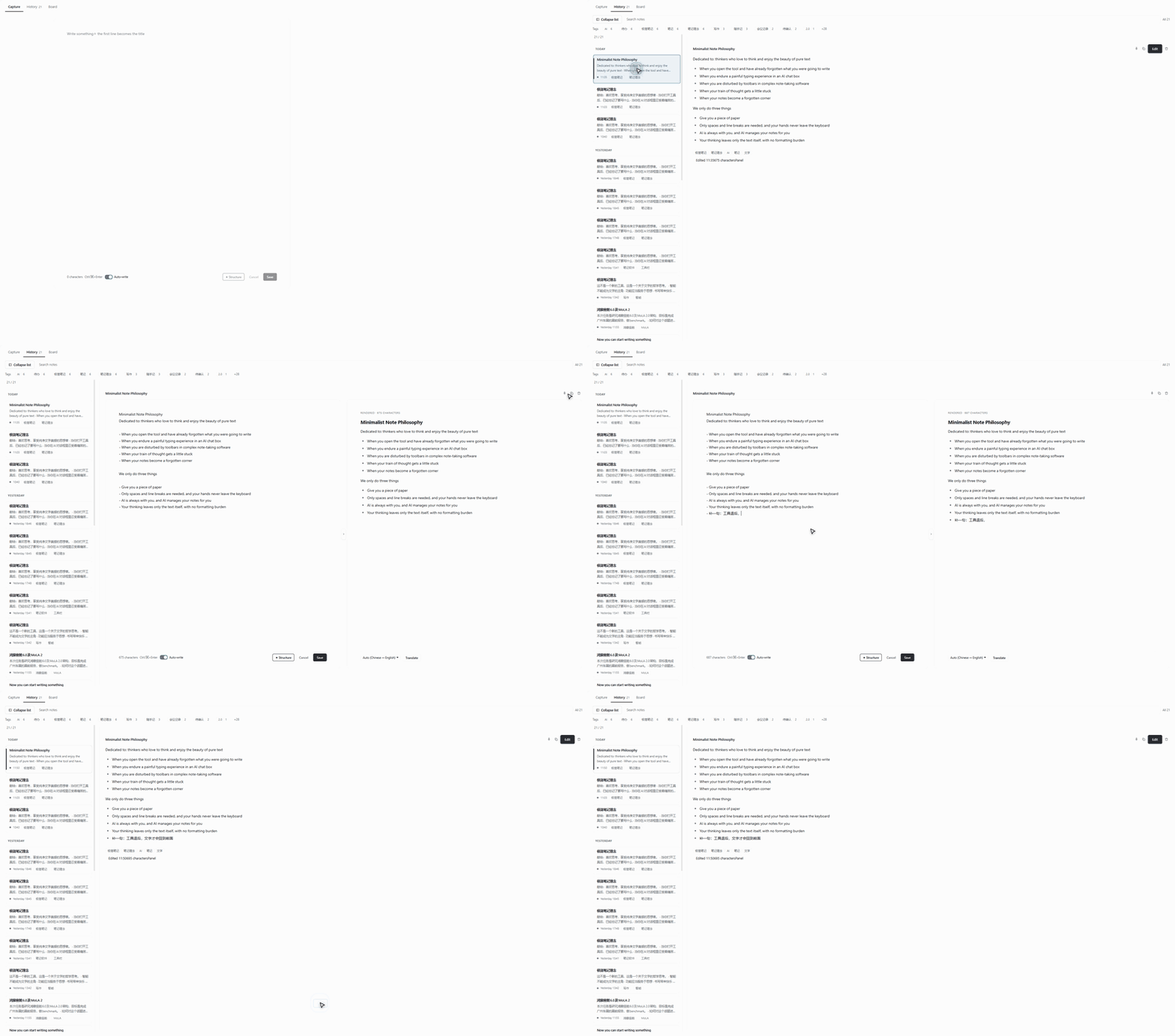
History
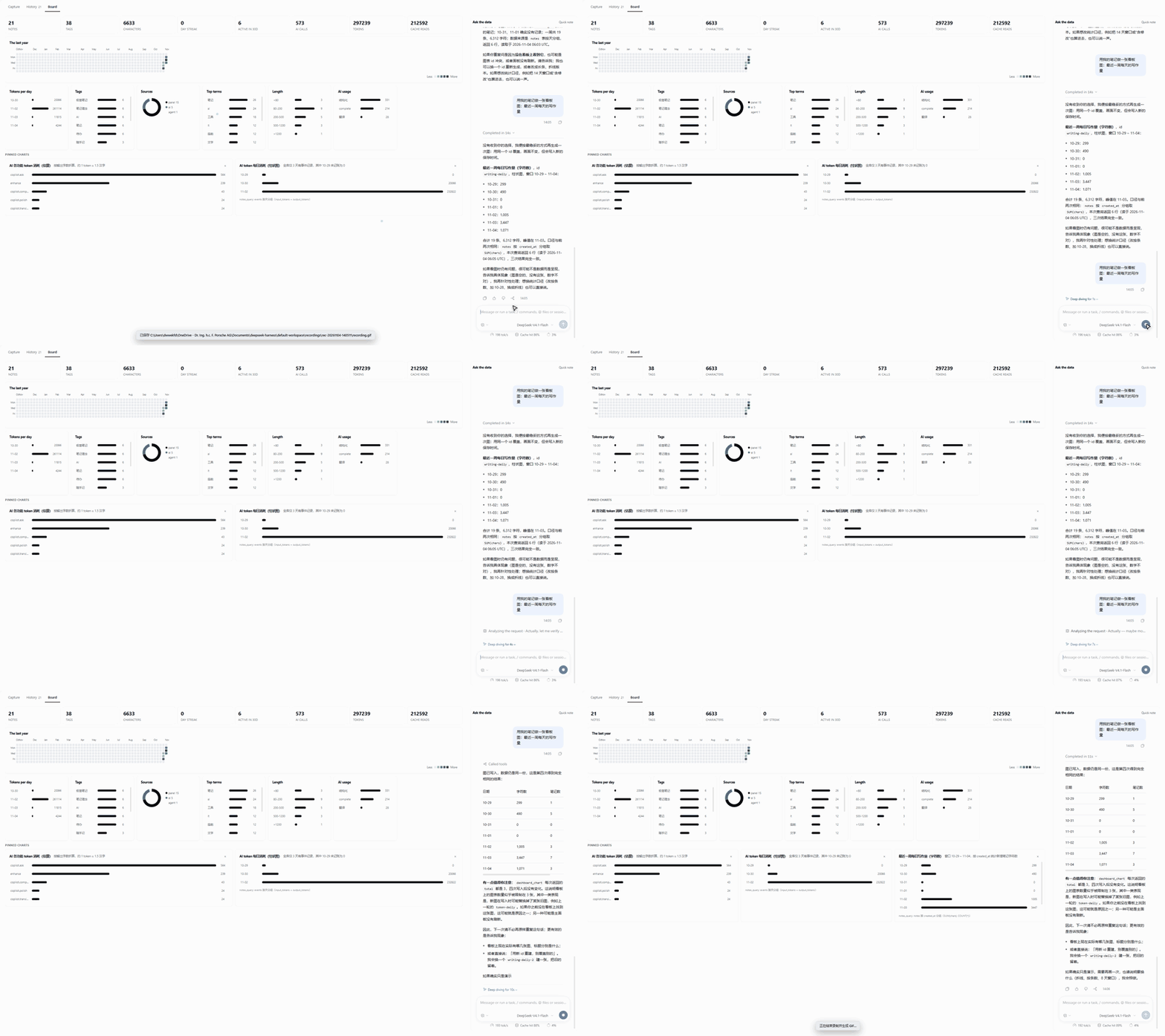
Board
 |
 |
 |
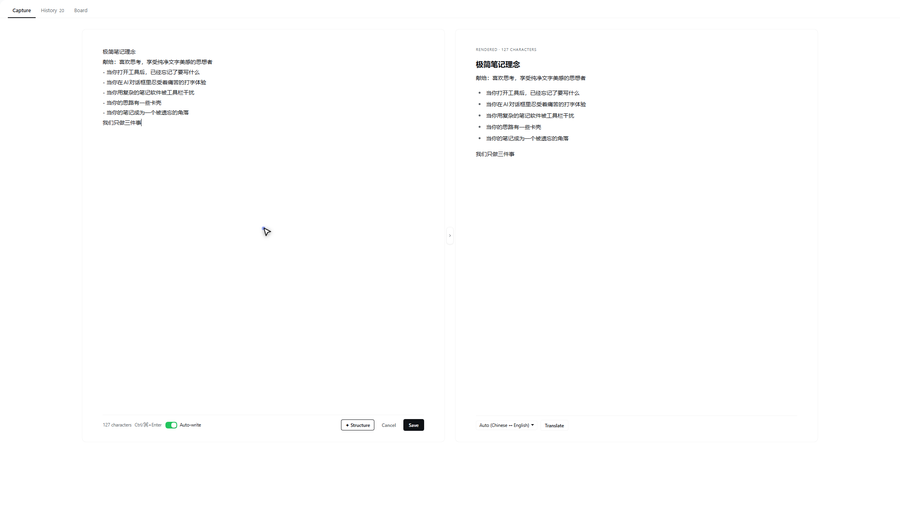
| Capture | History | Board |
What it stores, and what leaves the machine
- Notes are plain JSON files under
notes-vault/in the workspace (configurable withnotesPath), plus a disposable SQLite projection rebuilt from them. Deleting the database loses nothing. - Nothing is uploaded. Model calls go through the host's own
llmservice, so they use whatever provider and key the rest of DSH already uses. - The board's assistant is a real agent session limited to the notebook's read-only query tools,
notes_analyze,dashboard_chartand the note-writingnotestool.
| Tab | What it is |
|---|---|
| Capture | One box, two pages. The right page is Format, running live on every keystroke; the toolbar's Structure button adds an AI rewrite beside it. |
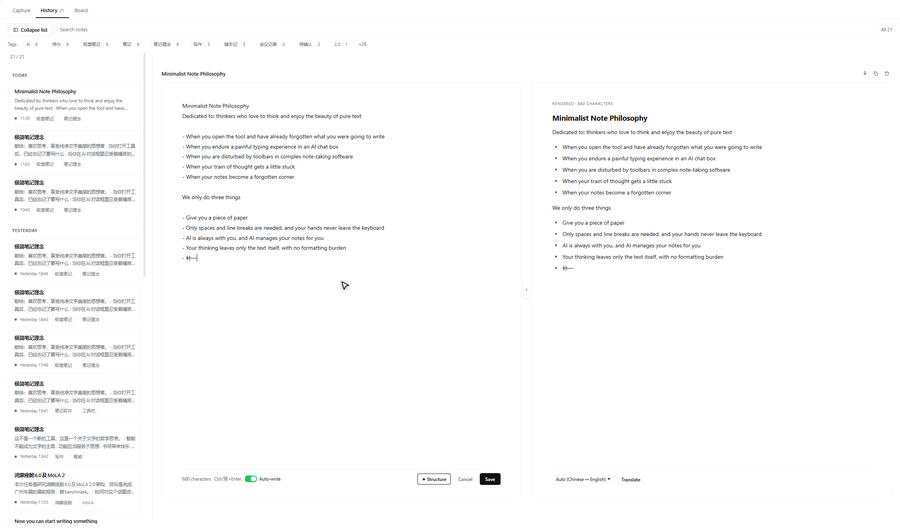
| History | The grouped history: two-line cards, a draggable list column, Markdown rendering, search and tags. Edit mounts the capture box — source on the left, the laid-out result on the right — so there is one editor, not two. |
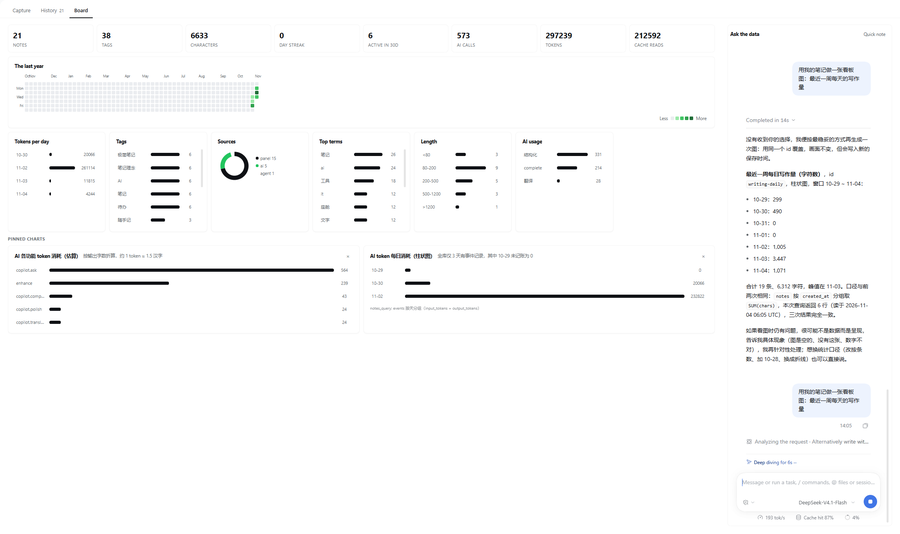
| Board | Statistics over the notebook and its usage, plus the host's native conversation running the notes-board agent preset. |
The four actions
| Action | Input | Lands in | Changes language |
|---|---|---|---|
| Format | the note, always | right page, live (no request, no button) | no |
| Structure | the note; the selection when there is one | an AI draft on the right page (Apply / Save / Translate) | never |
| Translate | the AI draft in place, or the note itself (selection, else whole) from the live preview | a draft edit / a proposal with Apply | yes |
| Apply | draft or proposal | back into the source, replacing only the range | — |
Format is deterministic (formatLocally), which is why it needs no button and no
model: separators, numbering, blank lines and stray stars are normalised, wording is
never touched, and the pass is idempotent. Saving a note writes the laid-out text, so
the right page is a promise rather than a hint. A selection in the editor highlights
the same lines in the preview; translate then works on that span.
Capture also works outside the panel: Alt+N or the small notebook icon in the
composer tool row opens a floating capture card, and /note 内容 saves a note
straight from the chat box.
Where notes live
notes.json is the source of truth: human-readable, diffable, and safe under
OneDrive. Everything else is derived.
<workspace>/notes-vault/
  notes.json      live notes (source of truth)
  trash.json      deleted notes, kept as a safety net
  links.json      which session belongs to the notebook
  events.jsonl    append-only instrumentation: AI calls, UI actions, charts
  dashboard.json  charts pinned to the dashboard
  index.db        SQLite projection of the above, for the query tools
notesPath in cordis.patch.yml changes the directory; a relative path anchors
on the default workspace from the registry, not on whichever session calls
first.
Three AI surfaces, three different mechanisms
The distinction matters, and getting it wrong is what made an earlier version send a truncated text dump into a prompt.
Structuring (
/notes/api/enhance/stream) — a single streamed model call. No session, no tools.start,delta…,donewith{title, body, tags}. Reasoning effort is set tooff; measured ≈0.5 s to first token.Completion (
/notes/api/complete) — the next sentence, asked for only after typing stops for a second; the note's own repeated wording answers without a request.The dashboard chat — a real agent session on the
notes-boardpreset, rendered with the host's own Conversation component. It has tools, so it queries instead of guessing:Tool What it does notes_queryone guarded SELECTagainstindex.db(read-only, single statement, ≤500 rows,?params)notes_analyzepreset aggregates: by_tag,by_source,by_day,by_hour,lengths,terms,ai_usage,timelinedashboard_chartadd/replace a pinned chart on the dashboard notesread and write the notes themselves The panel only creates the session (
POST /notes/api/session/create) and renders it. Delivery, streaming, tool cards and approvals are the framework's: the user types into the native composer, so no turn is ever pushed by hand.
The database
lib/db.js maintains a SQLite projection (index.db) with four tables:
| Table | Contents |
|---|---|
notes |
one row per note, body is the full text |
note_tags |
one row per (note, tag), so tags are a GROUP BY |
events |
every AI call and UI action, with latency and outcome |
messages |
the dashboard conversation transcript, keyed by (session_id, seq) |
Two rules keep it honest:
- It is disposable. Delete
index.dband it rebuilds from the JSON on the next read. A cache must never hold data the files do not. - It opens lazily and closes with the plugin. Windows locks an open database file, so the disposer releases it before the directory could be moved.
node:sqlite ships with the app's own runtime (Node 24). If it is ever missing,
the query tools disable themselves and say so; the rest of the notebook works.
Instrumentation
Every AI call appends one line to events.jsonl — kind, characters, elapsed time,
time to first token, success. UI beacons (POST /notes/api/event) record what the
user did: tab switches, note opens, AI calls, chart removals. The dashboard
conversation is ingested into messages on each poll, keyed by sequence number so
re-reading is idempotent.
That is what the 「AI 使用」tile and the average-first-token figure come from, and what lets the assistant answer "what did I ask you last week".
Files
| File | Role |
|---|---|
index.js |
Host half: the notes service, tools, command, data plane. |
lib/store.js |
The notebook files: notes, trash, links, search. |
lib/db.js |
The SQLite projection and its guarded queries. |
lib/text.js |
Term extraction (non-overlapping CJK bigrams, English words). |
lib/analytics.js |
Pure statistics for the dashboard. |
lib/events.js |
The event log and the pinned-chart store. |
lib/llm.js |
Streamed model call, reasoning-effort selection, timing. |
lib/chat.js |
The translate stream (whole note or numbered lines). |
lib/prompt.js |
Prompts and parsers: structuring, translation. |
lib/tools.js |
Tool adapters: query, analyze, chart, notes, enhance. |
lib/api.js |
/notes/api routes, including the SSE streams. |
src/head.js |
Browser prologue: i18n, api helpers, formatting, Markdown, styles. |
src/board.js |
Dashboard: chart renderers, statistics view, and the editor behaviours (spaces, Backspace, completion). |
src/panel.js |
Panel: tabs, capture, history, session shell, mount points. |
build.mjs |
Concatenates the three sources into client.js. |
tools/check-sources.mjs |
Parses the browser sources the way build.mjs wraps them. |
tools/fix-encoding.mjs |
Repairs a CJK string written through a byte-mangling pipeline. |
test/host.mjs |
Store, prompts, event log, chart store, tool adapters. |
test/prompts.mjs |
Structuring and completion prompts, term extraction. |
test/api.mjs |
The whole data plane in-process, including both SSE streams. |
test/render.mjs |
Slot wiring, tabs, dashboard, history editor and completion wiring. |
test/markdown.mjs |
Markdown rendering, snippets, tags, the drawer switch. |
Working on it
This directory is its own git repository; the first commit is the baseline the rest of the work is measured against.
node tools/check-sources.mjs     # syntax check for the factory-bodied sources
node build.mjs                   # src/*.js -> client.js
node --check client.js
node tools/fix-encoding.mjs      # repair double-encoded CJK (only after a bad write)
The suites, in the order they are usually run:
| Suite | What it covers |
|---|---|
test/host.mjs |
store, analytics, API routing |
test/prompts.mjs |
structuring prompt, Markdown parsing, title rules |
test/api.mjs |
routes end to end with a fake model |
test/render.mjs |
component trees (Capture, History, Board) |
test/markdown.mjs |
rendering, snippets, tags, outline markers |
test/document.mjs |
whole documents: coverage repair, index-aligned assembly, typography gate |
test/typing.mjs |
the 极简写 keyboard flows, simulated slowly: spaces, nesting, Backspace |
test/layout.mjs |
dock layout contract + a preview page for the composer pinning |
test/corpus.mjs |
live run against the app: 17 inputs → structure → render → translate |
client.js is generated from src/ by build.mjs. It is committed, because the host loads it
as the package's ./client export: a fresh clone therefore works without a build step, and
npm run build is only needed after editing src/. prepare/prepack rebuild it on install and
publish. exports/ holds generated previews and is ignored.
License
MIT — see LICENSE.
Built with
Built with DeepSeek Harness. The plugin was written in a
conversation with it — design, code, tests, the recorded clips and this README — and the same harness runs
its suites. Commits carry Co-Authored-By: DeepSeek Harness <noreply@deepseek.com> as the record.
Notes for maintainers
- Edit
src/, thennode build.mjs.node --check src/panel.jsfails by design (the files are factory bodies); usenode tools/check-sources.mjs. STYLESand the i18n dictionaries live in a template literal. A backtick in a CSS comment, or a${in prose, silently truncates the string.- Never rewrite these files through PowerShell text pipelines.
Get-Content -Rawreads them as ANSI andSet-Contentwrites UTF-8, which double-encodes every CJK string. Use the file tools, or Node with explicit UTF-8. - No
Configexport: a profile-installed bundle resolves only its own dependencies, so no schema library is imported. - Optional services (
commands,webServer,layout,llm,agentDefaultModel,sessionController,sessions) are read throughctx.get(...), neverctx.<name>: cordis throws on an undeclared property read. - The panel declares a
notes.board.conversationchild slot; that declaration is what makes the framework injectSessionProvider+renderSlot. - The shell strips a slot
childrenarray before rendering the panel. - A key like
notesis used by both the sidebar icon and the main panel; select the panel by slot name in tests, not by key. - Every visible style is a
--dsw-alias-*token; literal colors appear only inicon.svg… with one deliberate exception: the contribution matrix uses GitHub's exact five-step green ramp (--dshn-heat-0..4, with GitHub's dark variant underprefers-color-scheme: dark). Opacity over an accent colour cannot reproduce that ramp, and matching it is the point — so it is pinned, in one place, and named here rather than hidden.
The contribution matrix
One column per week, one cell per day, a year of days. Intensity is quantised by
quartiles of the non-zero counts, as GitHub does, not by a ratio to the peak:
a notebook with one note a day therefore shows one light shade rather than
painting every day in the darkest green. The busiest day is always the darkest.
src/board.js (Heatmap) draws it; lib/analytics.js (calendarYear) supplies a
Sunday-aligned series so the renderer needs no date arithmetic.
- Host-side changes need an app restart; client-side changes need a refresh.
No comments yet. Be the first to write one.