dsh-conversation-toc
中文 | English
Conversation outline for DeepSeek Harness Web — a right-side topic sidebar (TOC) like the DeepSeek web app, with scroll-spy highlighting and click-to-jump navigation.


Overview
dsh-conversation-toc is a browser-side plugin for DeepSeek Harness Web. After installation, an 「Outline」 button appears on the right side of the session header, and a conversation outline panel (or a collapsed minimap rail) floats on the right of the chat — the same reading experience as the DeepSeek web app's right sidebar:
- Topic list — every user question is a top-level topic,
steeringfollow-ups are indented sub-topics, and##/###headings inside assistant answers become third-level topics, so you can jump into any section of a long answer; - Scroll-spy — the outline highlights the topic you are currently reading as you scroll;
- Jump navigation — click any topic to smooth-scroll to the corresponding message;
- Minimap rail — when there isn't enough room (or you collapse it manually), only the capsule indicator rail stays on the right; click a capsule to jump, hover to preview the topic text.
Works on Windows / macOS / Linux — everything runs in the browser: no host service, no settings page, no platform-specific code.
Screenshots
Expanded outline panel
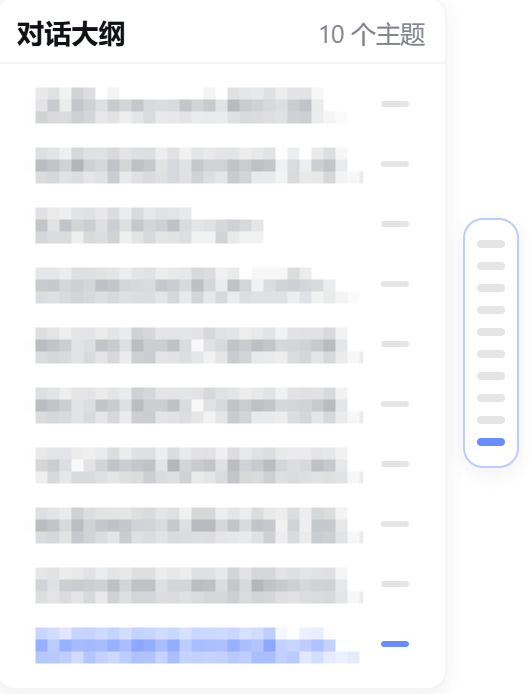
Collapsed minimap rail

Features
- Three display modes, cycled by the header「Outline」button:
expanded panel → minimap rail → hidden; the choice is remembered inlocalStorage. - Hierarchical topics: user question (level 1) →
steeringfollow-up (level 2, indented) → assistant answer headings##/###(level 3). - Scroll-spy highlight: the current reading position is tracked against the real chat scrollport and highlighted in blue; when scrolled to the bottom, the last topic is highlighted.
- Jump-to-section: reuses the core chat anchors (
[data-chat-anchor-key]/[data-conversation-scroll]) — no private stylesheets, resilient across DSH updates. - Adaptive layout: the expanded panel floats in the whitespace to the right of the message column; when there isn't enough room it automatically falls back to the minimap rail, and it never overlaps the right "details" panel.
- Theme-aware: uses DSH theme tokens, so it follows light / dark themes; typography scales with the app's display-size setting.
- Live updates: topics come straight from the session store (
chat.order/chat.nodes), so new messages and streaming output are reflected automatically. - Safe by design: no host API and no disk writes — the only persisted state is the display-mode preference in
localStorage.
Recommended Installation
Either method works and is equivalent. We recommend the one-command install.
Option 1 (recommended): one command
Published on npm — install with a single command:
dsh plugin --profile web add dsh-conversation-toc
Restart the dsh web service after installation.
Prefer installing from source? This GitHub repository or a local tarball work too:
# from GitHub
dsh plugin --profile web add git+https://github.com/twelvecarbon/dsh-conversation-toc.git

# or from a local tarball
dsh plugin --profile web add C:\path\to\dsh-conversation-toc-0.1.1.tgz
Option 2: manual install
Follow the detailed manual / wiring / uninstall guide below.
What's in the package
One npm package = a host half (an empty Cordis plugin row, lib/index.js — the feature is purely browser-side) + a client half (the outline UI, lib/client.js).
The package integrates with DSH through two declarations:
| Declaration | Purpose |
|---|---|
dsh.bundle.patch (cordis.patch.yml) |
Lets DSH recognize it as a standard bundle plugin package: dsh plugin --profile <name> add <package> installs and wires it in one command, no manual config editing |
dsh.client + exports["./client"] |
Lets the web client auto-load the outline UI at /plugins/<package>/client.js |
So for users, installation is one command — no YAML editing, no manual file copying.
Installation (for users)
0. Prerequisites
- DeepSeek Harness installed (
npm install -g @deepseek-ai/dsh, a desktop app built on it, ornpx @deepseek-ai/dsh web). - Option 1 needs pnpm:
npm install -g pnpm(orcorepack enable). - Make sure
dshis on PATH.
1. Method A (recommended): one command
dsh plugin --profile web add dsh-conversation-toc
This does three things (all automatic):
- Installs the package via pnpm into
~/.dsh/profiles/web(auto-initializes the profile on first use); - Detects the package's
dsh.bundledeclaration and writes the package name into the profile'sdsh.profile.bundleslayer list; - After restart, DSH reads the package's
cordis.patch.ymland mounts the plugin row into the app tree — no manual config editing.
Same for other profiles (replace web with your profile name, e.g. dsh plugin --profile headless add ...; dsh web equals dsh --profile web).
Test a local tarball:
dsh plugin --profile web add C:\path\to\dsh-conversation-toc-0.1.1.tgz
2. Method B: manual install (no pnpm / no dsh plugin)
B1. Install the dependency:
cd ~/.dsh/profiles/web
pnpm add dsh-conversation-toc
# or from a local folder / tarball
# pnpm add C:\path\to\dsh-conversation-toc
B2. Wire it up (once, idempotent): append the package name to the profile's dsh.profile.bundles in ~/.dsh/profiles/web/package.json:
"dsh": {
  "profile": {
    "bundles": [
      "@deepseek-ai/dsh-base",
      "@deepseek-ai/dsh-web-app",
      "dsh-conversation-toc"
    ]
  }
}
B3. Mount the plugin row: append to ~/.dsh/profiles/web/cordis.patch.yml (create it if missing):
- insert:
    - id: conversation-toc
      name: 'dsh-conversation-toc'
B4. Restart the dsh web service.
3. Uninstall
dsh plugin --profile web remove dsh-conversation-toc
Or manually: remove the dependency, the dsh.profile.bundles entry, and the cordis.patch.yml row, then restart.
Usage
- Open any conversation and send / view messages;
- The 「Outline」 button appears on the right of the session header;
- The outline panel floats on the right of the chat: click any topic to jump to the corresponding message; the current topic highlights in blue as you scroll;
- When there isn't enough room, the panel automatically collapses to the minimap rail; click the「Outline」button to cycle the three display modes (expanded → rail → hidden).
How it works
- Data source — the browser reads the session store (
useSessionselectors overchat.order/chat.nodes), so topics stay in sync with new messages and streaming output; - DOM anchors — it reuses the core
[data-chat-anchor-key]anchors and the[data-conversation-scroll]scrollport, no private class names; - Host side — nothing to do:
lib/index.jsis an empty host row that exists only so the package mounts as a standard DSH bundle plugin and its client bundle is discovered by the web boot graph.
File structure
dsh-conversation-toc/
├── package.json                # dsh.bundle.patch + dsh.client declarations
├── cordis.patch.yml            # host plugin row (mount layer)
├── lib/
│   ├── index.js                # host half (empty — no host service)
│   └── client.js               # client half (the whole feature)
├── scripts/
│   ├── check-package.js        # pre-publish contract gate (npm run check)
│   ├── smoke-test.cjs          # pure-logic smoke tests (npm run test)
│   └── generate-screenshots.ps1  # regenerates docs/assets mockups (Windows)
├── docs/assets/                # README screenshots
├── CHANGELOG.md
├── LICENSE
├── README.md                   # English
└── README.zh.md                # 中文
Changelog
See CHANGELOG.md.
No comments yet. Be the first to write one.