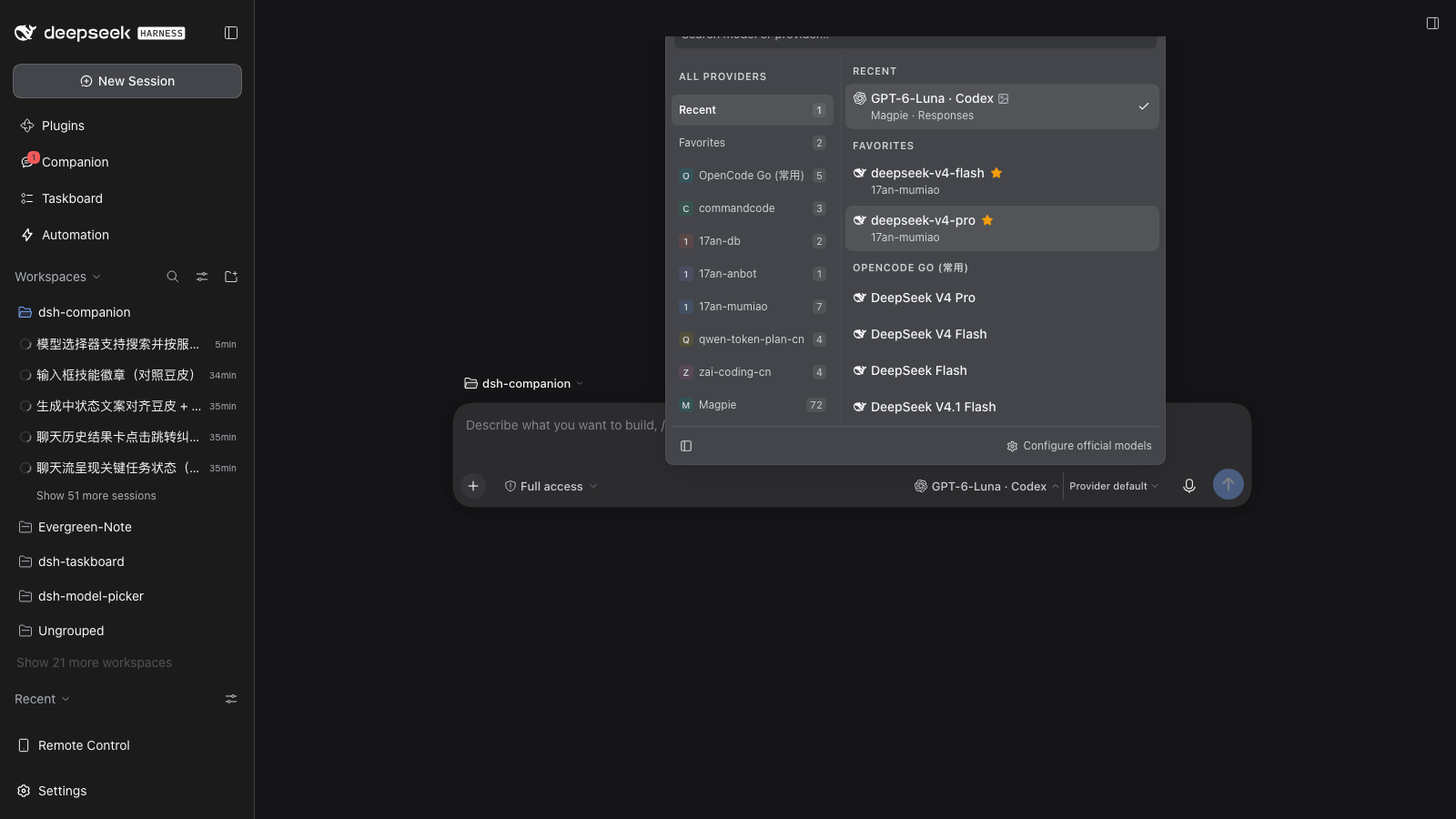
dsh-model-picker
Enhanced model picker for the dsh web GUI — replaces the composer's model seat
(conversation.input.model).
Design
A two-zone trigger button splits model selection and reasoning-effort selection into separate popups:
| Zone | Click | Popup content |
|---|---|---|
| Left (model name) | Opens the model picker | Search box at top (auto-focused), provider column on the left, model list on the right |
| Right (effort) | Opens the effort picker | List of available reasoning-effort levels |
Hovering a zone names what it will act on. The model zone reads
provider · model: one model id is routinely served by several providers, so
the name alone does not say where the model runs. The supplier named is the
display one, so a selection on a folded (modlens vision) route still reads
as its base provider — the same name the user clicked in the column.
The panel is 540px wide and up to 500px tall, and both give way under pressure
rather than overflowing. Its height is clamped against the measured space above
the trigger (which is 50vh + 61px in the hero layout, checked at six window
heights), minus the panel's own chrome: at a 900px-tall window the panel measures
exactly 500px and keeps an 11px margin from the top edge. When the provider
column folds, the panel gives up that column's width instead of stretching the
model list (see Configure official models).
Supplier chip
A model row leads with the mark of whoever made the model — DeepSeek's whale,
Zhipu's mark, Qwen's — on the closed trigger as well as on every row in the
list, so which model is in use, and whose it is, reads before the picker is ever
opened. Marks are the published mono cuts from
@lobehub/icons-static-svg (MIT),
inlined as paths on their own 24×24 grid and filled with currentColor.
- The mark names the model's maker, not the supplier:
17an-mumiao,qwen-token-plan-cnandopencode-go1all servedeepseek-v4-flash, and the question a row answers is "what am I picking". A per-supplier mark would answer "who resells it" and, worse, could only ever be a letter for the three17anfloors. - Two rules, lab first. The model's own lab is read from the leading token of
any
vendor/model,vendor:modelorvendor_modelsegment — that is what catches17an-db/deepseek-v4.1-flash. Only when no lab is named does the host in the label earn a mark, matched as a whole word, soComposer 2.5 · CursorandAuto · Cursorwear Cursor's. - The order between them is the whole design:
grok-4.7@500k · Cursoris Grok's model resold through Cursor, andDeepSeek-V4.1-Flash · Trae CNis DeepSeek's through Trae. Reading the host first would relabel both with the wrong maker — exactly the mistake a mark exists to prevent — so a host mark only ever appears on a row whose model segment named no lab at all. - A row whose maker cannot be named honestly —
Auto · routing group,Space-Bunny,Ling 3.1 Flash Free— keeps the supplier's tinted initial instead. The two shapes say different things at a glance: a mark is a lab, a tinted uppercase letter is "the picker cannot name this row's maker yet". A mislabelled logo would be worse than a letter the panel can always back up. - The fallback letter is matched by a fixed prefix list, deliberately not a
generic "first word" rule:
mimoandhy3are real families whose ids carry no lab in them, so they are listed by name, while a rule loose enough to guess them would also handautoa logo it has not earned. - Supplier floors in the left column keep the letter on its tint: a floor
names a supplier, and
17an-db,17an-anbotand17an-mumiaowould otherwise be indistinguishable. The model list beside it names labs, which have marks. - The tint is chosen, not hashed. A hue derived from the route id produced ten unrelated colours in one panel, gave neighbouring suppliers near-identical chips, and let the palette drift as providers were added. Each supplier now takes a hue from a fixed set by its position in the configured provider order, so a hue belongs to a supplier rather than to a moment in time.
- Every chip is held at the same lightness and chroma (OKLCH, hue varies only). No supplier shouts louder than another, and no supplier's chip can vanish into the panel the way a mid-blue one did under a fixed saturation.
- Both shapes take the surrounding ink (
color: inherit), so they are dark on the light theme and light on the dark one (12.35:1 and 6.56:1 measured on painted pixels). A per-hue glyph colour was tried and removed: a light tint of the hue is legible on the dark theme and effectively invisible on the light one, which is the theme nobody checks. Full-colour brand marks were declined for the same reason the tint is held down: a dozen brand palettes would fight the panel's one accent, which is the check mark on the model in use. - Only the tint carries a hue; a brand mark carries none, because the mark is the shape and a chip behind it would only make a logo read as a letter.
- The trigger's
max-width(300px) leaves room for the avatar's footprint (16px plus its gap) on top of the name budget, so wearing it costs the model name no characters. When the composer row runs short it is the model NAME that truncates, never the effort zone: the effort zone reports a state in one short word, and a clipped state word is a different string ("Hi..."), while a name is free-form, truncates readably, and the tooltip carries it in full. - The avatar is hidden from the accessibility tree: the supplier and the model are already named in the trigger tooltip and the row detail, so a mark would only repeat them.
Provider folding
A provider whose name is another provider's name plus a trailing parenthesized
capability suffix folds into that base provider's row. modlens registers vision
as its own provider route (DeepSeek (modlens vision)), which would otherwise
put a near-duplicate row per provider in the column.
- Folding is display-only: every row keeps its models paired with the group that serves them, so picking a folded model still submits that model's own provider id.
- The suffix stays on the model name, and a folded model whose route differs from its row is labelled with that route, so the two are never confused.
- A suffixed provider whose base is absent keeps its own row.
Model facts (context window / image input)
The browser catalog the seat reads (ModelCatalogModel) carries only
id / name / description / reasoning — no context window and no input
modalities. Both exist on the Host's llm service, so the host half
(lib/host.js) republishes them over one loopback route:
GET /api/model-picker/models
→ { ok: true, models: [{ provider, id, contextWindow?, input? }] }
resolveModel()is the only source ofcontext: { contextWindow };listModels()is the cheaper source ofinputModalities.- One row per provider/model is isolated: a provider or model that throws is dropped, and a row carrying neither fact is omitted entirely.
- The snapshot is cached for 30s — the route never fans out per keystroke.
- The popup badges each row with an image glyph, which rides after the model
name because input modality is a property of the model, and with a context
chip (
1M,384K) in the trailing strip, where the numbers line up as a column you can compare down. Both are joined onprovider/modelId. - Vision. A plain glyph means the model reads pixels itself. A glyph with a
slash across it means the route accepts images only because modlens bridges
them: the model still cannot see — modlens transcribes the image to text
first. The
(modlens vision)suffix is what tells the two apart. - The slash, rather than a dimmed glyph, is deliberate. Fading the glyph to carry "this model cannot see" put it under the 3:1 floor for non-text graphics and erased the distinction entirely in greyscale. A shape difference survives low vision, greyscale and both themes; a lighter grey does not.
- The modlens suffix is not the general vision signal: modlens declines to wrap a model whose id already carries a vision marker, whose catalog declares image input, or that falls outside its configured families. A row with no suffix can therefore be natively vision-capable; the glyph, not the name, is the answer. With modlens disabled the folding and the bridge glyph are simply dormant — nothing is suffixed.
- Before the host half has been restarted the route 404s, so the context chip and native-vision glyph are missing until then.
Grouped list (elevator)
The right column is always one grouped list: Recent (最近使用 in a Chinese UI — the route history, pinned at the top once it has entries), Favorites (收藏 — the starred models, another mirrored copy), then every provider's group. The left column is a table of contents to this list.
- Scrolling the right column highlights the left row for the section pinned at the list's top edge (scroll spy / elevator). The group headers are
position: sticky, so the left row always matches the header you see. - Clicking a left-column supplier jumps the list straight to that group — an instant landing, not an animated ride: the elevator is a table of contents, and the time spent travelling is time nobody asked for. During a search, clicking a supplier narrows the results instead (search facet).
- Groups are separated by their sticky heading alone. A hairline rule per group was drawn across the list every few rows and earned nothing, so there is none.
- A group heading is its label and nothing else. It used to wear a pictogram (a clock for the history, and one building glyph shared by every supplier and the favorites). A building does not read as "supplier", the favorites group has no building in it, and the label already said which group you were in, so the icons were removed.
Recent
The panel opens on the models used lately, with the route in use at the front — so switching back to the previous model is one Enter away from opening the popup. Every history row names the provider serving it, because the group spans suppliers.
- What is recorded is the current route the directory reports, not the rows clicked in this popup: a switch made in this list, in the shipped
/modelpopup, or by a session reopening on its own model all count as "used" — the history answers "what have I been using", not "what did I click in this panel". - Keyed on the route (
provider/modelId), deduplicated and fixed-length (6 entries): reusing a route only moves it to the front instead of taking a second slot. - It lives in
localStorageunderdsh.modelPicker.recent, with the same conventions as the favorites. A route that is no longer configured (provider uninstalled, model retired) stays in storage but is not rendered: the record comes back with the provider, and the list never shows a model that is not there. - An empty history shows neither the group nor its floor, and an empty favorites group does the same: a heading with nothing under it is a promise the panel cannot keep. The favorites floor goes with its group, since a floor that jumps to a section which is not rendered would scroll the list nowhere. Starring one model brings both back.
Favorites
Every model row carries a ☆ / ★ toggle after the model name, and after the vision mark when there is one, so a row reads as a name followed by its marks: what the model accepts first, then the action you can take on it. The row is itself a <button>, so the star stops its click from reaching it — favoriting a model must never also pick it — and it handles Enter / Space on its own.
The star is revealed, not always present. Favoriting is something you do to a row, not part of what the row says, so the star stays unpainted until the row is hovered or holds keyboard focus. Its box keeps its place either way, so revealing it never shifts the row under the pointer, and only a pointer that can actually hover hides it: on a touch screen it would be permanently unreachable, so there it stays visible.
A favorited row always shows its star. That star is state rather than an invitation, and hiding it would hide the answer.
Favorited models appear twice in the list: once in their provider's group, and once in the favorites group pinned at the top of the list. A favorites row always names the provider serving it.
Favorites are keyed on the route (
provider/modelId), not the bare model id: one model id is routinely served by several configured providers, and favoriting one route says nothing about the others.They live in
localStorageunderdsh.modelPicker.favorites, the same place the shipped conversation plugin keeps its own view and width preferences. A storage refusal (private mode, full quota) is swallowed: the in-memory set still tracks the page.
Retry on the same model (the failure row's own button)
The Host draws one line in the transcript — This turn failed — and stops there.
Switching into that conversation, the reader is looking straight at the red row
and has nothing to press: to try once more they have to type "retry" into the
composer themselves. This puts the Retry button under that row, above the
composer.
The narrowest repair there is. It does not switch the model, does not touch the fallback, and changes nothing the user chose — it re-sends the failed turn on the model already in use. Because nothing has to be configured first, it needs no setup: it is there with no fallback designated, and it is there on a conversation opened cold from history.
The cold open is the whole point. That failure is not in the session
snapshot — it is durable history, and the Host draws the red row from
turn/end's reason.error. So the panel reads the same fact: when the latest
turn/end ended with kind:'error' the retry is offered; when it ended
completed it is not, because the conversation has already moved past that
failure and re-running it would walk backwards. The tooltip carries the
provider's own words (lobsterai: no usable credential; log in first), so the
reason is legible before anything is pressed.
Three failure shapes, three submissions. Same discrimination as the failover button, different action:
| Failure | Signal | What the retry sends |
|---|---|---|
| Send — the request never left the client | promptError.op === 'send' |
The original words, read back from the session log |
| The turn died on the model — the Host drew the red row | the latest turn/end's reason.error |
The original words under one line saying the turn failed |
| Agent failure — no recoverable words | lastAgentError |
The resumption instruction: check what completed, then carry on |
That middle line earns its place: the failing turn is still in the transcript, so the words alone would read to the model as a second, identical instruction; "this turn failed — retry once" followed by the same request is what makes it the same request tried again.
It never fights the fallback over one failure. With a fallback designated
that failure belongs to Retry with the fallback (and to the automatic
escalation), and this button does not appear — two repairs over one event is how
a turn ends up run twice, once on the old model and once on the new one. With no
fallback the reverse holds: this is the only repair offered.
The press does not flicker. Admitting a prompt is a round trip, and until it settles the failure still reads as live, which would re-arm the button the user just pressed. So the press disables it (the row stays, only the button goes inert), a second press cannot queue the same turn again, and the arm is reset once the failure really clears — the next failure is a new question.
To shoot it: node scripts/screenshot-retry.mjs (writes live-retry.png,
live-retry-disarmed.png and live-retry-with-fallback.png from the same seat
and store npm test uses, rendered in real Chromium).
Failover (one click to recover a failed turn)
The scenario: a turn dies — the route ran out of quota, got rate limited, or the Agent failed partway through — and the user has to pick a model that still works and then retype "continue". That retyping is what this removes.
The design rule is visibility. This is a rare event, so it must not touch ordinary model switching at all. Nothing is rendered on a healthy session: there is no standing toggle to arm, no per-row mark, no menu entry. Instead a small button appears beside the composer only while a failure is live, and only when a fallback model has been designated. With no fallback the switch does not exist — the same-model retry above takes that case instead.
One click does both halves. The button switches to the fallback model and then sends the repair. The switch is committed first and awaited, because sending the repair on the old model would repair in exactly the place that just failed; if the switch does not take, nothing is sent.
Two failure shapes, two different repairs. They are told apart using the session's own public snapshot, and the button labels itself accordingly:
| Failure | Signal | Repair |
|---|---|---|
| Send — the prompt never left the client | promptError.op === 'send' |
the original words are replayed verbatim, read back from the session log |
| Agent — accepted, then failed or was interrupted mid-turn | lastAgentError, or a final assistant/message with interrupted === true |
a resumption instruction: check what actually completed, then continue |
Collapsing these into one "continue" would be wrong in the case that matters. A send failure left nothing behind, so re-sending the same request is exactly right. An agent failure may have left tools half-run and files half-written, so re-sending the request reads as a fresh instruction and risks redoing finished work — that repair instead tells the model to inspect the current state first. A bare "continue" is deliberately never used, because it reads as new input.
Designating fallback models. The popup footer's Fallback models entry opens a manager where you can search for and add multiple models, drag them into priority order, or remove them. Failover uses the first available route in that order that differs from the model that just failed. Older single-route settings migrate automatically. The queue persists in localStorage under dsh.modelPicker.fallback.
Probing a route, and remembering when it last failed. Every row in that manager carries a Test connection button: it sends one tiny prompt through the Host's own model runtime and reports OK with the round trip. When it does not answer, it says more than Failed — the failure is split into four classes: Out of quota, Rate limited, Auth failed, and Timed out; only what stays unrecognized reads as the generic failure. That split is the point. An exhausted balance and a momentary throttle fail identically and call for opposite responses (top up versus wait), and one "Failed" collapses them into a question the reader has to open a tooltip to answer. The class comes from the harness failure code (QUOTA / ACCOUNT_QUOTA / RATE_LIMIT / AUTH), and only when no code names one does the provider's own wording get a say — tested with the Host's own quota classifier, plus Chinese phrasing, because the channels on this machine answer in Chinese. The tooltip carries the sentence and keeps the provider's words as the evidence.
A route that fails — from that probe, or from a turn that actually died on the model in use — is stamped in localStorage under dsh.modelPicker.failures, with the time it failed, what said so, and the class. Keeping the class is what lets a reopened page still say Out of quota instead of degrading to Failed. The model list then wears that time after the model's name: an alert glyph and a clock, the source and the message in the tooltip. The one moment a dead channel is worth knowing about is the moment the next model is being chosen. A probe that answers clears the stamp, and a stamp older than two weeks is dropped on read, so the mark states a recent fact instead of keeping a permanent record. Unlike the vision mark, the pin and the star, it reserves no space — an absent stamp leaves no gap.
Checking a channel, and checking a model. The footer's probe button walks the list the panel is showing, and its label says how much that is. With a query typed — or a provider facet picked inside that query — the column is one specific set of models, so every one of them is probed: Check 12 models. With no query the column is the whole catalog, which on this machine is 1080 routes across 20 providers, and walking all of them answers a question nobody asked. The failures that decide whether a model is usable are channel-level — a dead key, a spent account, an endpoint that is simply unreachable — so that is one answer per provider, not one per model. The unfiltered run therefore probes one representative per provider (Check 20 providers) and leaves the other thousand routes alone. It is the same probe either way, one route at a time, so every answer lands in the ledger and the rows grow their marks while the run is still going.
The representative is the route its reader would reach for there: one they starred, else one they used recently — so the provider you are on is judged by the model you are on — else the first model that is not a free mirror, because a free tier turning a request down says something about the free tier and not about the account being paid for.
Three routes at a time, deliberately: a wide fan-out would answer "is this route dead" by killing healthy channels with 429s of its own making, and the ledger would record the outage it caused. The button is the stop control while it runs (its label becomes 12/20, tabular so the row cannot jitter), pressing it again ends the run, and closing the panel ends it too — a batch nobody is watching has no business holding request slots. In-flight answers still count into the receipt, which then says Checked 20/20 · failed 8, or stopped …, and retires itself after a few seconds; its tooltip names what failed, in provider scope by the same name the left column uses. The marks are the record; the receipt is only a receipt.
It retires itself. The failure state is read through the Session's own
subscribe/getSnapshot pair, so the button appears the moment the Host reports
a failure and disappears the moment prompt() clears it — no polling, and no
extra bookkeeping to keep the two in step. Clicking repairs once; a rejected
submission says so and stays retryable rather than latching as done. Everything
is submitted with mode queue, so a repair never interrupts a live turn.
Retries exhausted → it escalates without being asked. The Host retries a
failed request five times on the same model and only reports
lastAgentError once that budget is spent, so a Host-raised error already means
"retrying this route is futile". At that point the panel switches to the first
designated fallback that is not the model that just failed, sends the same
repair, and says which model it moved to. Four guards keep that from being
reckless: a user pressing stop never escalates (an interrupted turn is not an
error, and re-sending it would fight the cancel); an install with no fallback
designated stays completely passive — that case belongs to the same-model retry,
which never fires by itself; a failure already in the log when the panel
attaches is history being opened, not a turn that just broke; and a failure that
is already on the fallback, or that has already been escalated for, is left to
the user. The announcement is a report rather than a button — the repair is
already running — and it retires itself after a few seconds.
Best-effort throughout: an unreachable session, a released reference, or a stale fallback route that this session no longer lists leaves the rest of the picker working and reports why, rather than sending the work nowhere.
Configure official models
The popup carries one fixed row under its body: Configure official models → Settings · Models. The picker can only list what the configured providers offer — it cannot add the official DeepSeek route, sign the account in, or store an API key — and the moment that page is needed is exactly when this panel is open, so the panel is where the way to it belongs.
- The row is a direct child of the popup, outside the scrolling list: a row that scrolls away is a row the user cannot find when the models are missing. The body gives up its ~36px, never the row.
- It opens Settings on the 模型 / Models section in one step, not on whatever
section was open last. The settings modal owns its open/active state, and
publishes it through the store handle its
sidebar.settingsseat registers; the picker writesopenSection('models')to that handle — the same state change a click on that nav row makes. - A carrier whose settings seat carries no store falls back to running the
panel's own
settings.opencommand and then lighting its 模型 row, named by the label thesettings.sectionledger publishes (so the fallback follows the UI's locale instead of hard-coding a string). - With neither — no settings UI in this deployment — the row does nothing rather than closing the picker onto an empty page. The picker closes only once the panel has actually opened.
- The hand-off is read through this plugin's own inject set (
slots, plus the optionalshortcutsservice viactx.get), never the caller's, and it can never throw into a click handler.
The same row carries one more control: a provider-column toggle (the outlined-panel glyph) that folds this panel's own left column away and back.
- It folds this popup's provider list, which is the panel's table of contents. It is not the application's sidebar: that one belongs to the layout plugin, and this column belongs to the picker.
- Folded, the popup narrows by the column it gave up (measured: 550px to 362px), anchored to the same right edge. The model list keeps the width it had rather than stretching into the space: a column that folds should remove space, not redistribute it, and it is the reading width of the list that should not change. The divider that separated the two columns leaves with the column it belonged to.
- The fold is a view preference, remembered in
localStorageunderdsh.modelPicker.providersHidden, the way the favorites and the history are. It is not folded by default: the column is the panel's map, and a map the user never asked to lose should be there on the first open.
Language
The panel is written in the app's language — the one the user picked in
Settings → General → Language — never in the browser's. A user who chose 中文
inside DSH gets 中文 here even when the browser reports en-US, and the reverse
holds too.
- The source chain is: the
localeservice (the actual preference, and the value every other surface reads) →document.documentElement.lang(the shell's own declaration of the language it is rendering, which the locale plugin rewrites on every switch) →navigator.language(the pre-boot default only). Each step is guarded, so a carrier missing one still gets a language. - Switching the language re-renders the panel while it is open: the copy is read through a subscription to that source, so nothing waits for a reload or for the next open.
- The dictionary is deliberately small — two languages, one flat key set — so the panel never depends on a locale namespace being registered before it renders, and it cannot break the composer seat when one is missing.
Search semantics
The query is a facet over both columns, not just the model list:
- A provider matches by its display name, its route id, or by having at least one matching model. The provider column narrows to the matching providers and each badge shows that provider's match count.
- With no provider selected, the model list spans every matching provider and labels each row with its provider.
- Clicking a provider during a search narrows the list to that provider without clearing the query. Typing a new query clears the previous provider facet.
Model and effort data ride the same per-session ModelDirectory as the /model
popup, so a switch in either surface is what the other shows next.
Keyboard
The picker is search-first, so focus never leaves the search box: the popup is drivable end to end without tabbing through rows. The caret is the whole focus cue — the box keeps its resting border in every state, because it holds focus for the panel's entire life and a lit border would read as a state to clear.
- The popup opens with the cursor already on the first row — the route used
last; an empty group (no history yet, nothing starred) contributes no row, so
it is skipped rather than stood on. The cursor is not the current model: the
check mark reports what is in use, the cursor reports where the next
Enterlands. ↑/↓move one row,PageUp/PageDownten,Home/Endjump to the ends. The cursor holds at both ends instead of wrapping.Entercommits the cursor row and closes the popup, handing focus back to the trigger. Typing a new query puts the cursor back on the first match.- The cursor is the hover surface and nothing else — no rail, no border. The
list scrolls it into view, and
scroll-margin-topkeeps the sticky group header from covering the row it scrolled to. - The search box names the cursor row in
aria-activedescendant, so the position is announced even though DOM focus never moves. - Favorites stay reachable:
Tabto a row's star and pressEnter/Spaceto toggle it without picking the model.
Contrast and hierarchy
Every text element in the panel clears WCAG AA (4.5:1) measured on painted
pixels, not on declared colour values. The panel does not carry a second,
quieter grey: it uses the host's own label-secondary for metadata and separates
tiers by form instead (14px/500 for a model name, 12px/400 for a row detail,
11px/600 with .06em tracking for a group heading).
Three cheaper ways to get a "dimmer than body" ink were tried and rejected, all of them measurable:
| Approach | Measured | Why it fails |
|---|---|---|
opacity: .6 on the element |
2.63:1, and 2.25:1 over a hover row | Composites against whatever is behind it, so one value yields several ratios; it also fades a glyph's anti-aliased edge as much as its body |
color-mix(… , transparent) |
2.58:1 | Keeps an alpha channel instead of darkening, so every painted pixel is lighter than the ink it names |
color-mix(… , <panel surface>) |
4.14:1 on a light hover row | The mix is relative to a surface, and in the light theme the hover row is darker than the panel, so the direction inverts |
label-secondary clears the floor on all four surfaces this panel can put text
on: 6.37:1 and 5.04:1 in the dark theme, 5.50:1 and 4.94:1 in the light one.
Two further decisions follow the same rule, that a state should be carried by something other than a slight change in brightness:
- The checked image glyph is struck through, not dimmed (see Vision above).
- The selected provider row and the list's keyboard cursor use the same neutral
surface. The panel's single accent is the check mark on the model in use; an
accent-filled provider row made
--dsw-alias-brand-primary(which resolves to near-white here) fight the glyph for the eye.
Two rules keep a row readable once its hover surface is a filled rounded rect:
- Rows are separated by a 2px gap, not by their surfaces alone. The surfaces touch edge to edge, so two adjacent highlighted rows used to fuse into one block and read as a single control.
- A row's detail line shares the model name's left edge, not the chip's. The chip is a marker ahead of the name, so both text lines align; the indent is derived from the chip's own size, so it cannot drift away from it.
Motion is one chevron turn at 160ms on a strong ease-out curve, plus colour lifts
on press and hover. The turn is dropped under prefers-reduced-motion; the
colour changes stay, because they aid comprehension rather than being motion.
Test
npm test runs both halves:
scripts/interaction.mjsdrives the browser half in jsdom through its real loader entry: opens the model popup, types provider and model names, asserts that both columns filter, that a provider facet keeps the query, that the popup opens with the keyboard cursor on the first row and walks it with↑/↓/PageUp/PageDown/Home/EnduntilEntercommits it, and that the fact badges land on the rows the fact route describes. The history is asserted row by row as well: it records the route in use, moves a reused route to the front without duplicating it, stops at its cap, and leaves an unconfigured route in storage but out of the list. The fake context enforces cordis'swithout injectrule, so a missing service declaration fails the test instead of the live seat. It also asserts every icon is an SVG, never a text emoji or symbol character, in the closed trigger and in both popups, and that the search box declares no focus border — jsdom answers no:focusthroughgetComputedStyle, so the stylesheet text is what this half can check. The avatar is covered from both ends: every id shape that has to resolve a lab (glm-5.3-flashby id,deepseek/deepseek-v4-flash-vision-expafter avendor/prefix,MiniMaxAI/MiniMax-M3in the vendor segment,hy3by family abbreviation) does resolve one, the two anchor pairs (DeepSeek Chatvs the vendor-prefixed id,GLM-4.6vsglm-5.3-flash) wear the same mark, distinct labs wear different marks, a host-only label (Composer 2.5 · Cursor) earns the host's mark — and, the case the two rules exist for, a resold lab (Grok 4.7 @ 500k · Cursor,DeepSeek-V4.1-Flash · Trae CN) keeps the lab's mark rather than the host's. A row naming no lab at all keeps the supplier's tinted initial, at a curated OKLCH hue. Supplier floors are asserted to keep the letter and a distinct hue each, so the two shapes cannot drift into one. The settings hand-off is covered the same way: the footer sits outside the scroll area, its two settings entries share one trailing cluster whose boxes are adjacent and each wears a short label (the full sentence stays in the tooltip), clicking the models entry writesmodelsto the settings seat and closes the popup without picking a model, the no-store carrier falls back to thesettings.opencommand plus the ledger's own nav label, and a carrier with no settings UI leaves the picker open. The language is asserted against an English browser: the copy must follow the app's declaration, an open panel must re-render when it changes, thelocaleservice must outrank the document attribute, and a render that arrives with no locale source at all must still follow the document. Failover is asserted on both sides, and the negative side carries the most weight because the whole point is that a rare failure must not disturb ordinary switching: a clean session renders no button at all (with and without a fallback set), and a live failure with no fallback set renders no switch — the same-model retry takes that case instead, sends one queued prompt carrying the original words, switches nothing, and a second press while the admission is in flight does not queue it again. The reopened conversation is pinned separately, because it is the report that started this: aturn/endwhose reason iserrorputs the retry on screen without any healthy-to-failed edge to wait for, its tooltip carries the provider's message, and the replay is the failed request under a line saying the turn failed; a latercompletedturn retires it, since that failure is history the conversation has moved past; and with a fallback designated the retry never shows up beside the switch or its automatic escalation. On the positive side one click must both switch to the fallback and send the repair, in that order; a send failure replays the original words while an agent failure sends the resumption instruction under a different label; a final interrupted message counts as a failure; and the button retires itself once the failure clears, which is the behaviour that keeps it out of the way without any extra bookkeeping. Also pinned: a stale fallback route reports instead of switching to nothing, a rejected submission is reported and stays retryable rather than latching as done, the designation persists and clears on a second click, a legacy{route, enabled}record still yields its route, and an unreachable session leaves the picker listing models normally. The automatic escalation is asserted on the same axis: a watched failure escalates, switches, queues one repair and announces the new model in place of the button; a failure found already in the log at attach, a user stop, and a failure with no fallback designated each escalate nothing; a failure on the fallback itself does not switch to itself; and a second failure after the session healed escalates again, which is what keeps the loop breaker per-failure rather than per-session. The failure ledger is asserted end to end: a failed probe writes a timestamped record that survives a remount and still shows on the model row, a probe that answers clears it, a turn that fails stamps the model it failed on while a failure only found in the log stamps nothing, and a stamp past the two-week window never renders at all. The batch probe is asserted on the same axis: a query probes exactly the models it found and nothing else; with no query it probes one route per provider rather than the catalog, and the fixture lists four times as many models as providers so the difference is visible; a starred model — one no first-listed rule could pick — stands in for its provider; every answer lands in the ledger; the button counts while it runs and hands itself back when it ends; the receipt names the provider that failed; and a second click stops the walk with the receipt sayingstoppedrather thanChecked.scripts/host-route.mjsdrives the real route handler with a stubllm: asserts the row shape, that a throwing provider/model is isolated, and that the 30s cache answers without re-listing. The connection-test route is driven the same way: a clean stream answers OK, while an error finish, an abort or a thrown provider comes back as a failure carrying the reason — and both routes are asserted to keep answering after the plugin's own context goes inactive, which is the case that used to make every model look dead.
Icon alignment. An inline <svg> sits on the text baseline, so the font's
descender space below it lifts the glyph above the centre of its own line box —
which is what knocks a chevron or a check mark off the text's horizontal line.
.dsh-mp2-root svg{display:block} removes that space, and each icon wrapper
centres its contents, so an icon's centre lands on the text's centre line.
node scripts/probe.mjs checks the real thing: it opens the running GUI
(DSH_COOKIE_JAR, default /tmp/dsh-cj.txt, holds an authenticated session
cookie), asserts the component mounted into the seat, opens the popup, measures
that the panel does not resize while the query narrows, and writes
live-model-picker.png.
node scripts/verify-live.mjs drives the running Web GUI with Playwright — it
forges the same signed browser-session cookie the host mints — and checks what
jsdom cannot: the cursor row's computed background, that the search box paints
its resting border rather than the accent one while it holds focus, that a
supplier click lands instead of animating, and that the footer's hand-off really
opens Settings on the Models section — including that the two settings entries
land as one adjacent cluster at the popup's trailing edge, which is a real layout
claim jsdom cannot settle. It also measures the first row's avatar in
a real browser: the mark must have a non-zero, non-overflowing box, keep its
fill-rule="evenodd" (without it an outline mark like Qwen's fills its own
counters), paint in a real colour rather than a transparent fill, carry no chip
behind it, and render no letter beside it. It closes the panel again, so a run
leaves the session as it found it. It targets the web profile on :3080 by
default; DSH_LIVE_ORIGIN=http://127.0.0.1:19387 points it at the desktop app
instead, which serves its own installed copy of lib/client.js — a change has to
be carried into that profile before the run can see it.
node scripts/verify-served.mjs answers a different and more annoying question:
is the running desktop app actually serving the build I just copied into it? It
compares the profile's lib/client.js with the checkout, then fetches the plugin
bundles the app hands the browser and looks for markers only the new build has.
This matters because the app is not reading that file per request — it builds a
bundle, serves it immutable for a year behind a rev-stamped URL, and the
concatenated bundle lags one page load behind the file: measured on this machine,
the first load after a copy still served the previous build and the second served
the new one. So "hit refresh and look" can show nothing, twice over. When the
check reports the marker missing, the answer is to reload again or restart the
app — never to conclude the code did not work.
node scripts/screenshot.mjs regenerates the README image. It stars two models
from different suppliers first — the favorites group is the feature a still image
has to show, and it is empty on a fresh browser profile — and refuses to write a
shot whose favorites group came out empty. Override the output with SHOT_OUT,
and the shell it photographs with DSH_LIVE_ORIGIN (same default and same reason
as verify-live.mjs above). It mints its own session cookie rather than reading
one from a file, and it shoots at a viewport tall enough to fit the whole popup:
the panel's height is clamped against the window, so a short window crops its
last rows mid-word.
Slot
Injects into conversation.input.model (declared by
@deepseek-ai/dsh-client-ui-conversation).
Inject contract
The seat is a single slot, so this entry shadows the shipped
ModelSelect — a registration that crashes leaves the composer with no model
control at all. cordis rebinds a service proxy's this.ctx to the caller,
so every face of ctx.modelDirectories (directoryFor, load, select) reads
remote.session through this plugin's inject set. The declaration is
therefore:
const inject = ['slots', 'sessions', 'modelDirectories', 'remote', 'remote.session']
Dropping remote / remote.session throws
cannot get property "remote.session" without inject inside the seat's inject
factory; the entry abdicates and the enhanced picker never appears.
Third-party assets
The brand marks a model row can wear are the published mono cuts from
@lobehub/icons-static-svg, MIT
licensed, inlined into lib/client.js as path data. They are the official marks
rather than redrawn approximations, and only the ones a configured route can
resolve to are carried — each is attributed to LobeHub in the source block it
lives in. The interface glyphs (star, check, chevron, panel toggle, image,
settings, external) are Lucide, ISC licensed, inlined the
same way. No icon font and no runtime icon dependency is installed.
No comments yet. Be the first to write one.