dsh-see-image



English | 中文
A DSH (DeepSeek Harness) plugin that registers a see_image tool — route image files to any OpenAI-compatible vision model and get a text description back, so text-only models can "see" pictures without switching models or orchestrating subagents. Default backend: GitHub Copilot gpt-4.1 (works on the Free plan) with built-in token auto-refresh. Install = copy the folder into your DSH profile + one cordis.patch.yml entry; hot-reload, zero npm installs.
model → see_image(file_path, question?)
        │ 1. read the image through DSH's file service (sandbox / observation policy applies)
        │ 2. base64-encode it
        │ 3. POST {baseURL}/chat/completions
        ▼
    vision model → text description → model answers from the description
Live demo
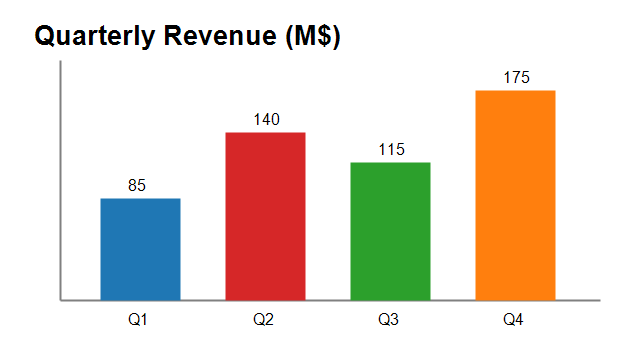
Feed it assets/demo-chart.png (shipped in this repo) with the question "Read this bar chart: the value and color of each quarter, and which quarter is highest?":
see_image returns:
Title: Quarterly Revenue (M$) Each quarter's value and color: Q1: 85 (blue), Q2: 140 (red), Q3: 115 (green), Q4: 175 (orange) Highest quarter: Q4 (175, orange)
(Real output from GitHub Copilot Free plan gpt-4.1, ~5 seconds.)
Features
- Any OpenAI-compatible VLM: Zhipu / Bailian / Doubao / SiliconFlow / local Ollama / OpenRouter… just change three config keys
- First-class GitHub Copilot support: default backend
gpt-4.1(Free plan eligible) with built-in token auto-refresh — no key management at all - No tool-count issues: requests are made by the plugin directly and don't carry DSH's tool list, so OpenAI-style gateway limits (128 tools) don't apply
- Zero npm dependencies: reuses the host's
@deepseek-ai/dsh-tools/schemastery(the profile's flatnode_modulesresolves them automatically) - Hot reload: editing
cordis.patch.ymltakes effect immediately (verified without restart; in conservative scenarios restartdsh web)
Install (3 steps)
(Optional) Clone the repository instead of unzipping:
git clone https://github.com/tiefeiyu/dsh-see-imageCopy the plugin into your profile directory (
$DSH_HOMEis usually~/.dsh; example shows thewebprofile):$DSH_HOME/profiles/web/plugins/dsh-see-image/ ├── index.js # plugin entry ├── scripts/ # Copilot token scripts (optional; only needed for the Copilot backend) ├── package.json ├── README.md └── LICENSEMount it — append to
$DSH_HOME/profiles/web/cordis.patch.yml:- insert: - id: local-see-image name: './plugins/dsh-see-image/index.js' config: baseURL: 'https://api.individual.githubcopilot.com' # default: GitHub Copilot model: gpt-4.1 apiKeyEnv: VISION_API_KEY # non-Copilot backends read this env var maxTokens: 1024 timeoutMs: 90000 maxBytes: 15728640Verify: wait ~6 seconds (hot reload);
see_imageappears in the tool list of new sessions.
Configuration
| Key | Default | Description |
|---|---|---|
baseURL |
https://api.individual.githubcopilot.com |
OpenAI-compatible endpoint; the plugin appends /chat/completions |
model |
gpt-4.1 |
Vision model ID |
apiKeyEnv |
VISION_API_KEY |
Env var name holding the API key for non-Copilot backends; empty sends no Authorization header (keyless local endpoints like Ollama) |
maxTokens |
1024 |
Max output tokens (Zhipu glm-4v-flash caps at 1024; raise it for larger models) |
timeoutMs |
90000 |
Request timeout |
maxBytes |
15728640 |
Max image size (15 MB) |
prompt |
(detailed Chinese description instruction) | Default question; a question argument passed at call time takes precedence |
Backend switching examples
Just change three lines of config (baseURL / model / apiKeyEnv) and set the env var (setx VISION_API_KEY "your-key" or write it to ~/.dsh/.env):
| Backend | baseURL | model | Notes |
|---|---|---|---|
| GitHub Copilot (default, free quota) | https://api.individual.githubcopilot.com |
gpt-4.1 |
Uses the built-in token flow (below); no VISION_API_KEY needed |
| Zhipu (free tier) | https://open.bigmodel.cn/api/paas/v4 |
glm-4v-flash |
Register at bigmodel.cn for a key (id.secret format) |
| Alibaba Bailian | https://dashscope.aliyuncs.com/compatible-mode/v1 |
qwen3-vl-flash |
For screenshot/GUI scenarios try qwen3-vl-plus |
| SiliconFlow | https://api.siliconflow.cn/v1 |
Qwen/Qwen2.5-VL-32B-Instruct |
|
| Volcano Doubao | https://ark.cn-beijing.volces.com/api/v3 |
doubao-seed-2-1-turbo-260628 |
Ark model IDs carry a date suffix |
| Ollama local (offline) | http://localhost:11434/v1 |
qwen3-vl:4b |
apiKeyEnv: '' — fully offline and free |
GitHub Copilot token (default backend only)
The plugin refreshes automatically: Copilot access tokens expire after 30 minutes, so the plugin checks exp before every call, mints a fresh one from the OAuth refresh token when needed, and writes it back to ~/.dsh/.credentials.yaml.
One-time setup (~1 minute, needs GitHub authorization in a browser):
Run the bundled login script:
node scripts/copilot-login.mjsThe script prints an authorization URL and a code (e.g.
https://github.com/login/device+XXXX-XXXX). Open the URL in a browser, sign in to GitHub (an account with a Copilot subscription — the Free plan counts), enter the code and authorize.The script saves two things:
~/.dsh/copilot-oauth.json— the OAuth refresh token (long-lived, keep it private)COPILOT_GITHUB_TOKENin~/.dsh/.credentials.yaml— the current access token (auto-refreshed by the plugin)
If the OAuth token ever goes stale (rare), rerun the login script. You can also force an immediate refresh with node scripts/refresh-copilot-token.mjs.
Usage
In conversation, just say "look at this image / read this screenshot" — the model locates the file and calls the tool itself. You can also state the question explicitly:
see_image(file_path="C:\\Users\\me\\Desktop\\error.png", question="What is the full text of this error?")
question may be omitted; the default output covers: scene → verbatim text transcription → color/shape/layout details → explanation of charts/UI/errors (in Chinese).
Compatibility & known notes
- Tested with
@deepseek-ai/dsh0.1.0-rc.6(web profile, Windows; other platforms should behave the same) - The plugin registers at the host-global layer, so it is visible to every DSH entry point (web / TUI / remote)
- Does not cover Anthropic / Gemini native protocols (Gemini can be reached through its OpenAI-compatible entry)
- If hot reload doesn't pick up plugin code changes (ESM module cache), rename the file to a new path (e.g.
index.v2.js) and updatecordis.patch.yml'snameaccordingly, or restartdsh web
License
MIT
No comments yet. Be the first to write one.