dsh-llm-local-token
A DeepSeek Harness plugin that serves LLM calls with the OAuth tokens your local CLIs already hold — no separate API key, no extra login. If you are signed in to the Codex CLI or to Claude Code, those subscriptions become usable model routes inside DSH.
| Provider route | Credential source | Endpoint |
|---|---|---|
openai-codex |
~/.codex/auth.json (ChatGPT OAuth, shared with the codex CLI) |
https://chatgpt.com/backend-api |
anthropic |
~/.claude/.credentials.json, else the macOS Keychain item Claude Code-credentials |
https://api.anthropic.com |
Both routes appear in the model picker as soon as the plugin loads. A route whose credential is missing is skipped instead of failing the boot.
The usage badge additionally reports a GLM Coding Plan subscription, which DSH already serves
through pi-ai's own zai-coding-cn route — the plugin adds the quota, not a second route, so the
model picker gains no duplicate. See Subscription usage badge.
Both subscriptions as routes in the model picker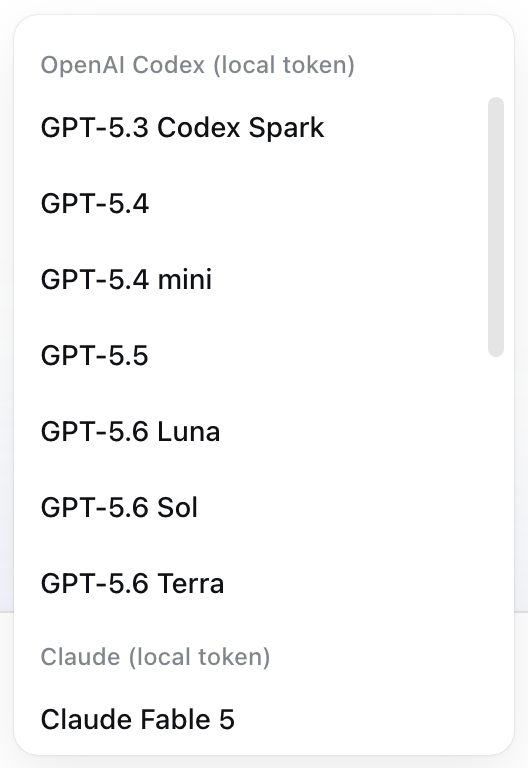 |
Subscription usage for every subscription the plugin can see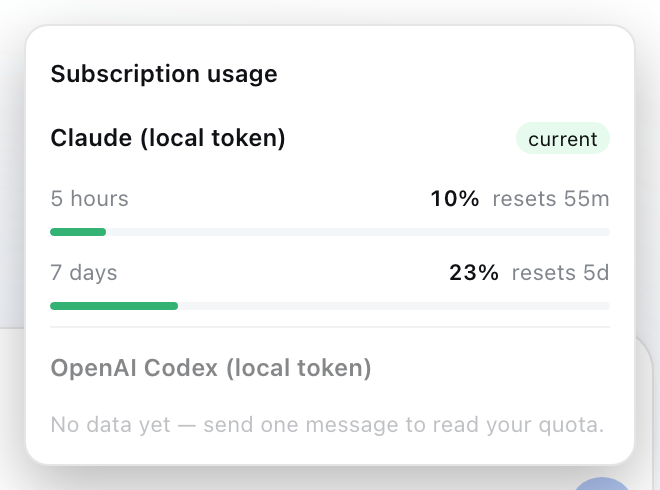 |
Why it exists
DSH resolves a provider's key through its credential seam, which expects an API key. Personal Codex / Claude subscriptions are OAuth-only, so the keys simply do not exist. This plugin resolves the token per request from the file the CLI maintains, refreshes it when it is close to expiry, and hands it to the pi-ai engine that DSH already ships.
Install
dsh plugin --profile web add dsh-llm-local-token

# or straight from git
dsh plugin --profile web add https://github.com/tianxia--/dsh-llm-local-token.git
Then restart dsh — that is the whole install. The package declares a profile
bundle (dsh.bundle.patch → cordis.patch.yml), so DSH
inserts the loader row for you; you do not have to hand-edit the profile's
own cordis.patch.yml.
If you vendored the plugin, or you want to pin its config in your own patch
layer, append the row yourself to ~/.dsh/profiles/web/cordis.patch.yml. Your
profile's layer is applied after every bundle layer, so restating the id here
also lets you override the bundle's defaults:
- insert:
    - id: llm-local-token
      name: dsh-llm-local-token
To make it the default model:
# ~/.dsh/settings.yaml
agent-default-model:
  provider: openai-codex
  model: gpt-5.6-terra
  reasoningEffort: medium
Configuration
All keys are optional; the defaults match a stock CLI install.
| Key | Default | Meaning |
|---|---|---|
codexAuthPath |
$CODEX_HOME/auth.json, else ~/.codex/auth.json |
Codex credential file |
claudeAuthPath |
~/.claude/.credentials.json |
Legacy Claude Code credential file |
claudeKeychainService |
Claude Code-credentials |
macOS Keychain service holding the Claude OAuth payload |
requireClaude |
false |
Fail activation when no Claude credential is found, instead of skipping the route |
codexTransport |
"sse" |
Streaming transport for the Codex route: sse / websocket / websocket-cached / auto. The quota badge depends on sse: pi-ai's default auto streams over WebSocket, and the x-codex-* quota headers exist only on the SSE response, so the badge stays empty under WS. Set auto to prefer WebSocket and accept no Codex quota data. |
usageProbe |
true |
Refresh quota on a schedule with one bare minimal request per provider. Set false to keep the panel purely passive. |
usageProbeIntervalHours |
4 |
Hours between probes. Tracks the 5-hour window, which resets about five times a day; 24 is once per day. |
usageProbeAtHour |
— | Local hour 0–23 for a once-daily probe at a fixed clock time. Overrides usageProbeIntervalHours. |
usageProbeStartupDelayMs |
20000 |
Delay before the probe that runs at boot. A clock schedule only fires while dsh happens to be running, so boot is its own trigger. |
usageProbeCodexModel |
gpt-5.6-terra |
Model the Codex probe names; only a vehicle for the headers. |
usageHistoryDays |
7 |
How many days of snapshots to keep per provider and serve to the panel's trend strip. Snapshots live in ~/.dsh/usage-history/<provider>.jsonl. |
usageProbeAnthropicModel |
claude-haiku-4-5-20251001 |
Model the Anthropic probe names; only a vehicle for the headers. |
glmQuota |
true |
Report GLM Coding Plan quota. No route is registered either way — DSH already serves GLM. |
glmApiKey |
— | GLM token, overriding every discovered source. |
glmApiKeyEnv |
ZAI_CODING_CN_API_KEY |
Environment variable and $DSH_HOME/.credentials.yaml ref consulted for the GLM token. |
glmBaseDomain |
https://open.bigmodel.cn |
Monitor host. https://api.z.ai is the international front; both answer the same body for the same account. |
Subscription usage badge
Codex and Claude state their quota in response headers, so reading it off a real request costs nothing. A route you never call has nothing to report, though — so the plugin also refreshes on a schedule, with one deliberately tiny request per provider (16 input tokens for Codex, 9 for Anthropic) that carries no prompt, skills, tools or history and is never stored. A badge appears in the composer bar next to the context ring; click it for the breakdown.
| Provider | Source | Shown |
|---|---|---|
openai-codex |
x-codex-primary-*, x-codex-secondary-*, x-codex-plan-type, x-codex-credits-balance |
plan, used % per window, reset countdown, credit balance |
anthropic |
anthropic-ratelimit-unified-{5h,7d}-{utilization,reset,status} |
used % for the 5-hour and 7-day windows, reset countdown |
zai-coding-cn |
GET /api/monitor/usage/quota/limit |
plan level, used % for the 5-hour and weekly token windows, and the MCP tool-call quota |
GLM is the odd one out and deliberately so. DSH already serves it through pi-ai's built-in
zai-coding-cn route, so this plugin contributes the quota half only — registering a route would
put a duplicate GLM in the model picker. Its numbers come from the subscription's own monitor
endpoint rather than response headers, so there is no probe request to pay for. modlens re-exposes
every pi-ai route under a modlens- prefix as a separate picker entry, and the badge treats
modlens-zai-coding-cn as the same subscription.
GLM's credential is resolved in the order that keeps the number honest — the badge has to report the subscription the calls are actually billed to:
glmApiKeyin this plugin's config- the
ZAI_CODING_CN_API_KEYenvironment variable - the same-named ref in
$DSH_HOME/.credentials.yaml— what DSH itself calls with ~/.zcode/v2/credentials.json→oauth:bigmodel:access_token, for a localzcodesign-in
With none of those present the GLM row is skipped, exactly like a missing Codex or Claude
credential. Set glmQuota: false to switch it off outright.
The badge is green under 60%, amber under 85%, red above. Any reading older than a minute carries
its age, because a 5-hour window resets about five times a day and a stale number that looks live
is worse than none.
The browser half polls GET /llm-local-token/usage every 15s; that route only reads the
in-memory snapshot.
The badge shows only the provider serving the currently selected model: pick Codex and you see
Codex's windows, switch to Claude and it swaps — the two are never mixed into one number. When the
selected model belongs to another adapter (a plain API key, another plugin) the badge hides itself,
because that quota is not this plugin's to report. The popover still lists every route, with the
active one first, marked "current" and expanded; the rest are collapsed to a header carrying their
first two windows, and open on click. Switching model re-applies that default. The selection comes from
ctx.modelDirectories; a composition without that service (non-Web) falls back to the previous
union-of-all-routes view.
Requirements
- Node.js 22.13+ (DSH's own floor;
--use-system-caneeds it too) dsh-basein the profile — it already provides@deepseek-ai/dsh-llm-pi-aiand@earendil-works/pi-ai- A signed-in CLI:
codex loginfor the Codex route; Claude Code for the Anthropic route - The Claude Keychain lookup is macOS-only. On Linux/Windows only the file store is consulted.
Token handling
- Read per request, never cached in memory beyond the call
- Refreshed when less than 5 minutes of life remain, then written back to the same file the CLI reads, so the CLI stays logged in (single-flight: concurrent requests trigger one refresh)
- Written atomically with
0600permissions - Never logged, never sent anywhere except the provider endpoint
Troubleshooting
UNABLE_TO_GET_ISSUER_CERT_LOCALLY
Your traffic goes through a TLS-inspecting proxy (Zscaler, Netskope, corporate MITM). Node does not trust its root CA even when the OS does. Start DSH with either:
node --use-system-ca …                          # trust the OS store (Node 22.13+)
NODE_EXTRA_CA_CERTS=/path/to/root-ca.pem dsh …  # or point at the proxy's root cert
Provider is not configured: openai-codex
Means the pi-ai provider refused an API-key override. This plugin already attaches an api-key
auth method to the OAuth-only Codex provider; seeing this error again implies a pi-ai version
whose resolveProviderAuth changed — open an issue with your @earendil-works/pi-ai version.
The model list shows no Codex/Claude entries
Check the boot log for llm-local-token: registered …. If it names only openai-codex, no
Claude credential was found (expected when Claude Code was never used on this machine).
Caveats
- Uses your personal subscription quota (ChatGPT Plus/Pro, Claude Pro/Max). Respect the provider's terms; this is not a way to share one seat across a team.
chatgpt.com/backend-apiis the Codex client's own endpoint, not a documented public API. It can change without notice; pin the pi-ai version if you need stability.
License
MIT
No comments yet. Be the first to write one.