
📊 Market Research Cockpit
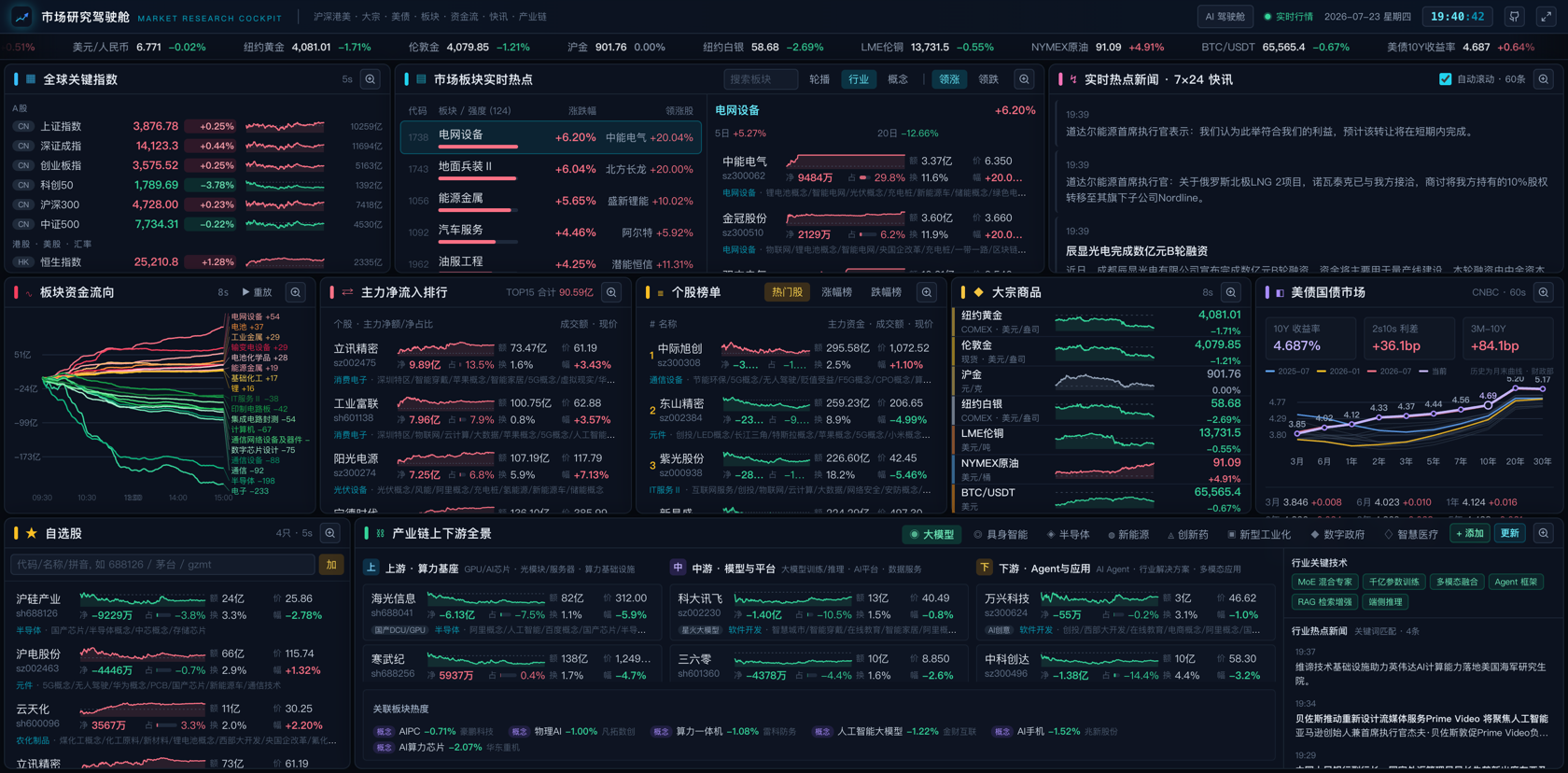
A one-screen real-time market dashboard for financial & industry research
A-shares / HK / US stocks · Commodities · US Treasury yields · Sector heat · Money flow · 7×24 news flash · Industry-chain watchlists







🚀 Live demo: https://mrd.hermes.cc.cd — no API keys, no login, works instantly
🛎️ Hosted version: in preparation — no pricing, no launch date yet. Want a managed deployment so you don't have to run your own server? Tell us what would matter to you. The open-source self-host stays free & MIT, that's not going anywhere.
🏠 Made by Gavin's Lab — a one-person company run by 7 AI agents on a kanban board: company site · live transparency office
✨ Features
- 🌍 Global markets on one screen — SSE / SZSE / Hang Seng / Dow / Nasdaq / S&P 500 / VIX / USD-CNY, with minute-level index charts side by side
- 🥇 Commodities & crypto — NY gold/silver, London gold, SHFE gold, LME copper, crude oil, BTC — live prices with intraday curves
- 💵 US Treasury monitor — 10Y / 2Y yields, 2s10s spread, yield-curve shape and its month-by-month history back to 2001
- 🔥 Sector heat radar — Industry / concept sector rankings; click a sector to drill into constituents, leading stocks and money flow
- 💰 Money-flow tracking — Top stocks by main-force net inflow, minute-level cumulative sector flow curves, hot / top-gainer / top-loser lists
- ⛓️ Industry-chain panorama — Semiconductors, AI compute, EV, robotics, innovative drugs and more; upstream/midstream/downstream tickers linked to live quotes. Stock lists can be edited manually or fetched automatically from iwencai
- 🤖 AI cockpit — OpenRouter daily rankings API tracking token-consumption trends of 50+ global LLM providers (7d–1y ranges), stacked-area share charts by provider/country/region, 60+ day long-range history
- 💹 LLM price-competition watch — Four panels on a 2×3 grid: TTSI spend-index trend (weighted / closed-source / open-source price lines on a 0-based axis, multi-month full history from a local
ttsi.csvCC BY 4.0 archive merged with the daily RSS tail), model price table (~400 models, sortable by intelligence / input / output / task cost), value scatter (intelligence index × task cost on a log axis, vendor colors), and a price-cut / share-shift event feed from TrakToken daily annotations - 🪟 Earnings window (/fin) — Earnings-season macro view: disclosure calendar (14-day rhythm bars + today's list), earnings forecasts (beat/miss stats bar + profit-range details), industry profit ranking (scale × momentum dual encoding), stock profit ranking (by amount / growth), plus per-company 12-quarter trends (revenue/profit bars + ROE/gross/net margin lines)
- 🏷️ Commodity prices page (/goods) — Main-contract futures daily trends across 6 groups (precious / base / ferrous / energy-chem / agri / international energy) with 30d–365d ranges, plus Sunsirs spot quotes (accumulated daily) and spot–futures basis tables
- 📰 7×24 news flash — Scrolling global financial news with auto-highlighted macro keywords and industry-chain mentions
- 🖥️ Installable desktop app — Built-in PWA support (Web Manifest + Service Worker); install from the browser address bar and run in a standalone window
- 🍎 Native macOS app — Swift WKWebView thin shell, follows the same pattern as Android TV
- 📺 Android TV app — Native WebView shell (
android-tv/) with D-pad spatial navigation, fullscreen panel zoom (proportional scaling + slideshow), split-flap ticker, tuned for legacy engines and weak GPUs - 📱 iOS Scripting script — TypeScript/TSX script (
scriptable/, mirrored totheBigGavin/mrd-scripting) that wraps the cockpit in the Scripting app's WebView: TV mode via?tv=1, forced landscape, safe-area-free fullscreen, Liquid Glass exit button, local splash screen with the mrd logo (breathing animation) and a white-screen-free transition into the live dashboard - ⚡ Zero-dependency data service — Built-in Node proxy aggregates public market-data endpoints with in-memory caching; most endpoints need no API key and work out of the box
🏗️ Architecture
flowchart LR
    subgraph External data sources
        A[Tencent Quotes] --> D
        B[Sina Finance] --> D
        C1[Eastmoney] --> D
        C2[Wallstreetcn] --> D
        C3[CNBC / Binance] --> D
        C4[iwencai] --> D
        C5[OpenRouter rankings] --> D
        C6[Artificial Analysis API] --> D
        C7[TrakToken TTSI RSS] --> D
    end
    subgraph This project
        D["Node data proxy<br/>in-memory TTL cache"] -->|"/api/*"| E["React 19 frontend<br/>polling refresh"]
        E --> F[One-screen cockpit UI]
    end
- The frontend prefers the bundled Node proxy; when it is unavailable, some endpoints (Tencent / Wallstreetcn) gracefully fall back to direct browser connections
- Unified client quote hub: all panel prices / changes come from a single client-side quote hub (
src/lib/market.ts) that batch-fetches every 5s and distributes one snapshot — the same ticker renders the same frame everywhere; server-side quotes are cached per code (5s, aligned with the client poll loop) and watch-set changes only fetch the new codes - Per-endpoint server cache TTLs (5s for quotes up to 24h for sector membership), bounded capacity (LRU + periodic sweep), no database, no external storage
- Upstream-friendly under many concurrent users: per-code TTL caches + in-flight dedup share one upstream fetch across concurrent cache misses, failure backoff (5s→2min negative caching) keeps a downed upstream from being hammered, browser-direct fallbacks are throttled per code, and
/api/statsexposes request / upstream-fetch / 429 counters - Spot prices are collected by the server every 4 hours into local history files — history grows day by day without the frontend being online
- Single-process production: one port serves both the API and the built frontend
🧱 Product boundary (red lines)
This repository is only for the mrd product (the market-data cockpit). Code / data / credentials / tests for the OPC transparency office, company site, marketing, or customer support must never land here — they live in their own repos:
| Product / service | Repo | Public domain |
|---|---|---|
| mrd (this repo) | theBigGavin/marketingdashboard | mrd.hermes.cc.cd |
| OPC backend (opc-api) | theBigGavin/opc-os · opc-api/ (private) |
opc.hermes.cc.cd |
| Company-site backend | theBigGavin/company-site-backend | api.hermes.cc.cd |
| Company-site frontend | theBigGavin/gavin-lab-company | www.hermes.cc.cd |
| knock leaderboard | theBigGavin/mylauncher · server/ |
hermes.cc.cd/api/v1/knock |
Rules:
- New APIs mount on their own product domain; cross-product calls go through the owning product's backend — never add another product's routes or reverse proxies here.
- Sensitive credentials exist only in the owning repo's gitignored
server/.env. This repo keeps only mrd's own keys:IWENCAI_BASE_URL/IWENCAI_API_KEY/OPENROUTER_API_KEY/ARTIFICIAL_ANALYSIS_API_KEY. - Guard: run
scripts/check_product_boundary.sh(manual or CI) before merging — FAIL means non-mrd code slipped in. It treats/api/rank,qq-rank,/api/leads,/api/v1/knockand/company/opc/status.json(legacy static service, P0-1 stopped updates, kept for the whitelist) as mrd-owned and never flags them.
🚀 Quick start
Prerequisites
- Node.js 18+
curlavailable on the system (used by some proxy endpoints)
Local development
npm install     # or pnpm install
npm run dev
- Frontend dev server: http://localhost:3000
- Data proxy: http://localhost:3001 (Vite proxies
/apito it automatically)
Production
npm run build   # builds to dist/
# Optional: configure API keys (AI panels)
#   echo 'OPENROUTER_API_KEY=sk-or-v1-xxxx' > server/.env          # AI cockpit usage panel
#   echo 'ARTIFICIAL_ANALYSIS_API_KEY=aa_xxxx' >> server/.env      # LLM price panels
# Optional: full TTSI history — download ttsi.csv from traktoken.com and
# place it at server/data/ttsi.csv (CC BY 4.0). Without it the trend
# panel falls back to the 60-day RSS tail automatically.
npm start       # single process, visit http://localhost:3000
Docker
docker build -t market-cockpit .
docker run -p 3000:3000 market-cockpit
Install as a desktop app (PWA)
Open the deployed page in Chrome / Edge and click the install icon on the right of the address bar (or menu → "Install Market Research Cockpit") to run it as a standalone desktop app with offline-cached static assets and its own icon.
Note: market data is fetched live; offline only the app shell works.
macOS Desktop App
The macos/ directory contains a native Swift WKWebView shell. Same pattern as Android TV — a thin native window around the same web UI.
Prerequisites: Xcode
open macos/MarketCockpit.xcodeproj # Open in Xcode, press ⌘R to build & run
Loads http://localhost:3000/?desktop=1 by default (run npm start first).
Android TV app
The android-tv/ directory contains a native WebView shell (zero third-party dependencies) that brings the cockpit to Android TVs and set-top boxes. The web app enters TV mode via ?tv=1 and shares the same codebase as the desktop version.
Remote-control model
- D-pad spatial navigation: panels, nav links, tabs and scroll regions are all focusable (cyan highlight ring), scored by edge distance + axis overlap so the candidate straight ahead always wins
- OK: zoom a panel / activate a button / switch pages
- Zoom = fullscreen overlay: the panel covers the screen with a dim backdrop, its content scaled up proportionally (CSS zoom, capped at 3x), while every other panel stays put — zero reflow
- Inside the overlay: ←/→ switches to the adjacent panel slideshow-style; ↑/↓ scrolls the content (at the top, one more ↑ jumps to the tab bar); tabs, board rows and the constituents sidebar are all reachable and operable
- Back: restore the zoomed panel → history back → exit; Menu: change the server URL
- Split-flap ticker: the top quote strip works like a departure board — 7 equal-width cards, one card flipping at a time every few seconds (a full-width scrolling layer is too much for weak TV GPUs; flipping only repaints a tiny region)
- Splash screen: breathing logo + progress indicator that fades out once the page is ready
TV-mode adaptations (no effect on desktop)
- Fixed 1920 CSS-px viewport so layout and font sizes are identical on any TV density; the shell computes the initial scale from the screen's dp width to fit exactly
- Legacy engine compatibility (< Chromium 88): fallbacks for
:where(),insetand flexgap - Weak-GPU optimizations: blur/shadows/animations disabled, clock and countdowns tick per minute, long lists trimmed (boards 200→40, news 60→25, rankings 30→15), quote polling slowed 5s→10s
- Debug badge in the corner: WebView engine version · build time · live FPS · JS heap · quote heartbeat (distinguishes "polling broken" from "market closed")
Setup
- Build the APK:
cd android-tv && ./gradlew assembleDebug— output atapp/build/outputs/apk/debug/app-debug.apk - Sideload it onto the TV (
adb install app-debug.apk, or copy via USB drive) - The app connects to the public deployment
https://mrd.hermes.cc.cdby default — works out of the box; press the remote's menu key anytime to switch to a LAN address (runnpm starton a computer and enterhttp://<computer-ip>:3000)
iOS Scripting script
The scriptable/ directory contains a Scripting app (scripting.fun) script that presents the cockpit inside a native WebView. It is also mirrored as a standalone repository theBigGavin/mrd-scripting so it can be imported directly.
Features
- Loads
https://mrd.hermes.cc.cd/?tv=1— TV mode (D-pad spatial navigation, tap-to-zoom panels, touch swipe to switch) - Forced landscape, title-bar-free, safe-area-free fullscreen (
ignoresSafeArea) - Liquid Glass exit button (
buttonStyle="glass", iOS 26) - Local splash screen: mrd logo with breathing animation + spinner, then a seamless dark transition into the dashboard (no white flash)
Install (one tap)
Open the import link on your iPhone (requires the Scripting app, iOS 26+):
https://scripting.fun/import_scripts?urls=%5B%22https%3A%5C%2F%5C%2Fgithub.com%5C%2FtheBigGavin%5C%2Fmrd-scripting%5C%2Ftree%5C%2Fmain%22%5D
Or share the mrd-dashboard.scripting file from scriptable/. If a script with the same name already exists, delete it before re-importing to avoid cache conflicts.
Repackaging: .scripting is a zip (STORE method, flag_bits=2048 for UTF-8 names, zip version 20, DOS date 2020) containing index.tsx, page.tsx and script.json. Rebuild with python3 scriptable/package.py.
📡 API overview
During development the frontend talks to the local proxy via /api:
| Endpoint | Description |
|---|---|
/api/quotes?codes=... |
Real-time index / stock quotes |
/api/minute?code=... |
Intraday minute series |
/api/boards?type=...&dir=...&n=... |
Industry / concept sector rankings |
/api/board-stocks?code=...&n=... |
Sector constituents |
/api/futures?list=... |
Commodity / crypto quotes |
/api/future-minute?code=... |
Futures intraday series |
/api/future-daily?code=...&n=... |
Futures daily K-line (last ~400 bars; domestic nf_ / international hf_) |
/api/spot-table |
Sunsirs spot–futures table (spot / futures / basis; spot history accumulates daily) |
/api/chem-spot?id=...&name=... |
Sunsirs chemical spot quotes (median market price, history accumulates daily) |
/api/rank?sort=...&n=... |
Stock leaderboards (gain / turnover / volume) |
/api/moneyflow?n=... |
Top stocks by main-force net inflow |
/api/stock-flows?codes=... |
Batch per-stock money flow |
/api/board-flow?n=... |
Sector money-flow curves |
/api/stock-boards?code=... |
Sectors a stock belongs to (industry / region / concept) |
/api/news?page=...&size=... |
7×24 financial news flash |
/api/treasuries |
Real-time US Treasury yields |
/api/treasury-history |
Monthly US Treasury yield history (2001–now; local archive in server/treasury-rates/ + live fill for the current year) |
/api/mystery-select?query=...&limit=... |
iwencai stock screening (by concept / industry) |
/api/finance-main?code=... |
Per-company financial highlights, last 12 periods (Eastmoney F10: revenue / profit / ROE / margins…) |
/api/finance-board?period=... |
Earnings macro bundle (top-50 stocks by profit + top-15 industry aggregates + recent disclosure calendar) |
/api/finance-forecast?period=... |
Earnings forecasts (profit range / YoY / type + beat–miss stats) |
/api/chain-parse |
Industry-chain text parsing (auto-assigns upstream / midstream / downstream by paragraph headings) |
/api/openrouter-usage |
OpenRouter daily rankings (provider token consumption, persisted local cache) |
/api/aa-models |
Artificial Analysis full model pricing (~600 models: intelligence index, input/output per 1M tokens, task cost; 24h cache + daily snapshot accumulates in server/data/model-prices.json) |
/api/spend-index |
TrakToken TTSI spend index (full history from local ttsi.csv merged with the daily RSS tail, plus price-cut / share-shift events) |
/api/stats |
Runtime observability: request / upstream-fetch / 429 counters, uptime |
/api/stock-search?q=... |
Stock search (name / pinyin initials → code, Sina suggestion proxy) |
/api/health |
Health check |
Note:
/api/mystery-selectand/api/openrouter-usageconsume server-side private API keys and only accept same-origin page requests (403 cross-origin);/api/aa-modelsneedsARTIFICIAL_ANALYSIS_API_KEYinserver/.envbut the endpoint itself stays public (24h cached). All APIs only reflect CORS Origin to same-origin pages and are rate-limited per client IP (2400 req/min public, 30 req/min private; 429 when exceeded; real client IP taken fromCF-Connecting-IPbehind Cloudflare Tunnel). POST bodies are capped at 256KB, and unmatched/api/routes return a 404 JSON.
🤖 MCP Server (Phase 1.5)
mrd ships a built-in MCP server so AI agents can call market data tools directly. No extra dependencies — it runs in the same Node.js process, reusing the shared cached() memory cache.
Protocol: JSON-RPC 2.0 over Streamable HTTP (SSE for server→client pushes, POST for requests).
Endpoints
| Method | Path | Description |
|---|---|---|
GET |
/mcp |
Server metadata: version, tool list, resource list |
POST |
/mcp |
JSON-RPC 2.0 request (initialize / tools/list / tools/call / ping …) |
GET |
/mcp/stream |
SSE stream for server-initiated notifications |
Authentication
No API key required for the public MCP tools. Private endpoints (/api/mystery-select, /api/openrouter-usage) are not exposed via MCP and require their own key configuration.
Tool List (5 public tools)
| Tool | Description |
|---|---|
get_quotes |
Real-time A-share / HK / US / FX quotes. Input: comma-separated codes, e.g. sh000001,sz399001,hkHSI,usNVDA |
get_boards |
Sector heat rankings. type: 01 (A-share industry) / 02 (A-share concept) / 03 (HK industry) / 05 (US); dir: 0 descending / 1 ascending |
get_futures |
Commodity & crypto futures. Default list: NY Gold, Spot Gold, Silver, CAD, Crude Oil, VIX, Domestic Gold, BTC |
get_money_flow |
A-share main-force net inflow ranking (Eastmoney primary, Sina fallback) |
get_news |
Sina 7×24 financial flash. page (default 1), size (default 40) |
Resources
| URI | Description |
|---|---|
mrd://health |
Server health status |
mrd://stats |
Cache size & runtime stats |
Quick Start
# Start the server
npm start

# 1. Discover — get server metadata
curl http://localhost:3000/mcp

# 2. Initialize (required first call)
curl -X POST http://localhost:3000/mcp \
  -H "Content-Type: application/json" \
  -d '{"jsonrpc":"2.0","id":1,"method":"initialize","params":{}}'

# 3. List tools
curl -X POST http://localhost:3000/mcp \
  -H "Content-Type: application/json" \
  -d '{"jsonrpc":"2.0","id":2,"method":"tools/list","params":{}}'

# 4. Call a tool — get A-share index quotes
curl -X POST http://localhost:3000/mcp \
  -H "Content-Type: application/json" \
  -d '{
    "jsonrpc":"2.0","id":3,"method":"tools/call",
    "params":{
      "name":"get_quotes",
      "arguments":{"codes":"sh000001,sz399001,hkHSI,usNVDA"}
    }
  }'

# 5. Get sector rankings
curl -X POST http://localhost:3000/mcp \
  -H "Content-Type: application/json" \
  -d '{
    "jsonrpc":"2.0","id":4,"method":"tools/call",
    "params":{
      "name":"get_boards",
      "arguments":{"type":"01","dir":"0","n":"10"}
    }
  }'

# 6. Ping (keep-alive / health check)
curl -X POST http://localhost:3000/mcp \
  -H "Content-Type: application/json" \
  -d '{"jsonrpc":"2.0","id":5,"method":"ping","params":{}}'
Using with Claude Desktop
Add this to ~/.config/claude/desktop.yaml (or the equivalent config file):
mcpServers:
  mrd:
    command: npx
    args:
      - -y
      - @modelcontextprotocol/server-http
      - http://localhost:3000/mcp
Restart Claude Desktop. The 5 MRD tools will appear in the tools panel automatically.
Caching
All tool responses are cached in the server's shared memory:
| Data | Cache TTL |
|---|---|
Quotes (get_quotes) |
5 s |
Sector rankings (get_boards) |
5 s |
Futures (get_futures) |
15 s |
Money flow (get_money_flow) |
8 s |
News (get_news) |
8 s |
Concurrent requests for the same data share one upstream fetch (inflight deduplication). Upstream failures trigger exponential backoff — the cache serves stale data rather than surfacing errors.
DSH / DeepSeek Harness Compatibility
The MCP protocol is agent-framework agnostic. mrd can be called by DeepSeek Harness plugins, LangChain tools, or any MCP client. The server auto-detects DSH-compatible clients via the User-Agent header and applies DSH-appropriate cache TTLs.
Install inside DeepSeek Harness (zero key, remote endpoint, no local server needed):
dsh plugin --profile web add github:theBigGavin/marketingdashboard
The dsh.bundle manifest bridges https://mrd.hermes.cc.cd/mcp through the in-box @deepseek-ai/dsh-mcp-client; the 5 tools appear as mcp__mrd__*. mrd is also listed on the DSH community directories (GitHub dsh-plugin topic, awesome-dsh-plugin curated registry).
🗂️ Project structure
├── server/
│   ├── dev.cjs        # Dev entry: starts Vite and the data proxy together
│   ├── index.cjs      # Data proxy + production static file serving
│   └── data/          # Runtime-accumulated data (gitignored): spot-history.json,
│                      #   model-prices.json, ttsi.csv (optional full TTSI history)
├── macos/              # macOS desktop app (Swift + WKWebView)
│   ├── MarketCockpit.xcodeproj
│   └── MarketCockpit/
├── src/
│   ├── App.tsx        # Cockpit layout & routing (/ market cockpit, /ai AI cockpit, /goods commodity prices, /fin earnings window)
│   ├── AiDashboard.tsx    # AI cockpit page (2×3 grid: OpenRouter usage spanning two rows + 4 LLM price panels)
│   ├── FinDashboard.tsx   # Earnings window page (panels in components/dash/fin/)
│   ├── GoodsDashboard.tsx # Commodity prices page (6-group trend panels + spot/basis panel)
│   ├── components/
│   │   └── dash/      # Cockpit panels + shared UI primitives
│   │       ├── fin/       # Earnings window panels (calendar, forecast, industry rank, stock rank, company, trend, peer comparison)
│   │       │   ├── FinContext.ts     # Shared company selection & reporting period state
│   │       │   └── utils.ts          # quarterLabel, forecastTone (re-exports from lib/)
│   │       ├── Spark.tsx       # Mini sparklines (A-share / 24h continuous / daily session axes)
│   │       ├── SharedUI.tsx    # TabBar (segmented control), AsyncContent (loading/error/empty wrapper)
│   │       └── ...
│   ├── config/        # Static config for indices, commodities, industry chains, goods groups
│   ├── hooks/         # Shared hooks
│   │   ├── usePolling.ts       # Per-component polling (hidden-tab pause, inflight guard)
│   │   ├── useSharedPolling.ts # Same-key components share one timer via useSyncExternalStore
│   │   ├── useElementSize.ts   # ResizeObserver → {ref, size} for SVG auto-sizing
│   │   ├── useStockSearch.ts   # Debounced search + dropdown + keyboard nav for stock pickers
│   │   └── ...
│   └── lib/           # API client, unified quote hub, shared utilities
│       ├── market.ts      # MarketHub: reference-counted quote subscriptions, single 5s poll loop
│       ├── api.ts         # Typed fetch wrappers (server-first, browser-direct fallback)
│       ├── format.ts      # fmtPrice, fmtPct, fmtYi, fmtWan, clsChg, hexChg, TNUM…
│       ├── code.ts        # normalizeStockCode / toMarketCode — stock code prefix normalization
│       └── storage.ts     # loadJson / saveJson — typed localStorage with error handling
└── docs/              # Screenshots and other doc assets
🛠️ Tech stack
- Frontend: React 19 · Vite 7 · TypeScript · Tailwind CSS · lucide-react icons (charts are hand-written SVG)
- Backend: Node.js native
http(no framework) ·curl/fetch - Data sources: Tencent, Sina, Eastmoney, Wallstreetcn, CNBC, Binance, Sunsirs, OpenRouter, Artificial Analysis, TrakToken and other public market-data endpoints
⚠️ Disclaimer
This project is for learning and research purposes only. All market data comes from public web endpoints and may be delayed or inaccurate. Nothing here constitutes investment advice.
🤝 Contributing
Issues and PRs are welcome:
- Fork this repository
- Create a
feature/xxxbranch - Commit and push your changes
- Open a Pull Request
No comments yet. Be the first to write one.