dsh-balance-whale
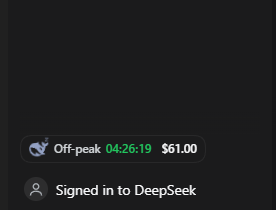
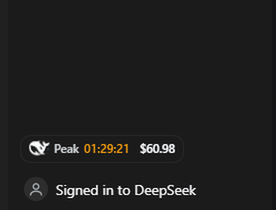
A whale in the DSH sidebar footer that shows your DeepSeek account balance, a live countdown to the next price switch, and whether you are on peak or off-peak pricing.
- Peak — the whale is drawn bright and tilted, and the countdown runs in the peak colour.
- Off-peak — the whale is drawn pale and curled, and the countdown runs in the off-peak colour.
- A live
HH:MM:SSbetween the whale and the balance counts down to the next switch, and the whale changes pose the moment it reaches zero. - The balance refreshes by itself every 30 seconds, and immediately when the window regains focus or the page becomes visible. Nothing to click.
The screenshots above are stills. In the running app the whale moves: it bobs and turns while the price is at peak, and breathes slowly while it sleeps off-peak.
Hover the chip for the full picture: the price multiplier, the clock time of the next switch, the recharge/bonus split, and how long ago the number was read.
Install
dsh plugin --profile web add github:tespio/dsh-balance-whale
Prebuilt tarball, pinned to a release:
dsh plugin --profile web add https://github.com/tespio/dsh-balance-whale/releases/download/v1.1.2/dsh-balance-whale-1.1.2.tgz
There is no build step and there are no dependencies — the package is plain JavaScript, so installing it never asks you to approve build scripts. After a page refresh the chip appears beside Settings in the sidebar footer.
Requires a DSH build where you are signed in to a DeepSeek account (Settings → Account). Without a
signed-in account the chip shows — and says so in its tooltip.
How it works
- Host half (
index.js) reads the signed-in account's Platform wallets through the harness account service and serves them as JSON on one loopback route,/plugin/deepseek-balance, cached for 10 seconds. The browser never receives a credential. - Client half (
client.js) registers a chip in thesidebar.footer.actionslot, polls that route, and draws the whale inline as SVG. Styles use the host's--dsw-alias-*theme tokens, so it follows light and dark themes.
A failed read never blanks the number: the last good balance stays on screen while the next attempt runs, retrying at 4s, 8s and 16s before settling back to the 30-second cadence.
Pricing rule
Peak is Monday–Friday 09:00–12:00 and 14:00–18:00 Beijing time (UTC+8), with half-open ranges (12:00 sharp is already off-peak). Everything else is off-peak at half price, and weekends plus Chinese public holidays are off-peak all day. The rule and the whale artwork come from DeepSeek Status.
The switch is computed in the browser and re-armed exactly on the boundary, so the whale changes pose on the minute rather than up to a poll late.
Privacy
- No telemetry, no analytics. The only network request is the balance read the host performs through your existing Platform sign-in.
- The route returns wallet totals and timestamps only, is served from the same origin, and sends no CORS header, so other sites cannot read it.
Related
dsh-whale-widget covers this ground and much more: a floating corner widget with usage accounting, per-turn cost, alerts, sounds and balance templates for 30+ providers. If you want any of that, use it.
This plugin is deliberately the small one: a chip in the sidebar footer that shows the balance and the current price period, with no panel, no settings, no extra files and no network beyond the balance read.
Notes
- The whale is the DeepSeek mark, taken from the Simple Icons collection (CC0). "DeepSeek" and its logo belong to their owner; this is an unofficial widget.
- The Chinese public-holiday calendar is embedded (2025–2026). A new year needs a new release.
License
MIT
No comments yet. Be the first to write one.