DSH HUB
首页插件商店插件包社区排行榜资源发布指南
插件源码
返回插件目录

sunny0826 /

sunny0826/dsh-plugin-herdr

已验证

Herdr control-plane plugin for DeepSeek Harness (DSH): observe and drive Herdr — a terminal workspace manager for AI coding agents — from DSH sessions

★ 0 Stars0 Forks0 IssuesN/A 社区评分0 已确认安装
查看 GitHub
README来源: main@7039f5b3

dsh-plugin-herdr

English | 简体中文

Herdr control-plane plugin for DeepSeek Harness (DSH): observe and drive Herdr — a terminal workspace manager for AI coding agents — from DSH sessions.

  • 19 herdr_* tools: snapshot, agent list, agent start/wait/prompt/ explain/send-keys, pane run/read/split/send-keys, workspace create/close/ rename, pane close/rename, pane layout, layout apply, notification — all over the Herdr socket protocol (JSONL over a Unix-domain socket; the CLI transport has been removed).
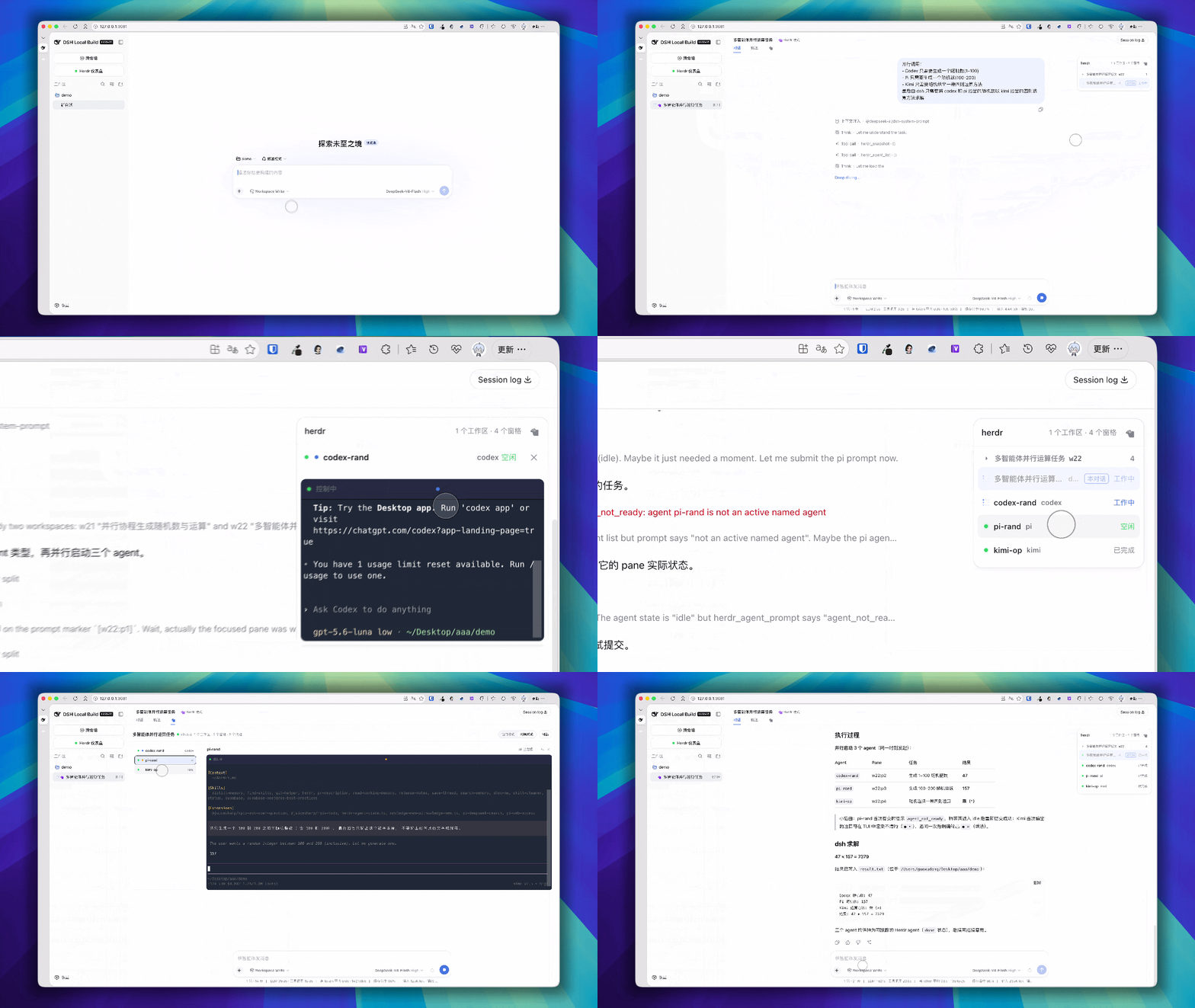
  • Herdr panel & tab, scoped to the session: both the conversation-page Herdr tab and the right-side floating pane list show only the current session's dedicated workspace and its panes. Mode-gated UI: conversations that are not in "Herdr 模式" show no Herdr tab, panel, or header pill at all.
  • herdr mode (agent preset): create a session in "Herdr 模式" — the session gets a dedicated workspace created in the project directory, every pane the session produces (splits, agents) lives in that workspace, and the whole workspace is reclaimed when the session ends.
  • Open real agents: herdr_agent_start starts a coding agent (pi / codex / claude) in the session workspace and waits until Herdr recognizes it; submit work with herdr_agent_prompt and wait with herdr_agent_wait.
  • Global Herdr Dashboard: a machine-level read-only overview of the local Herdr server (all workspaces across sessions/projects) — opened from the left sidebar button right under New Session. The button is a DOM marker injected into the sidebar's document flow between New Session and the workspace/session browser (plugin-only, via the existing shell.overlay slot host — no DSH changes required; a MutationObserver re-inserts it after React re-renders/collapse), with a status dot (running / stopped / not-installed / checking; reused from the shared /herdr-status poll). Clicking opens a full-height page covering the right work area (from the sidebar's right edge; the sidebar stays visible). The page shows server/socket/host cards (process metrics merged into the Herdr server card), a full agent-name list, and per-workspace agent-kind treemaps; closing the page returns to the current conversation (header ✕ / Escape). Treemap blocks are clickable: a block whose kind has exactly one agent jumps to that pane in the current session's Herdr tab (the pane must belong to the current DSH session — resolved via a reverse lookup /herdr-pane-session); panes of other sessions (or unbound panes) keep the panel open and show an inline notice instead. Workspace cards themselves are not clickable (blank areas and the header row do nothing) — everything stays strictly read-only with no cross-session navigation.

Install

Prerequisites: a DSH profile (e.g. web) and a running herdr headless server (the panel's start button spawns herdr server from PATH — the only remaining CLI invocation, see "Platform support").

dsh plugin is a thin pnpm forwarder: it runs pnpm <args> inside the profile directory ($DSH_HOME/profiles/<name>/), then reconciles the dsh.profile.bundles layer list against the installed state — this package declares dsh.bundle.patch, so installing it joins the profile's bundle layers (which is how its cordis.patch.yml gets applied).

# local directory
dsh plugin --profile web add /path/to/dsh-plugin-herdr

# tarball (pnpm pack output)
pnpm pack
dsh plugin --profile web add ./dsh-plugin-herdr-*.tgz

# git
dsh plugin --profile web add github:sunny0826/dsh-plugin-herdr

pnpm allowBuilds: git-hosted installs run the package prepare script. If pnpm blocks it, add the exact key pnpm printed under allowBuilds in <profile>/pnpm-workspace.yaml, then re-run.

Verify the install with dsh plugin --profile web list (or dsh plugin --profile web why dsh-plugin-herdr).

After install, restart the profile. The plugin registers ctx.herdr, the tools, and the Herdr panel; the "Herdr 模式" preset appears in the new-session picker (copied to $DSH_HOME/.agent-presets/herdr/ on first load).

Uninstall

Remove the plugin from the profile — dsh plugin ... remove forwards to pnpm remove and drops the package from the dsh.profile.bundles layer list in the same step:

dsh plugin --profile web remove dsh-plugin-herdr

Then restart the profile: the herdr_* tools, ctx.herdr, the Herdr panel, and the herdr-mode wiring are gone.

The uninstall leaves three traces worth knowing about:

  • Agent preset — the "Herdr 模式" preset was copied to $DSH_HOME/.agent-presets/herdr/ and is not removed. It stays in the new-session picker but is inert without the plugin; delete it manually: rm -rf "$DSH_HOME/.agent-presets/herdr".
  • Herdr workspaces — herdr-mode sessions own a dedicated dsh:<project> workspace that is reclaimed when the session ends. Close open herdr-mode sessions before uninstalling; any leftovers can be closed from the herdr CLI (herdr workspace list / herdr workspace close <id>).
  • Profile config — herdr config entries you added to the profile's cordis.patch.yml (e.g. timeoutMs) become inert; remove them for a clean profile.

Reinstalling is just the Install section again: the bundle layer is re-added and the preset is re-copied on first load.

Configuration

Key Type Default Description
socketPath string – herdr socket path (HERDR_SOCKET_PATH); POSIX only
session string – herdr session name (HERDR_SESSION)
timeoutMs number 30000 per-command timeout
allowBackground boolean false expose run_in_background on pane run
events.enabled boolean false subscribe to Herdr events
events.maxReconnectMs number 30000 event subscription reconnect cap
reportState boolean true report DSH→Herdr state inside a pane (HERDR_ENV)
projectRoot string – project directory for server-side filtering; defaults to process.cwd()

Preset configuration (presets/herdr/agent.cordis.yml, herdr-session-mode):

Key Default Description
paneId '' Fixed pane binding shared by all sessions; empty = every session creates its own dedicated workspace
label '' Display label override; empty = auto dsh:<project name> (cwd basename, falls back to dsh:<short session id>)
cwd – Workspace working directory; empty = the session's project directory

Output limits (CA-014):

  • Per-command output is capped at 1 MiB per stream; pane_read/pane_run report truncated: true when the cap is hit (the server-reported truncated flag is surfaced as-is).

Platform support: the plugin is POSIX-only — all control-plane interaction goes over the herdr Unix-domain socket (JSONL), and the panel's start button spawns herdr server from PATH as the single bootstrap exception. Windows (named pipe) is not supported: the plugin refuses to load without a resolvable socket path. Use POSIX (macOS/Linux).

Example patch (cordis.patch.yml):

- id: dsh-plugin-herdr-client
  name: dsh-plugin-herdr/client-entry
  config:
    timeoutMs: 15000
- id: dsh-plugin-herdr
  name: dsh-plugin-herdr
  config:
    timeoutMs: 15000

Tools

Tool Description
herdr_snapshot Session snapshot: workspaces, tabs, panes, agents, focus
herdr_agent_list List agents (filter by workspace / status)
herdr_agent_start Start a coding agent (pi / codex / claude) in a pane and wait until Herdr recognizes it; default pane = a new split inside the session workspace
herdr_agent_prompt Submit a prompt to an agent, optionally wait for a state
herdr_agent_wait Wait for an agent to reach a state
herdr_agent_explain Explain agent detection state
herdr_agent_send_keys Send keys to an agent
herdr_pane_run Run a shell command in a pane; reuses the session's bound pane by default (a new split only when there is no bound pane)
herdr_pane_read Read pane terminal output (visible/recent)
herdr_pane_split Split a pane (direction/ratio/cwd/env)
herdr_pane_send_keys Send key presses to a pane
herdr_pane_layout Read a pane's layout
herdr_pane_close Close a pane — destructive
herdr_pane_rename Rename a pane (pane_id, label may be empty/null to clear the name)
herdr_workspace_create Create a workspace (refused in herdr 模式 — the session already owns one)
herdr_workspace_close Close a workspace and all its panes — destructive
herdr_workspace_rename Rename a workspace (workspace_id, non-empty label ≤64 chars)
herdr_layout_apply Apply a declarative layout
herdr_notification Show a system notification

herdr mode (agent preset)

Select Herdr 模式 when creating a session. The session:

  • gets a dedicated workspace created in the project directory (session cwd) at session start; its root pane is the session's bound pane;
  • keeps every pane it produces (pane_run splits, agent_start, pane_split) inside that workspace — herdr_workspace_create is refused so nothing leaks out;
  • reports working / idle to the Herdr sidebar (pane.report-agent);
  • closes the whole dedicated workspace when the session is disposed (fixed bindings are only released);
  • survives process restarts: the bound pane carries an internal marker (tokens.dsh_session = <sessionId>, permanent), so a restarted instance reuses the same pane instead of creating duplicates.

Naming conventions

  • Display name (workspace / bound-pane label): dsh:<project name>-<short session id> (project name = session cwd basename; dsh:<short session id> fallback without a cwd) — concurrent sessions in the same project stay distinct. Config label overrides.
  • Internal marker is kept separate from the display name: the pane's tokens.dsh_session (not the label) keeps the full session id; only the last-8 short id appears in visible names.
  • Agent names: herdr_agent_start auto-generates <kind>-<n> (e.g. pi-1); pass name explicitly for <kind>-<purpose> (e.g. pi-disk-check).

Opening an agent to do work

herdr_agent_start {kind: 'pi'}                       # starts in a new pane inside the session workspace
herdr_agent_prompt {target: '<pane_id>', text: '...'} # submit the task
herdr_agent_wait   {target: '<pane_id>', until: [idle, done, blocked], timeout_ms}
herdr_pane_read    {pane_id: '<pane_id>'}             # read the result

One-shot commands like pi --print "..." are not Herdr agents — herdr_agent_wait cannot track them; use herdr_agent_start instead.

Herdr panel interactions

The conversation-page Herdr tab and the right-side floating pane list are scoped to the current session (mode-gated: hidden entirely outside herdr 模式):

  • Panes view: the Herdr tab shows only the session's dedicated workspace and its panes (the global dashboard lives in the left sidebar — see above; the old in-tab Dashboard sub-view/button has been removed).
  • Session workspace only: both views show just the session's dedicated workspace and its panes (no project/all scope toggle — that concept is gone).
  • Two-column cards + drag sort: panes render as a two-column grid; dragging the ⋮⋮ handle reorders within a workspace. Order persists in localStorage key herdr:pane-order:<workspace_id>. Cross-workspace drags are ignored. Reacts to narrow viewports (<640px → single column).
  • Log preview/expand: card body shows the latest lines with a fade-out; "展开" gives an independently scrolling log that auto-follows a working agent and offers "复制" (full output).
  • Rename: ✎ or double-click turns the pane/workspace name into an inline input (≤64 chars); clearing the pane name removes it (falls back to the agent name, then the title). Renames are persisted by herdr server.
  • Close: ✕ (hover) opens a confirm dialog; a workspace close shows its pane count. The dialog and the server both refuse closing the pane that hosts the current session (self-pane).
  • Herdr tab logo: the tab is labelled with the herdr logo (CSS-masked, theme-aware) instead of text.

Safety boundary

  • All actions are local to your machine; the plugin talks to the local herdr socket (the only subprocess spawn is the optional server-start bootstrap).
  • The panel endpoints (/herdr-status, /herdr-dashboard, /herdr-start, /herdr-session-pane, /herdr-pane-session, /herdr-close, /herdr-rename) are plain HTTP on the local web server — do not expose the DSH web port publicly. They are additionally guarded (CA-007):
    • strict methods: /herdr-status, /herdr-dashboard, /herdr-session-pane & /herdr-pane-session are GET-only (read-only), /herdr-start, /herdr-close & /herdr-rename are POST-only (otherwise 405 + Allow);
    • local-context only: Host must be localhost/127.0.0.1/::1 (DNS-rebinding defense); cross-site Origin or Sec-Fetch-Site: cross-site is rejected with 403 (CSRF defense) — unauthorized requests cannot start the herdr server or read terminal/topology data.
  • State reporting is display-only: it does not affect Herdr's own wait or notification semantics.

Troubleshooting

Symptom Fix
HERDR_UNAVAILABLE: "herdr socket not found" Start the Herdr headless server (herdr server or the panel's start button); install herdr first: `curl -fsSL https://herdr.dev/install.sh
Plugin fails to load with "requires a resolvable socket path" Windows is not supported; on POSIX set socketPath/HERDR_SOCKET_PATH
No "Herdr 模式" preset Check $DSH_HOME/.agent-presets/herdr/ exists (plugin recreates it on load)
Panel stuck on "正在获取本会话 pane…" The session was switched into herdr 模式 after creation or the server restarted; the first model request triggers a fallback bind — send a message, or restart the profile
herdr_agent_start fails with agent_pane_busy Transient: a freshly split pane's shell is still initializing; the tool retries automatically — check again shortly

Development

pnpm install
pnpm build        # tsdown (node entries + web client bundle)
pnpm quality      # typecheck + gen-types drift check + unit tests
pnpm test         # unit tests (node --test)
pnpm test:integration  # build + run.mjs + extended.mjs + events.mjs + close-rename.mjs (real herdr; SKIPs when unavailable)
pnpm gen:types    # regenerate protocol types from the herdr schema fixture
—/ 5

暂无评分

已验证 DSH bundle

Commit 7039f5b3b2d6

社区评论

还没有评论,来写第一条。

DSH HUB

社区维护的 DSH 插件索引。不是 GitHub 或 DeepSeek AI 的官方产品。

社区资源API关于