dsh-swiss-grid
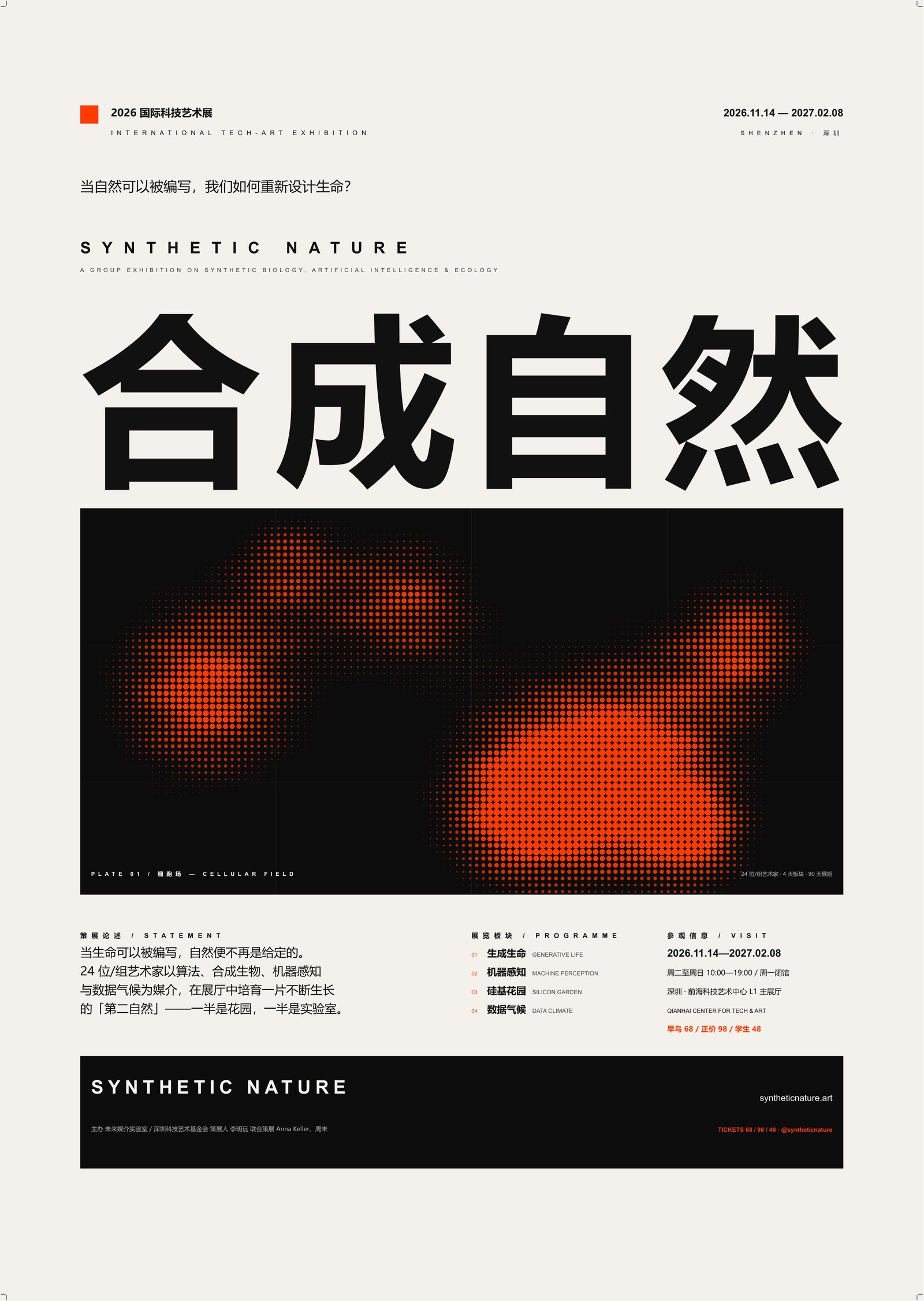
A DeepSeek Harness plugin that adds the Swiss grid design system to your agent: compute a page grid (版心, columns, baseline, type scale), then build print-ready SVG → PDF posters, book spreads, magazine pages and exhibition graphics, plus the grid-overlay proof that shows the layout really snaps to the grid.
The skill is a distilled, executable summary of Josef Müller-Brockmann's Grid systems in graphic design (1961/1981) — not a scan, not a reprint: a method reference, parameter tables and a small rendering toolchain.
What you get
- Skill
swiss-grid-design— rules, workflow, geometry/type cheat sheet, QA gate. - References — the method, formats & scaling tables (A4–A0, 8/20/32-cell systems), the SVG→PDF output pipeline with pitfalls, the delivery checklist, layout recipes.
- Zero-dependency tools
poster_builder.py— parametric A-series poster builder (bleed, crop marks, grid proof, PDF via Edge/Chromium, metadata/TrimBox finalisation);grid_calculator.py— geometry and type-scale calculator, JSON output;verify_print_pdf.py— page size, TrimBox/BleedBox, Type0 fonts, crop marks.
- Example output — preview and spec included; PDFs are generated locally.
Install
As a DSH plugin (recommended)
From GitHub (pnpm accepts github: sources):
dsh plugin --profile desktop add github:summersummer-liu/dsh-swiss-grid
From npm, once published:
dsh plugin add dsh-swiss-grid
Then restart dsh web (or the desktop app) once so the profile composes the new bundle. The
skill appears in the catalog as swiss-grid-design; invoke it with /swiss-grid-design or
just ask for a poster / grid layout.
Replace
OWNERwith the GitHub account that hosts the repo. The plugin is a standard DSH bundle:package.json→dsh.bundle.patch→cordis.patch.yml→index.jsregisters the bundledskills/*/SKILL.mdonctx.skills.
As a plain skill
If you only want the skill (no plugin system), copy the folder:
# Windows
Copy-Item -Recurse skills\swiss-grid-design "$HOME\.dsh\skills\"
# macOS / Linux
cp -R skills/swiss-grid-design "$HOME/.dsh/skills/"
Quick start
Requirements: Python 3.10+, and for PDF output Microsoft Edge or Chromium in a standard
location (the scripts also accept msedge/chrome on PATH). pymupdf/Pillow are optional
(for previews and the PDF verifier).
$py = "python"          # or your DSH Python runtime

# 1. compute the grid
python skills/swiss-grid-design/assets/grid_calculator.py --preset a2-32

# 2. build a poster (copy the builder into your project first, then edit TEXTS/ART/colours)
python poster_builder.py --preset a2-32 --outdir out --grid --pdf --preview

# 3. verify the print PDF
python skills/swiss-grid-design/assets/verify_print_pdf.py \
  --pdf out/poster_a2-32.pdf --trim 420x594 --bleed 3
The builder writes the artwork PDF, the grid-overlay PDF, SVG/HTML sources, spec.md and a
preview JPG. The verifier checks page size = trim + 2 × bleed, a proper TrimBox/BleedBox,
real text, Type0 (not Type3) glyphs, and crop marks.
The rules in one breath
Every element snaps to a column line, row line or baseline multiple. A unit cell is an integer number of body lines; the baseline is derived from the cell (default cell ÷ 6). Type sizes are kept as multiples of the baseline (24 pt = 3×8 = 2×12 = 1×24). Margins start from head 1 : inner 1 : outer 2 : foot 3 for books; single-sheet posters may use symmetric sides. Captions and images occupy whole lines/cells — never half. The delivery is always the pair artwork + grid diagram.
Files
index.js                 skill provider for ctx.skills
cordis.patch.yml         DSH bundle patch
skills/swiss-grid-design/
  SKILL.md               the skill itself
  references/            method, parameters, output pipeline, QA, layout recipes
  assets/                poster_builder.py, grid_calculator.py, verify_print_pdf.py, example/
test/provider.test.js    loader + frontmatter tests (node --test)
scripts/                 install-skill.ps1, set-owner.mjs
Attribution and licensing
The method is attributed to Josef Müller-Brockmann's Grid systems in graphic design (Niggli, 1981; Chinese edition 上海人民美术出版社 2016). This project is an independent summary and toolchain, not affiliated with or endorsed by the author, publisher or rights holders. No pages, scans or figures from the book are redistributed.
Example copy (exhibition name, dates, institutions, artists) is fictional. The example preview is rendered with fonts installed on the build machine; no font files are distributed. If you use Microsoft YaHei or another proprietary font, make sure your own licence covers it — the toolchain also works with open-source TrueType CJK fonts (see the skill's font notes).
Code and documentation: MIT (see LICENSE and NOTICE).
No comments yet. Be the first to write one.