dsh-todo-board
给 DeepSeek Harness(DSH)agent 的一块跨会话 TODO 板:一次只派一件事,干完它自己去拿下一件。
A cross-session TODO board for DeepSeek Harness: hand the agent one task at a time, and it picks up the next one by itself.




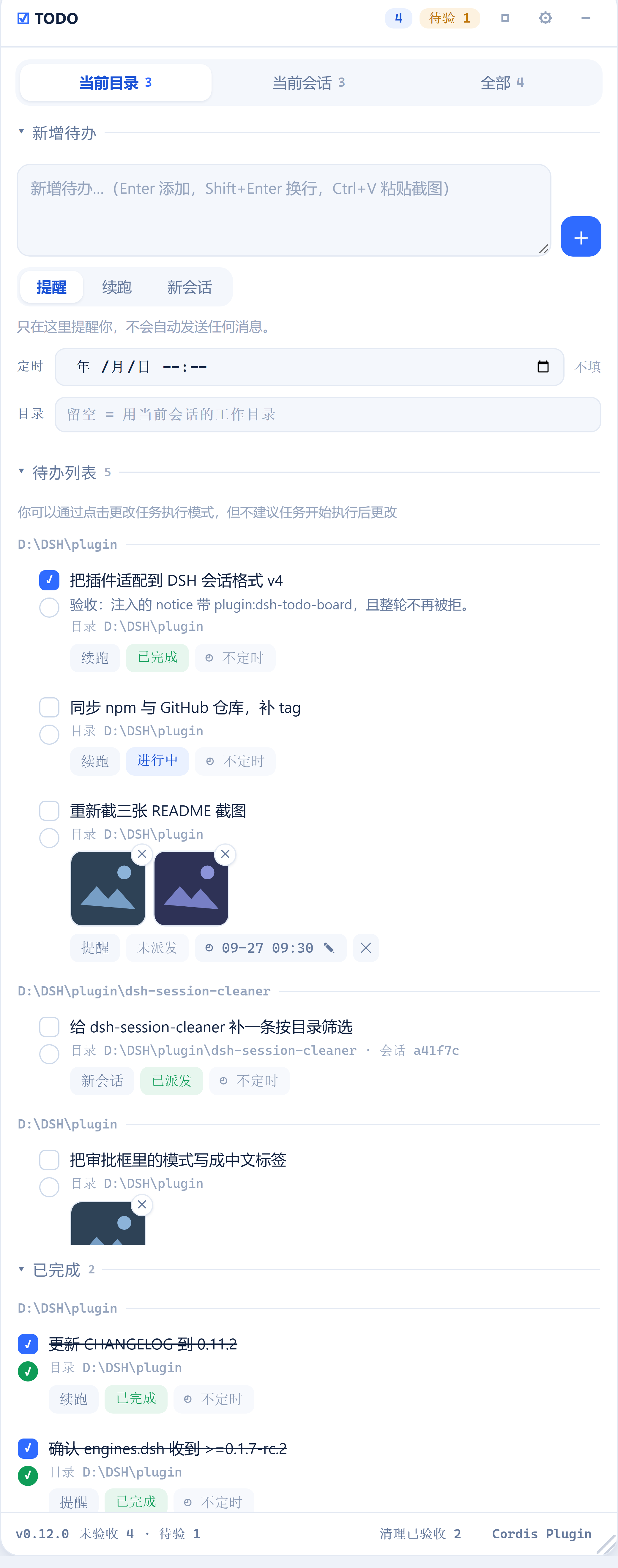
它解决什么 / Why
让 AI 干完一件事之后,自己去待办板里找同一目录下还没做完的下一件继续干 —— 不用你盯着逐个验收,也不用一次把一堆任务塞给它、结果每件都做得半吊子。
待办按工作目录分组,列表顺序就是执行顺序;每条待办自己带一档执行模式(只提醒 / 自动续跑 / 自动新开会话);AI 干完勾自己的左勾,你验收勾右勾,右勾才真正了结它。
- 面板是一个浮窗(
shell.overlay),拖动、缩放、折叠都在里面,位置和尺寸记在localStorage。 - 板子是全局单文件:
${DSH_HOME}/todo-board/board.json,原子写入。面板内按目录分组显示。
Let the agent finish one thing, then look up the next unfinished task in the same working directory and keep going. Tasks are grouped by directory, list order is execution order, and only your own (round) tick closes one.
功能一览 / What you get
| 能力 | 一句话 |
|---|---|
| 跨会话自动接续 | 回合结束时把同目录下一条未完成待办交给当前会话或新会话 |
| 三档执行模式 | 提醒 / 自动续跑 / 自动新开会话,每条待办独立选 |
| 任务状态 | 每行都有且只有一个状态标签,从实时会话列表推导,永不落盘 |
| 卡住会自愈 | 派发失败记 lostAt 并按退避重试,绝不静默退休 |
| 图片附件 | Ctrl+V 粘贴截图,最多 4 张,派发时是真正的图片 |
| 定时执行 | 本地时间到点才派发,列表里随时可改 |
| 双勾选 | 方形是 AI 自己勾的,圆形是你的验收;右勾才了结 |
| 界面风格 | 蓝白 / 素白 / 紧凑 / 随主题四套,一键循环切换 |
| 开发者日志 | 面板内切页看日志,出错才亮小圆点,默认只记本插件 |
| 长任务先规划 | 明显分多步时先问你要不要拆,/todo 一键注入模板 |
| 模型工具与审批门 | AI 改板子走 DSH 原生审批框,不问就执行不了(沙箱已放开完全访问时除外) |
安装 / Install
dsh plugin --profile web add dsh-todo-board          # 从 npm 安装 / from npm
dsh plugin --profile web add <git-url-or-path>       # 或从仓库/本地目录 / from a repo or local path
安装后重启 Profile(重新执行 dsh web)才会装载 —— 本插件是 host 组合里的一行,不是运行时热加载。
Restart the profile afterwards: the plugin is a row in the host composition, not a runtime hot-load.
卸载 / Uninstall:dsh plugin --profile web remove dsh-todo-board
DSH 版本要求 / DSH version requirement
本插件 0.11.2 起要求 DSH ≥ 0.1.7-rc.2,并已在 DSH 0.2.1-rc.2(桌面端)上验证。
| 你的 DSH | 装哪个版本 |
|---|---|
| 0.1.7-rc.2 ~ 0.2.1-rc.2 | 当前版本(≥ 0.13.0) |
≤ 0.1.6(含 0.1.5-rc.3) |
dsh-todo-board@0.6.1(最后一版 v3 兼容版本) |
会话格式在这两端都是 v4,所以同一条适配覆盖两者。插件注入的每条消息都带一个生产者自有的 source({ kind: 'plugin:dsh-todo-board', form: 'notice' }):这是 v4 的硬性要求,旧 v3 的写法会被持久化层拒绝,而拒绝会带走整个回合——不只是那条提示。不带这个适配的发布版只有 0.4.1 / 0.5.0 / 0.6.1。
0.2.1-rc.2 的实际核对结论:会话格式仍是 v4(SESSION_FORMAT_VERSION = 4),插件依赖的 14 个 host 服务、4 个 host 事件、shell.overlay slot、以及 useSessions 的 store 形状全部未变。逐项证据见 docs/report-0.2.1-compat.md。
版本门是 peer,不是 engines / The gate is a peer, not an engine
engines.dsh 是一扇哑门:npm 只校验它认识的引擎名(node / npm),自定义引擎名不参与检查 —— 装在 DSH 0.1.5 / 0.1.6 上不会有 EBADENGINE 警告。它因此保留着(把范围也留给了 DSH 自己读),但它只是一个声明,从来不是门。
从 0.13.0 起,包里多了一条真正会拦的 peer 依赖:
"peerDependencies": { "@deepseek-ai/dsh": ">=0.1.7-rc.2" }
peer 由 npm 的解析器执行(includePrerelease: true,所以 0.2.0-rc.2 这类预发布版本能被正确匹配),装错版本在安装那一步就被挡下:
| 已装的 DSH | 结果 |
|---|---|
0.2.1-rc.2(当前桌面端) |
✅ compatible |
0.2.0-rc.2 |
✅ compatible |
0.1.7 / 0.1.7-rc.2 |
✅ compatible |
0.1.6 |
⛔ BLOCKED,并告知需要 {"@deepseek-ai/dsh": ">=0.1.7-rc.2"} |
为什么没有上界。 这里刻意不写
<0.3.0之类的上限。实测(includePrerelease: true,与 npm 解析 peer 时的选项一致):<0.3.0能挡住0.3.0,却挡不住0.3.0-rc.1;要真挡住预发布得写<0.3.0-0,而这会把走 nightly 通道的人直接锁在门外。一个拦不住 next 的上界只是假安慰,代价却是实打实的误伤,所以范围只声明下界。
版本差别是行为差别。
0.13.0以前装错版本一路畅通、无声无息,实际表现是运行时报错(原因写进插件日志);0.13.0起它会当场被拦下,而不是等运行时才炸。反过来说,如果你要留在 DSH0.1.6或更早,就得显式装dsh-todo-board@0.12.0或更低 —— 那几版没有这道 peer 约束,但也同样没有这层保护。
快速上手 / Quick start
- 右上角出现浮窗,输入一条待办,选执行模式,点「添加」。
- 让 AI 去做这件事。它做完会调用
todo_board action=done给自己打左勾,然后查同目录下一条。 - 你验收后点右勾;底部「清理已验收」批量清掉。
三档执行模式 / Run modes
每条待办在新增时选一档(默认「提醒」)。
| 模式 | 行为 |
|---|---|
| 提醒 | 不自动做任何事,等你在浮窗里点 ▶ |
| 自动续跑 | 回合结束时,把下一条待办注入当前会话继续跑 |
| 自动新会话 | 回合结束时,新建一个同目录会话并执行该待办 |
「目录」一行决定这条待办归属哪个目录:分组标题、能否在「当前目录」里看到、回合结束后由哪个会话接续,都看它。留空 = 跟随当前会话的工作目录。
派发顺序 = 面板里从上到下的顺序,拖动行首 ⠿ 调整,持久化。选择是按归属而不是按目录:一条待办只被它所属的那个会话接走,同目录的另一个会话不会顺手拿走你的活。
「自动新会话」第一次派发时创建会话并绑定到这条待办,之后复用同一个会话,不会一次运行开一个。绑定会话不在了才会再开;点行上的 会话 … ✕ 解绑可手动换一个。
任务状态 / Task states
状态由 host 从实时会话列表推导(不落盘,避免与实际不一致)。每一行都带且只带一个状态标签——需要靠推断才知道的状态等于看不见:
| 状态 | 含义 |
|---|---|
未派发 |
还没交给任何会话;▶ 可点 |
已派发 |
已交给会话,目标还活着 |
进行中 |
目标会话此刻正在跑 |
已完成 |
AI 打了左勾,或你打了右勾 |
目标会话丢失 |
派发时找不到目标会话,悬住了 |
只有 进行中 和悬住的行显眼。已完成 的划线只跟验收走,所以 AI 勾完但你没验收的行会显示「已完成」而依然清晰可读。
「悬住」的原因不止一种,面板按实际原因显示:目标会话丢失、图片被拒(会话是好的,别冤枉它)、建会话失败、预设解析失败、服务不可用;tooltip 写清原因和出路。
▶ 只能在「未派发」时点击。 重复派发只会产生重复工作。
派发失败不会盖上「已派发」的戳。 那个戳的含义是"已经发出去了",而调度器和钩子都会按它跳过——盖上就等于把这条待办永久退休。取而代之的是记录 lostAt 并按退避重试(首次 1 分钟后翻倍,最多半小时一次)。改模式、换目录、解绑会话都会立刻清掉标记让它重新排队;卡住的待办也不会挡住后面的条目。
图片附件 / Attached images
待办可以带图片(最多 4 张,PNG / JPG / WebP / GIF)。图片存进 DSH 的附件库,派发时作为真正的图片和提示词一起发给模型——不是把文件名写进文字里。
- 在新增框里直接
Ctrl+V粘贴截图即可附图,粘完显示缩略图,点缩略图移除。原来的「📎 图片」选文件按钮已删除。行上的缩略图点击可放大,✕ 移除单张。 - 输入框空着时没有任何常驻提示:能力由 placeholder 里的
Ctrl+V 粘贴截图说明,附图区只在真的附了图之后才出现。 - 纯文本粘贴不受影响:只有剪贴板里真的带图片时才会拦截粘贴。
- 一次粘太多会粘满为止并告知(「只粘贴了前 N 张」),而不是静默丢掉。
- 剪贴板图片有时不带 MIME 类型;这种会按文件名的扩展名补上类型再交给 host(host 对媒体类型是严格校验的)。
- 图片字节由本插件自己的
GET /dsh-todo-board/image?id=…提供:harness 自带的图片读取是会话作用域的,而待办的附件存在板上,所以板自己当权威——没被任何待办引用的 id 一律 404。 - 目标模型必须支持图片:派发前会查模型是否声明了
image,文本模型会得到明确提示而不是适配器抛错。
定时执行 / Scheduled execution
每条待办都可以带一个本地时间(YYYY-MM-DDTHH:mm,分钟精度)。到点之前不会被派发;到点之后 DSH 按它自己的模式执行它——就像你此刻按了 ▶。
- 新增框里的「定时」一行用浏览器的时间选择器挑时间;留空 = 立即可执行。
- 列表里的待办也能改定时:没定时的行显示
🕓 不定时,点一下就地展开选择器;已定时的行点标签打开同一个选择器(带着当前时间),Enter/✓保存、Esc取消,标签旁的✕单独取消定时。 - 行上的定时标签显示时间,已到点会变黄。
提醒模式到点只弹一条桌面通知(需要浏览器通知权限);自动续跑/自动新会话到点才真正派发。- 定时只判一次;错过的时间(DSH 当时没运行)会在下次启动后立刻补上。时间用主机本地时区解释。
双勾选 / Two checkboxes
| 勾 | 谁勾 | 含义 |
|---|---|---|
| 左(方框) | 模型自己调 todo_board action=done,也可手点 |
AI 已完成,等你验收 |
| 右(圆框) | 只有用户 | 已验收,真正了结 |
只有右勾才把待办从未完成列表里移除,系统提示段落明确禁止模型代勾右勾。
勾上右勾时这一行从「待办列表」移走、进入「已完成」区块——不是变灰留在原地,是真的换了一个列表。新区块在待办列表和面板之间,最近验收的排在最上面,按目录分组,同样可折叠。再点一次那个圆勾就撤销验收,行会回到待办列表。已完成的行不参与执行顺序:没有拖柄、也不能被拖成落点(▶ 与 ✕ 仍然可用)。
界面风格 / Skins
四套界面,标题栏的 ◻ 循环切换。默认是蓝白极简:白卡片、蓝色强调、状态是一块淡色而不是一圈边框。
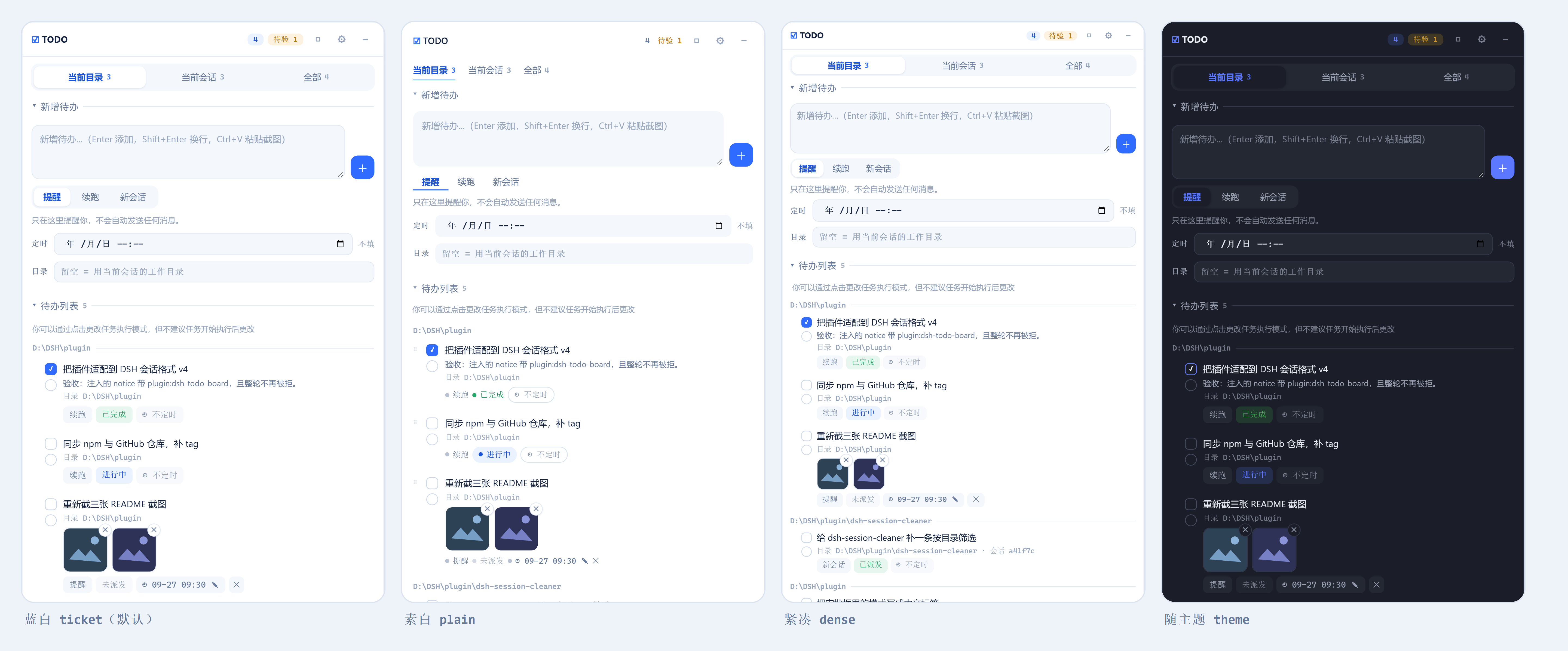
| 界面 | 它改什么 |
|---|---|
蓝白 ticket |
默认:白卡片 + 蓝色强调,状态是淡色标签,细线分隔 |
素白 plain |
去掉卡片边框与分隔线,留白更多;状态标签收成一个色点 |
紧凑 dense |
结构同默认,字号行距各降一档,图片缩略图变小 |
随主题 theme |
跟 DSH 界面走:深色界面下这块板也是深色的 |
四套界面里,控件一个不多一个不少,意思也不变。 方形是「AI 已完成」、圆形是「已验收」——那是含义,不是装饰。切换只动外观,不碰任何数据,也不影响 DSH 其他界面(每条皮肤规则都限定在本面板根节点之下)。
皮肤是只加不改的样式表:基础表描述默认那套,另三套只声明自己不同的地方,所以写错时退回的是「原来那套界面」而不是「没有样式」。颜色全部先落到一组 --tb-* 变量上,于是「随主题」只是把那组变量重新绑到 DSH 的主题令牌——同一份排版,只换颜色。
面板操作 / Panel
- 折叠为一行:标题栏
–把整板收成一行(TODO · 未完成数 · 下一条待办 · 待验 N),点这一行任意位置展开。折起后仍可拖动,位置与展开态共用同一份存储;位移小于 3px 仍算点击。 - 拖动 / 缩放:拖标题栏移动,右下角
◢缩放;双击标题栏或拖柄还原。窗口变窄时自动收回视野内,拉宽时回到你放它的地方。位置与尺寸存在主机端的board.json,换端口、换浏览器、重启都保持。 - 区块折叠:面板内部三个区块(新增待办 / 待办列表 / 已完成)各自可折叠,状态记
localStorage,刷新后保持。 - 底部状态线(不可折叠):左下方常显版本号与未验收数量——不是可折叠区块,所以不会被折起来后"看不见就当没有"。右侧是
清理已验收 N与Cordis Plugin两条功能入口。 - 筛选:当前会话 / 当前目录 / 全部,每段带未完成计数。
- 行内编辑:双击标题改名;点模式标签在 提醒 → 续跑 → 新会话 之间循环;点定时标签改时间。
- 备注(note):有备注的行在标题下方显示正文(最多 2 行,紧凑界面 1 行,悬停看全文)。行尾「+ 备注 / ✎ 备注」是它自己的控件:多行框,
Enter保存、Shift+Enter换行、Esc取消。不裁剪、不设上限——它是派发时一起发给模型的上下文。 - 多行输入:新增框自动增高(3 行起,最高 180px),
Enter添加、Shift+Enter换行、Ctrl+V粘贴截图。 - Cordis 入口:侧边栏底部的
Cordis Plugin按钮折起,入口移到本面板底部;点它打开原面板,出现在本面板正下方。找不到入口时按钮变灰并提示。
开发者日志 / Developer log
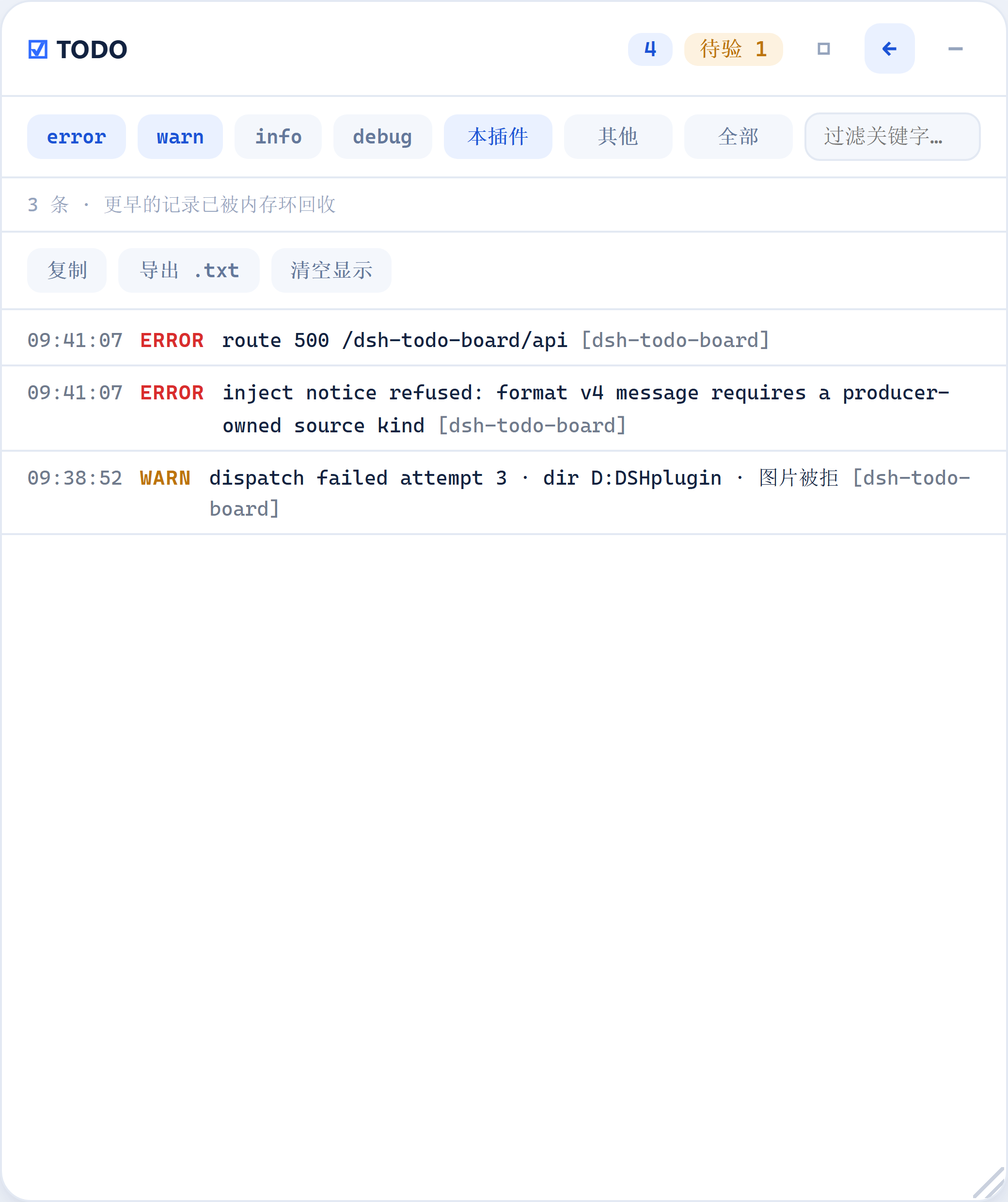
标题栏 ⚙ 把面板在同一个浮窗内切到日志页(不是新窗口、不进 DSH 设置页)。平时不出现在你的工作流里:出问题时按钮亮小圆点,点开看完即清。
- 过滤:级别(error / warn / info / debug,至少保留一个)、来源(本插件 / 其他插件 / 全部)、关键字。最新在最上面——打开它的理由通常就是刚坏掉的那件事。
- 复制 / 导出 .txt / 清空显示。清空只清面板,不动主机记录。
- 默认只记本插件(自己的 debug 也记,别的插件只收 error)。
- 日志正文只在日志页打开时才传给浏览器。关着时轮询负载与没有这个功能时逐字节相同,只多带一个数字(圆点就是这么来的)。
- 位置:
${DSH_HOME}/todo-board/log.ndjson,一行一条,上限 256 KiB(超了保留最新一半),权限0o600。写不进去只是不再落盘,内存日志照常。
失败路径都会留痕:派发失败(含第几次、目标会话、目录、原因)、读写板失败、建会话 / preset 失败、图片入库失败、路由 500,以及被信任校验拒绝的请求(同一来源只记第一条)。
脱敏是承重结构,不是加固。 密钥从来不是被某处不小心的
logger.warn(secret)记下的,而是夹在别人构造好的消息里——通常是配置校验失败时的Error.message。所以每一行落盘前都过脱敏,导出时再过一遍。已知未覆盖:JSON dump 里、键名不像密钥、值也没有可识别前缀的密钥。
长任务先规划 / Plan a long task first
给模型一个多阶段任务时,它应该先问一句要不要用 TODO 板拆成步骤、按顺序做。这个能力由三部分组成:
| 谁 | 用什么 | 做什么 |
|---|---|---|
| 模型 | 系统提示段落里的一条规则 | 明显分多步、且当前目录下还没有待办时,先问一句「要不要拆」;已经拆过就不再问 |
| 你 | /todo <目标> 命令 |
一句话把模板注入当前会话,模型随即给计划 |
| 你/模型 | Skill todo-board-planning |
拆分手册(粒度、note 写什么、模式怎么选),模型按需加载 |
确定性提醒与它的两个阈值 / The deterministic nudge
上面那条是提示词里的软规则,模型可以不理。所以还有一层硬规则,跑在主机端:当你的消息同时满足三个条件时,插件会在这一轮里追加一句「这条请求看起来不止一步,要不要拆」。
字数 ≥ 200 且 条目数 ≥ 2 且 当前目录下没有未完成待办
两个阈值:字数(默认 200,这条消息至少多长)与条目数(默认 2,至少出现几次「阶段标记」——编号 1./2)、列表 -/*、顺序词「第一步/其次/最后」、名词「阶段/步骤/流程/里程碑」)。两项都要满足:只看长度,贴一段报错就会触发;只看标记,「1. 改个错别字」也会触发。
怎么调 / Adjusting it
面板标题栏的 ⚒(设置)按钮里有四项:
| 项 | 范围 | 说明 |
|---|---|---|
| 长任务主动提醒 | 开关 | 关掉就完全不提醒,也不消耗「每会话一次」的额度 |
| 字数 ≥ | 10–10000 | 太短的就不算计划 |
| 条目数 ≥ | 1–100 | 阶段标记至少出现几次 |
| 单次回合最多新开会话 | 1–50(默认 10) | 一次回合结束最多开几个新会话 |
超出范围主机端会拒绝保存并在面板上说明原因。设置存在 board.json 的 settings 字段里,跟着板子一起原子写入,跨浏览器一致。
为什么「单次回合最多新开会话」值得调:一个回合结束时,队列里
newSession模式的待办会各开一个新会话,这个数就是「一次最多开几个」。计划最多能有 20 步,而默认只派 10 条——超过的留到下一次回合结束,不会丢,但如果你不再触发回合,它们就不动。计划长就调大。
复制这段给模型
用 TODO 板把这件事拆成可执行的步骤,然后按顺序做。

【目标】<一句话说清最终要什么>
【边界】<不要做什么、必须遵守什么>
【完成标准】<怎么算做完;能跑命令/看结果最好>

拆分要求:
1. 每条一句话、彼此有顺序、能独立验收;一条只交付一件事,别把两件事塞一条;
2. 先给我看拆分结果,我确认后再写进板子;我说改就改;
3. 每条待办的备注(note)里写清:验收标准 + 已知的坑/前置条件;
4. 定好顺序后,用一次 action="add" 的 items 把整份计划写进去(一次审批),不要一条一条建。

执行要求:
5. 开始后每做完一条,立刻 action="done" 勾成「AI 已完成」,再取同目录下一条继续,不要停下来问我;
6. 中途要加步骤就告诉我,别自己闷着改范围。

(我没特别说的话:默认拆 3–8 步;建好后用 ask_user_question 问我「就按这个做(立刻开始)/只建清单不开始/我再改改」。)
这段模板在代码里只有一处定义(
PLAN_TEMPLATE),/todo命令、Skill 正文与本 README 共用它;tools/check-template-parity.mjs会逐字比对上面这个代码块,防止"文档里那份悄悄过期"。
一次写入整份计划:add 传 items 数组即可。一次调用 = 一次审批框(框里逐条列出每一步的标题),数组顺序即执行顺序,上限 20 条;任意一条不合法 → 整批一条都不写。每步可以有自己的 mode / note / schedule / images。
执行模式怎么选:resume(推荐,同一会话连跑)、newSession(每步开新会话,适合步骤互相独立)、remind(只建清单,你自己点 ▶)。模型建完后应当用 ask_user_question 问你,「就按这个做」就等于你授权了第一步。
确定性提醒:提示词里的规则是"软"的,所以插件还在 agent/pre-step 上加了一道保守判断——当这一步进来的用户消息同时满足「长度 ≥ 200 字」「出现 ≥ 2 处阶段标记」「当前目录下没有未完成待办」「这个会话还没被提醒过」,才追加一句"这看起来不止一步"。两个阈值都在 lib/index.js(PLAN_NUDGE_MIN_CHARS / PLAN_NUDGE_MIN_MARKERS),误报的代价只是多问一句。
模型工具 / The todo_board tool
| action | 作用 |
|---|---|
list |
列出当前工作目录下未验收的待办(all: true 列全部目录),带 id、执行顺序与定时时间 |
add |
新增一条(追加到底部),可带 schedule 与 images;给 items 就能一次写入整份计划 |
done |
打左勾「AI 已完成」 |
reopen |
撤销左勾 |
note |
追加备注 |
schedule |
设置或取消定时时间(传空字符串即取消) |
update |
改标题 / 模式 / 目录 / 备注;先整体校验再落笔,一个字段不合法就整条拒绝 |
reorder |
传 ids 指定新的从上到下顺序。只接受同一个目录内的待办;未列出的保持原有相对顺序 |
dispatch |
立即派发一条待办(等于面板的 ▶)。只有「未派发」的能派发 |
工具输出 schema 是 additionalProperties: false 的严格 JSON Schema,返回值只含声明过的字段。
AI 改板子要你批准 / Approval for board writes
模型写板子走 DSH 的原生审批框(tools/pre-execute → ask → dsh-user-approval),所以这不是提示词里的约定:不问就执行不了,而且被拒绝时模型收到的是一个真正的失败结果。门装在工具注册表这一层,在任何工具体执行之前——所以在门还有意义的档位下,模型没有绕过的路径(唯一例外见下面的「never 与完全访问」)。
| action | 要审批吗 | 为什么 |
|---|---|---|
list |
不用 | 只是读 |
done / reopen |
不用 | 这是模型自己的左勾。「做完一条就勾掉、再取下一条」就是你要的自动接续;在 danger-full-access(审批档 never)下每次都会变成拒绝,那条链子会当场断掉。用哪个预设见下一节。 |
note |
不用 | 0.13.4 起:备注只是写在某一行上的文字,不删除、不改标题/模式/目录、不新建会话、不派发任何任务。在 never 下要求审批等于让它永远失败,而这恰好是「干完一步顺手记下下一步要什么」这个循环的一部分 |
add / schedule / update / reorder / dispatch |
要 | 都在改板子(dispatch 也是:它替用户启动了队列;schedule 也是:它让这行到点自己跑) |
| 将来新增的写动作 | 要(默认就是"要") | 白名单里没写的一律问——漏加一个动作必须失败关闭 |
唯一的免问写操作:当沙箱本身就是 danger-full-access、且审批档是 never 时(两个旋钮同时满足,与面板上显示的是哪个预设名无关),写操作直接放行、不弹框(0.13.5 起)。理由见下面「never 与完全访问」——那种组合下弹框必然被拒,而模型本来就能绕过这个工具直接改 board.json。
注意这条只说本插件的门不弹框。如果预设显示是 auto(自动审查),审查那一层仍然会先跑一遍 LLM 风险评估、并且仍可能拦下来——never 下它的结果是最终裁决,本插件的放行管不到它。想要「写板子完全不被打断」,用 danger-full-access 预设本身,别停在 auto 上。
审批挡的是「改板子」,不是「跑队列」:面板的 ▶、自动接续、定时到点派发都不需要审批——后两者根本不是工具调用,也在回合之外。「逐次确认」是默认,要少被打断就用 /permission 切档,不需要本插件实现"记住已授权"。
该用哪个权限预设 / Which permission preset to use
推荐 workspace-write。 三个预设的差别只有两个旋钮:
预设 = (沙箱 sandbox, 审批 approval)
| 预设 | 沙箱 | 审批 | TODO 板能不能正常跑 |
|---|---|---|---|
workspace-write |
workspace-write |
ask |
✅ 全都正常 |
danger-full-access |
danger-full-access |
never |
✅ 0.13.5 起全都能用(写操作不弹框,见下节) |
auto(自动审查) |
danger-full-access |
ask |
⚠️ 自动接续可能静默中断 |
never 与完全访问:为什么现在放行(0.13.5)
never 的规则是「需要审批的动作 → 一律拒绝,连弹窗都没有」。所以在 0.13.4 及以前,这个预设下写板子会失败并报 the user rejected tool "todo_board"——这句话不是说你拒绝了,是「没地方问,只好当作拒绝」,很容易误导。
0.13.5 起分情况处理。放行的条件不是「审批档是 never」,而是两个旋钮同时满足:
| 条件 | 为什么 |
|---|---|
审批档 = never |
弹框注定被拒,问也白问 |
沙箱 = danger-full-access |
这堵墙本来就没在挡人(见下) |
这两个值分别来自各自最权威的那一侧,都不是拿预设的名字去猜:
- 审批档直接问审批服务(
approval.effectivePolicy(session))——它才是「这个会话到底要不要弹框」的权威来源。 - 沙箱从当前预设解析出的组合里读。DSH 的预设表(
permissionPresets的presets)是可配置的,名字只是标签,谁都能把danger-full-access这个键指向别的组合。插件把current(session)返回的预设名解析回它的组合,再比对沙箱字段的值——换个表也照样对。
为什么审批档不能也从预设里读:current() 返回的是预设的定义,不是旋钮的实时值。举例:你先选了 auto,之后又把审批档改成 never——此时 derive() 仍然返回 auto(它是「还选着的 Auto」),而 auto 这个预设的定义永远写着 approval: ask。要是拿这个字段当审批档,一个真的「完全访问 + never」的会话会被一直拒掉。沙箱字段没有这个问题:derive() 的每个分支都保证它与真实沙箱一致。
为什么必须看沙箱:sandbox 和 approval 是两个互相独立的旋钮,never 完全可以配 read-only / workspace-write(这时预设显示为 custom)。而本插件写 board.json 用的是宿主权限,不经过 shell 沙箱——沙箱受限时,审批门是模型与这个文件之间唯一的东西。那种情况下让 never 变成通行证,等于凭空开出一条沙箱没批准的写通道。所以:never + 受限沙箱 → 照样拒绝,只是错误信息现在会点名真正的原因,不再冒充「用户拒绝了」。
为什么完全访问下放行反而更安全:沙箱已经是 danger-full-access 时,模型本来就能用文件工具直接改 board.json——预设自己的说明就是「完全文件访问,不弹审批框」。硬要它走审批,只会把它逼去手改 JSON,而那样会跳过参数校验、跳过 seq 计数、跳过原子替换。让它用正规工具是两害相权。
读不到就照旧问:审批档或预设读不出来时(服务缺失、投影未注册),一律当成「问不出结果」,继续弹框,绝不当成「可以放行」。反过来,沙箱是 danger-full-access 但审批档是 ask 时也照常弹框——放行必须两个条件同时成立。
这两条假设跟着一条常驻检查(tools/check-permission-derive.mjs)走:它加载真实的 dsh-permission-presets,把 derive() 在「3 种沙箱 × 2 种审批档 × 5 种预设选择 × 3 张预设表」共 90 个状态上跑一遍,断言放行条件成立时真实沙箱一定是完全访问。所以哪天 DSH 改了 derive() 的行为,这里会先响。
大白话:「完全权限」放开的是「能碰什么」;现在它也能让"不用问"生效,但只在沙箱确实没在挡的时候。
为什么 auto(自动审查)也会挡
自动审查挂在工具调用链的最前面,每次调用先做一次 LLM 风险评估;done 虽免本插件的审批,却仍要过这道审查。一旦被判成需要人确认,那条续跑链就在不报错的情况下停住。
没有「既自动审查又完全放行」的档:审查只在预设恰好是 auto 时生效,而 auto 固定带 approval: ask。想要审查就必然 ask,想要 never 就必然没有审查。workspace-write 是唯一「审查不介入、写板子又能用」的档位,代价是沙箱限制在工作目录内 + 每次写板子点一次确认。
完整机理与源码证据见
docs/report-auto-review-conflict.md。
数据 / Data
${DSH_HOME}/todo-board/board.json(默认 ~/.dsh/todo-board/board.json),原子写入(临时文件 + rename)。文件缺失时自动创建;读坏或写失败会在浮窗底部红字提示。开发者日志在同目录的 log.ndjson。
同一个文件里还存着两类偏好,都跟着板子走:
| 字段 | 存什么 |
|---|---|
settings |
规划提醒的开关与三个阈值(见「长任务先规划」) |
layout |
浮窗最后停放的位置与尺寸 |
为什么位置存在主机端而不是 localStorage:storage 按 origin 隔离,127.0.0.1:41012 和 127.0.0.1:25005 在浏览器看来是两个网站——DSH 换个端口重启,面板就"忘了"自己停在哪。存进 board.json 之后换端口、换浏览器都还在。浏览器里仍留一份 localStorage 兜底,供路由不可达时使用。
会话生命周期:「自动新会话」创建的会话走 ctx.root + agentPresets.mount(),归属应用根上下文而不是本插件行,因此停用 / 更新 / 卸载本插件不会连带拆掉这些会话。
结构 / Layout
package.json          dsh.bundle.patch → cordis.patch.yml;dsh.client.platform = web
cordis.patch.yml      向 profile 树 insert 一行 todo-board
lib/index.js          Host:板文件、todo_board 工具、审批门、回合结束钩子、提示词段落、
                      日志 exporter、/dsh-todo-board/api 与 /dsh-todo-board/image
client/client.js      Browser:shell.overlay 浮窗;三套皮肤、粘贴附图、日志页都在此
tools/                smoke / client-smoke / check-http / check-live / check-browser /
                      check-fence-parity / check-session-format / check-template-parity /
                      check-*-guard(变异检查)/ capture-fixture(重生成截图)
Host 半刻意不 import 任何 @deepseek-ai/*:profile 安装的插件从自身目录解析模块,harness 包在那里不可达,一切通过 ctx。
开发 / Development
npm run check        # node --check 两个入口
npm test             # 8 个套件:两半 smoke、重试、真实 HTTP、真实 cordis、围栏对表、会话格式、模板对表
npm run guard        # 变异测试:把每个修过的行为改坏一次,要求测试必须抓到
npm run test:browser # 真实 Chrome 里验证皮肤、粘贴、折叠拖动(需 Chrome,可设 DSHTB_CHROME)
改客户端只需刷新页面;改 Host 半要重启 Profile。 桌面端同理由 dsh-client-hmr 自动发现客户端改动(500ms 轮询 + SSE),Host 半要重启应用。
npm run guard 会临时改写 lib/index.js / client/client.js,跑完逐字节还原——别在同一时刻手动改这两个文件。它不是重复劳动:一条永远不会失败的断言和没有断言是一样的。
check-live.mjs 补的是 stub 与真实运行时的语义差(真实 cordis 要等服务被 provide 才唤醒)。可用 DSHTB_CORDIS / DSHTB_TOOLS / DSHTB_SESSION 指向任意 DSH 安装,包括桌面端 app.asar 里那份:
DSHTB_CORDIS="file:///<asar>/dsh/node_modules/@deepseek-ai/cordis/lib/index.js" \
DSHTB_TOOLS="file:///<asar>/dsh/node_modules/@deepseek-ai/dsh-tools/lib/index.js" \
ELECTRON_RUN_AS_NODE=1 "<DSH 安装目录>/DeepSeek Harness.exe" tools/check-live.mjs
其余细节见 docs/(0.2.1 适配报告、自动审查冲突分析)与代码注释。Host 半刻意不 import 任何 @deepseek-ai/*:profile 安装的插件从自身目录解析模块,harness 包在那里不可达,一切通过 ctx。
截图 / Screenshots
node tools/capture-fixture.mjs     # 重生成 assets/screenshot-*.png(推荐:无需登录、可重复)
node tools/capture-screenshots.mjs # 从运行中的 GUI 抓图(需要那个 profile 的浏览器凭据)
capture-fixture.mjs 加载真的 client/client.js,用它自己安装的样式表,再按组件真实渲染结构搭出固定件。开图之前它会断言固定件用到的每个类名都在插件样式表里声明过:类名被重命名时,固定件仍然会"渲染成功",但它渲染的是没有样式的面板——而一张不存在的面板截图比没有截图更糟。
已知限制 / Limitations
- 浮窗在页面可见时每 2.5s 轮询一次
/dsh-todo-board/api,不是推送(日志页复用同一条轮询)。页面隐藏时暂停,切回来立即刷新一次。 - 模型还够不到面板的全部能力:
remove(删除)与clearVerified(清理已验收)仍然只有面板能做——删除是不可逆的。 add接受mode(模型调用也一样):用户和模型都要能一次建出「续跑 / 新会话」的待办。代价是"批准创建"这一次也可能顺带批准了"自动执行"——缓解手段是审批框把模式写在理由里。- 待办板是全局单文件,不按目录分文件。「自动新会话」需要待办上的目录路径可创建。
- 定时只支持单次的绝对时间,没有 cron / 周期规则;到点后「自动续跑」需要来源会话当时还在运行,否则按「没有可接续的活动会话」处理。
- 一次回合最多开出的新会话数有上限(默认 10,设置页可调到 50)。到上限后剩下的待办留到下一次回合结束,不是丢弃——但如果你不再触发回合,它们就不动。
- Cordis 入口是 DOM 桥接:按该插件自己渲染的
data-cordis-badge属性定位,用!important覆盖它算出的位置。DSH 升级若改了这套实现,桥接会失效——那时按钮会变灰并提示,不会静默失灵。 - 日志只记本插件,且脱敏有已知缺口。内存环上限 500 条,更早的只在
log.ndjson里;日志页不跨刷新保留。同一来源(host)的信任拒绝只记第一条,后续只累计,避免刷屏。
安全 / Security
模型写板子走审批门(见上面「AI 改板子要你批准」)。它装在 tools/pre-execute,也就是工具注册表这一层,在任何工具体执行之前——所以模型没有绕过的路径,形式也不是"提示词请它先问"。
两条路由(/dsh-todo-board/api、/dsh-todo-board/image)不在 DSH 的 /api 通道上(那道围栏按通道注册),所以围栏必须在这里自己装。做法是优先调用 harness 自己的门,拿不到时才退回复刻版:
ctx.get('connection').requestRejection(request)   // dsh-client-connection
  1. isTrustedApiRequest        → Host / Origin(防 rebinding / CSRF)
  2. browserAuth.isAuthenticated → 浏览器会话凭据
为什么必须借而不是复刻:0.9.0 只复刻了第 1 件,漏掉了第 2 件——而漏掉的恰恰是挡住本机进程的那一半。后果是任何本机进程(包括 AI 自己用的 shell)都能直接 POST 这条路由改写板子,审批门被整条绕过;日志正文也挂在这条路由上。旁证本来就摆在眼前:GET / 对裸客户端返回 401,本插件的路由却返回 200。
现在:面板(浏览器,带 DSH 签发的 dsh-auth-* cookie)照常可用;shell 客户端拿到 401。代价是用脚本/curl 直接写板子也不再可用——那正是要堵的通道。
部署在非回环地址时,用 DSH 自己的 dsh --profile web --trusted-host <authority> 声明;读不到就退化为仅回环。
三、代价与边界(说清楚,别当成没发生)
- 用脚本 / curl 直接往板子里写,从此也不可用了——那正是要堵的那条通道。需要程序化写入就用模型工具(会走审批),或嵌进 DSH 里。
- 面板被 401 挡住的唯一情形,是浏览器没有那份会话 cookie。那时插件日志会写明原因和解法,面板页脚也会直接说:用
dsh web打印的那条带 token 的地址重开页面即可。 danger-full-access(审批档never)下模型写板子不再弹框,而是直接放行(0.13.5 起):那种组合里弹框注定被拒,而沙箱已经不是限制,放行反而避免了模型去手改board.json。never配受限沙箱(预设显示custom)仍然拒绝——那时审批是唯一的防线。- 本插件保证的是这条路由不再接受任意本机进程;它不替代 DSH 自身对整个 Web 面的安全模型。
No comments yet. Be the first to write one.