dsh-ikunchick-pet
English | 中文
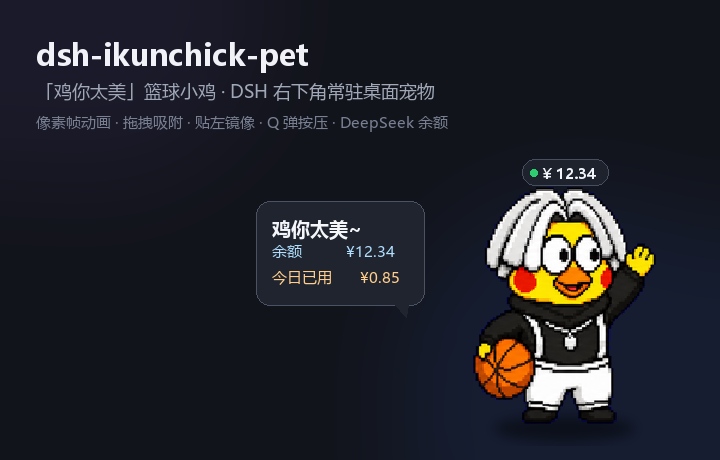
A "鸡你太美" basketball-chick desktop pet for the DeepSeek Harness (DSH) Web GUI. It lives in the bottom-right corner of the window as a pixel-art sprite, dribbles while the agent is working, waves when you poke it, dozes off when idle — and doubles as a lightweight DeepSeek balance widget.
Built as a standard DSH bundle plugin: a tiny host half (Cordis plugin + HTTP routes) and a browser
half that renders into the root-scoped shell.overlay slot. No build tooling required at install
time; the only "build" step inlines the spritesheet into the client bundle (see Development).

Features
- 🐤 Always-on corner pet — mounts into
shell.overlay(covers the whole frame), draggable anywhere, remembers its position across reloads. - 🏀 Hand-drawn pixel animations — idle breathing, dribbling (while any session is running),
waving (on click), celebrating (when a run finishes) and resting / sleeping after a
spell of inactivity.
image-rendering: pixelatedkeeps the pixel art crisp at any size. - 🧲 Edge snapping + mirror — drag near the left/right edge to snap; when snapped left the chick horizontally mirrors so it faces the content. Vertical position is clamped to the viewport.
- 🧸 Q-bounce press — pressing squashes the sprite with a spring-back transition, optional soft "boing" (WebAudio, no audio asset).
- 🔊 Click sounds — two built-in clips play on click: 奶龙笑 (Nailong laugh) and
唱跳rap篮球 (Kunkun's line); switch or mute from the right-click menu (picking one previews it).
The clips are synthesized offline with Windows SAPI TTS and baked into the bundle as data URIs —
nothing to download, and you can drop in your own clips by replacing
assets/click-*.wavand rebuilding. - 🔔 Waiting reminders — when a session is waiting for you to answer (
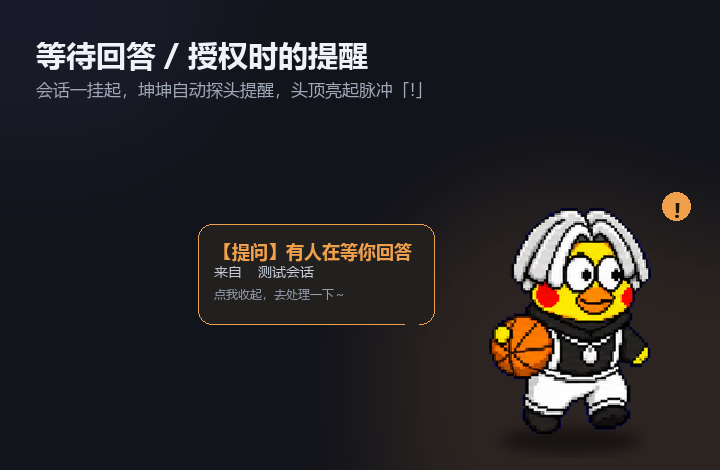
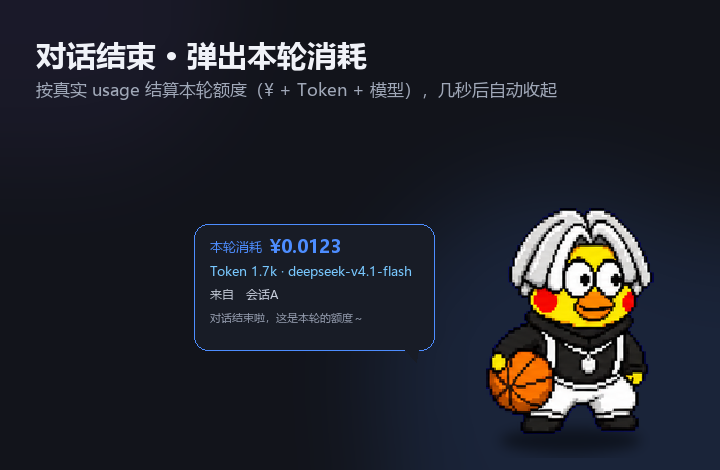
ask_user_question) or approve an action (approval/asked), the chick pops a reminder bubble (with the session name), plays a little attention hop, and shows a pulsing!badge until the interaction is resolved. Click the bubble to dismiss it; it disappears automatically once you answer/approve. - 💸 Per-turn consumption — when a turn finishes, the chick pops a 本轮消耗 bubble with the ¥
amount, token count and model, computed from the real
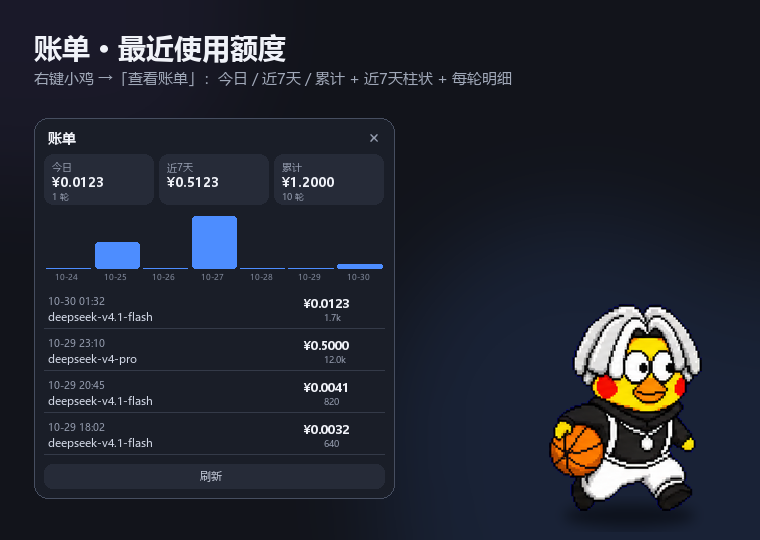
usage(input / cache / output) at DeepSeek peak/off-peak pricing. Auto-dismisses after a few seconds. - 📊 Usage ledger — right-click → 查看账单 opens a panel with today / last 7 days / total
spend, a 7-day bar chart, and the most recent turns (time, model, ¥, tokens). Persisted to
ledger.json(last 300 turns) so it survives restarts. - 💬 Speech bubble — click the chick for a random catchphrase plus, when configured, your DeepSeek balance and today's observed spend. The bubble auto-dismisses.
- 💰 Balance badge — a compact
¥pill above the pet, refreshed every 60s fromhttps://api.deepseek.com/user/balancevia the DSH credentials service (DEEPSEEK_API_KEY). Missing key / network errors degrade gracefully — the pet still works. - ⚙️ Right-click menu — size (S/M/L), animation speed, press sound, balance badge, manual
balance refresh, "back to corner", and hide (
🐤restore button appears at the corner). - 🌗 Theme-aware — bubble, badge and menu use DSH theme tokens, so they match light/dark.
Requirements
- DSH with the Web GUI (works with the official desktop client's
desktopprofile anddsh web). - Optional but recommended: a
DEEPSEEK_API_KEYin the DSH credentials service, to show balance. If you signed in with a DeepSeek account instead, the plugin simply shows "balance unavailable"; it never errors.
Install
Desktop client (Electron) — current profile
Copy this repository into the profile's node_modules and register it. The bundled script does all
three steps (copy files, add a file: dependency, append a loader row), with timestamped backups:
pwsh -File .\install.ps1
Then refresh the Web GUI (the client half loads on page load). The host half logs
[dsh-ikunchick-pet] host active · v0.1.0 to %USERPROFILE%\.dsh\logs\desktop-next.log.
Manual install (equivalent):
- Copy this folder to
%USERPROFILE%\.dsh\profiles\desktop\node_modules\dsh-ikunchick-pet. - Add
"dsh-ikunchick-pet": "file:<abs path, forward slashes>"to the profilepackage.jsondependencies. - Append to the profile
cordis.patch.yml:- insert: - id: dsh-ikunchick-pet name: dsh-ikunchick-pet
Note: the desktop client reads the
desktopprofile;dsh plugin --profile web add …installs into the wrong profile and nothing appears. Use the script above (or your host's plugin manager).
Usage
| Action | Result |
|---|---|
| Drag the chick | Move it; release near an edge to snap |
| Click the chick | Toggle the speech bubble (phrase + balance) |
| Right-click the chick | Open the settings menu |
| Menu → 点击音效 / Click sound | Off / Nailong laugh / 唱跳rap (picking one previews it) |
| A session waits for you | Pet auto-pops a reminder bubble + pulsing !; dismiss by click, auto-clears when resolved |
| A conversation turn finishes | Pet pops a per-turn cost bubble (¥ + tokens + model) |
| Menu → 大小 / Size | S / M / L |
| Menu → 动画 / Motion | Slow / Normal / Fast |
| Menu → 刷新余额 / Refresh balance | Force an immediate balance fetch |
| Menu → 查看账单 / View ledger | Today / 7-day / total spend, 7-day bars, recent turns |
| Menu → 回到右下角 / Back to corner | Reset position |
| Menu → 隐藏小鸡 / Hide chick | Hide; a 🐤 button stays at the corner to call it back |
Data & privacy
- Settings/position:
%DSH_HOME%\dsh-ikunchick-pet\state.json(atomic write, normalized on the host). - Per-day balance ledger:
%DSH_HOME%\dsh-ikunchick-pet\usage.json— only a date, last observed balance and accumulated observed drop. Recharges are ignored, never subtracted. - Per-turn usage ledger:
%DSH_HOME%\dsh-ikunchick-pet\ledger.json— the last 300 settled turns (timestamp, ¥ amount, token splits, model, session title). No messages or prompts are stored. - The DeepSeek API key is never read into the plugin's own files: it is resolved through the DSH
credentials service at request time, used for one
GET /user/balance, and discarded.
How the animation works
The spritesheet is an 8×9 grid of equal cells (assets/spritesheet.webp). Animations are simply
frame sequences of [row, col] pairs, drawn by setting the sprite element's background-position
and background-size. Current mappings:
| Animation | Frames | When |
|---|---|---|
idle |
row 0 | default |
dribble |
row 1 | any session running |
dribble2 |
row 2 | (available variant) |
wave |
row 3 | click |
raise |
row 4 | run finished |
talk |
row 5 | (available variant) |
rest |
row 8 | idle > 65s |
Development
dsh-ikunchick-pet/
├─ package.json            # dsh.bundle.patch + dsh.client.platform
├─ cordis.patch.yml        # loader insert row
├─ icon.svg
├─ lib/
│  ├─ index.js             # host half: /api/dsh-ikunchick-pet/{state,balance,wait,turn,ledger}
│  ├─ client.src.js        # readable browser source (sprite placeholder)
│  └─ client.js            # BUILT bundle (sprite inlined) — what ships
├─ assets/spritesheet.webp # pixel art source
├─ assets/click-kun.wav     # 唱跳rap篮球 click clip (SAPI-synthesized)
├─ assets/click-nailong.wav # 奶龙笑 click clip (SAPI-synthesized)
├─ scripts/build-client.mjs # inlines sprite + click clips into lib/client.js
├─ scripts/process-audio.py # trim/normalize/speed the raw SAPI clips into assets/
├─ docs/panel.png, preview-dribble.webp
├─ install.ps1
└─ README.md / README.zh.md
- Edit the browser logic in
lib/client.src.js, then rebuild the shipped bundle:
(The client module may onlynode scripts/build-client.mjsrequire('react')— it cannot load local files — so the webp and the two click WAVs are inlined as base64 data URIs.) Refresh the GUI to pick up client changes. - Host changes (
lib/index.js) require a patch reload (toggle theinsertrow) — do not restart the whole desktop process. - Waiting detection (host) — the host subscribes to
ctx.on('session/event', …)and tracks the latest suspended interaction:tool/callwithname: 'ask_user_question'→ question,approval/asked→ approval; cleared bytool/result, otherapproval/*, orturn/start|end. The browser pollsPOST /api/dsh-ikunchick-pet/wait(every 1.5 s) and pops the reminder on a new pendingid. - Per-turn cost (host) — aggregates
assistant/messageusage(inputTokens+cacheReadTokensoutputTokens) per(session, turn)and settles onturn/endusing the price table at the top oflib/index.js(PRICE_FLASH/PRICE_PRO, peak = weekday 09–12 & 14–18 Beijing). Each settled turn bumps a persistedseq; the browser pollsPOST /api/dsh-ikunchick-pet/turnand pops the cost bubble whenseqchanges. Subagent sessions are excluded.
- Usage ledger (host) — each settled turn is appended to
ledger.json(atomic rename, capped at 300).POST /api/dsh-ikunchick-pet/ledgerreturns the recent entries plus aggregates (today / 7-day / all / by-model / last-7-day series), computed in Beijing time. - Quick checks:
node --check lib/index.js,node --check lib/client.js, andnode scripts/build-client.mjs.
License
Code is MIT (see LICENSE). The pixel-art spritesheet under assets/ is distributed as-is
for running this plugin only and is not relicensed under MIT.
No comments yet. Be the first to write one.