dsh-llm-qwen-local
English | 简体中文
DeepSeek Harness LLM adapter plugin for a locally deployed Qwen model (e.g. Qwen3.8-27B) served by vLLM behind its OpenAI-compatible /v1/chat/completions endpoint.
v0.3.2 · exact compatibility target: DSH
0.1.2-rc.1· MIT · community-maintained and not a DeepSeek or Qwen product.
dsh plugin --profile web add dsh-llm-qwen-local
Two deployment-specific knobs are first-class:
- Per-model multimodal switch (
multimodal: true/false) — declares whether the deployment serves the model with vision. - Fully configurable reasoning efforts — every selectable level, its display name, its
reasoning_effortwire spelling, the default level, and howoffis expressed on the wire all come from configuration, matching whatever vocabulary your vLLM build accepts.
- id: llm-qwen-local
  name: dsh-llm-qwen-local
  config:
    baseURL: http://127.0.0.1:8000/v1
    models:
      - id: qwen3.8
        name: Qwen3.8 (local)
        multimodal: true
        reasoning:
          efforts:
            - { id: off, wire: none }
            - { id: low, wire: low }
            - { id: medium, wire: medium }
            - { id: xhigh, wire: xhigh }
          defaultEffort: xhigh
Documentation
| English | 中文 | |
|---|---|---|
| Installation & usage | (this README) | (此 README) |
| Configuration reference — every field | docs/configuration.md | docs/configuration.zh.md |
| Design notes — wire dialect, model parameters, framework compatibility, error paths, limitations | docs/design.md | docs/design.zh.md |
Requirements
- An installed
dsh(the CLI) 0.1.2-rc.1 or newer, and a vLLM instance serving your Qwen model with the OpenAI-compatible API. - Node.js with global
fetch(18+). - A profile whose composition mounts
@deepseek-ai/dsh-attachment— the standardwebandheadlessprofiles do, viadsh-base.
Required vLLM serve flags (per the official vLLM recipe): --reasoning-parser qwen3 is effectively mandatory — without it the whole reasoning block lands in message.content — plus --enable-auto-tool-choice --tool-call-parser qwen3_coder for tool calling and --max-model-len 262144 (or higher).
Install
# install from npm (recommended — prebuilt, no build step on install):
dsh plugin --profile web add dsh-llm-qwen-local

# install from git (the prepare script builds lib/ on install):
dsh plugin --profile web add github:starefinger/dsh-llm-qwen-local

# or from a local checkout (same prepare build runs on install):
dsh plugin --profile web add ./path/to/qwen3.8-LLM-plugin

# or from a packed tarball (prebuilt — no build step on install):
dsh plugin --profile web add ./dsh-llm-qwen-local-0.3.2.tgz

# verify the contributed layer, then start:
dsh --profile web --dump-config
dsh --profile web
Version-pinned install (tag)
Each compatibility snapshot is tagged with the dsh version it targets. Snapshots published since 0.3.1 use dsh-<dsh-version>-plugin-<plugin-version> (dsh version first, plugin version as suffix); earlier snapshots use the bare dsh-<dsh-version> form. For a given dsh version, several tags may exist — use the one with the newest plugin-version suffix: it is the latest snapshot that supports your dsh. To install a specific snapshot, append #<tag> to the git URL — pnpm resolves the tag to the exact commit, so the install is reproducible and independent of main's current state:
# install the latest snapshot for dsh 0.1.2-rc.1 (plugin 0.3.2):
dsh plugin --profile web add "git+https://github.com/starefinger/dsh-llm-qwen-local.git#dsh-0.1.2-rc.1-plugin-0.3.2"
Pick the tag matching your dsh version (dsh --version) — when several tags share the same dsh version, take the newest plugin-version suffix. After upgrading dsh, remove and re-add with the tag for the new version:
dsh plugin --profile web remove dsh-llm-qwen-local
dsh plugin --profile web add "git+https://github.com/starefinger/dsh-llm-qwen-local.git#dsh-<new-dsh-version>-plugin-<plugin-version>"
Tags are immutable snapshots: a fix for an already-published tag ships as a new tag (a newer plugin-version suffix for the same dsh version), never by moving an existing one.
Git and local-path installs run the package's prepare script (→ pnpm build) to produce lib/ during install. pnpm v10 blocks dependency build scripts until they are allowed: if the first install fails with a "blocked build scripts" notice, add the exact key pnpm printed under allowBuilds in the profile's pnpm-workspace.yaml, then re-run the same dsh plugin add command. The tarball install is prebuilt and never needs this.
Quick start
1. Configure on the settings page
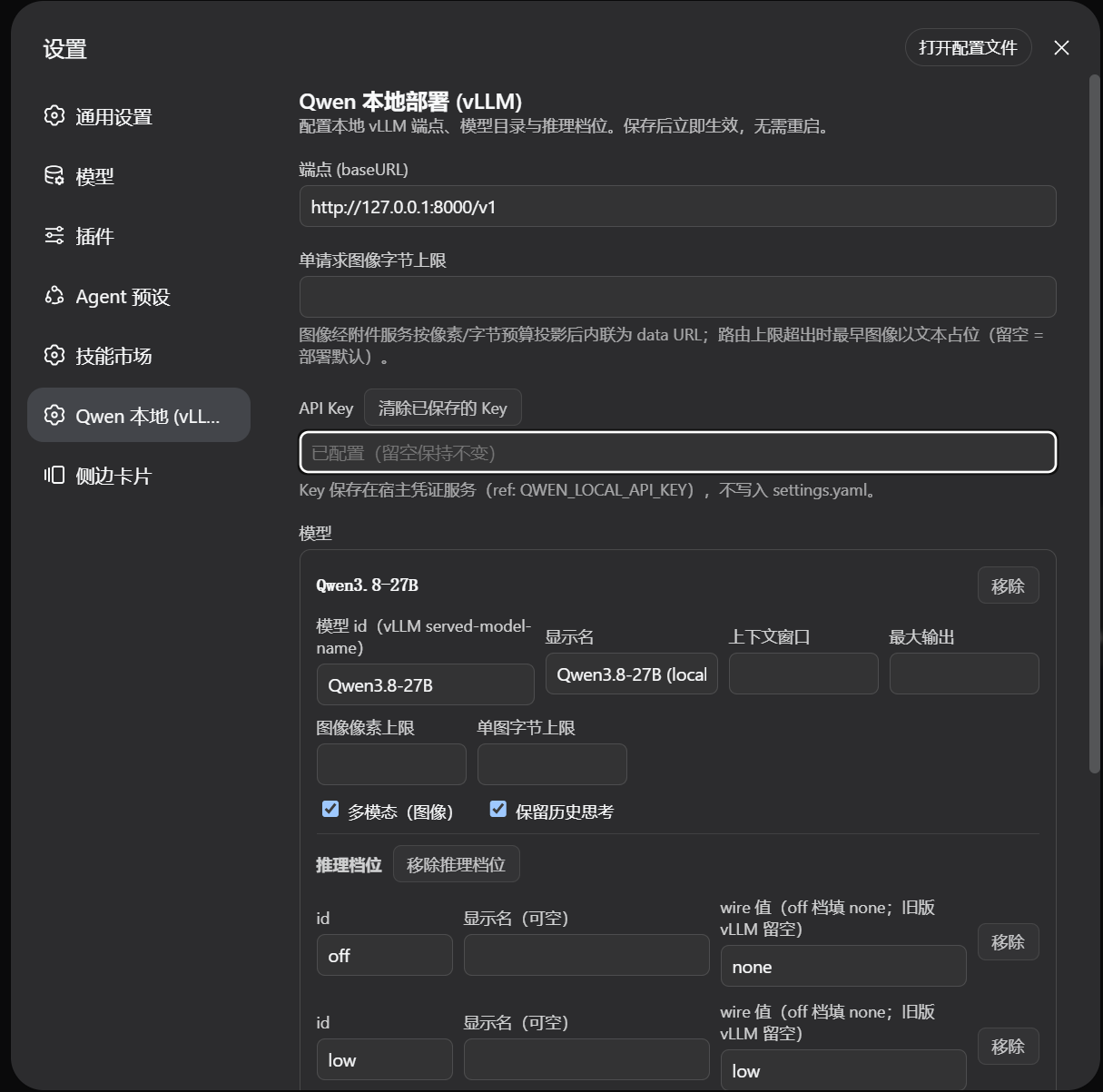
The bundle's cordis.patch.yml inserts a baseline llm-qwen-local line (model qwen3.8, multimodal: true, off/low/medium/xhigh efforts, default xhigh). Open Settings → Qwen 本地 (vLLM) to edit it: endpoint, optional API key (stored in the host credentials service, never in settings.yaml), and one card per model — id, display name, context window, output cap, image budgets, the multimodal switch, thinking preservation, and the reasoning-effort table:
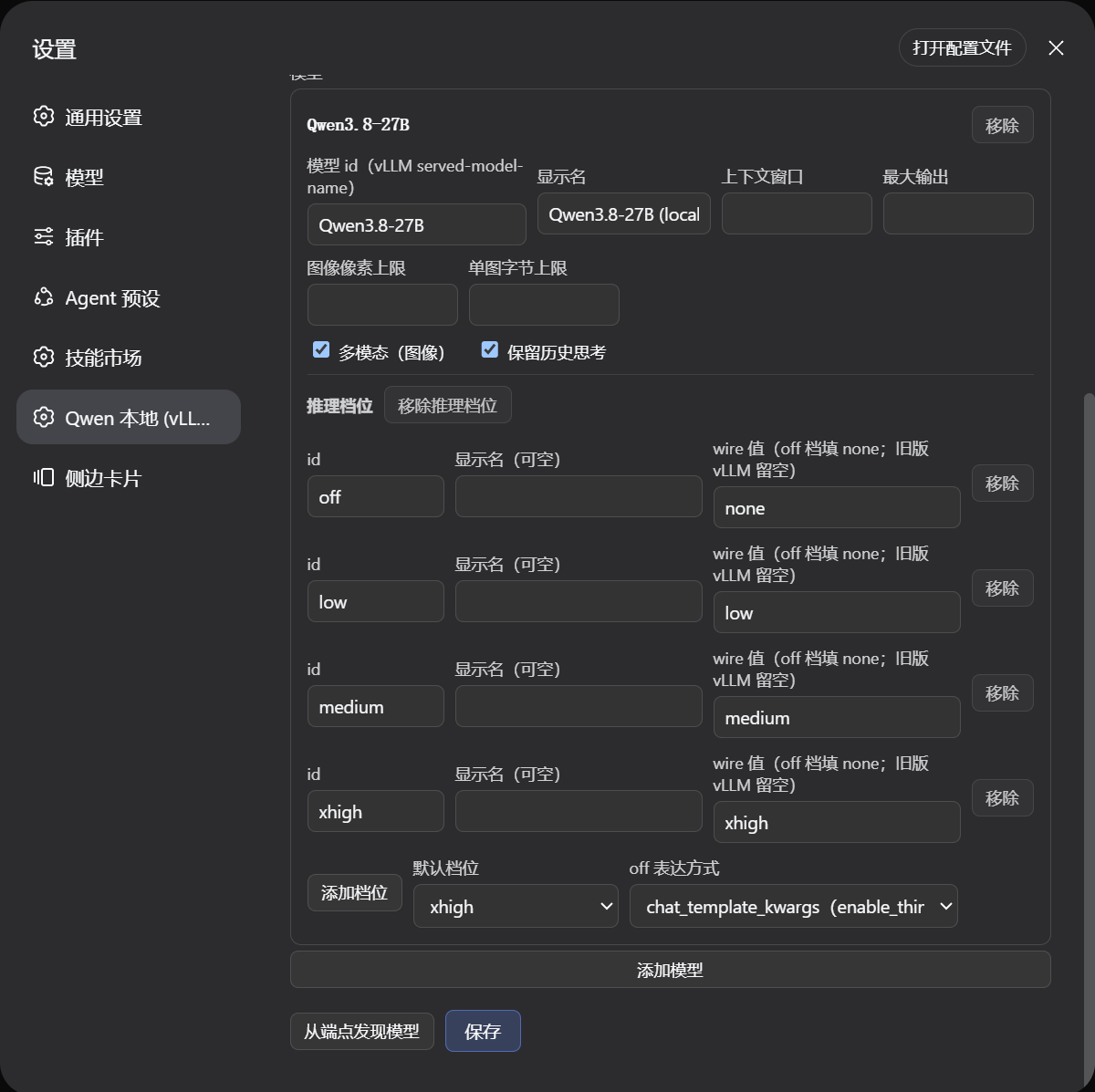
- Discover models probes
{baseURL}/modelsand merges the ids it finds. - Save applies live — the adapter re-resolves per request, so a saved change reaches the next model call without a restart.
- Prefer config files? Override the line from your profile's
cordis.patch.ymlbyid: llm-qwen-local— a patch replaces the target line's entireconfig(no deep merge), so restate every key you keep.
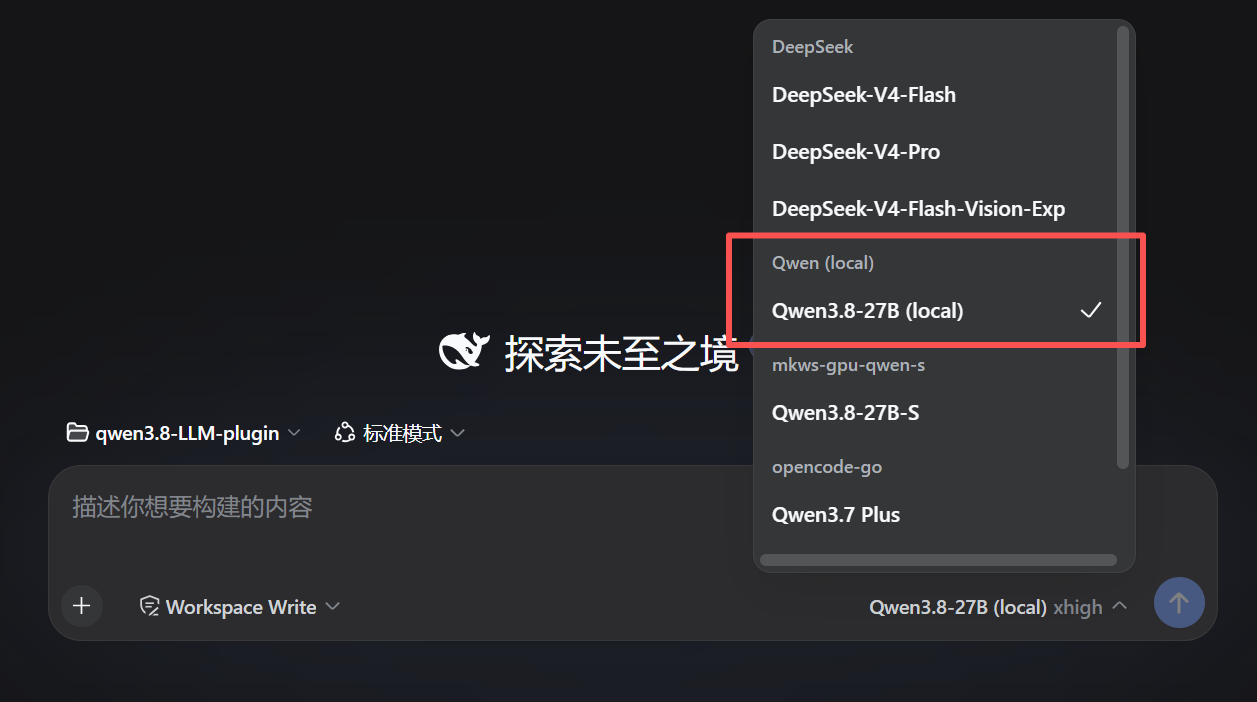
2. Select the model
In the Web UI's model selector, the baseline qwen3.8 entry appears under its Qwen (local) provider group:
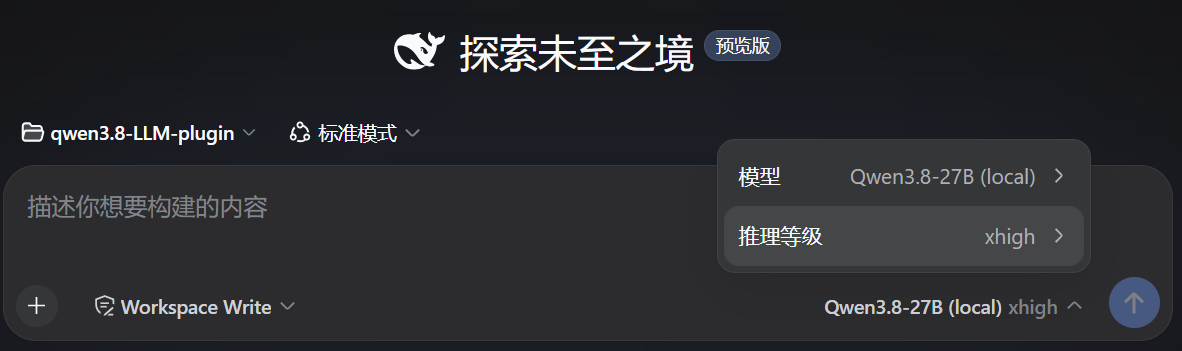
3. Switch the reasoning level per request
Click the input footer (model name + effort, e.g. Qwen3.8-27B (local) xhigh) to switch the session model or the per-request reasoning level (the levels your config declares, e.g. off / low / medium / xhigh):
Configuration at a glance
All fields except models are optional; schema defaults fill the rest.
| Field | Default | Meaning |
|---|---|---|
baseURL |
http://127.0.0.1:8000/v1 |
Endpoint base; /chat/completions is appended. |
apiKeyEnv |
— (no auth header) | Env-var name holding an optional bearer token, read per request. |
models |
required | At least one model entry (see below). |
defaultContextWindow |
262144 |
Context capacity used when a model has no exact value. |
maxTokens |
32768 |
Per-request output cap fallback. |
maxRequestImageBytes |
— (keep every image) | Total inlined base64 image payload bound per request; the oldest images are placeholder-swapped when exceeded. |
Model entries: id (required), name, contextWindow, maxTokens, multimodal (the vision switch — set true for Qwen3.8-27B), preserveThinking, imageMaxPixels, imageMaxBytes, and reasoning (absent = no selectable efforts).
Full field-by-field reference, the multimodal switch semantics (over- vs under-claiming), and the reasoning-effort details: docs/configuration.md · 中文.
Headline limitations
- A modality declaration is not verified —
multimodal: trueon a text-only endpoint fails mid-turn after the image message is durable;multimodal: falseon a vision endpoint is silent (images become text placeholders). - Tool-result images ride a follow-up user message — the vLLM wire is text-only in
role: 'tool', so for a multimodal model an image inside a tool result is split into a follow-uprole: 'user'multimodal message. - No video input, no DashScope / Qwen Cloud — the harness has no video content block, and the adapter targets local OpenAI-compatible servers only.
The complete list (thinking-replay shape, projection caveats, deferred work) and what this plugin does not claim: docs/design.md · 中文.
Development
pnpm install
pnpm build     # tsc → lib/ + client bundle
pnpm typecheck
pnpm test      # vitest: serialization, translation, e2e against a mock vLLM
Tests run against a scripted in-process vLLM (SSE) mock — no real model or endpoint is required.
License
This repository is licensed under MIT.
The plugin depends only on MIT-licensed runtime packages (@deepseek-ai/schemastery, eventsource-parser); its development toolchain includes TypeScript (Apache-2.0) among other MIT-licensed tools. No DeepSeek Harness or Qwen source is vendored into this repository. The Qwen3.8-27B model weights and the DSH product remain subject to their own upstream terms; this plugin is a community project and is not an official DeepSeek or Qwen/Alibaba product.
No comments yet. Be the first to write one.