Game Center




English
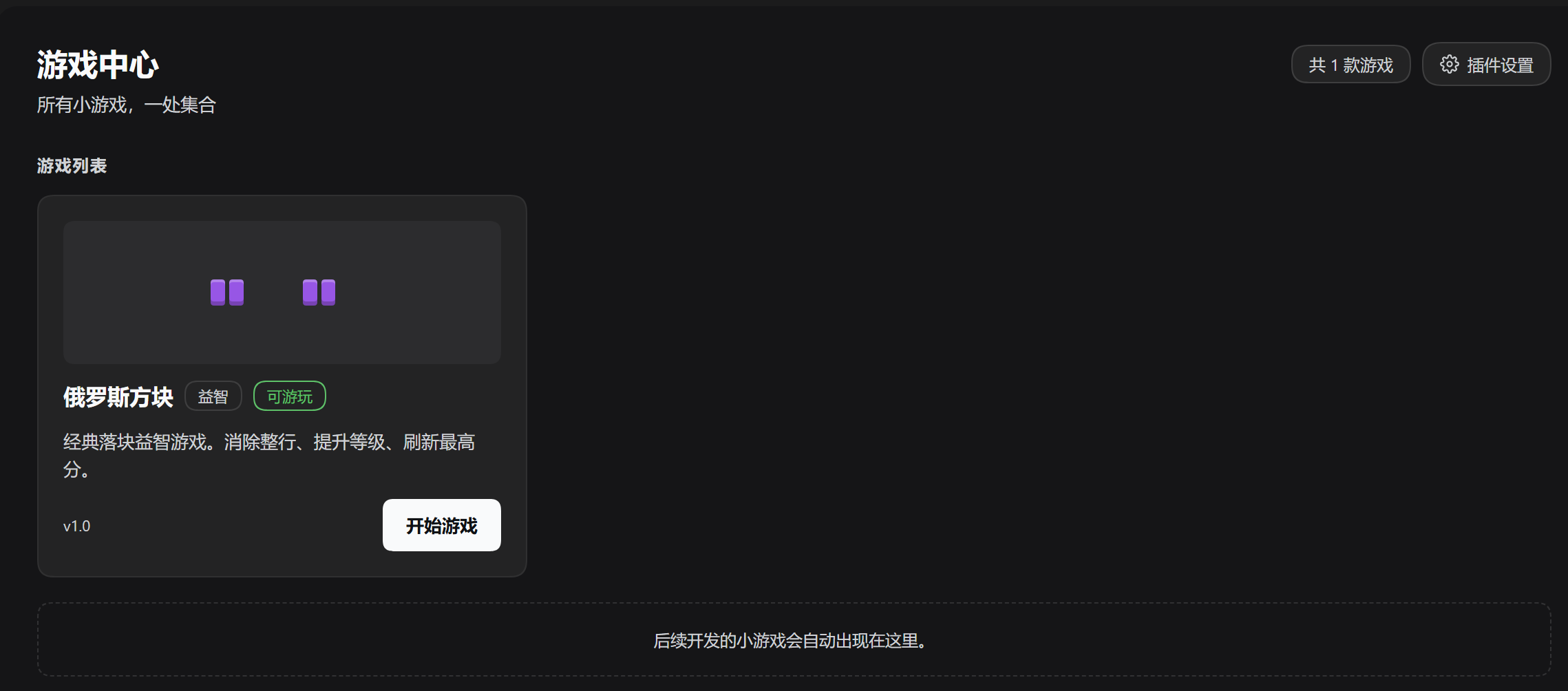
A DeepSeek Harness panel plugin that keeps the mini-games built for this harness in one place, and lets you play them without leaving the window. Ships with Tetris and Cops & Robbers.
Requirements
| DeepSeek Harness | 0.2.1-rc.5 or newer (Web UI; verified on 0.2.2-rc.1) |
| Node.js | >= 22 |
| npm dependencies | none at runtime — the panel injects @deepseek-ai/dsh-client-locale and @deepseek-ai/dsh-client-ui-slots, which the harness provides |
Install
The plugin is listed in the awesome-dsh-plugin catalog, so it appears in dshmarket and in DSH's Plugins → Discover: search for Game Center, 游戏中心 or Tetris and click Install. That is the easiest path.
It is also published through three channels you can install from directly:
| Channel | Command | Notes |
|---|---|---|
| dshmarket / Discover | search Game Center | one-click; the catalog entry lives in awesome-dsh-plugin |
| npm | dsh plugin --profile web add dsh-game-center |
prebuilt dsh-game-center@1.2.2; no build scripts, so no allowBuilds prompt |
| GitHub Release tarball | dsh plugin --profile web add "https://github.com/stallenlu/dsh-game-center/releases/latest/download/dsh-game-center.tgz" |
prebuilt; the asset name carries no version, so the URL keeps working after upgrades |
| Git source | dsh plugin --profile web add github:stallenlu/dsh-game-center |
always the current main; a code push needs no PR |
With a single profile, dsh plugin add … works the same without --profile web.
Restart DSH afterwards — a full restart, not just a Web UI refresh, for a first install — then open Game Center from the sidebar.
What it does
- One list for the games. The panel is a game library: each game is a card with a picture built from the game itself, its name, category, version and status, and it plays in the same panel — no new tab or window.
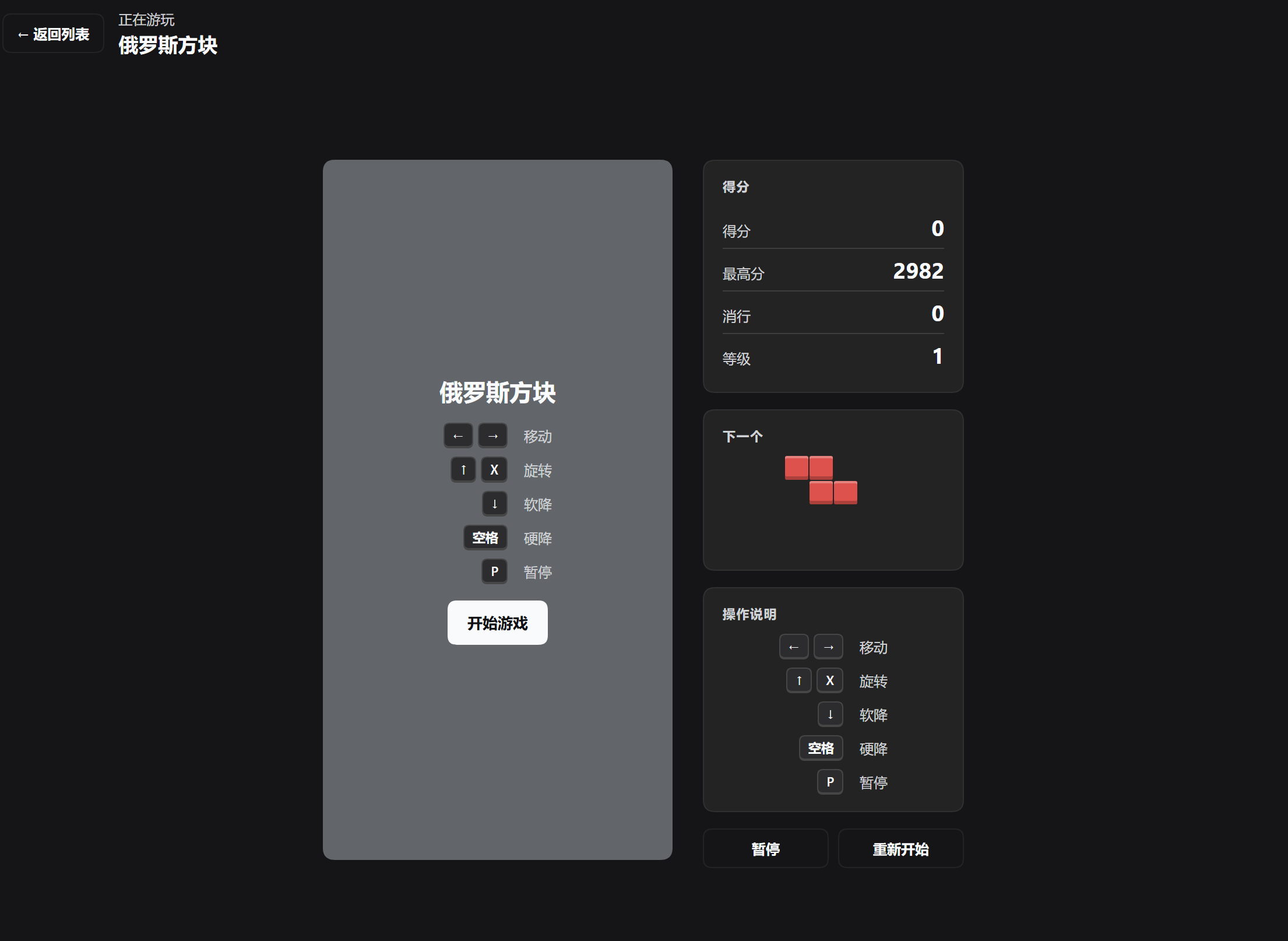
- Tetris. A 10×20 board with a ghost piece, a next-piece preview, pause/restart, and a best score kept in
localStorage. Pieces come from a 7-bag shuffle, so you never wait more than twelve pieces for an I and never get the same piece twice in a row. A landed piece waits 500 ms before it locks (up to 15 nudges re-arm the timer), and rotation kicks sideways up to two cells and up one row, so a piece against a wall or wedged on the floor can still be turned. Gravity follows800 × 0.9^(level−1)ms, floored at 60 ms around level 26. - Tetris scoring. A single / double / triple / tetris pays
100 / 300 / 500 / 800 × level; only a rotation that drops the piece straight into place counts as a T-spin and pays400 / 800 / 1200 / 1600 × level; a clear that follows another clear adds a combo bonus of50 × (combo − 1) × level. - Cops & Robbers. Play the thief on a walled grid: collect every piece of loot to clear the level while the police hunt you down. They path around the walls toward you and start outnumbered — Easy / Normal / Hard open with 1 / 2 / 3 police, and every two levels add another one until all six spawn points are in use — Hard reaches six at level 6, Normal at level 8, Easy at level 10. Their repath interval shrinks 6% per level down to a 90 ms floor, and Easy drops from moving every third tick to every other tick at level 5. Nobody ever moves on every player tick.
- A flashbang. A 💥 sits at a fixed cell of every Cops & Robbers level. Walk onto it to freeze every cop for twelve ticks (they stay put, dimmed, and the level timer keeps running) and collect 50 points; it comes back on the next level.
- Per-game difficulty. Difficulty is the game's own setting, chosen on its start screen and remembered per game: Easy / Normal / Hard start Tetris at level 1 / 3 / 5 and give Cops & Robbers 1 / 2 / 3 police; the level still rises as you play.
- Settings. The panel's own settings only: show or hide the sidebar entry, and reset to defaults. Reachable from the gear button in the panel header and from the plugin's page under Plugins.
- Theme. Colours come from the harness theme tokens (
--dsw-alias-*), so the panel follows light and dark mode.
Controls
Tetris
| Key | Action |
|---|---|
← → |
Move |
↑ X |
Rotate |
↓ |
Soft drop |
Space |
Hard drop |
P |
Pause |
Cops & Robbers
| Key | Action |
|---|---|
W A S D |
Move one cell |
← ↑ ↓ → |
Move one cell |
P |
Pause |
Layout
client.js          the Web client plugin: panel, settings, games, Tetris, Cops & Robbers
index.js           host-side entry (no host behaviour)
cordis.patch.yml   the insert row that mounts the bundle
locale/*.json      the plugin-list title and description
icon.svg           the in-app icon
assets/            storefront images (screenshot-1.png, screenshot-2.png, icon-180.png)
screenshots.json   the image list the catalog collects
verify.mjs         runnable check (node verify.mjs) — wiring + both games' cores
t-p0.mjs           regression: starting level, 7-bag, lock delay
t-p1.mjs           regression: wall kicks, gravity curve, chase curve, locale parity
t-p2.mjs           regression: T-spin, combo, flashbang, game registry
t-sim.mjs          simulation: random play to top-out, level formula invariant
t-balance.mjs      balance probe: how long a fleeing thief survives per level
Adding a game
client.js has a GAMES registry; an entry declares { id, nameKey, descKey, categoryKey, version, statusKey, thumb, thumbCell, thumbGap, render(t) } and appears in the library automatically. render receives the translate function and returns the game's element. A new game also needs its strings added to the zh / en dictionaries registered at the top of apply().
A game defined outside this file can be added at runtime instead: the module exports registerGame(entry) (it validates the entry, rejects a duplicate or built-in id, notifies the panel, and returns a function that unregisters it) and listGames(). Such an entry may skip the *Key fields and pass plain name / desc / category strings, and GameThumb draws an empty placeholder when it brings no thumb.
The card's picture must come from the game, not from decoration. Write a xxxThumb() that builds the matrix out of that game's own constants — a board, a map, its real colours — and set thumbCell / thumbGap so it fits the 104px panel. Both shipped games do this (tetrisThumb() drops real pieces through SHAPES / COLORS / collides, chaseThumb() draws CHASE_MAP), and verify.mjs asserts for every registered game that the picture is a non-blank grid of equal-width rows holding colours — so a hand-drawn or empty one fails the check. Note .gc-thumb is a grid: it used to be a flex row, which laid a 2D matrix out as one clipped line of cells.
Development
verify.mjs runs without the harness: it loads client.js, captures the module, calls apply() against a stub context, asserts the three slots (main panel, sidebar entry, plugin-page config) and the locale registrations, then exercises the Tetris core (rotation, collision, line clearing, drop scoring) and the chase core (map integrity, pathfinding, loot, lives).
The five t-*.mjs scripts cover what verify.mjs deliberately leaves alone — the behaviour added in 1.2.0 — and each prints one OK line:
node verify.mjs && node t-p0.mjs && node t-p1.mjs && node t-p2.mjs && node t-sim.mjs
t-sim.mjs plays a few hundred randomly-driven games to top-out and asserts the level formula holds every piece; t-balance.mjs is a probe rather than a pass/fail check — it reports how many ticks a fleeing thief survives per level, which is how the police curve was tuned.
Distribution and updates
The catalog entry lives in awesome-dsh-plugin (data/plugins/stallenlu__dsh-game-center.yml); the code lives in this repository. The catalog stores no copy of the code and no version number — it derives the install target at request time. Three channels are published:
| Channel | Where | How an update reaches users |
|---|---|---|
| npm | dsh-game-center@1.2.2 on registry.npmjs.org |
npm version patch && npm publish; the catalog's nightly probe-npm.mjs checks that repository points back here and picks up the new version automatically — no PR, and update detection switches to version numbers |
| GitHub Release | v1.2.2 with asset dsh-game-center.tgz |
publish a new Release keeping the same asset name, so releases/latest/download/dsh-game-center.tgz keeps resolving. Never put the version in the asset name — the permanent URL would 404 on the next release |
| Git source | main |
just git push; installs pinned to a commit see it on the next update check — no PR, no wait |
installTargetFor() prefers npm → release tarball → git source. Once the catalog auto-collects the npm package, npm becomes the default install command and the tarball stays as a fallback (and as the site's alternate command). A tarball: line in the catalog YAML (added through a catalog PR) is what makes the prebuilt archive visible there; npm: is deliberately not a valid YAML key — that mapping is auto-collected, never hand-written.
Rules worth keeping in mind when updating:
screenshots.jsonandassets/live in this repo — push here and they show up after the next nightly build, no catalog PR.- The catalog's
icon,name,categoryand zh/en descriptions live in the catalog YAML — changing those needs a PR to awesome-dsh-plugin (edit only your own entry; never hand-edit the generated READMEs). - Bump
versioninpackage.jsonwhen you change code, and keepcordis.patch.yml'sname:equal to the installed package name — a mismatch makesinstall_bundlefail withERR_MODULE_NOT_FOUND. - The catalog rebuilds automatically after a merge (usually within a day); users on the China mirror read the
dsh-plugin-catalognpm package, one build later.
License
MIT
中文
一个 DeepSeek Harness 面板插件:把为这个 harness 开发的小游戏集中到一处,不用离开当前窗口就能玩。自带游戏:俄罗斯方块、警察抓小偷。
环境要求
| DeepSeek Harness | 0.2.1-rc.5 或更新(Web UI;已在 0.2.2-rc.1 验证) |
| Node.js | >= 22 |
| npm 依赖 | 运行时无依赖——面板只注入 @deepseek-ai/dsh-client-locale 和 @deepseek-ai/dsh-client-ui-slots,由 harness 提供 |
安装
本插件已收录进 awesome-dsh-plugin 精选列表,因此会出现在 dshmarket 以及 DSH 的插件 → 发现里:搜索 Game Center、游戏中心 或 Tetris,点「安装」即可,这是最省事的方式。
也可以从以下三个已发布渠道直接安装:
| 渠道 | 命令 | 说明 |
|---|---|---|
| dshmarket / 发现 | 搜索游戏中心 | 一键安装;目录条目维护在 awesome-dsh-plugin |
| npm | dsh plugin --profile web add dsh-game-center |
预构建包 dsh-game-center@1.2.2;无构建脚本,不会弹 allowBuilds 授权 |
| GitHub Release tarball | dsh plugin --profile web add "https://github.com/stallenlu/dsh-game-center/releases/latest/download/dsh-game-center.tgz" |
预构建;资产名不含版本号,升级后链接仍有效 |
| Git 源码 | dsh plugin --profile web add github:stallenlu/dsh-game-center |
始终是 main 最新代码;推送代码后无需提 PR |
单 profile 环境下 dsh plugin add … 不带 --profile web 效果相同。
安装后请完整重启 DSH(首次安装仅刷新页面不够),再从侧边栏打开游戏中心。
功能
- 一个列表管理游戏。 面板本身就是游戏库:每款游戏一张卡片,带一张由游戏本身生成的示意图、名称、分类、版本与状态,点开就在同一面板里游玩,不新开标签页或窗口。
- 俄罗斯方块。 10×20 棋盘、落点虚影、下一个方块预览、暂停/重开,最高分存在
localStorage。出块用 7-bag:同一个袋子里的七种方块各出现一次才换袋,所以最多等十二块一定能等到 I,也不会连续两块同型。方块落地后有 500ms 的锁定延迟(最多 15 次移动可以重新计时),旋转时可以先左右踢最多两格、再往上踢一格,贴着墙或卡在地面时仍能转过来。下落间隔按800 × 0.9^(等级−1)毫秒递减,大约第 26 关触到 60ms 的下限。 - 俄罗斯方块的计分。 消一 / 二 / 三 / 四行分别得
100 / 300 / 500 / 800 × 等级;只有「旋转后直接落定」才算 T 旋,得400 / 800 / 1200 / 1600 × 等级;连续消行还有 连击 加成50 × (连击数 − 1) × 等级。 - 警察抓小偷。 你扮演小偷,在有墙的棋盘上把赃物全部捡走即可过关,同时要躲开追捕的警察。警察会绕开墙走最短路线追你,但开局是人数劣势:简单 / 普通 / 困难分别从 1 / 2 / 3 个警察开始,之后每两关多一个,直到六个出生点全用上——困难第 6 关、普通第 8 关、简单第 10 关就到满。它们的重算间隔每关缩短 6%,最低 90ms;简单难度在第 5 关会从「每三 tick 动一次」变成「每两 tick 动一次」。任何难度都不会每 tick 都动。
- 闪光弹。 警察抓小偷的每一关都有一个固定位置的 💥。走上去可以定住全部警察十二 tick(它们原地变暗,关卡计时照常走),同时加 50 分;进入下一关会重新出现。
- 每个游戏自己的难度。 难度是游戏自身的设置,在各自的开始界面上选择、按游戏分别记住:简单 / 普通 / 困难分别让俄罗斯方块从第 1 / 3 / 5 级开始,并让警察抓小偷开局有 1 / 2 / 3 个警察;等级仍会随游玩继续上升。
- 设置。 只放面板自身的设置:显示或隐藏侧边栏入口,以及恢复默认。面板右上角的齿轮按钮和插件页都能打开。
- 主题。 配色取自 harness 主题变量(
--dsw-alias-*),明暗主题自动跟随。
操作
俄罗斯方块
| 按键 | 作用 |
|---|---|
← → |
移动 |
↑ X |
旋转 |
↓ |
软降 |
Space |
硬降 |
P |
暂停 |
警察抓小偷
| 按键 | 作用 |
|---|---|
W A S D |
走一格 |
← ↑ ↓ → |
走一格 |
P |
暂停 |
目录
client.js          Web 客户端插件:面板、设置、游戏、俄罗斯方块、警察抓小偷
index.js           宿主侧入口(无宿主行为)
cordis.patch.yml   挂载 bundle 的 insert 行
locale/*.json      插件列表的标题与描述
icon.svg           应用内图标
assets/            商店图片(screenshot-1.png、screenshot-2.png、icon-180.png)
screenshots.json   目录采集的图片清单
verify.mjs         可运行自检(node verify.mjs):接线 + 两款游戏的核心逻辑
t-p0.mjs           回归:起始等级、7-bag 出块、锁定延迟
t-p1.mjs           回归:踢墙、重力曲线、追捕曲线、语言包对齐
t-p2.mjs           回归:T 旋、连击、闪光弹、游戏注册表
t-sim.mjs          模拟:随机操作打到顶死,逐步校验等级公式
t-balance.mjs      平衡探针:逃跑型小偷在每关能撑多少 tick
增加小游戏
client.js 里有一个 GAMES 注册表,一条记录声明 { id, nameKey, descKey, categoryKey, version, statusKey, thumb, thumbCell, thumbGap, render(t) } 后会自动出现在游戏库中。render 收到翻译函数并返回游戏元素;新游戏还需要把文案加进 apply() 顶部注册的 zh / en 字典。
本文件之外定义的游戏也可以在运行时加进来:模块导出了 registerGame(entry)(校验记录、拒绝重复或与内置冲突的 id、通知面板,并返回一个注销函数)和 listGames()。这类记录可以不写 *Key 字段,直接给 name / desc / category 字符串;没带 thumb 时 GameThumb 会画一个占位图。
卡片示意图必须来自游戏本身,不能用装饰性的图。 写一个 xxxThumb(),用这款游戏自己的常量搭出矩阵——棋盘、地图、真实配色——再用 thumbCell / thumbGap 让它放进 104px 的图区。现有两款都是这么做的(tetrisThumb() 通过 SHAPES / COLORS / collides 真的落方块,chaseThumb() 画的就是 CHASE_MAP),verify.mjs 会对注册表里每一款游戏断言示意图是非空网格、每行等宽、格子是颜色——所以手写的装饰图或空图会直接被自检拦下。另外注意 .gc-thumb 是 grid:它曾经是 flex 单行,会把二维矩阵排成一行再裁掉。
开发
verify.mjs 不依赖 harness 即可运行:加载 client.js、捕获模块、用桩上下文调用 apply(),断言三个插槽(主面板、侧边栏入口、插件页配置)与语言注册,再跑一遍俄罗斯方块核心逻辑(旋转、碰撞、消行、下落计分)和追捕逻辑(地图连通性、寻路、拾取赃物、命数)。
五个 t-*.mjs 脚本补上 verify.mjs 刻意不碰的部分——也就是 1.2.0 新增的行为——每个脚本打印一行 OK:
node verify.mjs && node t-p0.mjs && node t-p1.mjs && node t-p2.mjs && node t-sim.mjs
t-sim.mjs 会随机驱动几百局打到顶死,逐块校验等级公式;t-balance.mjs 是探针而不是通过/失败检查——它报告逃跑型小偷在每关能撑多少 tick,警察曲线就是照这个调出来的。
分发与更新
目录条目在 awesome-dsh-plugin(data/plugins/stallenlu__dsh-game-center.yml),代码在本仓库。目录不保存代码副本、也不记录版本号——它在每次请求时派生安装目标。目前发布了三个渠道:
| 渠道 | 发布位置 | 更新如何到达用户 |
|---|---|---|
| npm | registry.npmjs.org 上的 dsh-game-center@1.2.2 |
npm version patch && npm publish;目录的 nightly probe-npm.mjs 校验 repository 指回本仓库后自动采集新版本——无需提 PR,更新检测改按版本号 |
| GitHub Release | v1.2.2,附资产 dsh-game-center.tgz |
发布新 Release 时保持同名资产,releases/latest/download/dsh-game-center.tgz 会一直可用;资产名不要带版本号,否则下次发版永久链 404 |
| Git 源码 | main |
直接 git push;按 commit 钉住的安装会在下次检查更新时看到——无需 PR、无需等待 |
installTargetFor() 的优先级是 npm → Release tarball → Git 源码:一旦目录自动采集到 npm 包,npm 就成为默认安装命令,tarball 退为兜底(以及站点上的备选命令)。目录 YAML 里的 tarball: 行(通过给目录提 PR 添加)让预构建包在站点可见;npm: 不是合法 YAML 键,该映射由脚本自动采集,不能手写。
更新时还要记住:
screenshots.json与assets/在本仓库,这里 push 后下一次 nightly 构建即生效,不用给目录提 PR。- 目录里的
icon、name、category和中英描述在 YAML 里——改这些才需要向 awesome-dsh-plugin 提 PR(只改自己那一条;生成的 README 不要手改)。 - 改代码时顺手 bump
package.json的version,并保证cordis.patch.yml的name:等于已安装包名——不一致会让install_bundle报ERR_MODULE_NOT_FOUND。 - PR 合并后目录自动重建(通常一天内);中国区用户读
dsh-plugin-catalognpm 包,再晚一个构建周期。
许可
MIT
No comments yet. Be the first to write one.