English Prompt
Translate every prompt into English for the model, and keep the answer in the language you wrote in — one answer, rendered natively.
Demo
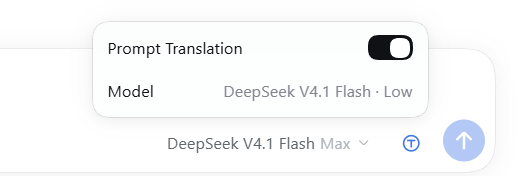
The circled-T control sits between the model selector and Send. It is blue while prompt translation is on and black while it is off; clicking it opens the settings panel above the composer, with the Prompt Translation switch and the model and reasoning effort the translation request actually uses.
Install
Paste this sentence into any DeepSeek Harness session:
Install the DSH plugin from https://github.com/stairclimber/dsh-english-prompt into my current profile: clone the repository, install its package directory as a plugin bundle with the plugin manager, and enable it.
The repository must be reachable by the installing account — make it public or sign in to GitHub before cloning.
What it does
Prompts → English. Before a prompt enters the model request — and before it becomes the durable user message of the Turn — the Host half asks your own configured model (
ctx.llm, on the Session's model route) for an English rendering. Markdown, fenced code, inline code, commands, URLs, file paths, and identifiers are preserved. The same call identifies the language you wrote in, and the result is cached per message.The answer stays in your language. A short language rule rides in the prompt's runtime context, which the loop re-reads after the prompt has been translated. It tells the model to write its answer in that language, so the answer is produced in your language from the start. The harness renders that one answer with its normal Markdown renderer: no second copy, no translation card, no English answer shown first.
No language drift. The rule names the language of the current prompt in every turn, so an English prompt in a Chinese conversation is answered in English and the next Chinese prompt is answered in Chinese.
Composer control and settings panel. A circled-T mark sits immediately to the right of the model selector, between it and Send. It is drawn as a blue line mark while prompt translation is on — using the same fill token as the composer's send button — and as a black line mark while it is off; there is no dimmed state. Clicking it opens a small settings panel above the composer, styled like the model-selection menu:
Row Kind Value Prompt Translation switch (default on) Enables prompt translation for this Session Model display The model and reasoning effort the plugin actually uses: the Session's route plus the lowest effort the route advertises ( DeepSeek V4.1 Flash · Low)The Model value is computed by the Host from the session environment (the Agent's current model selection resolved through
ctx.llm.resolveModelInfo()), not copied from the composer's model selector, so it shows the auxiliary request's real effort rather than the Session's.The plugin's own UI text — the button's tooltip, the panel rows, and the Plugin Manager title and description — is fixed English and does not follow the interface language.
Only text the plugin itself sends is translated; tool arguments, files, and other Session events are never rewritten. Every auxiliary request carries the Session identity (routes such as OpenCode require it) and the lowest reasoning effort the model offers.
How it works
agent/pre-steptranslates the human message that enters the step, so English is what the model reads and what the Session commits.ctx.systemPrompt.context({ name: 'english-prompt:response-language', order: 1000 })contributes the language rule. Runtime context is re-read byrefreshContext()afteragent/pre-step, which is why the rule always matches the language detected for this turn. Chat does not render runtime context, so the rule is invisible in the transcript.- The Client half only renders the button and talks to two loopback routes:
GET /english-prompt/state?sessionId=…andPOST /english-prompt/toggle?sessionId=…&enabled=0|1.statealso returns the resolvedroute(provider,model, displayname, and theeffortthe auxiliary call will request), which the settings panel shows. Cross-site browser requests are refused.
Configuration
cordis.patch.yml carries the row's config:
| Field | Default | Meaning |
|---|---|---|
translatePrompts |
true |
Translate prompts into English. |
answerInUserLanguage |
true |
Make the model answer in the prompt's language. |
maxTextChars |
12000 |
Longest prompt text translated in one request. |
timeoutMs |
45000 |
Deadline for one auxiliary translation request. |
Known limits
- The answer language is carried by an instruction, so the model must follow it. It is placed last — in the runtime context after the translated prompt — and was verified across Chinese/English turns in one conversation.
- The detected language is in-process. After a Host restart it is learned again from the next prompt you send.
- Prompts are committed to the Session in English, which is what the transcript and every later model step see; the wording you typed is not retained in the log.
- Each prompt costs one auxiliary model call, including English prompts, where the call confirms the language and returns the text unchanged.
No comments yet. Be the first to write one.