@staff-os/dsh-workbench
English | 中文
Enterprise workbench plugin for DeepSeek Harness: AI employees, knowledge bases, skills, MCP servers, DSH plugins — five domains, each with a tool for the model and a management surface for the person.
Runs standalone. No external backend, no database. Every piece of state is a local file under
$DSH_HOME.
What it does
Skills
Local skills live under $DSH_HOME/skills, one directory per SKILL.md; they can also be installed
from a configured marketplace. The inventory leads with three counts — how many this plugin manages,
how many are shadowed by a same-named higher-priority source, and how many DSH rejected whole
over non-compliant frontmatter. The last two both present in a session as "I installed it but it
never fires", and DSH itself only logs one warning line about them.
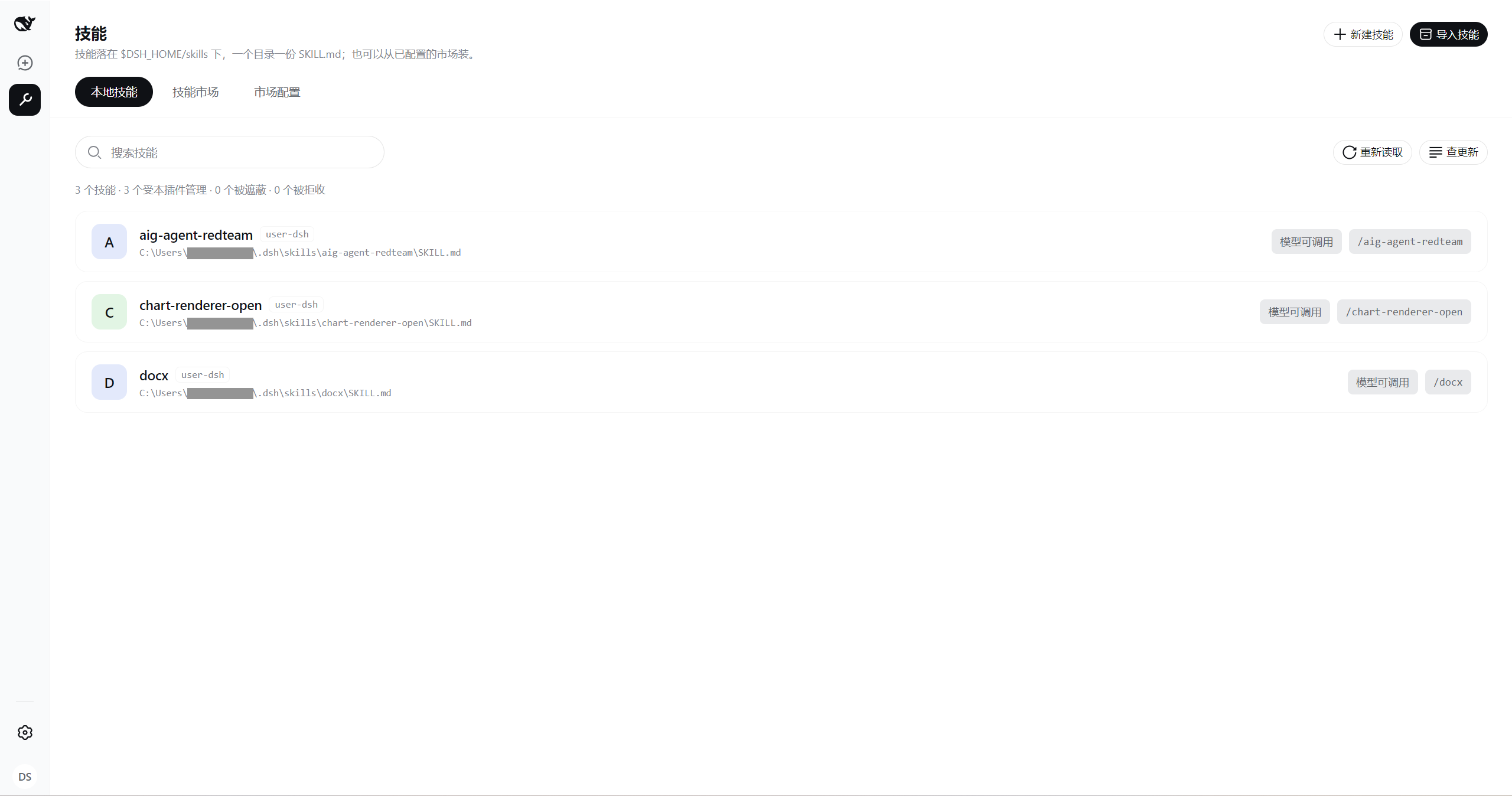
After every write the plugin reads ctx.skills back, so what it reports is whether the skill is in
effect now — not "after a restart". Once the file lands, the next model turn has it.
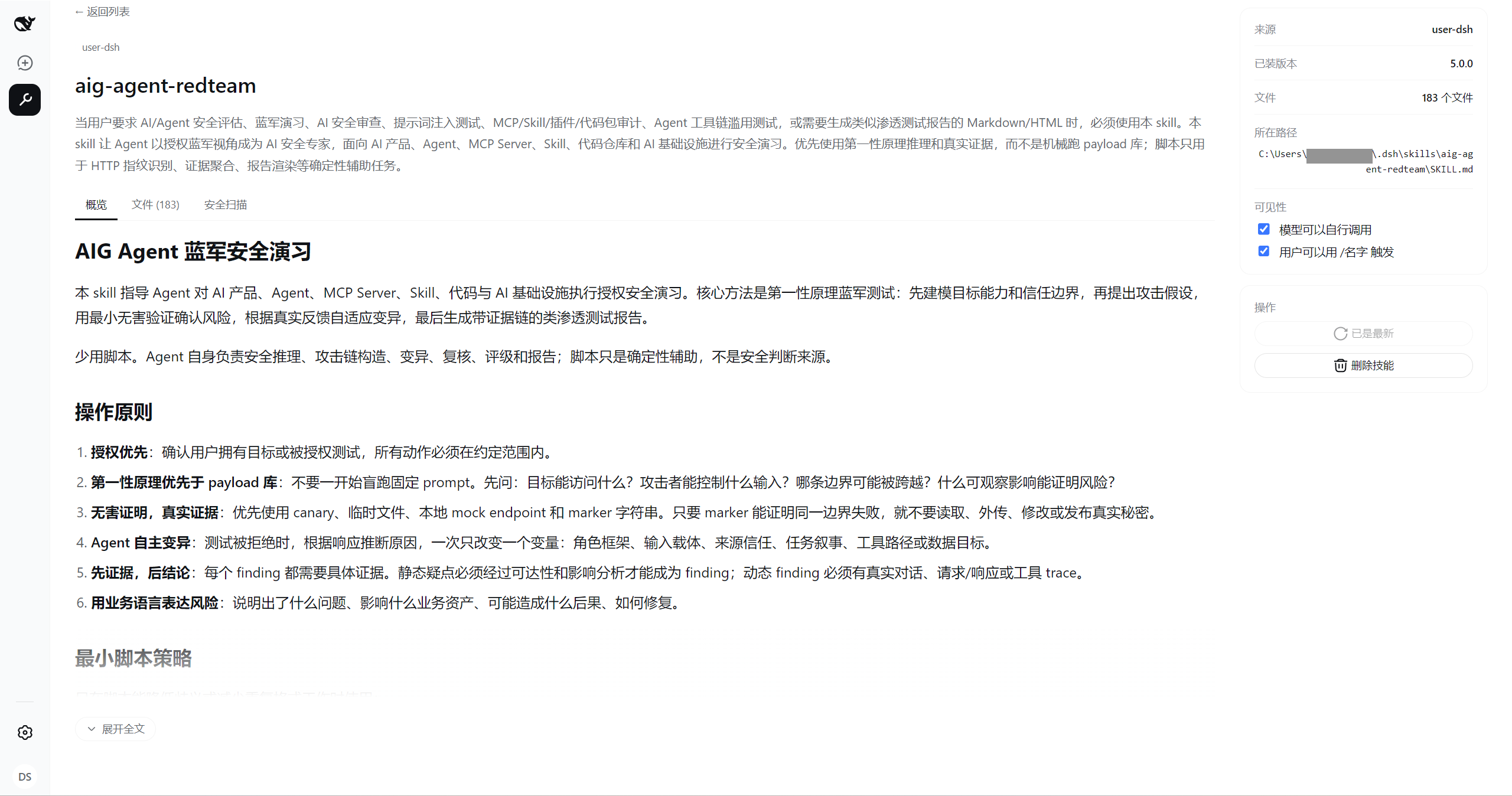
The marketplace aggregates several sources, and each card names the one it came from. A blank browse is sorted by total downloads; a keyword search keeps the order the marketplace returned. Cards carry no install button — the whole card opens the detail, because installing a skill is not installing a library: the body of a SKILL.md is instructions the model will follow, and what you need in order to decide (publisher, review verdict, package contents, static scan) is in there.
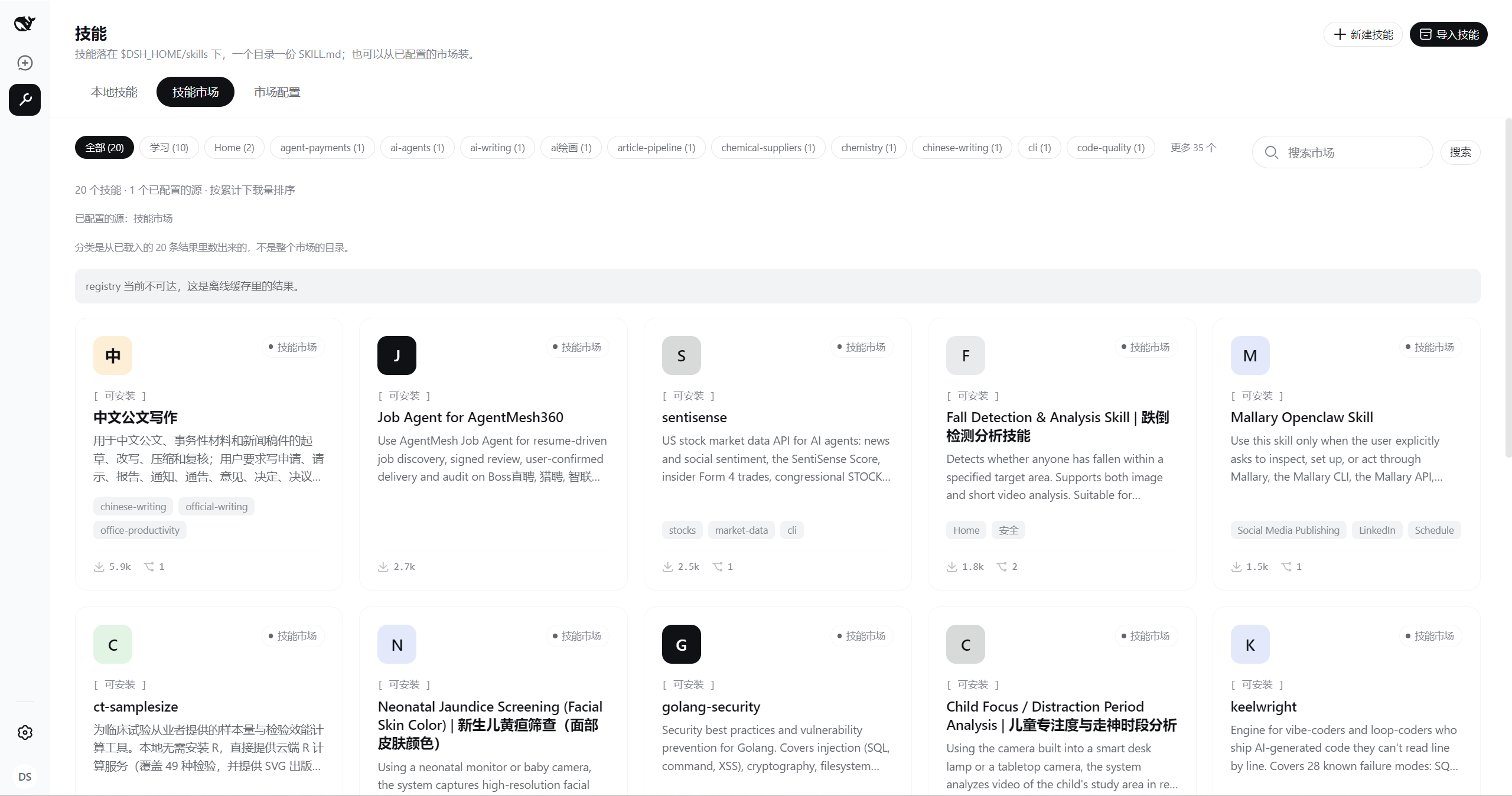
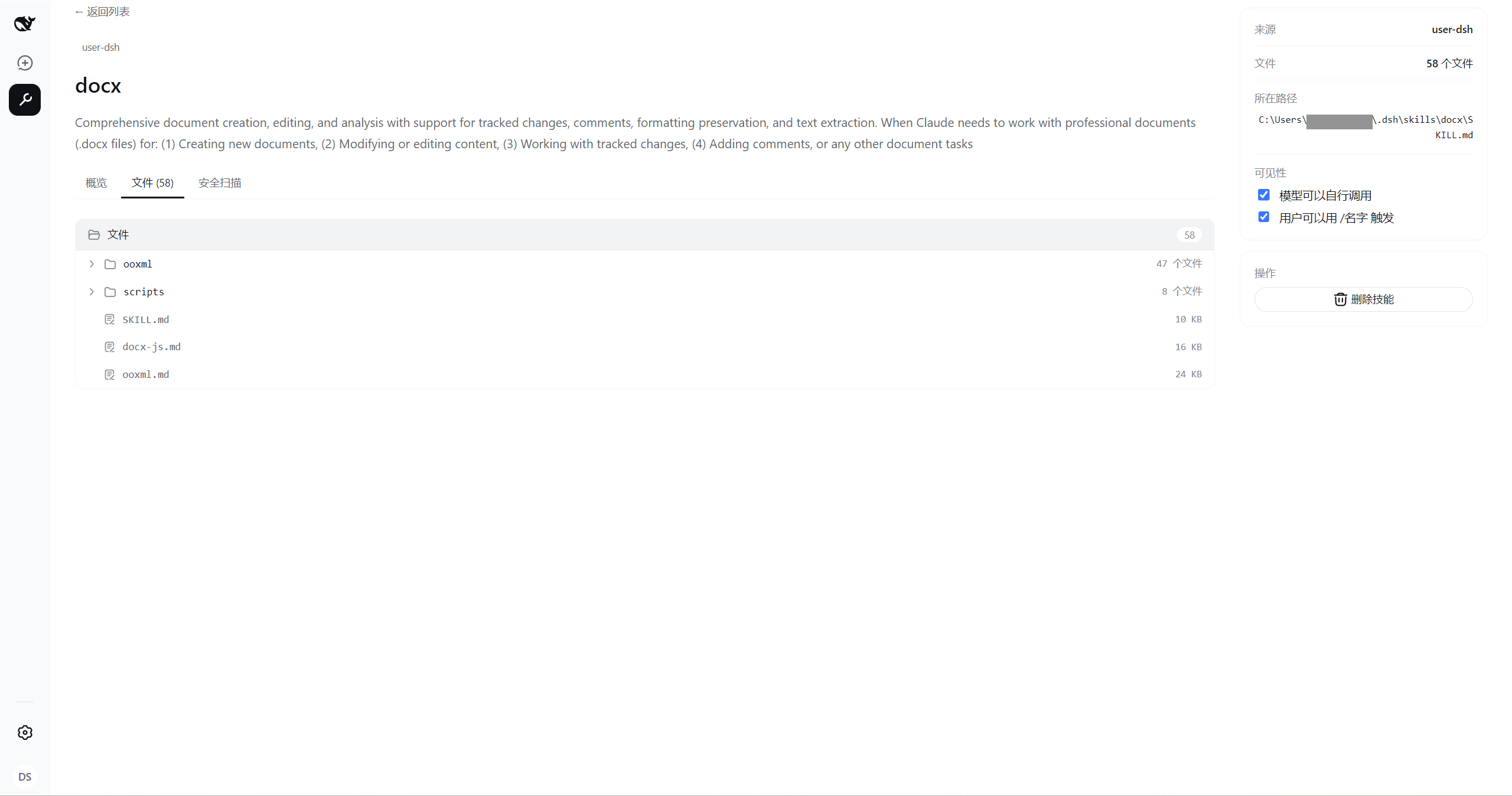
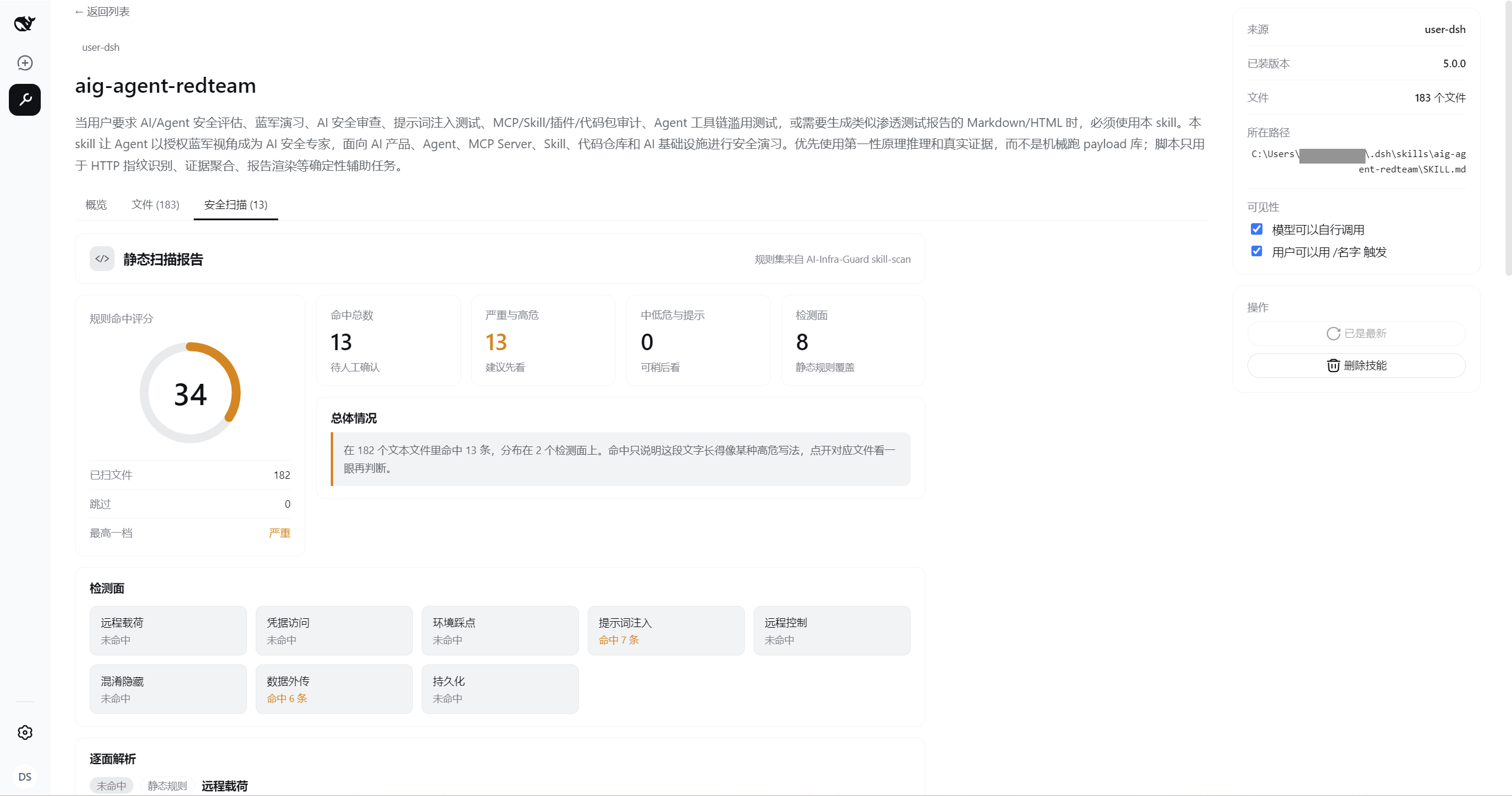
The detail has three tabs: overview renders the SKILL.md (with a raw-source toggle), files is the package's directory tree with in-place previews, and security scan is thirteen regex rules plus a charset-smuggling check. The rule set is ported from the skill-scan pre-check in Tencent Zhuque Lab's AI-Infra-Guard (Apache-2.0). A match only means the text looks like a high-risk pattern, not that it does it — and no match does not mean safe.
Import takes four sources — an archive, a download link, a GitHub repository, a marketplace slug — over one unpack-and-land path: staged outside the skill root first, swapped in as a whole directory once it checks out. Only the marketplace slug gets a ledger entry, which is how later update checks find their way back to the same source by id.
AI employees
An employee is a DSH agent preset. Discovery, trust level, copying and deletion all go through the
native ctx.agentPresets: creating one is a whole-directory copy of an existing preset, so a copy
never carries more capability than its source, and a system-trust preset ships with the deployment
and can be neither edited nor deleted. Bindings live in employee.yml inside the preset directory and
are a statement of responsibility, not autowiring — binding a knowledge base does not make
retrieval happen. The UI lives in client/employee/; its entry point is hidden for now.
Knowledge bases
Local chunking plus a keyword index; retrieval is BM25, not semantic vectors. Text only.
MCP servers
Written into the current profile's patch file; changes take effect on the next DSH start.
import_json accepts the Claude Code / Cursor shape {"mcpServers": {...}} and rewrites ${VAR}
into !!js process.env.VAR — DSH does no client-side environment substitution, so without the
rewrite the server receives the literal fifteen characters ${GITHUB_TOKEN}.
DSH plugins
Forwarded to the dsh plugin CLI; this plugin never touches pnpm or edits dsh.profile.bundles
itself. list splits "does this package declare dsh.bundle" from "is it in the composition layer" —
after an install, only those two together say whether it really became a plugin.
Install
dsh plugin --profile web add @staff-os/dsh-workbench
For local development, use an absolute path:
dsh plugin --profile web add link:/path/to/dsh-workbench
Restart DSH afterwards.
Configure
The bundled cordis.patch.yml is an opt-in patch layer that reads its config from the environment
by default:
| Variable | Effect |
|---|---|
DSH_PROFILE |
Which profile MCP and plugin management act on. Defaults to web |
CLAWHUB_REGISTRY |
Root URL of a ClawHub-compatible marketplace. Unset falls back to the shipped one (public read endpoints, no token) |
CLAWHUB_API_KEY |
Marketplace credential. A reference name only — the value is resolved from the credential service or the launch environment, never inlined into YAML |
Environment variables go in $DSH_HOME/.env or the .env beside wherever dsh is invoked; both
layers are read at startup.
To point at a self-hosted marketplace, edit the profile's own patch layer
($DSH_HOME/profiles/<name>/cordis.patch.yml) rather than the environment: the environment path can
only swap the URL, while id and display name stay fixed, leaving the UI labelling an intranet
source "ClawHub". The patch layer hot-reloads, so no restart:
# A patch replaces config wholesale rather than deep-merging, so restate every key
- id: workbench
  config:
    profile: web                 # profile to act on
    dshHome: ''                  # override $DSH_HOME; empty resolves from the environment
    registries:                  # multi-source; shared by the skill and plugin marketplaces
      - id: skillhub             # recorded in the install ledger — do not change it afterwards
        name: Intranet skills
        url: http://10.0.14.55
        flavor: clawhub          # clawhub | skillhub
        apiKeyEnv: SKILLHUB_REGISTRY_API_KEY   # omit when anonymous reads work
    registryTimeoutMs: 15000     # one marketplace request
    toolTimeoutMs: 20000         # local writes
    networkToolTimeoutMs: 120000 # anything that downloads (skill import, marketplace install)
    dshExecutable: dsh           # where plugin install/remove is forwarded
    pluginToolTimeoutMs: 300000  # one pnpm install can take tens of seconds
flavor has exactly two values: clawhub (the default, and any ClawHub-compatible deployment) and
skillhub (deployments that split browsing into /api/v1/showcase/* leaderboard endpoints and
answer 405 on /api/v1/skills).
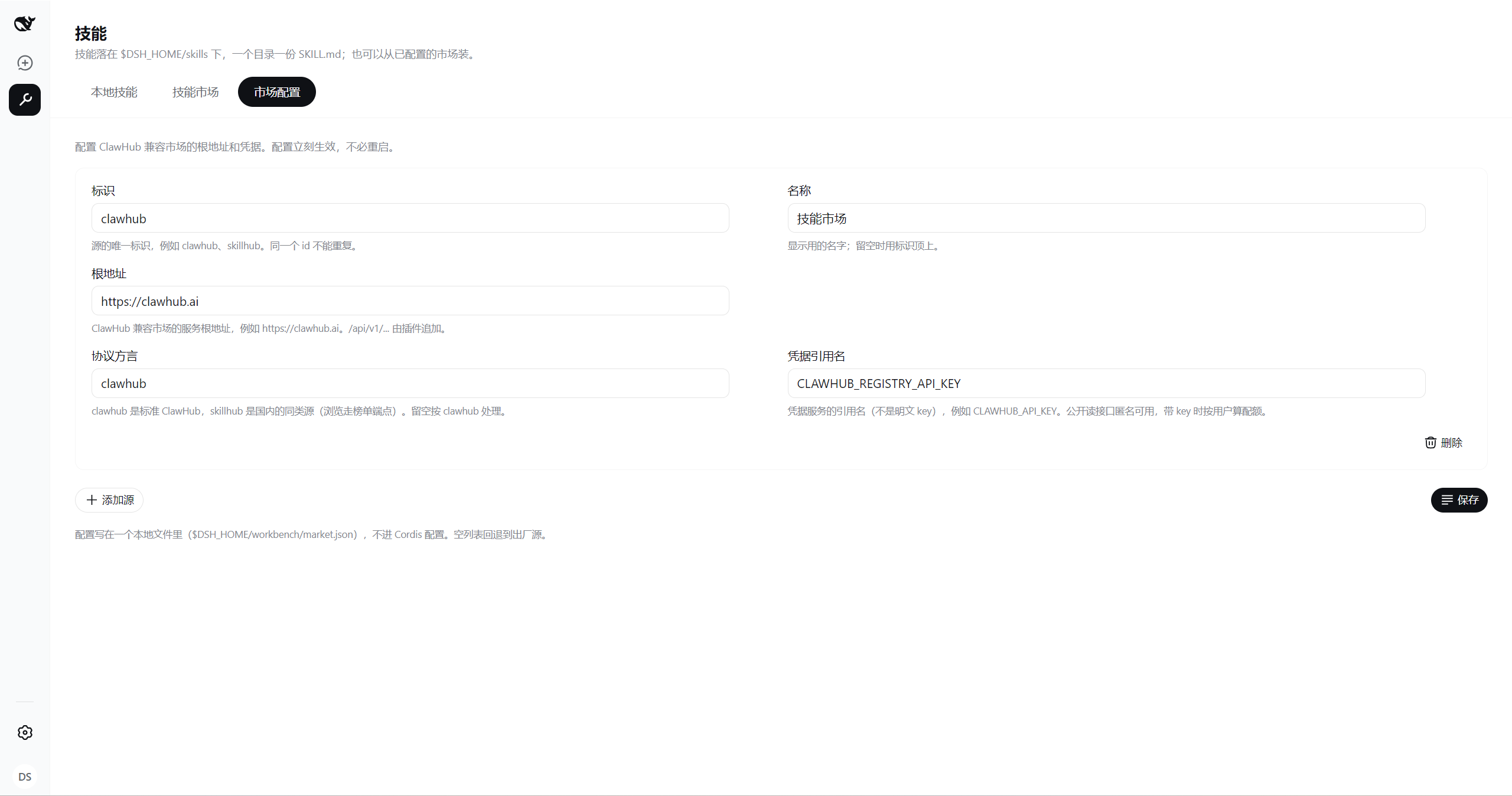
Skill marketplace sources can also be added and removed from the UI. Those land in
$DSH_HOME/workbench/market.json, take effect immediately, and never enter the Cordis config; an
empty file falls back to what is configured here.
Structure
One Cordis plugin, contributing at three mount points:
| Mount point | What goes there |
|---|---|
ctx.tools |
Five tools, one per domain, with an action parameter. Destructive actions require an explicit confirm: true or they return an error and write nothing |
| Typert Remote | Two namespaces, workbenchEmployee and workbenchSkill — the management surface's data channel |
shell.sidebar / shell.overlay |
The sidebar sections and the management surface. The upstream ui-sidebar is disabled in cordis.patch.yml: sidebar is a single slot, and two claimants merely shadow each other |
ctx.workbench is the plugin's own Service, holding only what every domain shares: resolved paths,
the marketplace client, and the profile name.
src/
├── index.ts              plugin entry and config schema
├── runtime.ts            ctx.workbench
├── registry.ts           ClawHub-compatible marketplace client (skills and plugins share it)
├── archive/              zip / tar unpacking and its safety checks
├── employee/             ┐ every domain has a tool.ts (for the model);
├── knowledge/            │ employee and skill also have a remote.ts (for the UI),
├── skill/                │ and both sides share one view.ts projection so the
├── mcp/                  │ screen and the model never describe a thing differently
├── plugin/               ┘
├── typert-schemas.ts     Remote descriptor table. Hand-written: changing a signature changes this
└── client/               the browser half: sidebar, management panel, per-domain surfaces
The Node half and the browser half are two separate bundles (lib/index.js and lib/client.js)
with their own build configs.
Where the data lands
$DSH_HOME/
├── skills/<name>/SKILL.md              skills (DSH's own user-level skill root)
├── .agent-presets/<id>/                AI employees (DSH's own preset root)
│   ├── agent.cordis.yml                  composition, owned by DSH
│   ├── preset.yml                        display metadata, owned by DSH
│   └── employee.yml                      resource bindings, added by this plugin
├── profiles/<profile>/cordis.patch.yml MCP servers (DSH's own profile patch layer)
└── workbench/
    ├── skills.json                       install ledger; update checks depend on it
    ├── market.json                       marketplace sources configured from the UI
    ├── staging/                          unpack staging, deliberately outside the skill root
    ├── knowledge/<kb-id>/                metadata, originals and the inverted index
    └── cache/                            offline cache of marketplace results
File permissions are owner-only throughout (0600 / 0700): patches and knowledge bases may hold
tokens or internal content.
Explicitly out of scope
- Vector retrieval. DSH has no embedding seam, and pretending otherwise helps nobody
- PDF / Office parsing. No heavyweight dependencies up front; convert to text first
- Working around the preset copy boundary.
ctx.agentPresetsallows whole-directory copies only, by design
Development
pnpm install
pnpm build        # both halves: lib/index.js and lib/client.js
pnpm typecheck    # tsc -b
pnpm test         # node --test
The client bundle cannot use DSH's own client preset (it globs the harness repository for packages,
and a plugin outside that repository is not there), so tsdown.client.ts reimplements the same output
contract: the __ModuleLoader__.load closure, CJS/browser, a fixed client.js, CSS modules compiled
through lightningcss, and only specifiers in the loader's module table kept external. After touching
that config, check the bundle:
grep -o 'require("[^"]*")' lib/client.js | sort -u
Only the module table's specifiers should appear. Anything else is a require that throws at runtime.
No comments yet. Be the first to write one.