
Terrain
Terrain prepares the ground so agents don't have to guess where to stand.
Engineering environment management for human developers and AI coding assistants — knowledge as the map, tools as the roads, conventions as the trail markers.
English · 简体中文


App preview
| Project overview | Engineering knowledge | DeepWiki Q&A | Agent environment |
|---|---|---|---|
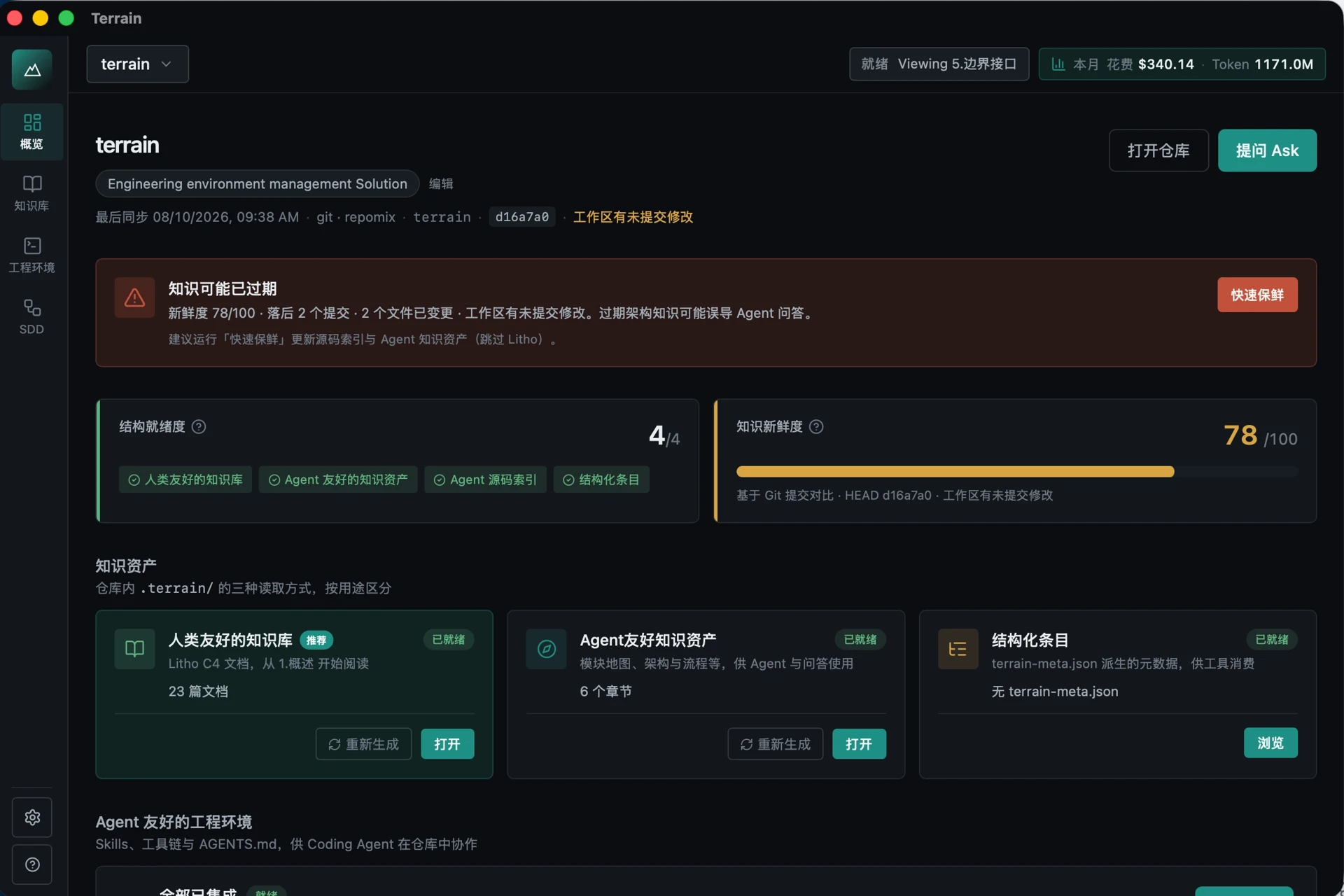 |
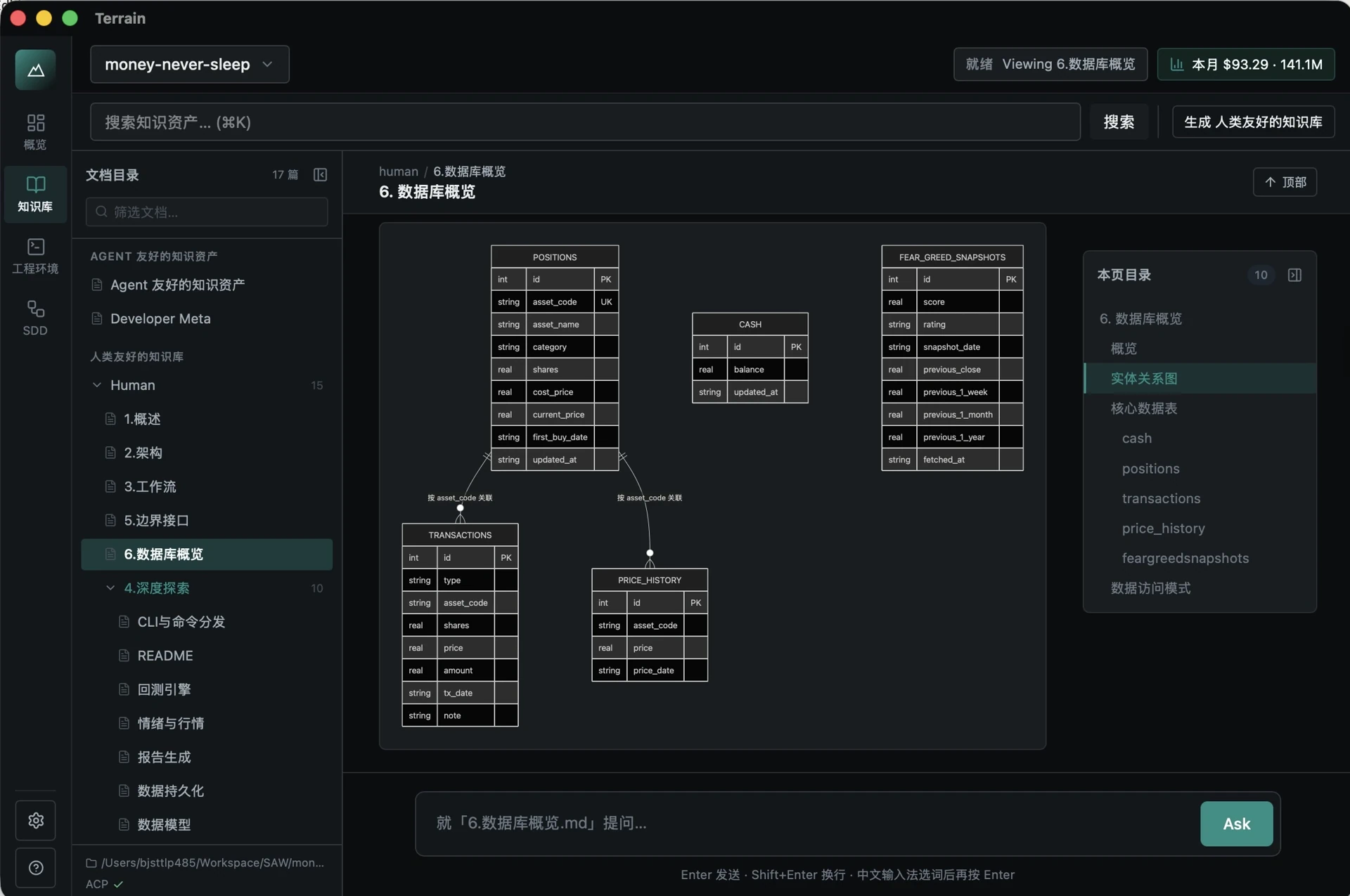 |
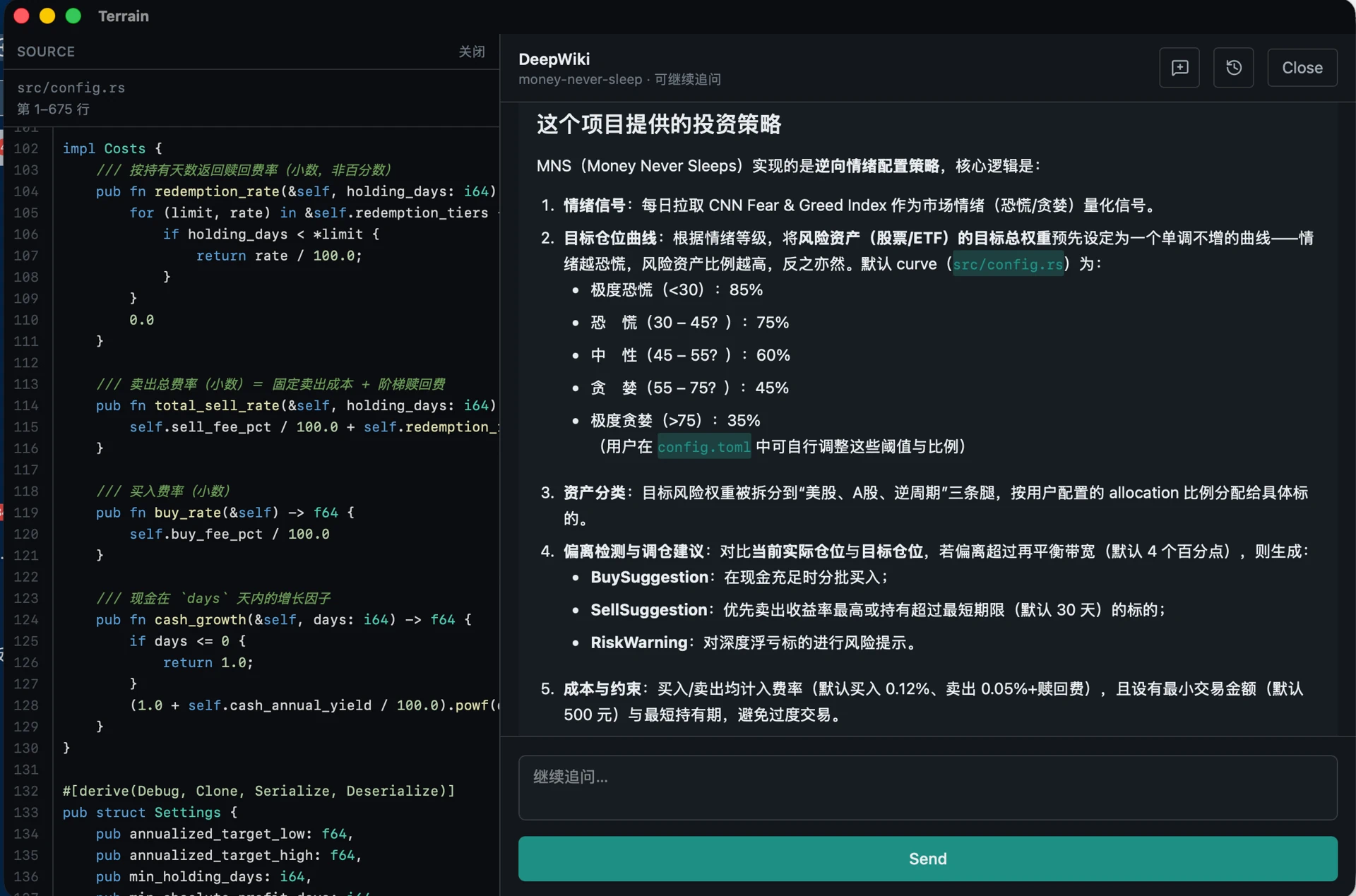 |
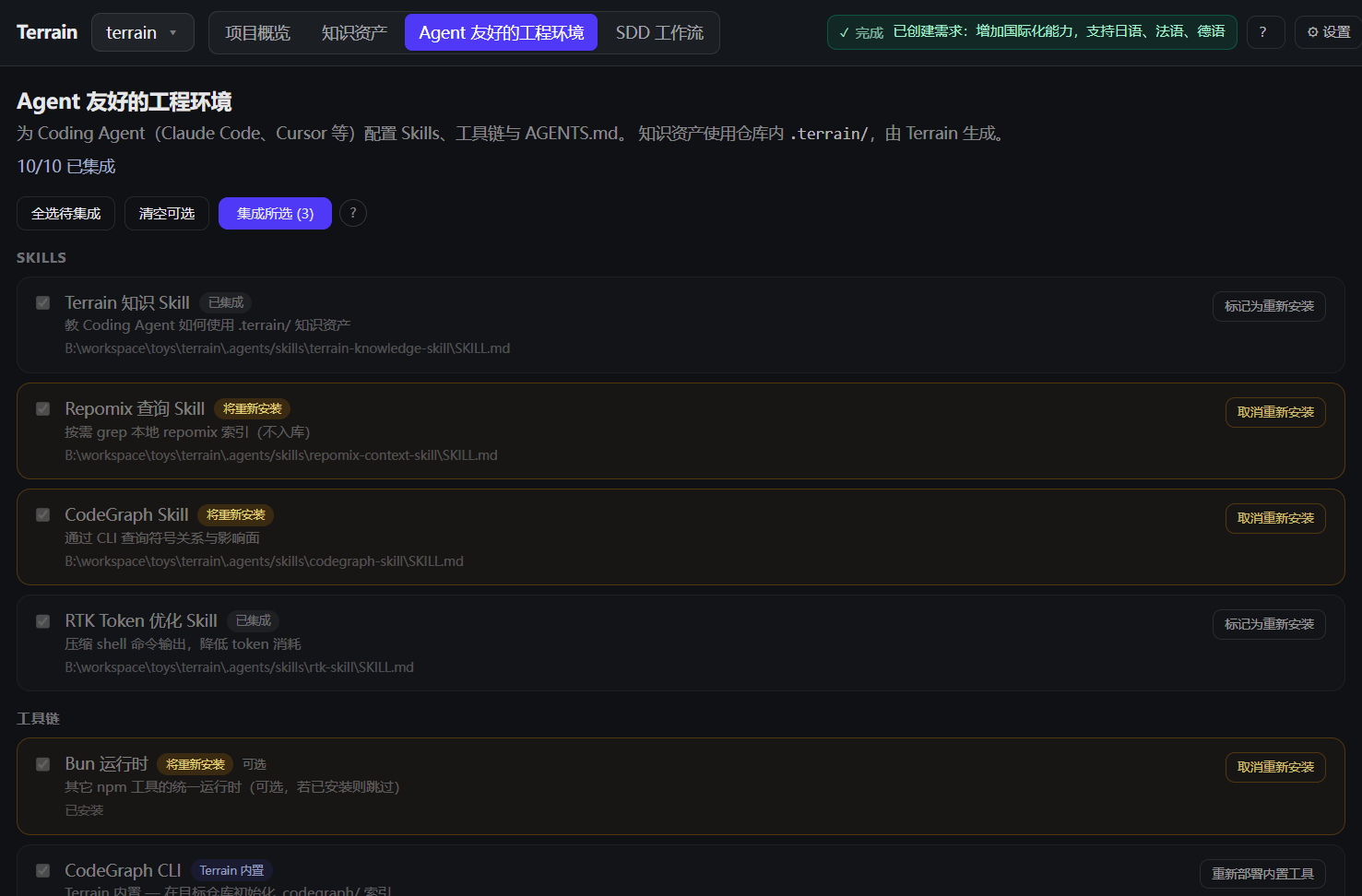 |
From left to right: project list with freshness scores, auto-generated C4 docs, knowledge-grounded Q&A, and one-command agent tooling setup.
Contents
- What is Terrain?
- Install
- Getting started
- CLI command reference
- Why Terrain?
- Architecture
- Ecosystem
- From Litho to Terrain
- License
What is Terrain?
Terrain is a standardized, AI-friendly engineering environment. Point it at a Git repository and it delivers three things:
- 🗺️ Engineering knowledge — always-in-sync C4 docs and agent context, produced from your code and consumed by both humans and AI agents.
- 🤝 A shared agent contract — Skills,
AGENTS.md, and CLIs, so every coding agent reads the project the same way instead of blind-grepping the live repo. - ⚙️ Auto-deployed tooling — one command installs what your agents need (CodeGraph, RTK, preset Skills); no per-repo yak-shaving.
It runs as a desktop app (GUI) or a CLI — see Getting started for which to pick.
Three pillars
| Pillar | Metaphor | What you get |
|---|---|---|
| Knowledge assets | Map | Dual-track docs in .terrain/, produced from code |
| Agent tooling | Roads | CodeGraph, RTK, and the Terrain CLI |
| Conventions & workflow | Trail markers | Skills, AGENTS.md, and the four-phase SDD workflow |
One codebase, two audiences:
| Audience | Path | Format |
|---|---|---|
| Humans | .terrain/human/ |
Narrative C4 docs with Mermaid diagrams |
| AI agents | .terrain/agent/context.md |
Structured architecture overview (≤ 14 KiB) |
| Source index | .terrain/agent/repomix.md |
Repomix pack — grep/read on demand, not preloaded |
| Domain terms | .terrain/knowledge/ |
Business glossary and internal conventions |
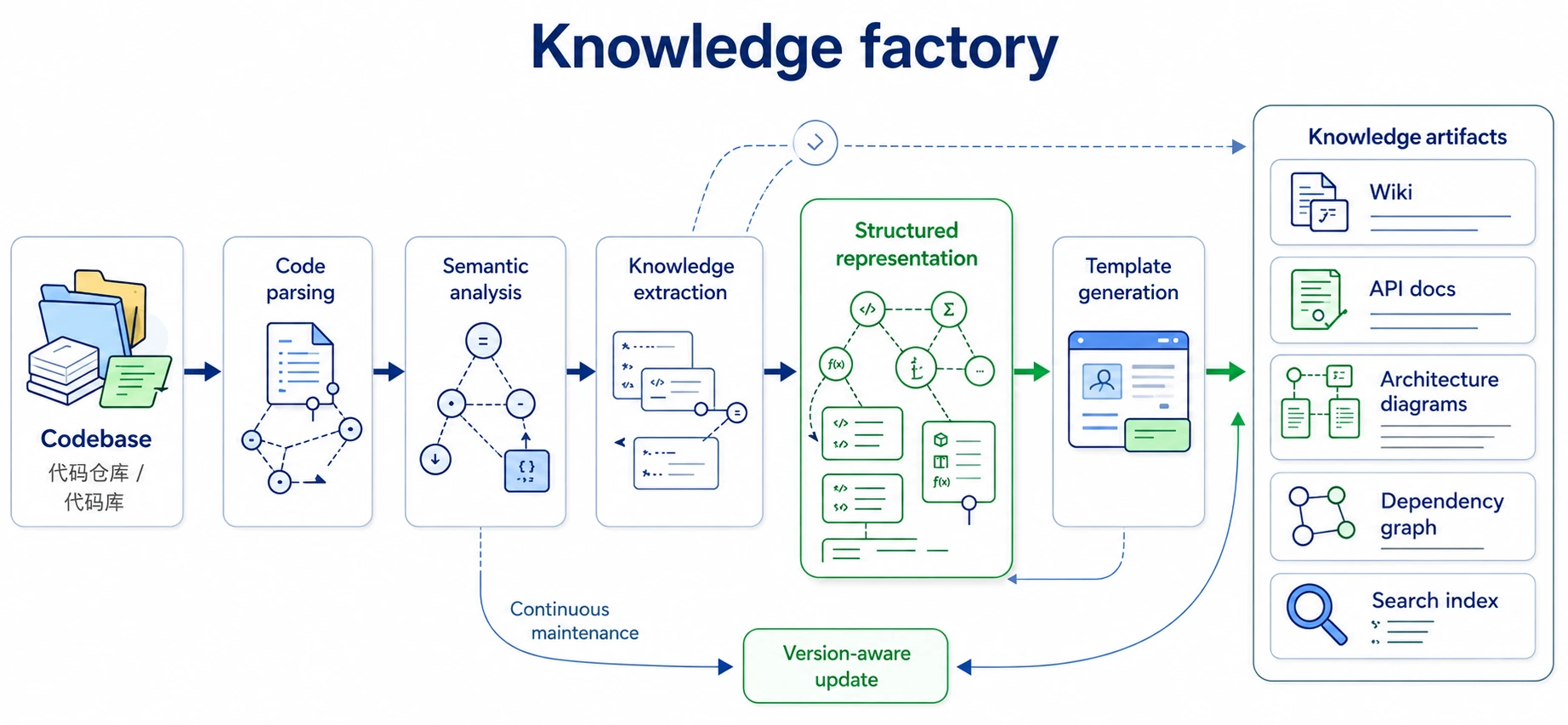
Knowledge factory
Why it stands out
- Incremental — tracks Git HEAD and regenerates only what changed, not the whole knowledge base.
- Freshness-scored — every asset carries a score; agents down-weight context below 50.
- One contract for every agent — Claude Code, Codex, OpenCode, and Cursor read the same layers through
terrain tools. - Toolchain in one command —
terrain env applyinstalls CodeGraph, RTK, and preset Skills in dependency order. - Reviewable workflow — SDD turns requirements → design → codegen → review into Markdown artifacts.
Performance & integration
- Native Rust core — a single binary, no runtime, no database. Scan, pack, search, freshness, and env run fully offline with no LLM call.
- Cross-platform — prebuilt desktop installers for macOS (Apple Silicon) and Windows x64, plus
@terrain-ai/clion npm for headless machines and CI. - Pipeline-friendly — JSON stdout on every
terrain toolscall and NDJSON event streaming fromterrain ask query --stream, so Terrain drops into CI jobs, PR checks, and agent loops without glue code.
Install
Option 1 — Prebuilt installer (recommended)
Download the package for your platform from GitHub Releases and open it — no Rust or Node toolchain required.
| Platform | Asset |
|---|---|
| macOS (Apple Silicon) | Terrain_<version>_macos_aarch64.dmg |
| Windows (x64) | Terrain_<version>_windows_x64.exe |
Option 2 — Build from source
Use this path for unsupported platforms, custom patches, or contributing to Terrain itself.
Prerequisites
- Rust — stable toolchain (MSRV 1.94; see rust-toolchain.toml)
- Node.js / Bun — frontend toolchain and optional Node-based tools
- LLM access (optional) — OpenAI-compatible API, Ollama, or LM Studio (configure in the desktop app Settings panel)
- Mainstream coding agent (optional) — e.g. Codex, DeepSeek Harness, or Claude Code, for knowledge composition and SDD codegen
Build
# Clone and install frontend dependencies
git clone https://github.com/sopaco/terrain.git
cd terrain
bun install

# Build Rust workspace (CLI + libraries)
cargo build --release

# CLI binary
./target/release/terrain --help

# Desktop app (development)
bun run dev:app
Getting started
Which entry point should I use?
| Desktop app (GUI) | CLI | |
|---|---|---|
| Best for | Day-to-day exploration and documentation of a codebase | R&D infrastructure, CI/CD, headless servers, agent pipelines |
| What you get | Everything pre-wired: project list, freshness scores, C4 docs, Q&A, env setup, SDD | 15 scriptable subcommands with JSON output for automation |
| Requires | Nothing beyond an optional LLM endpoint | No display; install via npm or let env integration deploy it |
| Typical use | Click through the app | terrain init, terrain ask query, terrain tools … inside a pipeline |
Path A — Desktop app (start here)
The app bundles the full loop, so there is nothing to compose yourself.
- Install and open Terrain (see Install).
- Add a project — point Terrain at a local Git repository.
- Run initialization — Terrain scans the repo, generates the six C4 docs, and writes
.terrain/. - Read or ask — browse the generated docs in the built-in reader, or ask a question in DeepWiki Q&A and get answers with citations.
- Wire up your agents — one click in the Agent environment screen installs Skills, CodeGraph, RTK, and the managed
AGENTS.mdsnippets.
The CLI is included: env integration deploys it to
~/.terrain/bin/terrain, so you can drop to the terminal at any point without a separate install.
Path B — CLI (infrastructure, CI, agent pipelines)
For headless machines, install the CLI from npm:
npm install -g @terrain-ai/cli # or: bunx @terrain-ai/cli <command>
Then drive the same knowledge pipeline from a script or pipeline:
# 1. Register a repository
terrain assets register ./my-repo --slug my-repo

# 2. Full initialization: scan + C4 docs + agent context
terrain init ./my-repo

# 3. Ask the knowledge base
terrain ask query "How does authentication flow through this project?" --project my-repo

# 4. Cheap refresh after commits (skips doc regeneration)
terrain refresh ./my-repo
Typical CI usage — regenerate knowledge on merge, then report freshness in the job log:
terrain refresh .
terrain project freshness-cached --project my-repo
External agents (Claude Code, Codex, OpenCode, Cursor) pull the same knowledge through the JSON API:
terrain tools list-projects
terrain tools read-context --project my-repo
terrain tools grep-pack --project my-repo --pattern "authenticate"
CLI command reference
The commands you will reach for most. Every command accepts a global --repo-path override.
Knowledge assets
| Command | Purpose |
|---|---|
terrain assets register <path> --slug <slug> |
Register a repository with the local registry |
terrain init [path] |
Full initialization — scan + C4 docs + agent context |
terrain refresh [path] |
Quick refresh — scan + repack + context, skips doc generation |
terrain ask query <query> --project <slug> |
Natural-language Q&A over the knowledge base (--stream for NDJSON) |
terrain search <query> |
Full-text search across generated knowledge |
terrain project overview --project <slug> |
Freshness scores, doc counts, and paths |
Environment standardization
| Command | Purpose |
|---|---|
terrain env status |
Check which Skills, tools, and AGENTS.md snippets are installed |
terrain env plan |
Preview what apply would change |
terrain env apply |
Install Skills, CodeGraph, RTK, and AGENTS.md in dependency order |
terrain tools <command> --project <slug> |
JSON API for external agents — read-context, search, read-doc, grep-pack, freshness |
Full CLI guide: Terrain CLI Guides — all 15 subcommands, including SDD (sdd run), token usage (usage), and pipeline internals (assets …).
Why Terrain?
Onboarding to a new codebase usually means days of reading source and stale wiki pages. Terrain compresses that to minutes: register a repo, run initialization, and get a full C4 doc set plus an agent-ready context pack.
| Without Terrain | With Terrain |
|---|---|
| Architecture knowledge scattered across wikis, Slack, and senior engineers | Engineering knowledge assets generated from the actual codebase |
| AI assistants grep the live repo blindly | Agents read context.md first, then targeted repomix slices |
| Docs drift from code on every refactor | Incremental updates + freshness tracking; knowledge travels with Git branches |
| Every team reinvents "how to onboard an AI to our repo" | Env integration installs Skills, CodeGraph, RTK, and AGENTS.md snippets |
Built for:
- Developers exploring or documenting a codebase
- Tech leads who want architecture docs that stay close to the code
- Teams adopting AI coding assistants and need a shared knowledge contract
- CI/CD pipelines that regenerate knowledge assets on merge
- ACP integrators wiring
terrain toolsinto Claude Code, Codex, OpenCode, or compatible agents
Architecture
System overview
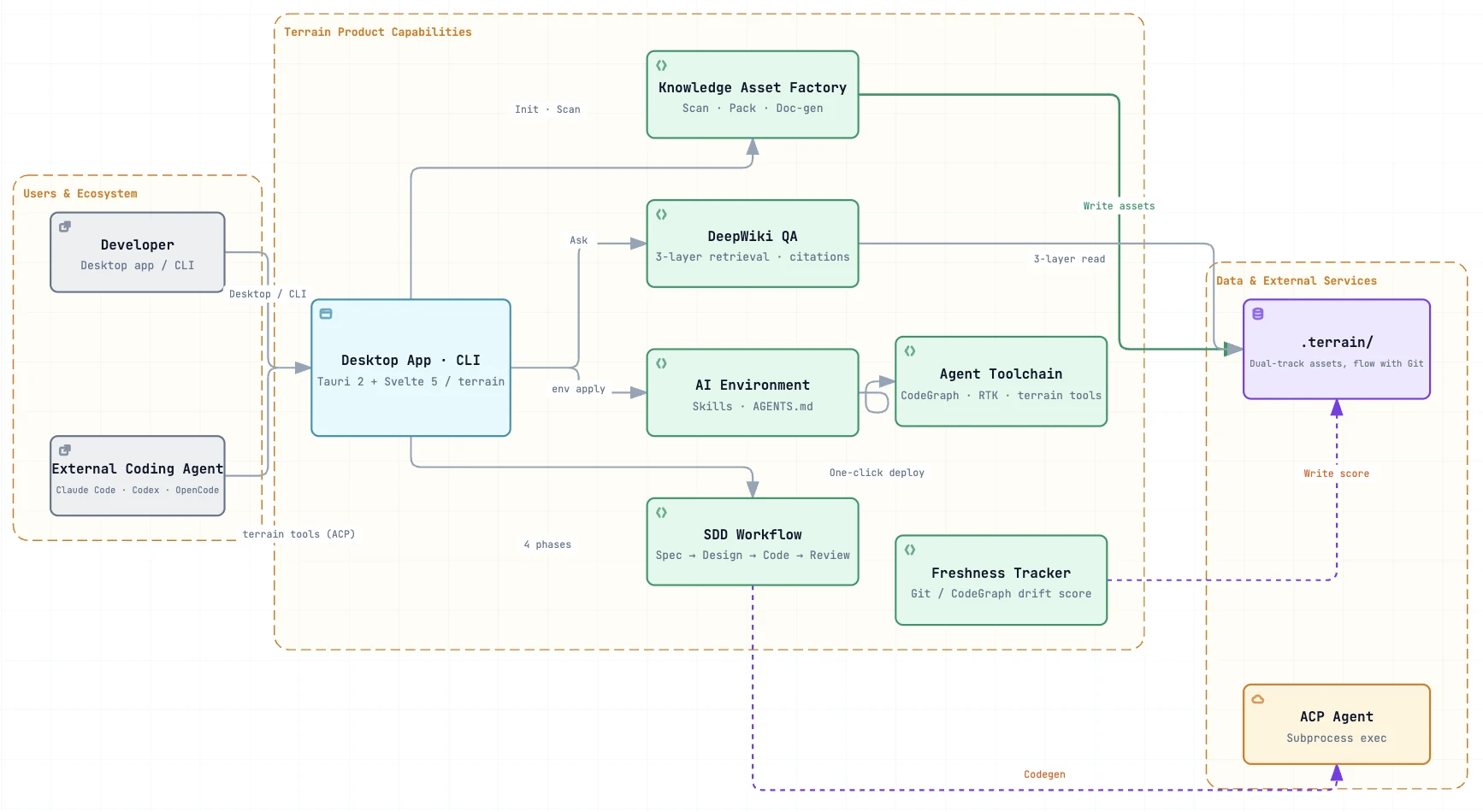
Humans use the desktop app or CLI; external coding agents use the same contract via terrain tools (JSON stdout). Assets live in-repo (.terrain/ travels with branches); ~/.terrain/registry.json holds project pointers only.
① Knowledge assets — the map
Dual-track output from one factory — narrative human/ for people, structured agent/ for machines.
Produce (scan/pack run offline; LLM/ACP where noted):
Git ──scan──► index.md
    ──pack──► repomix.md
    ──context (LLM)──► context.md
    ──docs (ACP)──► human/ + .litho-agent/ checkpoints
    ──track──► freshness.json
Consume — DeepWiki and terrain tools share the same three layers:
| Layer | Source | API |
|---|---|---|
| Macro | agent/context.md |
read-context |
| Meso | human/, knowledge/ |
search, read-doc |
| Micro | agent/repomix.md |
grep-pack → read-pack-file |
When sources conflict: repomix > CodeGraph > context.md > human/. Down-weight macro context when freshness_score < 50.
② Agent tooling — the roads
terrain env apply installs the navigation layer so agents don't improvise:
| Component | Purpose |
|---|---|
| Tools | ~/.terrain/bin/ — CodeGraph, RTK, terrain CLI (terrain tools for ACP) |
| Skills | Standard playbooks — terrain-knowledge → repomix → codegraph → rtk |
| AGENTS.md | Managed snippets — knowledge-first workflow, repomix for code, RTK for shell |
③ Conventions & workflow — the trail markers
SDD defines a repeatable path; each phase produces a reviewable Markdown artifact:
| Phase | Output | Engine |
|---|---|---|
| Requirements | 1.requirements.md |
Native LLM |
| Tech design | 2.tech-design.md |
Native LLM |
| Codegen | 3.implementation.md + repo changes |
ACP agent |
| Code review | 4.code-review.md |
Native LLM |
terrain sdd run --project my-repo --phase requirements
Session outputs live under ~/.terrain/sdd/{project}/sessions/{id}/outputs/ (local, not versioned). The knowledge pipeline uses the same resumable pattern — research checkpoints under .terrain/.litho-agent/.
Runtime
graph LR
    Chan[Desktop · CLI] --> Intel[terrain-agent]
    Chan --> Core[terrain-core]
    Intel --> Core
    Intel --> LLM[LLM]
    Intel --> ACP[ACP]
    Core --> FS[".terrain/ · Git · registry"]
Core handles scan, pack, search, freshness, and env without an LLM. Agent orchestrates DeepWiki, knowledge generation, SDD, and context generation — lightweight tasks via native LLM, heavy tool-using work via ACP subprocess.
.terrain/ directory (per project)
{your-repo}/.terrain/
├── index.md                 # Project index (from scan)
├── agent/
│   ├── context.md           # Macro architecture context for agents
│   ├── repomix.md           # Source pack (generated, often gitignored)
│   └── meta.json            # Pack metadata
├── human/                   # Engineering knowledge docs (1.Overview.md, 2.Architecture.md, …)
├── knowledge/               # Domain glossary and conventions
├── .meta/
│   ├── sync.json            # Scan sync state
│   └── freshness.json       # Asset freshness scores
└── .litho-agent/            # Litho/knowledge research workspace (transient)
Ecosystem
Terrain composes with the tools your AI workflow already uses:
| Component | Role |
|---|---|
| Claude Code / Codex / OpenCode / ACP agents | Execute knowledge composition, SDD codegen, and tool calls in an isolated process |
| Repomix | Packs source into a grep-friendly index for agents |
| CodeGraph | Symbol callers/callees/impact queries via bunx codegraph |
| RTK | Compresses shell output to save tokens (@terrain-ai/rtk on npm, or ~/.terrain/bin/rtk) |
| Terrain CLI | Scan, assets, terrain tools for ACP (@terrain-ai/cli on npm, or ~/.terrain/bin/terrain) |
| Preset Skills | LLM workflow instructions in preset_skills/ (knowledge, SDD, Ask, Context) |
| DeepWiki / Litho Book | Knowledge-grounded Q&A and Markdown reader, integrated in the desktop UI |
Trust model for coding agents: when sources conflict, repomix source > CodeGraph > context.md > human docs.
From Litho to Terrain
Terrain's knowledge engine is the direct successor of Litho, the AI documentation generator published as deepwiki-rs (1.7k★). Litho proved the core thesis at scale — generate architecture docs from code, keep them in sync, make them agent-ready. Terrain takes that practice and hardens it into a platform: incremental updates instead of full regeneration, broad language and framework adaptation, ACP access for external agents, and the Litho Book reader and Q&A built into the desktop app.
In short: if you liked Litho for docs, Terrain is Litho's knowledge core plus the environment, workflow, and agent bridge around it.
License
MIT — see LICENSE.
No comments yet. Be the first to write one.