dsh-song-memory
English · 简体中文









DeepSeek Harness 的「三层、可插拔、Agent 驱动」记忆系统 —— 界面已重做成大白话。
A plain-language UI redesign of dsh-mnemon v0.2.9, with the engine fully preserved.
Fork home: github.com/songoao25/dsh-song-memory · Engine docs & screenshots remain attributed to the upstream project.
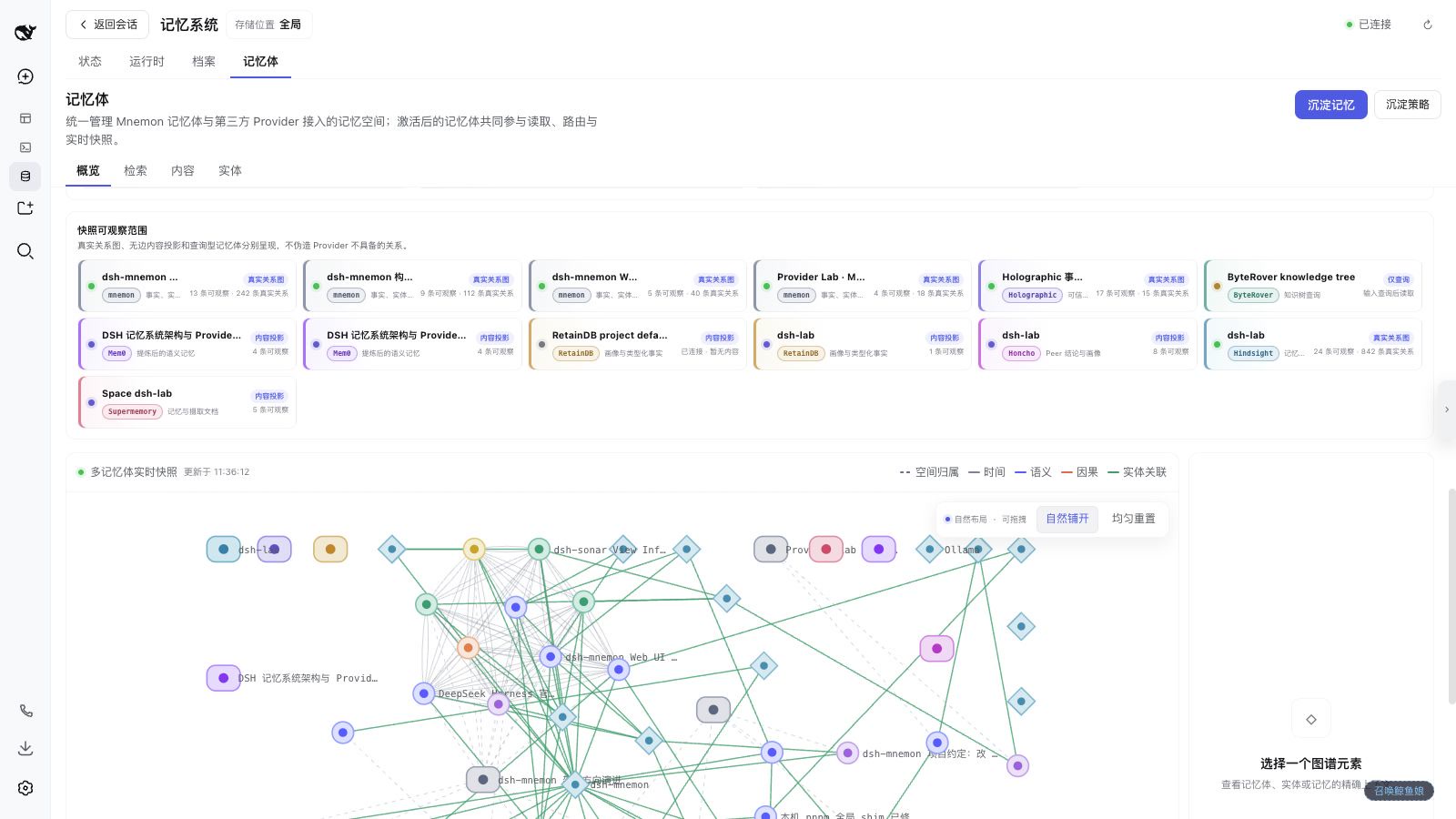
说明:上方截图 / 视频与本文其余处的界面素材(
.gif、.png、.mp4等)来自上游项目omdsh-dev/dsh-mnemon,可公开渲染;它们展示的是同一套共享引擎与界面能力。dsh-song-memory 仅重做了src/client/界面文案与导航,引擎层与上游逐字节一致。
Explore the capability map · Start in five minutes · Read the engine notes · Watch the widescreen demo
这是什么(给不愿读术语的人)
dsh-song-memory 是 DeepSeek Harness(DSH)的一个插件,帮 AI 记住你说过的话、你的偏好、项目的决定,并在之后的对话里自动用上——而不用你手动维护任何数据库、也不用懂任何术语。
它是 dsh-mnemon v0.2.9 的一个界面重做分支(fork):底层引擎、9 种存储服务、所有命令与能力一个字没动,我们只是把那套满是「记忆体 / 沉淀 / 召回 / Provider / 存储域」黑话的界面,按苹果 HIG 理念重做成了大白话。功能零丢失。
重做后,主界面只有四个大白话标签:
| 标签 | 干啥用 | 对应旧名 |
|---|---|---|
| 记忆 | 存东西、找东西、看关系图、设策略 | 记忆体 / 检索 / 图谱 |
| 常用小抄 | 关于「我」的偏好、关于「项目」的规则,每轮自动注入 | 运行时 |
| 项目文档 | 设计、调查、复盘等完整笔记 | 档案 |
| 运行状态 | 一眼看引擎 / 存储 / 连接是否健康 + 版本检查 | 状态 |
最常用的动作是 「存入记忆」:在对话里点一下,或直接说"帮我记住……",AI 自己判断值不值得存、存到哪个仓库、会不会重复——你不用选任何技术选项。检索默认就是「智能模式」(用大白话提问就能找回来)。
旧名 → 新白话名的完整对照见下方的「v2.0.0 重做说明」。
dsh-song-memory gives DSH one memory control plane without forcing every kind of knowledge into one database. Runtime Memory keeps compact context available every turn. Project Documents preserve complete narratives. Memory Spaces retrieve durable evidence on demand and can use Mnemon, OpenViking, Honcho, Mem0, Hindsight, Holographic, RetainDB, ByteRover, or Supermemory.
Mnemon remains the official, prioritized native engine. The third tier is replaceable; the first two keep the same storage, workspace, and interaction model regardless of provider.
Understand the scope in 30 seconds
| Tier | Keep here | How it reaches the Agent | Managed by |
|---|---|---|---|
| Runtime (常用小抄) | Preferences, collaboration rules, project conventions, environment facts | Compact USER.md / MEMORY.md projection on every turn |
Deterministic dsh-song-memory Host |
| Documents (项目文档) | Designs, investigations, procedures, postmortems, handoffs | Search first, full Markdown on demand | Deterministic dsh-song-memory Host |
| Memory Spaces (记忆) | Cross-session facts, decisions, entities, relations | Bounded recall from active spaces | Mnemon Native or an external Provider |
The tiers are not copies. A useful rule is: every-turn context goes to Runtime (常用小抄), complete narratives go to Documents (项目文档), and cross-task evidence goes to Memory Spaces (记忆). Current instructions, repository files, and live tool results always outrank historical memory.
Clicks that start real work
| User action | What actually runs | Data effect |
|---|---|---|
| Search (检索) | Concurrent provider-native recall | Read-only |
| Agent query | A clean top-level task Agent receives bounded evidence and writes an answer | Read-only |
| Save to memory (存入记忆) | A clean task Agent qualifies, routes, deduplicates, distills, and writes behind Host controls | Writes only if accepted |
| Smart selection | Hard rules filter providers; a task Agent resolves only genuine ambiguity | Saves a routing receipt |
| AI metadata | One asynchronous task Agent per selected Memory Space, each using the provider's fastest sample path | Local title/description only |
| Archive Document | A task Agent creates a searchable cold reference before the Host moves the original | Supervised move |
| Turn memory (本回合记忆) | Expands exact recall, write, and Document-search activity; each item navigates to its source | Read-only |
These tasks do not reuse or consume the main conversation history. By default they follow DSH's new-session model route; Settings → Memory System → Background task Agent can select a dedicated Provider and model.
One Memory Space workflow, nine providers
| Provider | Shape | Best fit |
|---|---|---|
| Mnemon | Official native local CLI + SQLite | Exact writes, entities, typed relationships, local-first sharing |
| OpenViking | HTTP + viking:// |
Resource trees and asynchronous extraction |
| Honcho | HTTP workspace / peers | Team and Agent-peer conclusions |
| Mem0 | Platform or self-hosted HTTP | Existing user / Agent memory |
| Hindsight | HTTP memory bank | Banks, entities, provider-native graph |
| Holographic | Local structured fact files | Auditable facts, trust scores, local entities |
| RetainDB | HTTP project / user | Project- and user-scoped profiles |
| ByteRover | Local brv CLI |
Code knowledge trees and curate workflows |
| Supermemory | HTTP container | Document ingestion and container sharing |
Provider capability differences stay visible. dsh-song-memory never invents graph edges, deletion semantics, or enumerable content for an engine that does not provide them. Settings owns reusable Provider services; Memory Spaces (记忆) owns concrete instances, activation, scope, and metadata. External Providers are off by default.
See the provider capability and deployment matrix.
Real WebUI walkthrough
The following roughly 55-second capture comes from a live 1600×900 DSH WebUI. It deliberately pauses on full-page scrolling, page transitions, Provider cards, dialogs, button-state changes, and a completed read-only Agent Query. Destructive confirmations are deliberately not submitted.

Visuals above are from the upstream
dsh-mnemon; the navigation labels and wording you see here in dsh-song-memory are the plain-language equivalents (记忆 / 常用小抄 / 项目文档 / 运行状态).
Watch the 1600×900 MP4 · Open the page-by-page UI guide
Start in five minutes
1. Install Mnemon Native
Mnemon is the default engine and the simplest local-first starting point:
# macOS
brew install --cask mnemon-dev/tap/mnemon

# macOS / Linux via Go
go install github.com/mnemon-dev/mnemon@latest

mnemon --version
Windows users can install the official v0.2.3-or-newer release ZIP. The expected installation path and checksum procedure are in Getting Started.
2. Install the DSH plugin
dsh plugin --profile web add dsh-song-memory
dsh --profile web
DSH profiles have independent plugin rosters. Install the same package separately for one-shot Headless tasks:
dsh plugin --profile headless add dsh-song-memory
dsh --profile headless "Check durable project context before answering this task."
For a local checkout, use an absolute path:
dsh plugin --profile web add "link:/absolute/path/to/dsh-song-memory"
dsh plugin --profile headless add "link:/absolute/path/to/dsh-song-memory"
3. Verify the first workflow
- Open 状态 / 运行状态 (Status) and verify dsh-song-memory, Mnemon Native, Runtime, Documents, and enabled Providers.
- Open 记忆 (Memory) → 概览 → 新建记忆仓库 and choose an enabled Provider explicitly (or let the default "smart + local-first" handle it).
- Submit one stable, future-useful candidate through 存入记忆 (Save to memory).
- Open 检索 (Search), run a direct search, then run Agent query against the same question.
- Return to the conversation, expand 本回合记忆 (Turn memory), and follow one exact tool link.
The primary tab order is intentionally plain-language: 记忆 / 常用小抄 / 项目文档 / 运行状态.
Familiar controls, expanded capability
Agent-driven memory operations
| Supervised distillation | Bounded Agent query |
|---|---|
 |
 |
The workbench makes the task boundary explicit before dispatch and keeps the returned answer beside its evidence scope. Conversation-native Turn memory (本回合记忆) and Save to memory (存入记忆) remain enabled by default and can be changed independently under Settings → Memory System → Conversation interface.
Manual or policy-driven placement
| Create explicitly | Route future distillation intelligently |
|---|---|
 |
 |
Manual creation always asks the user to choose. Smart selection is a distillation policy: hard rules define the eligible set, then an optional prompt guides the Agent only when several candidates remain.
Global, workspace, and custom scope
| Scope | Behavior |
|---|---|
global |
Uses ~/.mnemon; ideal for a local control plane shared across workspaces and Agents |
workspace |
Uses <workspace>/.mnemon; local Providers that support workspace following move with the effective workspace |
custom |
An explicit path with global semantics, useful for team conventions or isolated environments |
Remote Provider workspaces, users, banks, projects, containers, and URIs remain their own namespaces; switching the DSH workspace never silently rewrites them. In workspace mode, the workbench may inspect one selected workspace while the current conversation continues to execute in its own cwd. Independent task Agents launched from the workbench use the inspected workspace even when no main session is selected.
Web, conversation, and Headless share one system
| Surface | What remains available |
|---|---|
| Sidebar WebUI | 状态 (Status), 常用小抄 (Runtime), 项目文档 (Documents), 记忆 (Memory Spaces), Provider services, visualization, and confirmation surfaces |
| Conversation UI | Turn memory (本回合记忆), Save to memory (存入记忆), exact navigation to the corresponding page |
| Headless | Runtime injection, Document search, Memory Space tools, workspace routing, and supervised writes without a WebUI |
| Commands | /mnemon status, recall, related, remember, and forget |
Data and security boundaries
- Runtime and Documents are local deterministic stores. Mnemon Native is local by default; external Providers are explicit opt-ins.
- Provider credentials are mode
0600under<storageRoot>/state/memory-providers.json. They are never returned to the browser, smart-selection Agent, or Mnemon Pack. - Host calls use argument arrays with shell disabled, bounded output, timeouts, cancellation, schema validation, path boundaries, locks, and revisions.
- Disabling a Provider clears its local catalog metadata but never deletes remote data. Reconnecting rebuilds metadata from the Provider, using local defaults only when a field cannot be mapped.
- Changing scope never migrates, merges, or deletes an old root automatically.
- There is no deterministic secret scanner yet. Never store keys, tokens, private keys, or raw sensitive logs in any tier.
- Uninstalling the plugin does not remove local or remote memory data.
See Operations, security, and troubleshooting for backup, recovery, and diagnostics.
v2.0.0 重做说明 / Redesign notes
dsh-song-memory v2.0.0 is a UI-only redesign fork of dsh-mnemon v0.2.9. The fork rule is strict: only src/client/ changed; the entire engine/logic layer is byte-for-byte preserved (9 memory providers, host injection, commands, conversation UI, headless/CLI all intact). No capability was added or removed.
What the redesign changed (philosophy: Apple HIG — defaults simple, advanced options folded/hidden, all jargon replaced with plain Chinese, zero feature loss):
- Four plain-language top-level tabs replaced the old technical labels:
- 记忆 (Memory) ← 记忆体 / 检索 / 图谱 / 内容 / 实体 / 沉淀策略
- 常用小抄 (Runtime / personal cheat-sheet) ← 运行时
- 项目文档 (Documents) ← 档案
- 运行状态 (Status / runtime & diagnostics) ← 状态
- Inside 记忆: 概览 / 检索 / 内容 / 实体 + 存入记忆 (was 写入) + 策略. The smart/guided recall mode is on by default.
- 「存入记忆」unified flow: one button (or "帮我记住…") lets AI decide worthiness, routing, and dedup — no technical choices required for everyday saves.
- Dead-key / jargon cleanup: terms like 记忆体 / 沉淀 / 召回 / Provider / 存储域 were replaced with plain Chinese across the main UI and the settings page (config.*) alike (记忆体 → 记忆仓库, Provider → 存储服务 / 模型服务, 任务 Agent → 后台助手, etc.).
- All 14 upstream feature modules remain reachable from the four plain tabs — functionality is identical to upstream; only the interface was reworded.
The engine documentation under ./docs/en/ and ./docs/zh-CN/ is inherited from upstream dsh-mnemon and describes the shared, unchanged engine; the UI wording in those docs may differ from this fork's plain-language labels.
Documentation
| I want to… | Start here |
|---|---|
| See the complete product boundary | Capability map |
| Install and verify the first workflow | Getting Started |
| Follow every visible click and Agent action | Sidebar and conversation UI guide |
| Compare or deploy all nine Providers | Long-term memory providers |
| Understand tiering and lifecycle | Storage model · Workflows |
| Configure scope, routing, and model selection | Configuration |
| Back up, update, or troubleshoot | Operations |
| Integrate tools, commands, or RPC | Interface reference |
| Review the engine release | v0.2.9 release notes |
These docs describe the shared engine inherited from upstream dsh-mnemon; the UI labels in this fork are the plain-language equivalents listed above.
See the documentation hub for the full map.
Development
pnpm install
pnpm run verify
verify runs TypeScript checks, Vitest, a reproducible double build, an isolated real Headless-profile activation check, and published-package validation. lib/ is generated and intentionally not tracked.
License
MIT. Report security issues privately through SECURITY.md, not a public issue.
dsh-song-memory is a UI-redesign fork of dsh-mnemon (MIT / Apache-2.0 upstream). Engine copyright belongs to the upstream project; this fork's UI rewording is released under the same MIT license.
还没有评论,来写第一条。