dsh-token-usage-dashboard — Codex-style token usage dashboard



English | 简体中文
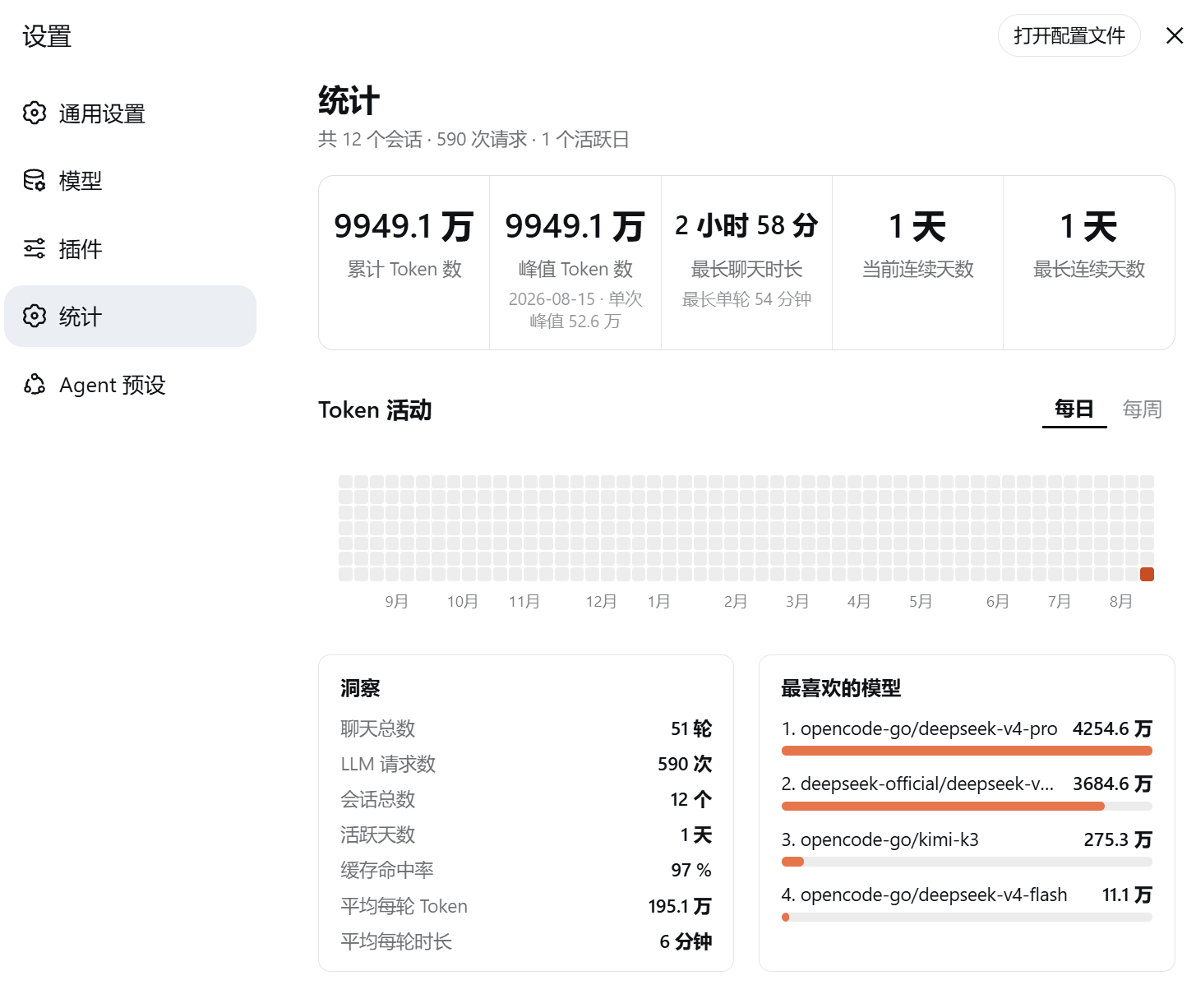
A Codex-style token usage dashboard for DeepSeek Harness (dsh) Web UI: 5 stat cards + a GitHub-style activity heatmap (daily / weekly) + insights + per-model usage ranking. The UI follows the DSH language setting: Chinese interface → Chinese dashboard, anything else → English.
✨ Features
- 5 stat cards: total tokens / peak tokens (single day) / longest chat / current streak / longest streak; auto-shrinking one-line values
- Heatmap: 53×7 rolling grid (today pinned to the bottom-right corner), hover for
Aug 15, 2026: 273k tokens · 34 requests; Daily / Weekly view toggle (weekly = bottom-up 7-cell bars, hover for the week total) - Insights: total turns, LLM requests, sessions, active days, cache hit rate, avg tokens & duration per turn
- Favorite models: provider/model token ranking (Top 5) with ratio bars
- Data source: session logs (
assistant/messageusage +request/headermodel attribution +turn/start/turn/enddurations), live incremental updates, persisted snapshot + incremental sync for fast restarts
🏗️ Architecture
The plugin has two runnable forms that share the same aggregation logic:
- Bundle form (recommended for end users): installed via
dsh plugin add; the npm package containslib/index.js(host half) andlib/client.js(client half). The host half registersGET /api/token-statsandPOST /api/token-stats/rescanthroughconnection.fetch, behind the Web UI's Host/Origin and browser-session checks; the client half registers a "Settings → Stats" section and fetches the API. - Dynamic-plugin form (for maintainers/iteration):
host.jsandclient.jsare pasted intocordis_definefor in-session deployment without restarting the profile.
Data flow:
- Host subscribes to
session/event/session/createdand also performs an initial backfill over historical session logs. - It folds
assistant/message.usage,request/headermodel attribution, andturn/start/turn/enddurations into in-memory aggregates. - Aggregates are periodically flushed to the host JSON storage unit
token_stats(normally<DSH_HOME>/storages/token_stats.json); on restart the snapshot is loaded first, then only new events are incrementally folded. Older Harness versions exposesessionPersistence.readFromfor suffix reads; versions without it usesessionQuery.readSessionto read the full log while still folding only new events. - The client polls
GET /api/token-stats(2s while scanning, 30s after ready) and renders the dashboard.
An explicit rescan rebuilds from the current logs and replaces all aggregates only after every read succeeds. Repeated or simultaneous rescans do not accumulate history again. Live events received during replay are merged in sequence order. Normal restarts retain statistics for deleted sessions; an explicit rescan removes that history when the logs are gone. A failed rescan preserves the last complete result and reports an error.
Both forms use the host's storage / storage.backend.json services for persistence; the JSON backend owns its configured root, atomic writes and directory creation. These services are required for normal Cordis activation (verified on DSH Desktop 0.2.1-rc.2). When the native unit is empty, a readable legacy token-stats/snapshot.json is migrated without modifying the old file. Directly embedded hosts without native storage may still provide fs; its legacy path uses profileContext.home, or an explicit dshHome. Bundle additionally falls back to DSH_HOME / the OS user's .dsh; Dynamic without any known home stays in memory. The dynamic plugin continues to use the authenticated Harness RPC channel.
Enable only one form per host. Bundle and Dynamic share the token_stats storage unit, which permits one active handle at a time.
The plugin does not restrict Harness release numbers. Both host forms check the session-query APIs during activation; Bundle also requires the authenticated Fetch registry. Optional incremental reads keep their full-log fallback. Tested versions and the pinned test fixture are recorded separately from activation requirements.
Tests
Run npm ci && npm test for regression tests covering both host implementations. The optional real-Harness HTTP and native-storage integration tests require Node 24 and a Harness source checkout; see TESTING.md for commands, the pinned contract revision, and coverage limits.
🚀 Install (bundle)
dsh plugin --profile web add github:solstice621/dsh-token-usage-dashboard
dsh --profile web   # restart to apply
Then open Settings → Stats for the full dashboard. Local install:
dsh plugin --profile web add file:/path/to/dsh-token-usage-dashboard.
On first open the plugin scans all historical sessions (seconds to a minute), then updates in real time via
session/event; the dashboard auto-refreshes every 30s — no manual action needed.
🧑💻 Dynamic-plugin deployment (maintainers)
This repo also maintains a dynamic Cordis plugin (toksta-5, deployed in-session via cordis_define,
handy for iterating without restarting the profile):
- Verify contracts with
cordis_inspect_list/cordis_inspect_query(sessionQuery, session/event, session/created, harness, React/host/styles builtins, settings.section, timer, locale); cordis_define:plugin.kind: "new",idPrefix: "toksta",code.host=host.js,code.client=client.js;cordis_run(mode=run/update) to activate.
⚠️ The bundle and the dynamic plugin register the same settings section id (
token-stats); don't run both at once — stop one before enabling the other.
📁 Files
| File | Description |
|---|---|
lib/index.js |
Bundle host half: folder + backfill + live listeners + GET /api/token-stats (POST /api/token-stats/rescan as fallback) |
lib/client.js |
Bundle client half: window.__ModuleLoader__.load factory, registers "Settings → Stats" |
cordis.patch.yml |
bundle patch: inserts the id: token-stats plugin row |
package.json |
npm package manifest (dsh.bundle / dsh.client) |
host.js / client.js |
Dynamic-plugin host/client function bodies (paste into cordis_define) |
plugin.json |
Plugin metadata & package history (pkg-9 … pkg-27) |
plan.md / progress.md |
Design docs & progress log (incl. every bug/fix) |
assets/dsh-token-usage-dashboard.png |
Dashboard screenshot |
✅ Acceptance checklist
- Settings → Stats: 5 equal-width cards, one-line values, aligned labels
- 53-column heatmap, today at bottom-right, year-month-day hover tips; Daily/Weekly toggle works
- Month axis aligned to columns; no horizontal scrollbar
- Insights (7 rows) and Top-5 model ranking with bars correct
- New conversations show up within 30s
- Language switch (zh ↔ en) relabels the whole dashboard on the fly
🩺 Troubleshooting
| Symptom | Cause / fix |
|---|---|
pnpm not found on PATH |
dsh plugin needs pnpm: corepack enable pnpm (bundled with Node ≥16.10) |
| Two "Stats" sections in Settings | bundle + dynamic plugin (toksta-5) both active; stop one |
| Plain text, no styles at all | CSS not injected: dynamic styles is a Client Builtin (styles.insert(css)), not ctx.get('styles'); bundle injects via <style> |
Client render crash ctx is not defined |
ctx only exists in apply(ctx); components use the module-level timer bridge (intervalRef = (cb, ms) => ctx.interval(...)) |
service "timer" is not declared |
client has no timer Service; drop inject: ['timer'] |
| Horizontal scrollbar flashes under the heatmap | old month-label nowrap text inflated scrollable overflow; container & month row are overflow:hidden now |
console.warn throws |
Host builtins only expose console.log/error; use console.error |
📐 Known boundaries
- Only calls whose adapter reports
usageare counted (skipped whenassistant/message.usageis absent); - Model attribution:
assistant/messagehas no model field — usage is attributed to the session's latestrequest/headerprovider/model; - Current streak counts to yesterday when today has no usage; interrupted (unclosed) turns add no duration;
- Title-generation calls (
session/title-llm-request) are not counted.
🌐 Ecosystem
- ✅ Listed in dsh-plugin-marketplace: scanner-verified
(
verified, one-click install pinned togithub:solstice621/dsh-token-usage-dashboard#<commit>, auto-refreshed every 2h); - 🚀 awesome-deepseek-harness listing PR: #225
docs: add dsh-token-usage-dashboard(UI & Experience, bilingual entry).
📄 License
MIT
No comments yet. Be the first to write one.