DSH 插件市场 / DSH Plugin Market
把 DSH 插件榜放进侧边栏。7,557 个插件,装、更新、关掉,都不用离开 Harness。
The DSH plugin catalog, inside your sidebar. 7,557 plugins. Install, update, and remove them without leaving Harness.
界面 / Screens
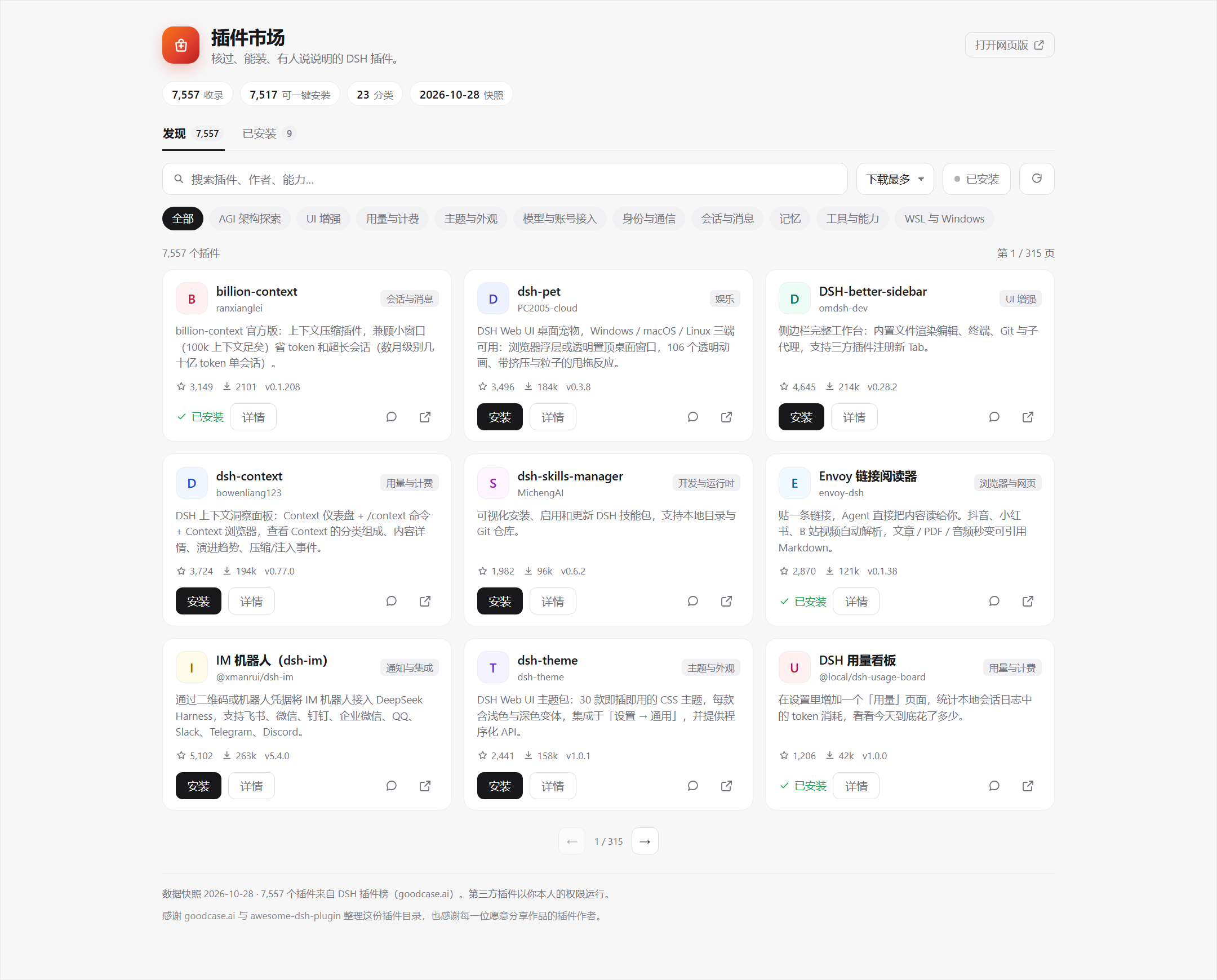
图 1:发现页。截图使用样例数据。 / Figure 1: Discover. Sample data.
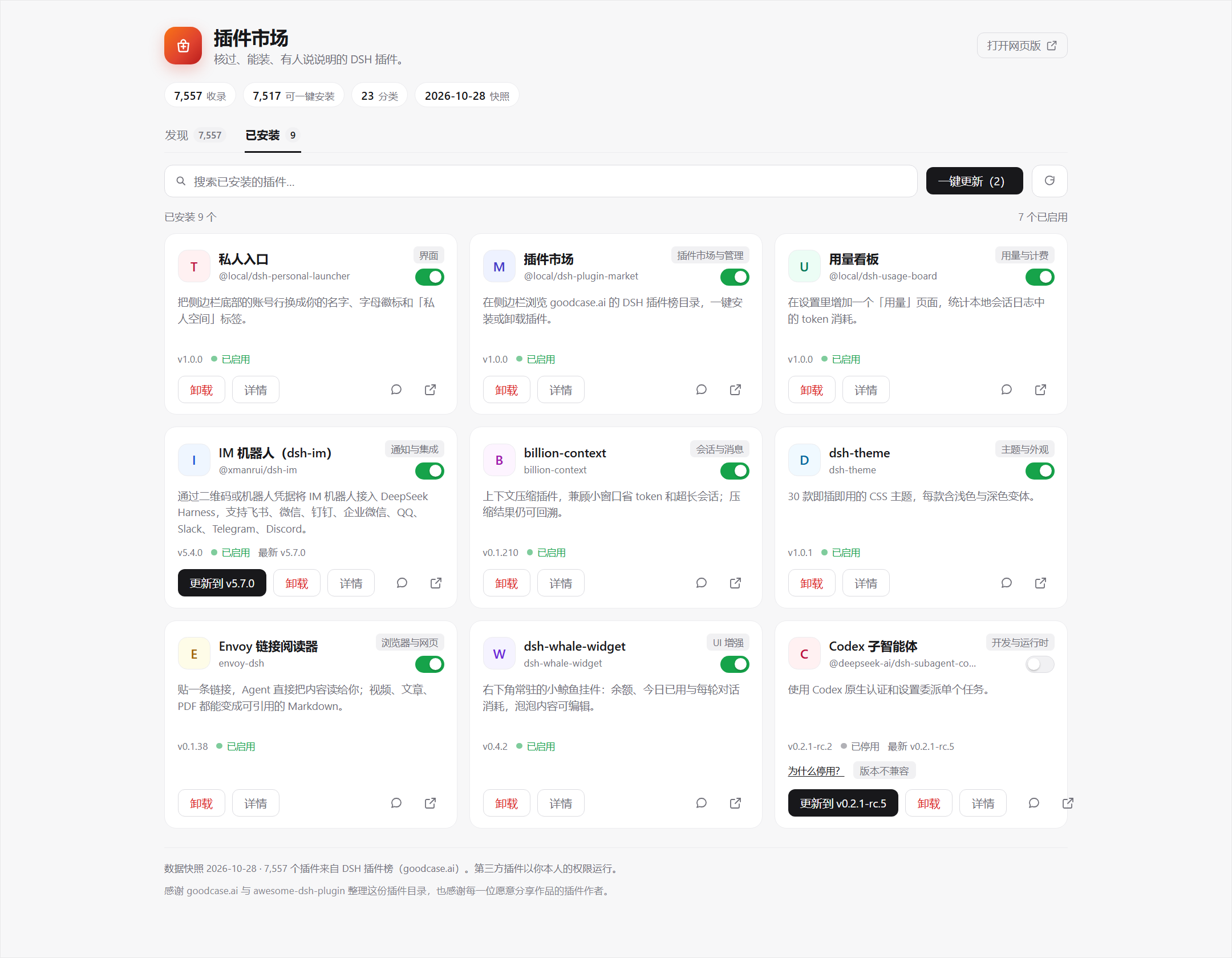
图 2:已安装页,带开关、更新和停用原因。 / Figure 2: Installed, with switches, updates, and disabled reasons.
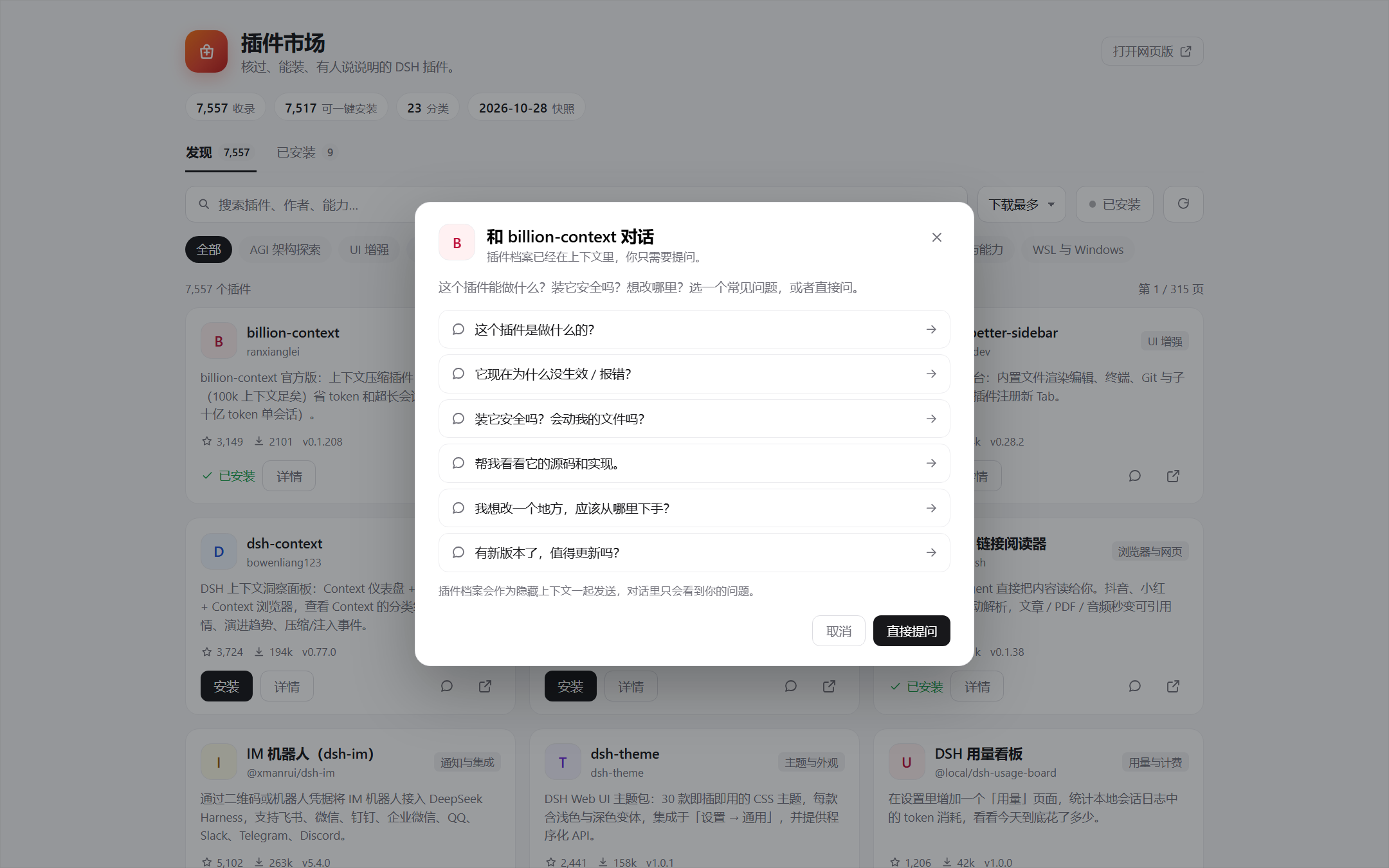
图 3:插件对话,六个常见问题。 / Figure 3: Plugin chat with six common questions.
中文
为什么会有这个
我用 DSH 的第一周,装插件要这么走一遍:在网页榜单里找到名字,复制安装命令,切回终端,粘贴,等 pnpm 跑完,重启 DSH,再回网页确认它到底装上没有。
插件少的时候还行。后来榜单越来越长,这个流程就有点烦。手机应用商店点一下就能装,DSH 里为什么不能?
Harness 本身有 pluginManager,装 bundle 的能力已经在了,缺的是一个能看见目录、点了就装的界面。我把 goodcase.ai 上的 7,557 条目录抓成静态快照,做成侧边栏里的面板。它调用 Harness 的接口装真实 bundle,装完就能用。
现在能做什么
- 7,557 个插件,23 个分类。可以按名称、作者、能力搜,也可以按下载量、Star 或收录时间排序。
- 安装、卸载、启用、停用都走 Harness 自己的插件管理接口。安装任务放在 Host,切走页面不会中断,回来还能接上进度。
- 已安装页会列全 profile 里的 bundle,包括本地 link、目录里没有的插件。每个插件有开关;停用的会说明原因,版本不兼容的可以直接更新修复。
- 有多个插件可更新时,已安装页会给出「一键更新(n)」,按队列逐个装。
- 每张插件卡片都有一个对话入口。六个常见问题点一下就会带着插件档案开聊,档案在模型上下文里,聊天记录里看不到。
安装
Release 包是固定版本,装起来最省事:
dsh plugin --profile <profile> add https://github.com/skystart233-code/dsh-plugin-market/releases/download/v1.0.0/local-dsh-plugin-market-1.0.0.tgz
想跟 main 的最新改动:
dsh plugin --profile <profile> add github:skystart233-code/dsh-plugin-market
本地开发就 clone 下来,在 profile 的 package.json 里 link,并把同名 key 加进 dsh.profile.bundles:
"@local/dsh-plugin-market": "link:C:/path/to/dsh-plugin-market"
装好后重启 DSH。侧边栏的「插件」和「自动化任务」之间会多一个店铺袋图标,线条和旁边那几个导航图标是一套。
包名是 @local/dsh-plugin-market,因为我的 desktop profile 直接 link 了这个目录。npm 上的 dsh-plugin-market 已经被占用,所以暂时没有 npm 包。GitHub 和 Release 都能装。
几个实现上的选择
进度条是估算的。pluginManager.installBundle 只在结束时返回结果,拿不到 pnpm 的实时输出。面板按耗时把进度推到 95%,完成时跳到结束;阶段文案也按同一套时间走。这比让按钮一直转圈强,但别把它当成精确进度。
安装任务放在 Host 的 jobs 里,不跟着面板走。切到别的会话、刷新页面,任务还在。重新进入市场时,面板调用 jobs:运行中的接管,已完成的弹一次提示,等待构建脚本批准的重新打开批准框。完成提示用 localStorage 去重。
版本比较用 semver。目录是 10 月 28 日的快照,可能比本地版本旧;只有市场版本严格更高时才显示更新,避免把新版本“更新”成旧版本。
停用原因来自运行时。手动关闭、版本不兼容、加载错误、随 DSH 安装自带的内置 bundle,面板分开显示;不兼容的会从 installTarget 里拿对应版本,给出更新按钮。
对话的插件档案没有放进输入框。Host 创建会话后,把档案注册到 agent.ctx 的 system prompt(名字 plugin-market-brief,order 950,interpolate: false),再把问题作为普通用户消息发进去。所以聊天记录里只有问题和回答。
数据
catalog.json 是 2026-10-28 的快照,来自 dsh.goodcase.ai,底层是 awesome-dsh-plugin。7,557 条里 7,517 条声明了 dsh manifest,可以点一下安装;其余 40 条保留手动命令。
面板里的名称、作者、分类、双语描述、npm 包名和版本、Star、下载量、仓库、安装命令都来自这份快照。已安装、启用、加载错误来自当前 profile 的 pluginManager.listBundles()。有没有更新,是快照版本和运行时版本做 semver 比较的结果。
重新生成目录:
node scripts/build-catalog.mjs
node scripts/build-catalog.mjs --chunk <saved-turbopack-chunk>
它是怎么搭的
index.js 是 Host 半边,在 Harness Web 服务上挂 POST /api/dsh-market/*。路由有 bootstrap、search、installed、install、jobs、poll、cancel、set-enabled、chat、remove。安装走 installBundle,卸载走 removeBundle,启停走 setBundleEnabled。耗时任务放进 jobs,客户端轮询,不让一个 HTTP 请求挂几分钟。
client.js 是 Client 半边,注册侧边栏图标和主面板,负责搜索、筛选、分页、弹层、进度、开关和对话入口。样式全部走 --dsw-alias-* token,深浅色主题自动跟。
catalog.json 是静态目录,面板离线也能打开。没有构建步骤,两个半边都是普通 JavaScript。
dsh-plugin-market/
├─ index.js              Host 半边 + 路由 + 安装任务
├─ client.js             Client 半边 + 样式 + 交互
├─ catalog.json          7,557 条目录快照
├─ cordis.patch.yml      bundle 声明
├─ scripts/
│  └─ build-catalog.mjs  从线上站点重建目录
├─ tools/
│  └─ preview.mjs        渲染 README 预览图
├─ test/
│  └─ market.test.mjs    Host 测试
└─ docs/                 README 图片
安全
第三方插件以你的权限运行。目录收录不等于安全审计,详情页和构建批准框里都会写这句话。
安装时如果 pnpm 发现构建脚本,面板会先列出脚本,点「允许并继续」才会执行。安装接口只接受同源 POST,不是本机页面发起的请求会被拒绝。
这个面板本身也是普通 bundle,不能绕过 pluginManager 的权限。这个项目和 DeepSeek 没有隶属关系。
限制
- 目录是静态快照。新插件要重新生成
catalog.json才会出现,面板不会每次打开都去抓几 MB 的线上数据。 - 进度是估算,原因上面说了。
- 同一时间只跑一个安装。批量更新是顺序队列,避免 pnpm 并发写同一个 profile。
- 不能在页面里卸载插件市场自己。这个按钮会禁用,免得自己把自己拆掉。
- 预览图是
tools/preview.mjs用样例数据渲染的,不是自动化视觉测试。
开发
node --test test/market.test.mjs
node --check index.js
node --check client.js
node tools/preview.mjs --shot
18 项 Host 测试。改完重载 bundle 就能看到效果,没有编译步骤。
致谢
目录数据来自 dsh.goodcase.ai(DSH 插件榜),它建立在 awesome-dsh-plugin 上。谢谢维护者把这些信息整理成公开、可检索的列表。
也谢谢每一位把作品放进目录的插件作者。这个面板只是索引,具体功能都在插件里。
DeepSeek Harness 提供了插件运行时、Web slot 和主题 token,这个面板才能长得像原生界面。面板底部另有一句对目录整理者的致谢。
English
Why this exists
The first week I used DSH, installing a plugin went like this: find the name on a web list, copy the install command, switch to a terminal, paste it, wait for pnpm, restart DSH, then go back to the web page and check whether it actually worked.
That was fine with a handful of plugins. As the list grew, the loop got old. Phone app stores solved this a long time ago: search, tap install, watch it finish, remove it when you stop using it. I wanted the same thing inside DSH.
Harness already had pluginManager, so the missing part was an interface that shows the catalog and installs from it. I took the 7,557-entry catalog from goodcase.ai, saved it as a static snapshot, and built this sidebar panel. It installs real bundles through the Harness API.
What it does
- 7,557 plugins across 23 categories. Search by name, author, or capability; sort by downloads, stars, or when the entry was added.
- Install, remove, enable, and disable through Harness's own plugin manager. Installs run on the Host, so leaving the page doesn't cancel them.
- The Installed tab includes every bundle in the profile, including local links the catalog doesn't know about. Each one has a switch; disabled entries explain why, and version mismatches offer the update that fixes them.
- When several plugins have updates, the Installed tab offers 一键更新(n) (Update all) and runs them as a queue.
- Every card has a chat button. Six common questions open a conversation with the plugin brief already in context; the transcript only shows your question and the answer.
Install
The release tarball is the stable route:
dsh plugin --profile <profile> add https://github.com/skystart233-code/dsh-plugin-market/releases/download/v1.0.0/local-dsh-plugin-market-1.0.0.tgz
To follow main:
dsh plugin --profile <profile> add github:skystart233-code/dsh-plugin-market
For local development, clone the repo and link it in the profile's package.json, then add the same key to dsh.profile.bundles:
"@local/dsh-plugin-market": "link:C:/path/to/dsh-plugin-market"
Restart DSH when it's done. A storefront icon shows up between the 插件 and 自动化任务 entries in the sidebar, drawn in the same line style as the shipped nav icons.
The package is named @local/dsh-plugin-market because my desktop profile links this checkout directly. The npm name dsh-plugin-market is already taken, so there is no npm package yet. GitHub and the release both work.
Some choices
The progress bar is an estimate. pluginManager.installBundle only returns the final result, and pnpm's live output never reaches the panel. The bar eases toward 95% based on elapsed time and jumps to done when the Host reports the result; the phase labels follow the same clock. It beats a spinner that says nothing, but it is not a byte counter.
Install jobs live in the Host, not in the panel. Switch sessions or reload the page and the job keeps running. On re-entry the panel calls jobs: a running job is adopted, a finished one produces a single toast, and a job waiting for build-script approval reopens the approval sheet. Finished jobs are announced once per browser via localStorage.
Updates use semver precedence. The catalog is a snapshot from October 28 and can be older than what is installed; the panel only offers an update when the catalog version is strictly higher, so a stale snapshot cannot downgrade a newer local build.
Disabled reasons come from the runtime. Manual disable, version mismatch, load error, and a bundle that ships with DSH are shown separately. For a mismatch, the panel reads the matching version from installTarget and offers the update that fixes it.
The chat brief never goes into the composer. The Host creates a session, registers the brief on agent.ctx as a system prompt (plugin-market-brief, order 950, interpolate: false), then sends the question as a normal user message. The transcript shows the question and the answer, nothing else.
Data
catalog.json is a 2026-10-28 snapshot from dsh.goodcase.ai, which is built on awesome-dsh-plugin. Of the 7,557 entries, 7,517 declare a dsh manifest and can be installed from the panel; the other 40 keep a manual command.
Names, authors, categories, bilingual descriptions, npm package names and versions, stars, downloads, repositories, and install commands come from that snapshot. Installed/enabled/error state comes from pluginManager.listBundles() in the current profile. Update availability is a semver comparison between the snapshot version and the runtime version.
Rebuild the catalog with:
node scripts/build-catalog.mjs
node scripts/build-catalog.mjs --chunk <saved-turbopack-chunk>
How it fits together
index.js is the Host half. It serves POST /api/dsh-market/* on the Harness web server: bootstrap, search, installed, install, jobs, poll, cancel, set-enabled, chat, and remove. Installs call installBundle, removals call removeBundle, and enable/disable calls setBundleEnabled. Long operations go into the jobs map, and the client polls instead of holding an HTTP request open.
client.js is the Client half. It registers the sidebar icon and the main panel, then handles search, filtering, pagination, dialogs, progress, switches, and the chat entry. Every color comes from a --dsw-alias-* token, so light and dark themes follow the shell.
catalog.json is static, which is why the panel opens offline. There is no build step; both halves are plain JavaScript.
dsh-plugin-market/
├─ index.js              Host half: routes and install jobs
├─ client.js             Client half: styles and interaction
├─ catalog.json          7,557-entry snapshot
├─ cordis.patch.yml      bundle declaration
├─ scripts/
│  └─ build-catalog.mjs  rebuild the catalog from the live site
├─ tools/
│  └─ preview.mjs        render the README screenshots
├─ test/
│  └─ market.test.mjs    Host tests
└─ docs/                 README images
Security
Third-party plugins run with your permissions. A catalog listing is not a security review; the detail sheet and the build-approval dialog both say so.
If pnpm finds build scripts during an install, the panel lists them first and waits for 允许并继续. The install endpoint accepts same-origin POST only, so requests from another local page are rejected.
The panel is a normal bundle. It cannot bypass pluginManager permissions, and the project has no affiliation with DeepSeek.
Limits
- The catalog is static. New plugins need a rebuilt
catalog.json; the panel doesn't download several megabytes on every open. - Progress is estimated, as described above.
- One install runs at a time. Batch updates are sequential so pnpm never writes the same profile concurrently.
- The market cannot uninstall itself from its own page. That button is disabled.
- The screenshots are rendered by
tools/preview.mjswith sample data. They are not an automated visual test.
Development
node --test test/market.test.mjs
node --check index.js
node --check client.js
node tools/preview.mjs --shot
18 Host tests. Reload the bundle after a change; there is no compile step.
Thanks
The catalog comes from dsh.goodcase.ai (the DSH plugin list), which is built on awesome-dsh-plugin. Thanks to the maintainers for keeping that information public and searchable.
Thanks to every plugin author who put their work in the catalog. This panel only indexes the catalog; the features live in the plugins.
DeepSeek Harness provides the plugin runtime, web slots, and theme tokens that let a third-party panel look native. The panel footer thanks the catalog maintainers separately.
License
MIT © 2026 TKK
No comments yet. Be the first to write one.