dsh-free-web
Free web search for DeepSeek Harness (DSH) with no search API and no API key.
dsh-free-web registers a search provider that reads Bing's public result page over plain HTTPS, falls back to its RSS view, and only then falls back to a local Chrome/Edge headless render. It powers DSH's built-in web_search tool, adds a per-session Web off / Smart / Always toggle next to the composer's permission control, and adds a search panel to the left sidebar.
No browser extension is involved. DSH's UI is a web surface, so this package has two halves: a Host half (Node) and a Client half (React components loaded by DSH itself). Chrome is only an optional headless renderer invoked by the Host.
Features
- No search API, no key: the provider scrapes the same public result page a browser would load.
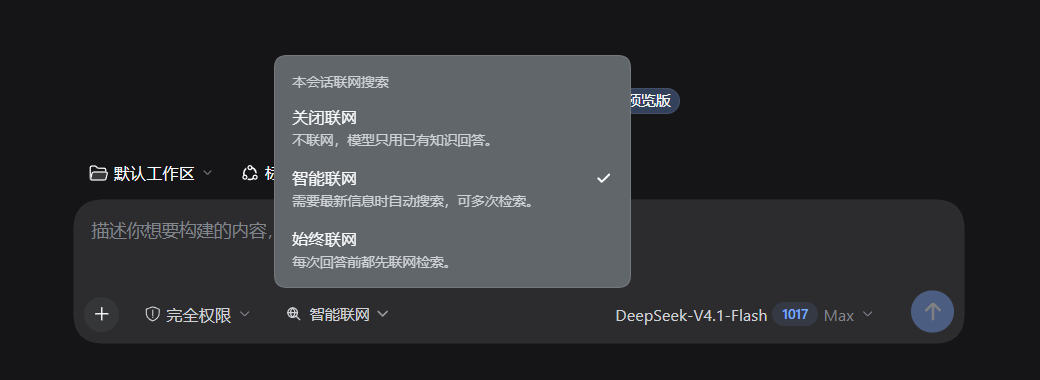
- Three search modes per session in the composer toolbar:
- Off —
web_searchis blocked by a Host guard;web_fetchstays available for links the user provides. - Smart (default) — the model decides during reasoning when to search, and may search repeatedly and follow up with
web_fetch. - Always — the Host runs one search automatically at the start of every user turn, injects the results as runtime context, and the model may search again if they are insufficient.
- Off —
- Left-sidebar panel for manual searches, with engine status and per-result links.
- Works on Web and Desktop: routes live under
/api/dsh-free-web/and the Client half uses relative URLs, so the same code works fordsh weband the Desktop shell'sdsh-app://page. - Fail-open: if every engine fails, the agent tool falls back to its normal error and the turn continues.
Screenshots
The composer toggle — pick Off / Smart / Always for the current session:
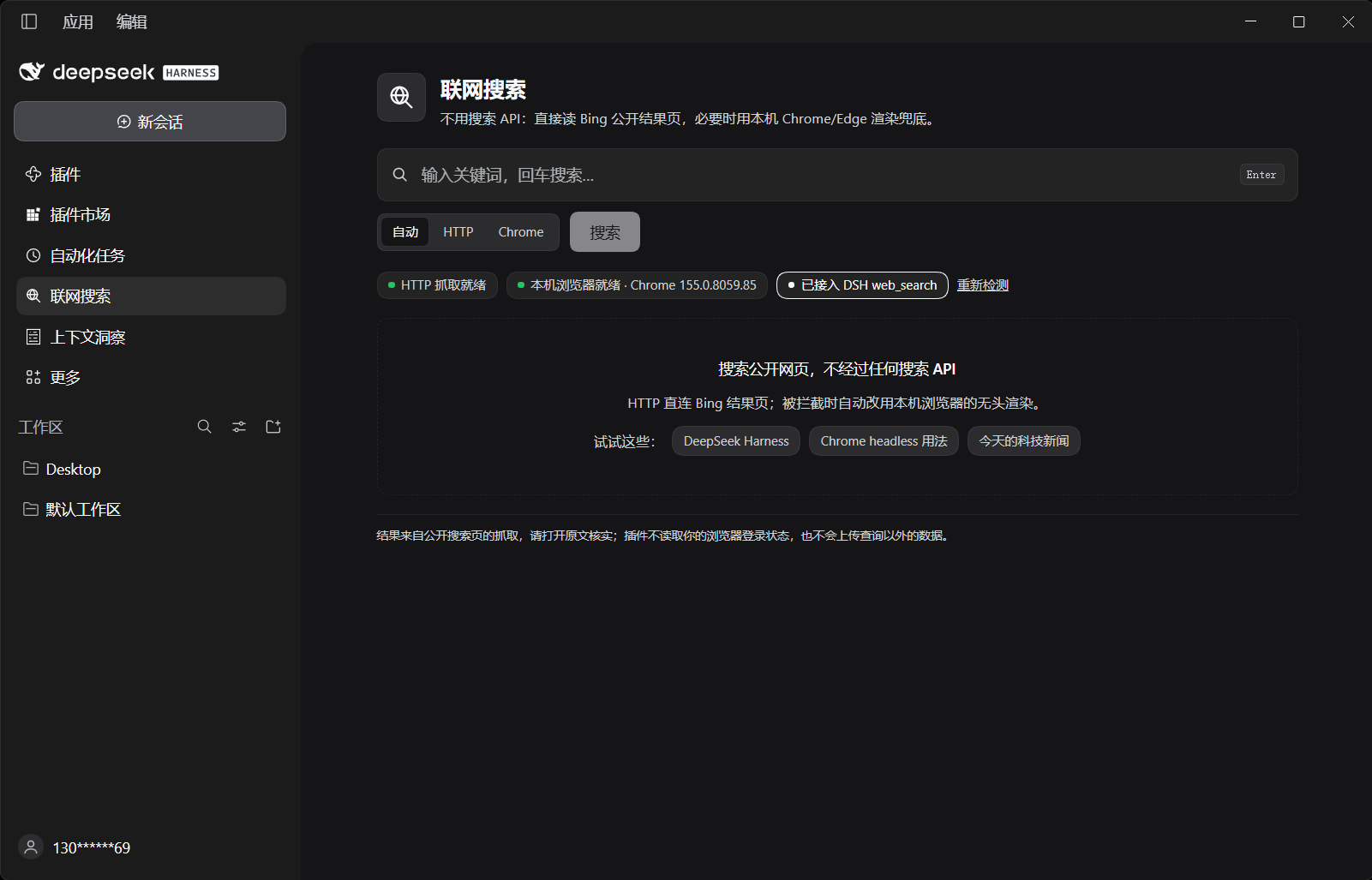
The sidebar panel — engine status, manual search, and per-result links:
Requirements
- DSH 0.2.1-rc.3 or newer (developed and tested against 0.2.1-rc.3,
desktopprofile, Windows 11). - Node.js 20+ on the Host (DSH bundles its own runtime).
- Optional: Google Chrome or Microsoft Edge for the render fallback. It is auto-detected; the plugin also works with HTTP-only search.
Install
Clone the repository somewhere stable (the profile links to this directory, so do not delete it):
git clone https://github.com/skyhome000/dsh-free-web.git
Then install it as a local DSH bundle, either from the GUI (Plugins → Add plugin → from directory) or with the plugin-manager tool:
plugin_manager install_bundle target: /absolute/path/to/dsh-free-web
Refresh the DSH window once (Ctrl+R) after installing or updating, so the browser half is loaded.
The bundle patch switches the built-in web service to this provider and keeps the existing HTTP fetcher selected:
- id: web
  name: '@deepseek-ai/dsh-web'
  config:
    searchProvider: free-web
    fetchProvider: http
Uninstalling the bundle removes the patch and restores the shipped defaults.
Usage
Composer toggle
The button sits to the right of the permission preset in the composer toolbar and shows the current mode (🌐 Smart web):
| Mode | Behaviour |
|---|---|
| Web off | web_search calls are rejected by a Host guard; web_fetch remains available so the model can open a URL the user supplied. |
| Smart (default) | The model searches on its own when the answer needs current or externally verifiable facts, and may search several times while reasoning. |
| Always | The Host automatically runs one search for the turn before the first model step (15 s cap) and injects the results as runtime context; the model uses them and can refine with more searches. |
The mode is stored per session in %DSH_HOME%/free-web/session-modes.json (up to 500 sessions) and applies to the next step immediately — no new session needed.
Sidebar panel
Click 联网搜索 / Web Search in the left sidebar to open a manual search panel:
- query input with Enter-to-search;
- engine mode: Auto / HTTP / Chrome;
- engine status (HTTP ready, local browser version, provider wired into
web_search), re-checkable; - result cards with title, URL and snippet, opening in a new tab;
- fallback notes when an engine fails.
How it works
- Provider —
index.jsregisters aWebSearchProviderwith idfree-webintoctx.web.available()is always true;search()runs the chain below and returns{ sources, truncated }. - Search chain
https://www.bing.com/search?q=…parsed fromli.b_algoblocks (title, URL, snippet);- the same query with
&format=rssparsed as RSS; chrome --headless=new --dump-domon the same URL, using a throwaway profile under the OS temp directory.
- Per-agent policy — on
agent/created(and for agents that already exist when the plugin mounts) it registers, on the agent's own context:- a
ctx.tools.guardthat rejectsweb_searchwhile the session is off; - a
systemPrompt.sectionwhose text follows the current mode; - a
systemPrompt.contextthat carries the automatic results in always mode; - an
agent/pre-steplistener that performs the automatic search on the first step of each turn.
- a
- Client UI —
client.jsregisters the sidebar entry, the main panel (main, keyfree-web) and the composer toggle (conversation.input.left). It talks to the Host overapi/dsh-free-web/status,/searchand/modewith relative URLs.
Configuration
| Setting | Value |
|---|---|
DSH_FREE_WEB_CHROME / CHROME_PATH |
Explicit browser executable path. |
| Auto-detected paths | Chrome and Edge under Program Files / Program Files (x86) / LocalAppData on Windows; /Applications/Google Chrome.app/…, /usr/bin/google-chrome, chromium, microsoft-edge elsewhere. |
| Results | web_search asks for up to 8 sources; the panel requests 8. |
| Timeouts | HTTP page 7 s, RSS 6 s, local browser 22 s, panel request 40 s, automatic search 15 s. |
| Mode store | %DSH_HOME%/free-web/session-modes.json. |
There is no plugin Config schema; the values above are code constants and environment variables.
Security
- Routes accept only local callers: a missing
Origin,null, thedsh-app:shell origin, or a loopback host (127.0.0.1,localhost,[::1]). Other origins get403. POSTmust beapplication/json, which is the CSRF boundary: a cross-site JSON request needs a preflight that only local origins pass. Bodies are capped at 64 KiB; queries at 400 characters.- No cookies, no browser session, no login state is read. The optional headless browser starts with a fresh temporary profile and is deleted afterwards.
- Search results are external, untrusted data. The built-in
web_searchtool already labels them as untrusted; the panel does the same.
Development
npm test        # node:test — 15 offline unit tests
npm run check   # node --check for both halves
The tests cover the HTML/RSS parsers (including Bing redirect unwrapping), the route/guard wiring, the per-session mode route, and the Client half's slot registrations and toggle rendering. They use a temporary DSH_HOME and never touch the network.
index.js              Host half: provider, routes, mode store, agent policy
client.js             Client half: sidebar panel and composer toggle
cordis.patch.yml      Bundle patch: plugin row + web.searchProvider override
locale/{en,zh}.json   Plugin title/description for the Plugin Manager
icon.svg              Plugin icon
test/                 Offline unit tests
.github/workflows/    CI (syntax check + tests on Ubuntu and Windows)
Limitations
- Bing can change its markup, rate-limit scraping, or serve different results by region; the chain retries through RSS and a local browser, but relevance is Bing's.
- In Always mode the automatic query is the user's message text (up to 400 characters). Long or conversational prompts may produce broad results; the model is instructed to refine with its own search.
- The Chrome fallback is slower (typically 6–15 s) and is only used when HTTP parsing fails.
- This project is not affiliated with DeepSeek, Microsoft, or Google.
No comments yet. Be the first to write one.