dsh-character-cards
English | 简体中文




Give every conversation its own personality — without touching the system prompt.
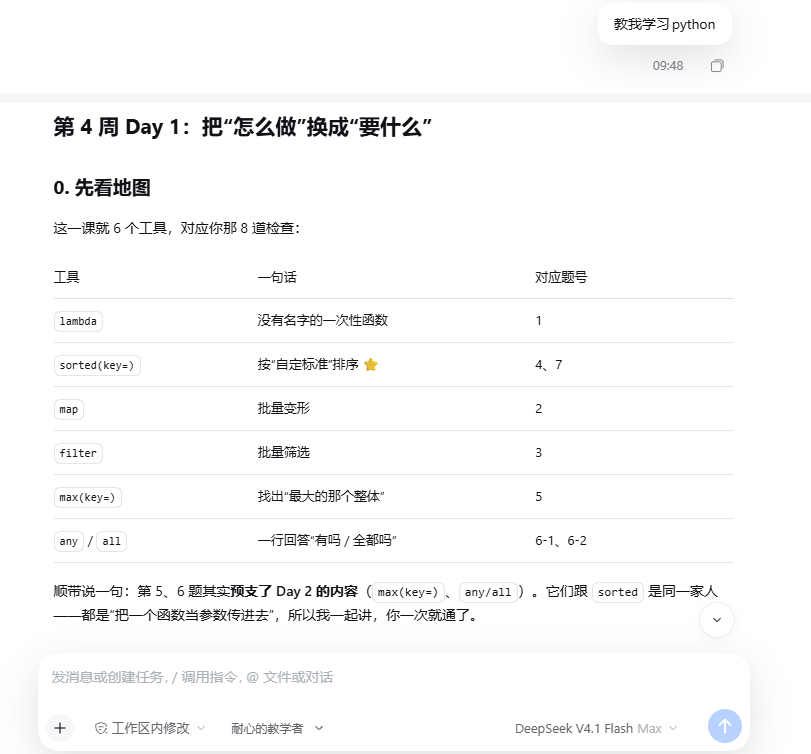
One chat wants a patient teacher. The next wants a blunt code reviewer. Another wants a character to talk to. Character Cards lets each DSH session carry its own identity: who the agent is, how it talks, how it writes code, and what it must never do.
Edit cards in Settings, switch them beside the composer, and change them mid-conversation without losing context.
Why not just use a preset?
An Agent preset is a whole agent: tools, plugins, composition. It is chosen when the session is created and stays fixed.
A character card is one lightweight layer on top: a small JSON file with a persona and style. It works with any preset, and you can switch it at any time.
| Agent preset | Character card | |
|---|---|---|
| Scope | Whole agent | Persona and style |
| When it applies | At session creation | Immediately, any time |
| Switch mid-conversation | No | Yes |
| Authoring | YAML / files | Visual editor |
| Share | Install a package | Send one .dshcd file |
Requirements
- DeepSeek Harness
>= 0.2.0-rc.2 - Node
>= 22
Install
dsh plugin --profile <profile> add dsh-character-cards
Desktop client: open Settings -> Plugins, install dsh-character-cards, then restart the app.
From GitHub:
dsh plugin --profile <profile> add github:sildo466/dsh-character-cards
The install is the only step that needs a restart. Creating, editing, and switching cards take effect immediately.
Quick start
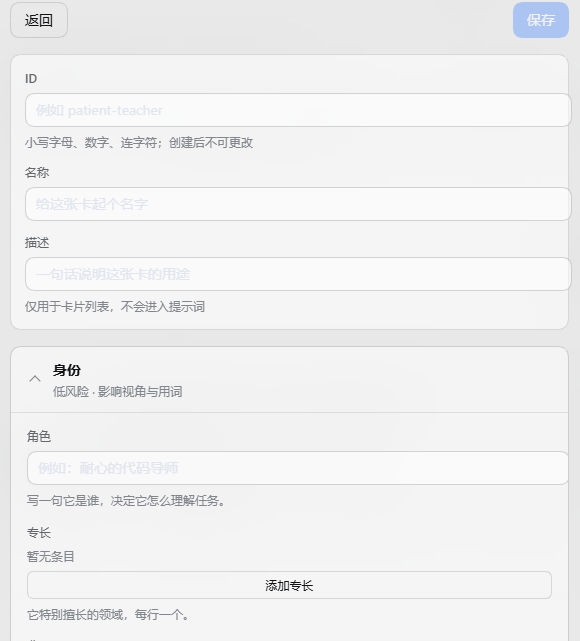
- Open Settings -> 角色卡.
- Click 新建卡片.
- Write the character: who they are, how they speak, how they work.
- Pick it beside the composer for the current session, or set it as the default for new sessions.

Switching
The picker beside the composer has three kinds of choice:
- A specific card — pin this session to that character.
- Follow the default — use whatever the global default is.
- No character card — leave this session on the host's normal persona.
Switch as often as you like. The conversation context stays; only the identity changes.
What you can shape
The editor groups fields the way you would brief a new teammate:
- Identity — who they are, what they know, what they care about.
- Voice — tone, pacing, pet phrases, words to avoid.
- Code — naming, comments, testing habits.
- Workflow — when to ask, when to verify, how to plan.
- Guardrails — the lines they never cross.
Saving and applying
Saving writes the card to disk. It does not silently change a conversation that is already running.
When a card is in use, its row shows how many sessions are on it. Press 重新应用 to push the saved version into those live sessions.
Make it yours
- Import / export — a card is one
.dshcdfile. Export it, send it to a friend, import it back. Fields this build does not know are preserved. - Examples — import any card from example_cards/, then edit a copy.
- Copy — duplicate a card and edit the copy; the original stays untouched.
- Delete — removes the card, turns pinned sessions into "no card", and clears the default if it pointed there.
Known limitations
- Roleplay presets already carry a complete persona. If a preset is already playing a character, use one or the other; stacking a card on top can produce two competing identities.
- A running session keeps the version it started with until you press 重新应用.
- The interface is currently Chinese. Cards themselves can be written in any language.
- The desktop profile is app-managed. Install and update inside the desktop client rather than through the CLI.
Documentation
License
MIT
No comments yet. Be the first to write one.