dsh-feishu
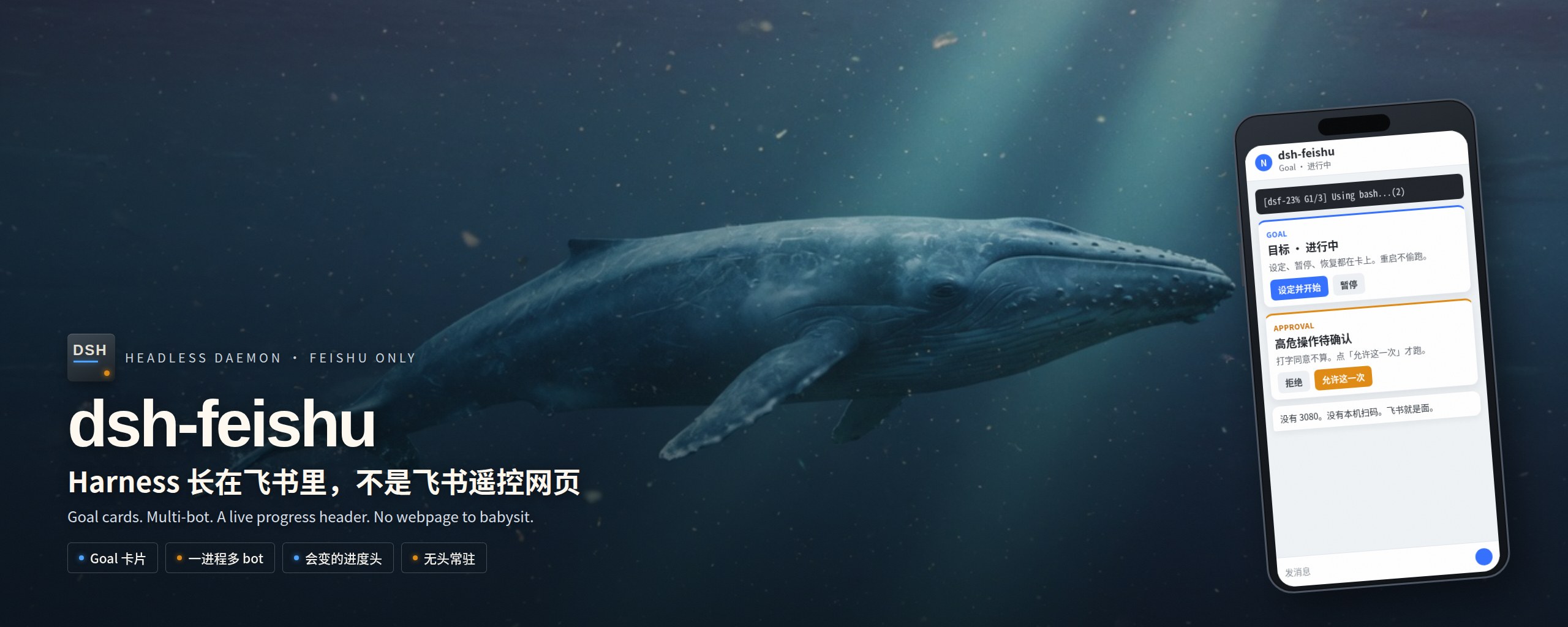
Harness 长在飞书里,不是飞书遥控网页





中文
插件市场里 feishu / lark 已经三十多个。多数是通知器、多 IM 网关,或 dsh plugin --profile web add 之后挂在官方网页旁边的桥。飞书只是遥控器:网页还在,关掉浏览器,产品就少了一半。不少还默认你坐在个人 PC 前,终端里弹二维码。
这套是跑在飞书里的 harness,部署面是 无头常驻:macOS、Linux、WSL 都能跑,主打一台能出网的机器当守护进程,不是笔记本终端扫码。一个 dsh --profile feishu 常驻,日志进文件,没有要人盯着的 TTY。飞书长连接进、飞书卡片出。模型、斜杠命令、进度、Goal、会话,全部发生在聊天框。没有 3080,没有给本机用的 TUI。高危操作出飞书审批卡,不是网页弹窗。
首个 bot 只能在开放平台建好,把 App ID / Secret 写进环境变量再启动。服务器上没处可贴二维码。已经通了的 bot 再开第二个,码可以打回飞书;那是后话,不是第一次上手。
不跟货架比按钮数量。没有打字机答案卡。要比的四件事:
- 长在飞书里 — harness 的面就是飞书,不是遥控网页
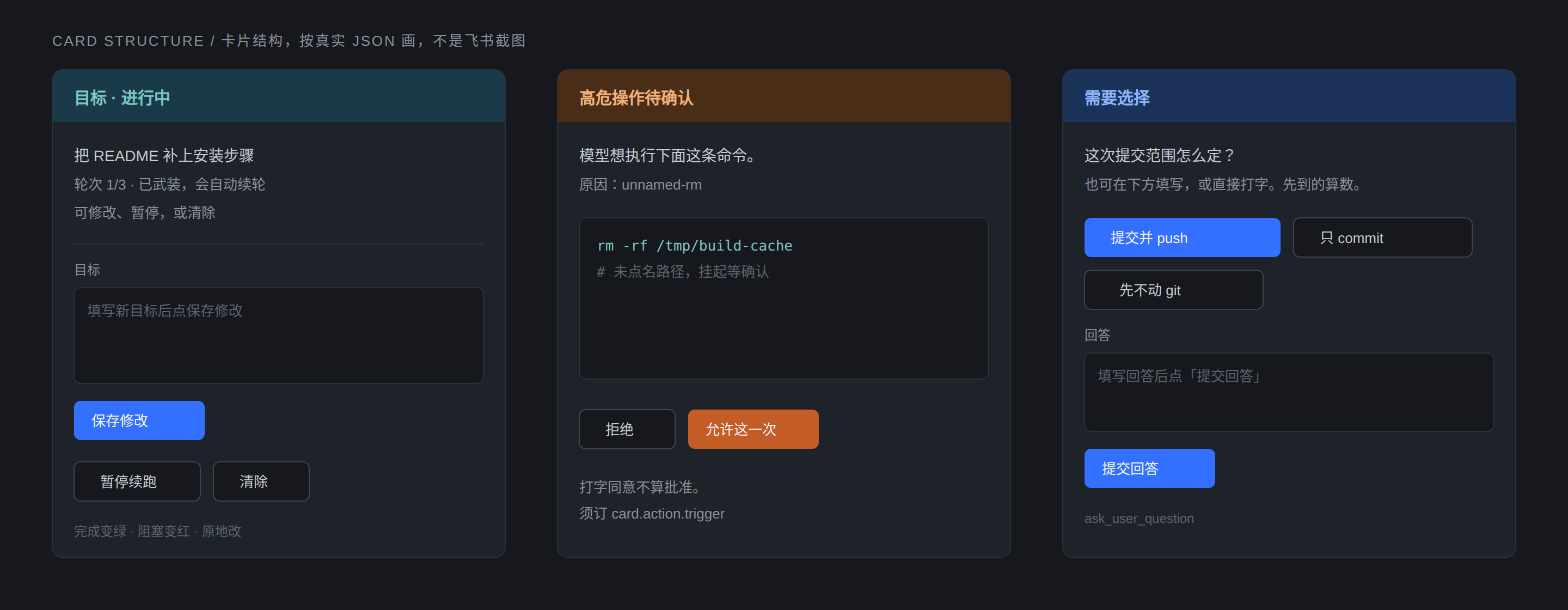
- Goal 卡片 — 设定、改目标、暂停、恢复、清除,点卡片就能做;重启不偷着续
- 一进程多 bot — 2~3 个飞书身份共用一套 Agent,同一条 session 不能两头同时握
- 会变的进度头 —
[dsf-23% G1/3] Using bash...(2),不是「正在思考…」四个字一直挂着
GitHub 上另有一个 PGZXB/dsh-feishu,飞书控制台 + 卡内审批,官方 Web 还在。owner 不同,产品也不同。
卖点
完全不依赖 Web
不装 dsh-web-app,不开 3080,不跑 headless 一次性进程。Cordis 插件直接 create / followup / steer / cancel / resume。飞书是面,不是壳外面再套的壳。
Goal:一张卡片管到底
发 /goal,或直接在卡片里填目标点「设定并开始」。句末可写「最多跑 3 轮」。
Agent 自己多轮推进。进程重启后 不会 偷偷接着烧,要在卡片上点「恢复自动续跑」,或发 /goal resume。
卡片上能做的事:
- 设定 / 修改目标(卡内表单)
- 暂停 / 恢复自动续跑
- 清除当前目标
- 完成变绿、阻塞变红,原地改,不另刷一堆纯文字
斜杠命令仍然全部可用。先到的算数。
会变的进度头
进度卡片原地改:
[dsf-23% G1/3] Using bash...(2)
模型别名、上下文占比、Goal 轮次(快到上限标 near)。跑完变 Done,失败变 Failed,正文另发一条,不跟进度糊在一起。
一进程多 Bot
同一个进程挂 2~3 个独立飞书应用。会话按 (appId, chat_id) 分开。历史可以互相 /resume,同一条 session 不能被两个窗口同时握住。
斜杠命令就在聊天框
/stop /clear /model /status /compact /resume /rename /goal /bye
不支持的 / 会直接告诉你本期有哪些。完整表见 docs/handbook.md。
高危审核卡 / 提问卡
未点名的 rm、find -delete、破坏性 git 会挂起,飞书出一张橙卡。点「允许这一次」才跑;打字同意不算批准。
需要选择时模型调 ask_user_question,出蓝卡。可以点选项,也可以在卡内填空提交,也可以直接打字。先到的算数。开放平台须订 card.action.trigger。
上下文会自己收
累计过 100K 之后,名单内(read / glob / grep / bash / 搜索读页)且超过 8K 的工具结果,完整进模型 3 次,第 4 次发送前走官方头 4K 尾 1K。skill 不过。冷启动和开门前的历史不回砍。glob 自动滤掉 node_modules / .git / .pnpm。可选:生图 / 多步浏览类 MCP 藏到 enable_mcp 之后。规格见 PRUNE.md。
多模态按飞书的方式走
图 / 语音 / 文件落到本地 inbox,把路径写给模型。不把图片塞进 session image block。回图、回文件、回语音走 send_file。
适合谁 / 不适合谁
适合:有一台能出网的机器,要把 dsh 做成 7×24 云端同事;已经在飞书办公、不想再为 Agent 开网页或守着笔记本终端;同一套 Agent 多个飞书身份;Goal 这种「交代完让它自己盯」,但中断和续跑必须自己说了算。
不适合:个人 PC 上扫码 30 秒上手、还想留官方 Web 控制台、需要打字机流式答案卡、或只把飞书当通知渠道。那些货架上已经很多,去搜 feishu 即可。
五分钟跑起来
面向一台已经能出网的机器(Linux / macOS / WSL;Windows 原生机也能起进程,Agent 调 bash 会别扭)。需要 Node 22 和已安装的 dsh(npm i -g @deepseek-ai/dsh)。
先在飞书开放平台建一个企业自建应用,事件订阅用长连接(WebSocket),不要 webhook。把 App ID / Secret 备好再部署。步骤见 docs/feishu-setup.md。
从 GitHub 装到独立 profile
dsh plugin --profile feishu add github:shoxiy-danny/dsh-feishu
建议钉扫描过的 commit,和市场页证据对齐:
dsh plugin --profile feishu add github:shoxiy-danny/dsh-feishu#<sha>
然后把 App ID / Secret 和 DEEPSEEK_API_KEY 放进环境,再:
dsh --profile feishu
从本仓脚本装(开发 / 自托管)
cp .env.example .env
# 填 FEISHU_APP_ID / FEISHU_APP_SECRET / DEEPSEEK_API_KEY

chmod +x scripts/*.sh scripts/dsh-feishu-cli
./scripts/setup.sh
./scripts/start.sh
启动后到这个应用的单聊打一句。应先收到表情,再看到进度头,然后是正文。发 /goal 会出一张可点的目标卡。
工作目录默认家目录;附件落 workspace/inbox/。第二个 bot 再填 FEISHU_APP_ID_2 / FEISHU_APP_SECRET_2。
文档
| 文件 | 内容 |
|---|---|
| docs/handbook.md | 斜杠命令、Goal 卡片、模型、多 bot、MCP、假 bot |
| docs/feishu-setup.md | 飞书应用、权限、长连接 |
| docs/publish.md | 作者:GitHub topic 和市场收录 |
| examples/ | 模型表、profile overlay 样例 |
默认模型只有 DeepSeek 官方 dsf / dsp。加自己的供应商:手册「模型」一节按字段说明,不按厂商抄作业。样例骨架在 examples/。
需要 DeepSeek Harness。发现页:dsh-plugin.market。
English
The harness lives in Feishu, not a remote for the webpage.
The plugin market already has thirty-plus feishu / lark listings. Most are notifiers, multi-IM gateways, or bridges you add with dsh plugin --profile web add. Feishu is only a remote: the webpage is still there, and closing the browser takes half the product with it.
This is the harness, running in Feishu, meant as a headless daemon on a box that stays on: Linux, macOS, or WSL. Not a laptop you scan a terminal QR on. One dsh --profile feishu. Logs go to a file. Nobody has to watch a TTY. Feishu WebSocket in, Feishu card out. Models, slash commands, progress, Goal, sessions: all in chat. No port 3080. No desktop TUI. High-risk commands pause on a Feishu approval card, not a web popup.
The first bot has to be created on the open platform and dropped into env vars. A headless server has nowhere to put a QR code. Extra bots can later be opened from an already-working chat; that is not how you bootstrap.
We do not compete on button count. No typewriter answer card. Four things instead:
- Lives in Feishu — the harness surface is chat, not a remote for the webpage
- Goal card — set, edit, pause, resume, clear on the card; a restart will not keep burning tokens until you resume
- Several bots, one process — 2–3 Feishu identities, one agent; one session cannot be held by two windows
- A progress header that changes —
[dsf-23% G1/3] Using bash...(2), not a frozen "Thinking…"
The three cards below are drawn from the real card JSON. They are not Feishu screenshots.
There is another GitHub repo named PGZXB/dsh-feishu: a Feishu console with in-card approvals, official web still on. Different owner, different product.
Features
No web dependency
No dsh-web-app, no port 3080, no one-shot headless runner. A Cordis plugin calls create / followup / steer / cancel / resume in-process. Feishu is the surface, not a wrapper around a wrapper.
Goal: one card, the whole loop
Send /goal, or type the objective on the card and tap Set and start. You can append "max 3 rounds" at the end.
The agent continues across turns. After a process restart it will not keep burning tokens until you tap Resume or send /goal resume.
On the card: create / edit (form), pause, resume, clear. Complete turns green, blocked turns red. Slash commands still work.
A progress header that actually changes
The card edits in place:
[dsf-23% G1/3] Using bash...(2)
Model alias, context %, Goal round (near when the cap is close). Done / Failed on the card; the reply is a separate message.
Several bots, one process
The same process holds 2–3 Feishu apps. Sessions are keyed by (appId, chat_id). History can /resume across bots; one session cannot be held by two windows at once.
Slash commands in the composer
/stop /clear /model /status /compact /resume /rename /goal /bye
Unknown / replies with the supported list. Full table: docs/handbook.md. /resume with no number sends a session card. The model can rename via SlashCommand({ command: "/rename …" }).
Context prunes itself
After 100K tokens, large read / glob / grep / bash / search results stay intact for 3 model views, then official head 4K + tail 1K. Skill results are never cut. Spec: PRUNE.md.
Approval cards / ask-user cards
Unnamed rm, find -delete, and destructive git pause on an orange card. Tap Allow once to run. Typing yes does not approve. Choices go through ask_user_question (blue card): tap an option, submit the form, or type a reply. First answer wins. Subscribe to card.action.trigger on the open platform.
Five minutes
Aimed at a machine that can reach the internet (Linux / macOS / WSL; a raw Windows box will start, but the agent’s bash calls will fight you). Need Node 22 and dsh (npm i -g @deepseek-ai/dsh).
Create a Feishu enterprise self-built app first. Subscribe to events over WebSocket, not webhook. Have App ID / Secret ready before you deploy. Details: docs/feishu-setup.md.
Install from GitHub
dsh plugin --profile feishu add github:shoxiy-danny/dsh-feishu
Pin a scanned commit if you want the same evidence the market page shows:
dsh plugin --profile feishu add github:shoxiy-danny/dsh-feishu#<sha>
Put FEISHU_APP_ID / FEISHU_APP_SECRET / DEEPSEEK_API_KEY in the environment, then:
dsh --profile feishu
Install from this repo (dev / self-host)
cp .env.example .env
# fill FEISHU_APP_ID / FEISHU_APP_SECRET / DEEPSEEK_API_KEY

chmod +x scripts/*.sh scripts/dsh-feishu-cli
./scripts/setup.sh
./scripts/start.sh
Then send one message in a p2p chat with that app. You should get a reaction, a progress header, then the reply. /goal opens a tappable Goal card.
Default cwd is the home directory; attachments land in workspace/inbox/. A second bot is FEISHU_APP_ID_2 / FEISHU_APP_SECRET_2.
Who this is for / not for
For: you have a machine that stays on and want dsh as a 24/7 coworker; you already live in Feishu and do not want another Agent webpage or a laptop terminal to babysit; one agent, several Feishu identities; Goal ("leave it running") with pause / resume that you say out loud.
Not for: 30-second QR setup on a personal PC; people who still want the official web console or typewriter streaming cards; or Feishu-as-notifications-only. The market already has those. Search feishu.
Docs
| File | What |
|---|---|
| docs/handbook.md | Commands, Goal card, models, multi-bot, MCP, fake CLI bot |
| docs/feishu-setup.md | Feishu app, scopes, long connection |
| docs/publish.md | Author: GitHub topics and market listing |
| examples/ | Model table and profile overlay samples |
Ships DeepSeek official aliases only: dsf / dsp. Extra providers: handbook §模型 (per-field, not per-vendor). Skeleton in examples/.
Requires DeepSeek Harness. Discovery: dsh-plugin.market.
MIT. Issues and PRs welcome.
No comments yet. Be the first to write one.